Accounts Not Registering as Checked-in After Check-out Expiration

Accounts in PAM are not checking back in after checkout expiration, and passwords are not being reset after expiration.
When a user makes an attempt to use the account, however, they are asked to check it out.
I either have to manually check
I am the first one in this morning, and I see all of these accounts checked out
And looking at the logs of my account:
You can see that at 3:54 PM was checked out, and checked back in at 6:37am the next morning when I came in to use it. Time is 0 minutes. I had to check it in manually. I did attempt to copy the password, but was given an error that I could not, so PAM did know that the check out was expired, but it is not completing check in processes.
b78e1212-63e5-45bc-b043-7fd88a26d243.png
f6007c29-982c-443c-a0af-f2ba382f534f.png
8d4ec299-e1cb-4397-8da5-c8e6fac9c5ca.png
b2f3feeb-d4c0-41b6-a9da-d433591145fc.png
7d37ad85-1279-495a-95b0-fe496124017b.png
All Comments (18)
Hello,
I'm sorry for the inconvenience. The check-in at the expiration should be triggered by the scheduler service. Could you validate if your scheduler service is running? You can go to the server where your DVLS instance is installed or have a look at the system dashboard.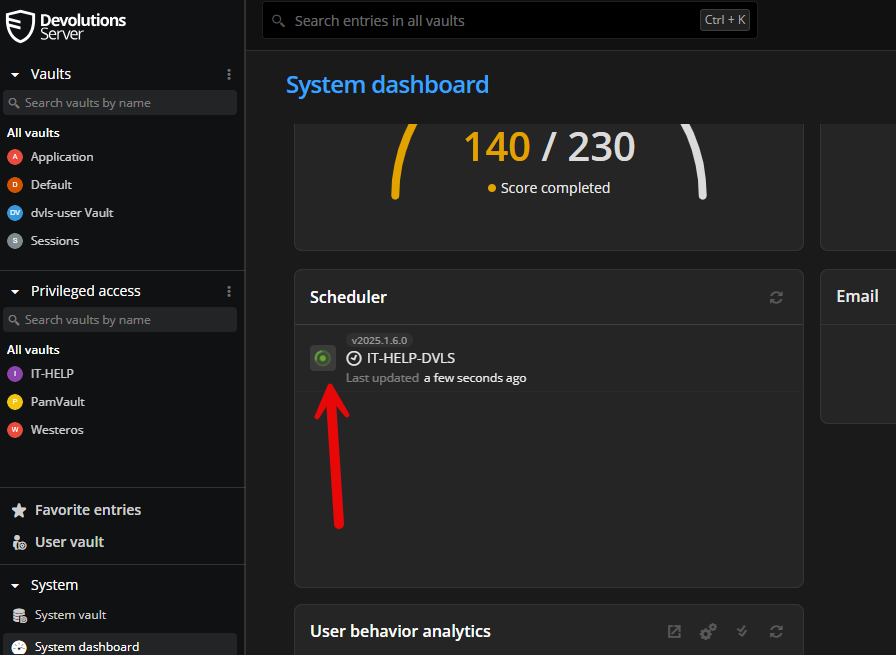
If the scheduler is not running, your administrator should have received a notification to inform him.
Please let me know if that helps.
Best regards,
François Dubois
9adaf335-ec24-4b50-9d69-c0763c64cb82.png
It is running: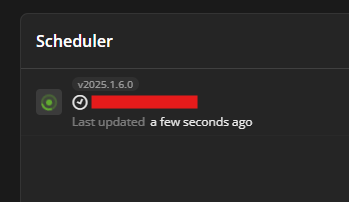

8756da53-cc11-48e6-8c1c-9721bef9bbf2.png
ef424490-082a-4b9c-8b6d-a1a8440aee52.png
Hello,
Thank you for your feedback.
Do you have relevant error messages in the DVLS Logs?
https://docs.devolutions.net/server/kb/how-to-articles/view-server-datasource-logs/
Could you send us the report mentioned in the following article?
https://docs.devolutions.net/server/kb/troubleshooting-articles/en-dvls-performance-issues/
Could you restart the Scheduler service to see if that helps?
Thank you for your collaboration.
Best regards,
Érica Poirier
Hello,
Thank you for your feedback.
Do you have relevant error messages in the DVLS Logs?
https://docs.devolutions.net/server/kb/how-to-articles/view-server-datasource-logs/
Could you send us the report mentioned in the following article?
https://docs.devolutions.net/server/kb/troubleshooting-articles/en-dvls-performance-issues/
Could you restart the Scheduler service to see if that helps?
Thank you for your collaboration.
Best regards,
I have sent the logs to service@devolutions.net.
I also performed a restart of the scheduler service, it did check the accounts back in.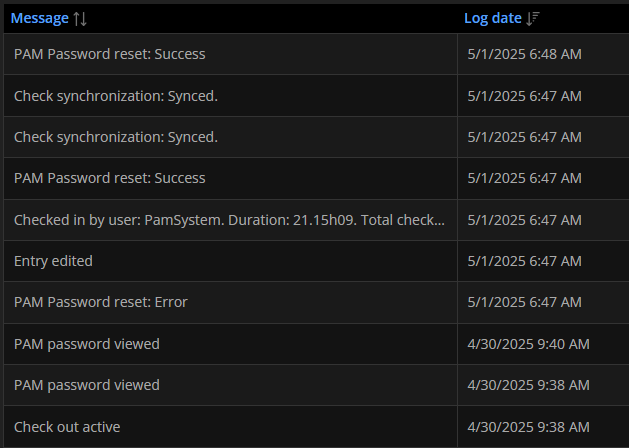
512d0509-5f6e-430b-a024-3ef33f472dc3.png
Hello,
Thank you for your feedback and the log files.
The database tables don't contain that many records.
Regarding the data source logs, there are 2 things I can notice that can impact the Scheduler.
The first one concerns the Azure cache, which is refreshed every 30 minutes. According to our records, you are using DVLS 2025.1.5. With this version, you can disable the Azure caching option as stated in this article.
The second one is related to what is being logged in the data source logs. I see a lot of Debug messages. The Log debug information option is required only when troubleshooting an issue. Please disable this option in the Logging settings of your DVLS.
Finally, could you confirm with a test PAM account that the automated check-in feature is working since you restarted the Scheduler?
Thank you for your collaboration.
Best regards,
Érica Poirier
I have adjusted the cache and logging settings.
I checked my account back in and then out again for 10 minutes. It did automatically check back in after the 10-minute period. I will check it out again for our normal duration and see if it and other accounts check in at the end of the day.
Thank you.
Hello,
Thank you for your feedback.
That's good news that it worked for this test.
Let us know the outcome of the automatic check-in for the other accounts.
Best regards,
Érica Poirier
Today I started getting this error, is it related to the cache change from earlier?
The following error was received by at 05/01/2025 12:11:58
Error:
HttpRequestException - An error occurred while sending the request. at System.Net.Http.HttpConnection.SendAsync(HttpRequestMessage request, Boolean async, CancellationToken cancellationToken) at System.Net.Http.HttpConnectionPool.SendWithVersionDetectionAndRetryAsync(HttpRequestMessage request, Boolean async, Boolean doRequestAuth, CancellationToken cancellationToken) at System.Net.Http.DiagnosticsHandler.SendAsyncCore(HttpRequestMessage request, Boolean async, CancellationToken cancellationToken) at System.Net.Http.RedirectHandler.SendAsync(HttpRequestMessage request, Boolean async, CancellationToken cancellationToken) at System.Net.Http.HttpClient.GetStringAsyncCore(HttpRequestMessage request, CancellationToken cancellationToken) at Devolutions.Server.ExternalAuthentication.MicrosoftAuthenticationProvider.RequestOpenIdConfiguration() at Devolutions.Server.ExternalAuthentication.MicrosoftAuthenticationProvider.GetOpenIdConfiguration() at Devolutions.Server.ExternalAuthentication.MicrosoftAuthenticationProvider.BuildAuthorizationCodeRequest(ExternalProviderAuthLogin parameters, String authCode, String nonce, String accessUri) at Devolutions.Server.ExternalAuthentication.OAuthExternalProviderService.GetAuthorizationCodeRequest(ExternalProviderAuthLogin parameters, HttpRequest request) at Devolutions.Server.Controllers.APIControllers.V2.AuthenticationController.LoginWithExternalProvider(ExternalProviderAuthLogin parameters) at Microsoft.AspNetCore.Mvc.Infrastructure.ActionMethodExecutor.TaskOfIActionResultExecutor.Execute(ActionContext actionContext, IActionResultTypeMapper mapper, ObjectMethodExecutor executor, Object controller, Object[] arguments) at Microsoft.AspNetCore.Mvc.Infrastructure.ControllerActionInvoker.<InvokeActionMethodAsync>g__Awaited|12_0(ControllerActionInvoker invoker, ValueTask`1 actionResultValueTask) at Microsoft.AspNetCore.Mvc.Infrastructure.ControllerActionInvoker.<InvokeNextActionFilterAsync>g__Awaited|10_0(ControllerActionInvoker invoker, Task lastTask, State next, Scope scope, Object state, Boolean isCompleted) at Microsoft.AspNetCore.Mvc.Infrastructure.ControllerActionInvoker.Rethrow(ActionExecutedContextSealed context) at Microsoft.AspNetCore.Mvc.Infrastructure.ControllerActionInvoker.Next(State& next, Scope& scope, Object& state, Boolean& isCompleted) at Microsoft.AspNetCore.Mvc.Infrastructure.ControllerActionInvoker.<InvokeInnerFilterAsync>g__Awaited|13_0(ControllerActionInvoker invoker, Task lastTask, State next, Scope scope, Object state, Boolean isCompleted) at Microsoft.AspNetCore.Mvc.Infrastructure.ResourceInvoker.<InvokeNextExceptionFilterAsync>g__Awaited|26_0(ResourceInvoker invoker, Task lastTask, State next, Scope scope, Object state, Boolean isCompleted) ------------------------------------------ IOException - Unable to read data from the transport connection: An existing connection was forcibly closed by the remote host.. at System.Net.Sockets.Socket.AwaitableSocketAsyncEventArgs.System.Threading.Tasks.Sources.IValueTaskSource<System.Int32>.GetResult(Int16 token) at System.Net.Security.SslStream.EnsureFullTlsFrameAsync[TIOAdapter](CancellationToken cancellationToken, Int32 estimatedSize) at System.Runtime.CompilerServices.PoolingAsyncValueTaskMethodBuilder`1.StateMachineBox`1.System.Threading.Tasks.Sources.IValueTaskSource<TResult>.GetResult(Int16 token) at System.Net.Security.SslStream.ReadAsyncInternal[TIOAdapter](Memory`1 buffer, CancellationToken cancellationToken) at System.Runtime.CompilerServices.PoolingAsyncValueTaskMethodBuilder`1.StateMachineBox`1.System.Threading.Tasks.Sources.IValueTaskSource<TResult>.GetResult(Int16 token) at System.Net.Http.HttpConnection.<CheckUsabilityOnScavenge>g__ReadAheadWithZeroByteReadAsync|39_0() at System.Net.Http.HttpConnection.SendAsync(HttpRequestMessage request, Boolean async, CancellationToken cancellationToken) ------------------------------------------ SocketException - An existing connection was forcibly closed by the remote host. --- Default
Source:
System.Net.Http
Hello,
Thank you for your feedback.
It's probably a configuration of the Microsoft authentication in DVLS and the EntraID App Registration for your DVLS.
Does this error prevent users from authenticating to DVLS using their Azure account?
Even if it's not the exact same error message, could you check if this article can solve your error message?
https://docs.devolutions.net/server/kb/troubleshooting-articles/sso-authentication-error-following-update-older-dvls-version/#solution
Best regards,
Érica Poirier
All accounts checked-in as expected. Thank you.
Hello,
Thank you for your feedback.
That's good news that the accounts are checked in as expected.
Did you still get the HttpRequestException error message you reported yesterday?
Best regards,
Érica Poirier
I do not think so. That message came in 2 times within 4 hours of changing settings, but I have not seen it after the 2nd time. I will continue to monitor for it and see if it is actually causing issues. Thank you.
Hello,
Thank you for your feedback.
Just make sure the ID Tokens option is disabled in the Azure App Registration you use for your DVLS.
Best regards,
Érica Poirier
aa3f6107-5b7c-4043-8427-dc8afaf573f1.png
Hello,
The issue of the scheduler service not checking in/rotating passwords is recurring. I am having to manually restart the scheduler service every other day.
Hello,
Thank you for your feedback.
Are you using the Backup Manager feature in DVLS? If so, we have noticed that it competes against the PAM account automatic check-in process every other day, and that's why you have to restart the Scheduler.
We are currently investigating this issue, but have yet to find the root cause.
A workaround would be creating a scheduled task to restart the Scheduler every night until we find a fix.
Thank you for your collaboration.
Best regards,
Érica Poirier
We are using the backup feature for the web backup only. I am going to disable that as I am backing up the server on a regular basis anyways (web backup is likely redundant.) I will report back how it goes. Thank you.
Turn off the backup feature did not work. Account has been checked out since 5/10, and this post is on 5/12.
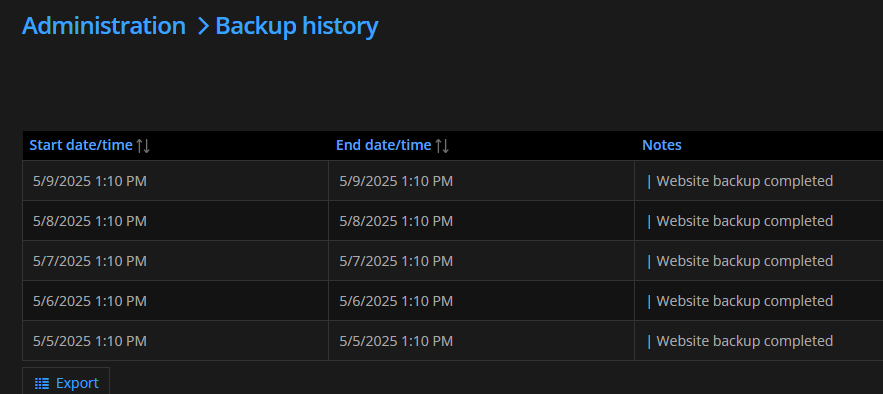
60f6e861-6f40-42a4-a2cb-c34a4bb255a4.png
ddba73cd-c23e-40db-9cd1-5466b321c2df.png
Hello,
Thank you for your feedback.
Our QA and developer teams are investigating this issue.
As we speak, the only workaround is to restart the scheduler, manually or with a scheduled task. We understand that it's a workaround.
We will notify you once a fix is available.
Thank you for being so patient.
Best regards,
Érica Poirier