Keyboard feature is not working

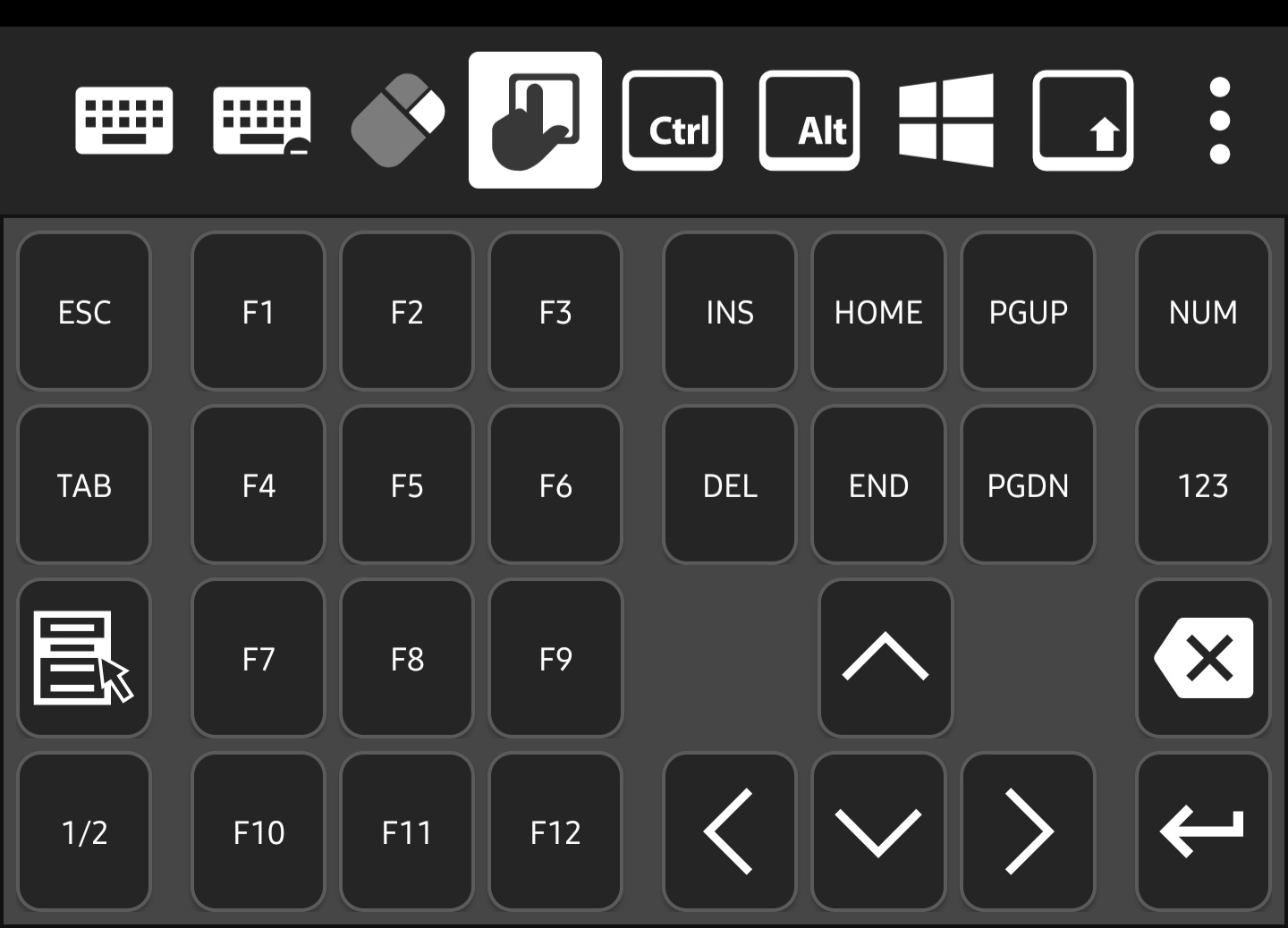
The left lower side "1/2" key and the right side "123" key are not working. When touched them, nothing happended.
Please, check not only the keys that I mentioned but also the entire keys.
Screenshot_20250417_003116.jpg
All Comments (10)
Hello,
Thank you for reporting this issue. We will investigate and follow up with you shortly.
Best regards,
Frederick Simard
Hello,
Thank you for contacting Devolutions Support.
Could you please test if the issue persists after enabling "Legacy Keyboard Processing"? You can do this by navigating to:
Application Settings > Sessions > Unified Remote Connection Settings, and toggling on "Legacy Keyboard Processing."
Best regards,
Carl Marien
Hi,
I'm already using the Legacy Keyboard Processing due to the unicode issue.
Could you explain what those keys are used for?
I want to check if what I know is correct.
The "1/2" key is for switching to the second page of the keyboard layout, and the "123" key is for showing the number pad with digits and symbols like + and -, right?
Best regards.
Hi Nathaniel,
Yes, you're correct. The "1/2" key switches to the second page of the keyboard layout, giving you access to keys like Copy, Cut, Paste, Alt-F4, and others.
The "123" key opens the number pad.
We've also identified the issue and a fix will be included in the next release.
Best regards,
Nicolas Dufour
Hi Nicolas,
Thanks for your reply.
For the next release, please include every key on the number pad.
In the version before the keyboard layout change, keys like “+” and “–” were missing, which was inconvenient.
Best regards.
Hello,
These buttons should indeed offer other option, but it seems they currently do not.
I’ve opened a bug report regarding this issue and will keep you informed of any updates on the internal case.
Best regards,
Carl Marien
Hi Carl,
I’ve confirmed that the extended keyboard layout buttons are responding.
However, the Number Lock key is still not functioning properly.
When I turn off the Number Lock, the keys are not mapped to alternative keys such as "home, end, arrows, page up/down, etc."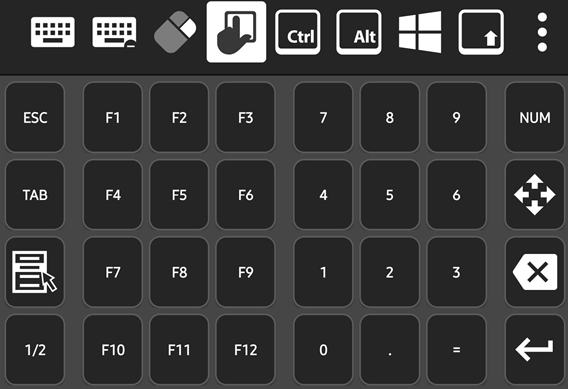
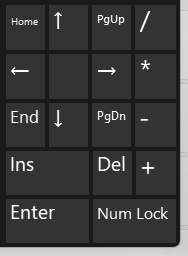
I believe the Number Lock key should both indicate its on/off state and toggle the behavior of the number pad keys as shown below.
Additionally, the keys '/', '*', '-', and '+' are still missing, as I mentioned earlier. These keys are also essential components of the number keypad.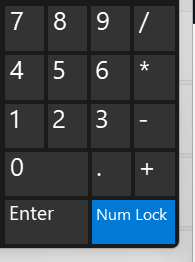
Best regards,
Nathaniel Kim.
b67c73d3-c921-4280-a96b-df02af56b2b4.png
1722cf78-ff2d-47dd-8525-1f7b20fef442.png
7db3865f-b41c-40bb-b758-c1645aaae75f.png
Hello,
You're right — we should have a way to indicate whether Num Lock is on or off. We'll create a ticket for that. We'll also look into supporting the '/', '*', '-', and '+' keys on the extended keyboard.
However, we were unable to reproduce the issue you described where the alternate keys do not work. Pressing the following keys on the extended keyboard correctly activated the expected alternate functions:
- 7 → Home
- 1 → End
- 9 → Page Up
- 3 → Page Down
- 2, 4, 6, 8 → Arrow keys
We tested with both Legacy Keyboard Processing turned on and off. When it was enabled, we also tried with Unicode mode on and off. In all cases, the alternate keys functioned as expected.
Could you provide an example of an application on your remote computer where the alternate keys are not working?
Best regards,
Frederick Simard
Hi, Frederick
Sorry, the alternate functions are working correctly, I checked it incorrectly.
Please, add number pad insert and delete key also.
Best regards,
Nathaniel Kim
Hello,
We will keep you informed of any updates on this case.
Best regards.
Carl Marien