Password rotation time different than configured

We use password rotation within the PAM module where we configure to reset the password for our privileged accounts on a daily base.
This is configured to reset every day at 05:00 a.m. but Devolutions is resetting this at 07:00 a.m.
Is this a known issue and can this be fixed?
All Comments (15)
Hello,
Thank you for reaching out!
My name is William and I'm here to assist you in any way I can.
Would it be possible to confirm if you have a time difference between the Devolutions Server and you machine or the domain controller? Also where are you seeing that the password reset is done at 7AM is this from the web interface of the Devolutions Server?
Best regards,
Hi William,
There is no time difference. I see this time in the web interface of Devolutions Server. As you can see here we configured this account to rotate at 04:00:
And in the logging you see this:
And in our audit tool of our Active Directory this is the time the password is changed:
db359ced-160b-413c-8a1a-e0909c1b402e.png
00664086-4a3f-4108-a359-14175f480b28.png
5b0af58e-2535-4d07-a419-8aec43b934fa.png
Hello,
Would it be possible to confirm if the time difference might be between your server and PC from which you are accessing the web interface of the Devolutions Server?
Also could you confirm the timezone configured on the Devolutions Server?
Best regards,
Everything is the same. All are synchronized with NTP. If there are time differences you can't login into your domain and have alot of issues.
Our timezone is UTC +1 (Amsterdam, Europe).
I guess you can reproduce this on your end setting this timezone?
Hello,
Thank you for your patience, our development team confirmed that they foot the root of the issue and are working on a fix. This will be included in the next release of Devolutions Server.
Best regards,
Hi William,
This is still not fixed. It seems this is related to summer/wintertime.
Hello,
Thank you for your feedback. Would it be possible to confirm this information:
- The version of your Devolutions Server
- The timezone configured under Administration > System Settings > General > Time-based usage
- The timezone on the Windows server hosting the Devolutions Server
Best regards,
Hi William,
I think this information is important: when I reset the scheduler after summer/wintertime reset the scheduletime is correct again.
Is there a way to auto fix this without restarting the scheduler?
Hello,
Thank you for the additional details — that observation about the schedule correcting itself after a restart is very helpful.
At this point, we don’t have enough evidence to confirm the exact root cause or whether this behaviour is expected or a defect, especially around daylight saving time handling. The fact that restarting the scheduler temporarily resolves the issue suggests there may be a timing or caching inconsistency, but we need more data to validate this.
To move this forward, I’d like to gather a bit more information:
- The exact version of your Devolutions Server
- The timezone configured under Administration > System Settings > General > Time-based usage
- The Windows timezone on the server hosting Devolutions Server
- Confirmation of when the DST change occurred vs when the schedule started drifting
- If possible, a short extract of logs around a rotation event before and after restarting the scheduler
Regarding your question: at the moment, there is no built-in mechanism to automatically resync the scheduler after a DST change without a restart.
Once we have the information above, we can determine whether this is a known limitation, a configuration issue, or something we need to escalate further.
Best regards,
Hi William,
My previous post was not right. There are still wrong scheduletimes with password rotation. Here are the answers to your questions:
- Devolutions Server 2026.1.7.0
- (UTC +01:00) Amsterdam, Berlin, Bern, Rome, Stockholm, Vienna
- (UTC +01:00) Amsterdam, Berlin, Bern, Rome, Stockholm, Vienna
Hello,
Thank you for the confirmation.
Since both your Devolutions Server timezone setting and the Windows timezone on the server host are configured as (UTC +01:00) Amsterdam, Berlin, Bern, Rome, Stockholm, Vienna, this does not appear to be a simple server-side timezone mismatch.
Before concluding that the rotation itself is running at the wrong time, I would like to rule out how the timestamps are being displayed in the different interfaces you are using.
Could you please confirm the following:
- The timezone on the workstation from which you are viewing the Devolutions Server web interface
- Whether the time shown in the Devolutions Server web interface is expected to be in server time or local browser/workstation time in your environment
- The timezone used by the Active Directory audit tool you are referencing
- If possible, the corresponding timestamp from the Windows Event Viewer on the server hosting Devolutions Server at the time of one of the password rotations
The goal here is to confirm whether:
- the password rotation is actually executing late,
- or
- the different tools are simply displaying the event time using different timezone contexts.
Since you are on Devolutions Server 2026.1.7.0, I would still recommend updating to the latest supported build and retesting afterward, as several password rotation and scheduler-related fixes have been made in more recent versions.
Best regards,
Hi William,
I checked the timezones of my workstation. This is correct and the same as the timezone in Devolutions Server. Also the timezone in our audit tool is the same. I also made an Active Directory change and checked the time in this tool and this was the exact time as I made the change.
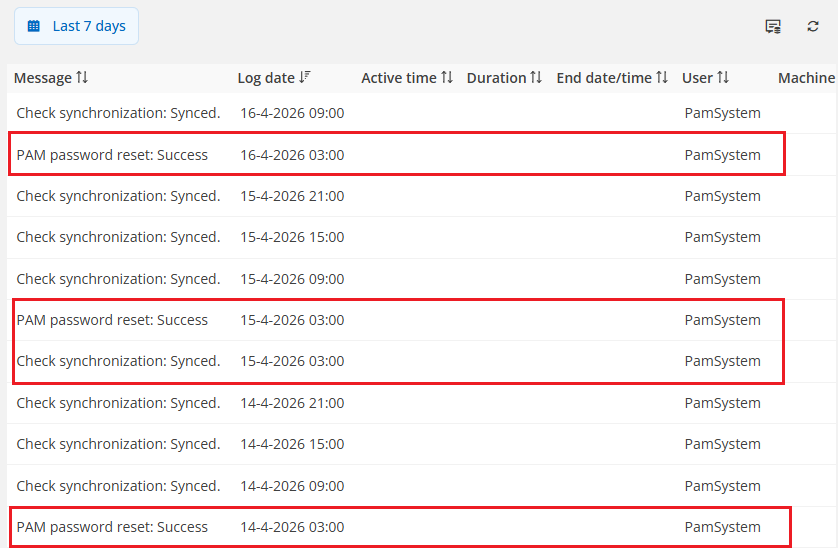
When I check the logs tab on the user in Devolutions it's saying the PAM reset is executed at 03:00 so there is something wrong in Devolutions: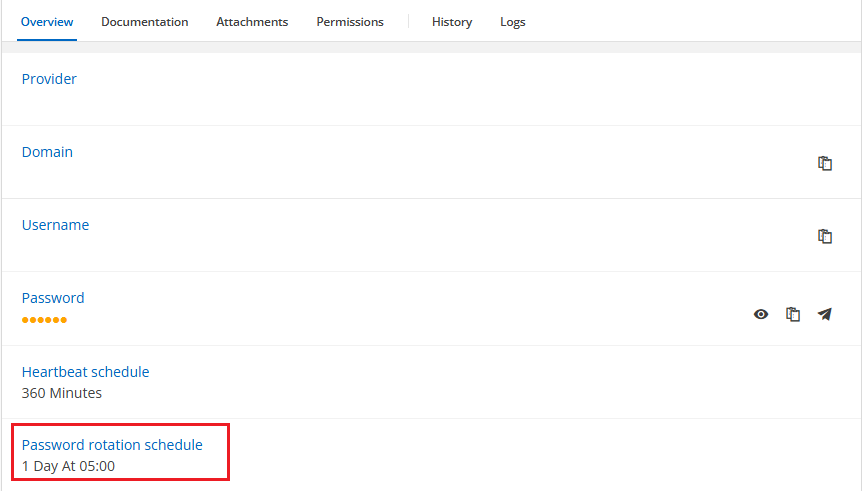
9c31bb26-b999-45e8-bbea-2753c999e233.png
c698d324-ce55-4e0b-ba42-f33946930733.png
Hello,
Thank you for the clarification and the screenshots.
Based on what you shared, this no longer appears to be a timezone display issue. The PAM account is configured with a password rotation schedule of 1 day at 05:00, while the Logs tab on the same account shows the password reset executing at 03:00 on multiple days. Since you also confirmed that the workstation, Devolutions Server, and audit tool are all using the same timezone, this points to a discrepancy in the scheduling behaviour within Devolutions Server itself.
You are currently running Devolutions Server 2026.1.7.0, which is a recent version, but not the latest available build in the 2026.1 release line. As a first validation step, I recommend testing on the latest available version.
If the behaviour still occurs after updating, we will treat this as a product issue and escalate it further. In that case, the screenshots you already provided showing:
- the configured password rotation schedule, and
- the actual execution time in the PAM account logs
will be the right evidence to support that escalation.
Best regards,
Yesterday we updated Devolutions Server to 2026.1.16.0 and the problem is solved now.
Hello,
Thank you for the confirmation, I'm glad to know the issue is resolved.
I'll go ahead and mark this thread as resolved.
Best regards,