PAM credentials not available in RDP Web Client

We use the PAM module in combination with RDM and Devolutions Server. When we want to connect with RDP web client to an asset where PAM credentials are configured this is not working and we get this error: [CredSSP] CredSSP Caused by: InvalidToken: Got empty identity.
When we want to connect with an asset where we have linked credentials everything is working fine.
Is this a known issue and can this be solved?
All Comments (9)
Hello,
Thank you for reaching out!
My name is William and I'm here to assist you in any way I can.
Would it be possible to confirm the version of Devolutions Server you are using?
I've tested this on my side and had a CredSSP error the first time I tried to launch the session after the check-out of my PAM account (probably because of my JiT Elevation that hasn't had the time to replicate) but on the second try it was able to open.
Are you using the JiT Elevation with your PAM account?
Have you tried checking out the account from the PAM vault before opening the session and let some time between both action?
Best regards,
Hi William,
At the moment we use version 2024.3.11.0.
We use JiT, but only for domain admin/enterprise admin rights. For normal RDP access, this isn't needed.
I just tested a normal check-out and a check-out with JiT and waited a few minutes before starting a RDP session, but still the same error.
Hello,
Would it be possible to upgrade your Devolutions Server to the last stable version (2024.3.15.0) at least and see if you are still experiencing the issue?
Best regards,
I upgraded Devolutions Server to the latest version and now I receive the following error when connecting with Open in web client:
This credential type is not supported by the web client
This error indicates PAM credentials are not supported in Devolutions Server at the moment. Is this conclusion right?
Hello,
Would it be possible to confirm if you are using the My Privileged Account credential option on the entry?
If so, this is not supported in the web interface, as it is a local setting of RDM only.
Best regards,
Hi William,
We use this, because this is the way how we need to work with the PAM module (is there another way to configure this in RDM?)
So when using a privileged account the web version is never an option?
Hello,
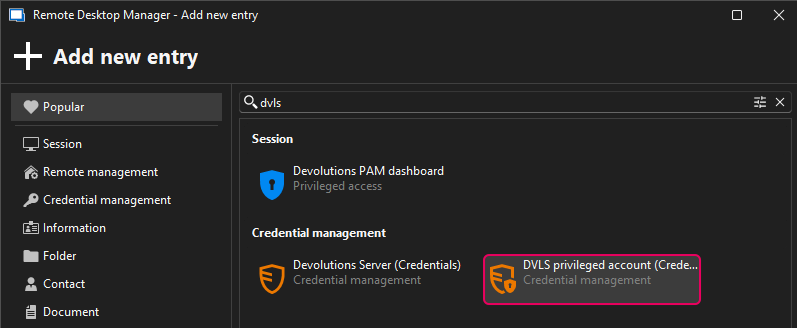
If you want to use the entry from the web interface, you can either configure the Credentials to "Privileged Account" and select a specific account for that entry, or you can use the "Find by name (User Vault)" and create a "DVLS Privileged account" entry in your user vault.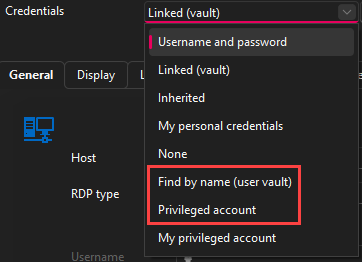
Best regards,
9b311ed7-ec26-4834-bd08-887aa3cec3bd.png
438c1d80-455f-4788-882f-049118cefa1f.png
Hi William,
That no option. We use the complete Devolutions suite (RDM, Server, Gateway, PAM) with a large amount of users where every user has their own privileged account. Why is there no option to set your DVLS privileged account in the web interface?
Hello,
After reviewing the release notes, the options for My privileged account and My personal credentials should be saved on the server side as well since the 2025.1.3.0 version.
After some testing, the use of the credential type "DVLS Privileged Account" is not supported in the web interface. If you changed it to "Username and Password" for example, this will work.
If you would like to see the credential type "DVLS Privileged Account" supported from the web, I would suggest opening a feature request thread on the forum:
Devolutions Server: https://forum.devolutions.net/forums/34/devolutions-server--feature-request
Feel free to reach out if you have any questions or need further clarification.
Best regards,