Expiring Entries Notification Options No Longer Exist

Good morning.
Just came across something else that needs to be addressed in the beta.
I verified this is an issue on both my installed version and the portable beta:
That screen looked like this in v2024.3.28.0: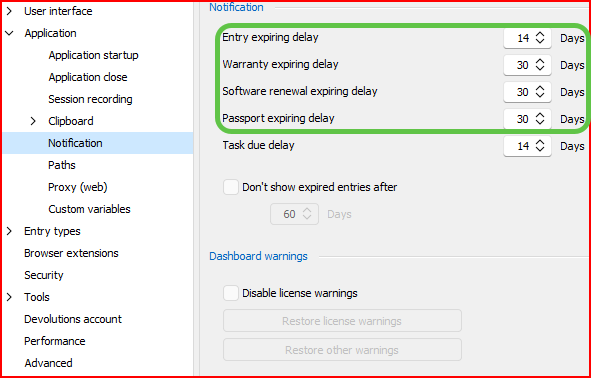
The circled ones have just up and vanished from the beta.
--- Chuck
Overgaard, AZ (-7 MST / Zulu Year-Round)
RDM Version: 2026.2.16.0 64-Bit - Free
4672463d-65fa-4eff-bf10-4266385c57f4.png
8f87511a-1e26-4afa-ba7b-ab8268783b84.png
All Comments (7)
Hello Chuck,
Thank you for reaching out to Devolutions Support.
The options have been reorganized and merged into a single setting.
You can now find the entry expiration delay under: Administration -> System Settings -> Common -> Notification
Best regards,
Carl Marien
Hello Chuck,
Thank you for reaching out to Devolutions Support.
The options have been reorganized and merged into a single setting.
You can now find the entry expiration delay under: Administration -> System Settings -> Common -> System Settings.
Best regards,
Good morning, Carl.
There is no Administration > System Settings > Common > System Settings.
Are you referring to Administration > System Settings > Common > Notification:
If that's the case, and this is correct, who would ever suggest that kind of asinine change?
Combining all them in to one is one of the dumbest changes you folks have made in a considerable amount of time.
There's no reason I need a password that expires in 14 days to give me a notification 30 days ahead of time. And a Warranty extension through a vendor that takes 90 days to renew, shouldn't alert my 30 days before it expires. And some software vendors that we deal with take a LOT longer than 30 days to renew license keys, etc.
They should have remained the way they were. There was no need to change these and combine them in to one.
And let me guess, where they are now, is set for a System Wide change, instead of a user wide configuration like they were?
Some users may want 14 day notification for passwords. Some may only want 7, some may want 365, etc.
--- Chuck
Overgaard, AZ (-7 MST / Zulu Year-Round)
RDM Version: 2026.2.16.0 64-Bit - Free
c3180abf-2ad9-4f56-9763-66853961b8f1.png
Hello Chuck,
First, thank you for your perspective. Our users' feedback is valuable, and I hope it shows with the features we implement and our responsiveness to feedback we receive. We've had some discussions internally and for now, we'll revert the changes. You can expect this before the official release of 2025.1, so things will go back as they were on 2024.3.
For some added context, this change originally made sense for us, as we were trying to harmonize what we call "notifications" in DVLS alongside what we call "notifications" in RDM. We didn't expect our users to need the granularity of the settings, as well as having it configurable per-user. We'll revise our approach for this, as if it's immediately causing friction with the small user-base of the beta version, it will cause even more with the full release.
We've also settled on distinguishing more clearly between the "action center" (the new term for what is currently called "notifications" in RDM), and "notifications" that come from the server like DVLS. The two features don't act the same despite having been called the same in our products over the years, so we'll aim to rectify that in the near future. At the end of the day, we don't want to remove useful features for our users, but we also want to simplify the experience when using our products. I hope this at least puts into perspective why a change like this was done in our beta version.
Regards,
Hubert Mireault
Hello Chuck,
First, thank you for your perspective. Our users' feedback is valuable, and I hope it shows with the features we implement and our responsiveness to feedback we receive. We've had some discussions internally and for now, we'll revert the changes. You can expect this before the official release of 2025.1, so things will go back as they were on 2024.3.
For some added context, this change originally made sense for us, as we were trying to harmonize what we call "notifications" in DVLS alongside what we call "notifications" in RDM. We didn't expect our users to need the granularity of the settings, as well as having it configurable per-user. We'll revise our approach for this, as if it's immediately causing friction with the small user-base of the beta version, it will cause even more with the full release.
We've also settled on distinguishing more clearly between the "action center" (the new term for what is currently called "notifications" in RDM), and "notifications" that come from the server like DVLS. The two features don't act the same despite having been called the same in our products over the years, so we'll aim to rectify that in the near future. At the end of the day, we don't want to remove useful features for our users, but we also want to simplify the experience when using our products. I hope this at least puts into perspective why a change like this was done in our beta version.
Regards,
Thank you for the transparency as always, Hubert.
Yes, it does give perspective as to why the change was made.
Has anyone from Devolutions (maybe even David) thought about posting an "upcoming changes" section here in the Beta forums?
Something as simple as:
2025.1.11.0 Prospective Changes:

*) Combining Notifications and moving from User Configuration to System Configuration to keep all them with one setting.
-) This will eliminate all the different Expiration dates, and only have one expiration date available to service all items. This will now be a System Wide settings, instead of an Individual User preference setting.

*) Removing XBox capabilities completely from RDM
-) This functionality is extermely obsolete and our code no longer supports it

*) Revamping the look and feel of the onboarding screen
-) We are just revamping this to bring it up to date. Here is a screenshot of what we have proposed.
I am not speaking for everyone reading this as most won't reply to give their thoughts, but I think that would go over extremely well with your customer base who assist with the Beta versions, etc. Maybe even post a small screenshot of what you folks are talking about.
Not anything big like the Release Notes, as we don't need to know there's a bug fix to the Active Directory Synchronizers, but more of the common every day options.
Just a thought!? I know having a team of end-users who could update your documentation as well as tooltips (hovering over an option within RDM to get a description of what it does, instead of just repeating what the program has the option listed as) within the software I have brought up before and heard it was a good idea, but then the idea never comes to fruition, so this probably won't either, but it's a damn good suggestion! I would raise my hand to assist in either of those.
--- Chuck
Overgaard, AZ (-7 MST / Zulu Year-Round)
RDM Version: 2026.2.16.0 64-Bit - Free
Has anyone from Devolutions (maybe even David) thought about posting an "upcoming changes" section here in the Beta forums?
That's an interesting idea. We could see about doing a "sneak peak" of what's been developed in the middle of our development cycle. I'll keep this in mind and we'll see if it's useful for users. We might try it out for 2025.2. We try not to make too many promises since a lot of things can happen during development, and we don't want to say something is coming when in the end it's not.
We also publish a blog post for our yearly, very high level roadmap, every year. If you haven't seen the one for 2025, it's here: https://blog.devolutions.net/2025/01/devolutions-2025-roadmap/
Additionally, when it comes to "breaking changes", there's usually the following reasons they happen:
- A technology stops working as expected and is very difficult (or impossible) to keep integrating, so we opt to remove it. Example, an add-on for a product removes the availability of their CLI and offers no other way to integrate in our product.
- A technology stops working as expected and we don't have any usage from our users. Example, we notice in our QA testing an add-on stopped working a year ago, and no user reported the issue, we may opt to remove the add-on.
- When we try to harmonize our features across products or simplify the user experience. Example, this is the case you saw with the action center (notifications).
The first two are easier to notify in advance (and we tend to deprecate entries before removing them, usually), but the third case is more difficult, as sometimes it happens last minute when polishing a feature and comes in at the end of the development cycle. Still, we'll see what we can do to minimize these occurences, as often we try to make it as seamless for our users as possible.
For your other points, I'll separate them in two different points as they don't have the exact same challenges.
tooltips (hovering over an option within RDM to get a description of what it does, instead of just repeating what the program has the option listed as)
This isn't simple to accomplish on a technical level. Maybe in the long term we could look at this but it's not a priority. It would require us to add tooltips to every control as well as handle the English and French translations for both (as those languages we handle ourselves), which would be an incredible amount of work with the amount of features and configurations there are. Still, I understand that making the application more comprehensive that way is a step to simplifying the user experience, so it's not something we're disregarding, we just have other priorities.
I know having a team of end-users who could update your documentation [...]
I discussed with David and at the moment, we don't have a good way to onboard users to help with this. If you have any specific topics you'd want to see added or modified, or suggestions for how to handle future topics, I encourage you to suggest them and we'll see if we can make the modifications or implement the suggestions.
As a note, we've been slowly updating certain topics to be more descriptive. For example, the SSH terminal topic was revamped a little while ago: https://docs.devolutions.net/rdm/kb/knowledge-base/ssh-session-entry/
It should give a good idea of what we aim to do with the description of configurations and fields. It's more polished and understandable than what we've had in the past, thanks to our small team who is dedicated to our documentation website.
Let me know what you think or if you have any additional suggestions.
Regards,
Hubert Mireault
Has anyone from Devolutions (maybe even David) thought about posting an "upcoming changes" section here in the Beta forums?
That's an interesting idea. We could see about doing a "sneak peak" of what's been developed in the middle of our development cycle. I'll keep this in mind and we'll see if it's useful for users. We might try it out for 2025.2. We try not to make too many promises since a lot of things can happen during development, and we don't want to say something is coming when in the end it's not.
We also publish a blog post for our yearly, very high level roadmap, every year. If you haven't seen the one for 2025, it's here: https://blog.devolutions.net/2025/01/devolutions-2025-roadmap/
Additionally, when it comes to "breaking changes", there's usually the following reasons they happen:
- A technology stops working as expected and is very difficult (or impossible) to keep integrating, so we opt to remove it. Example, an add-on for a product removes the availability of their CLI and offers no other way to integrate in our product.
- A technology stops working as expected and we don't have any usage from our users. Example, we notice in our QA testing an add-on stopped working a year ago, and no user reported the issue, we may opt to remove the add-on.
- When we try to harmonize our features across products or simplify the user experience. Example, this is the case you saw with the action center (notifications).
The first two are easier to notify in advance (and we tend to deprecate entries before removing them, usually), but the third case is more difficult, as sometimes it happens last minute when polishing a feature and comes in at the end of the development cycle. Still, we'll see what we can do to minimize these occurences, as often we try to make it as seamless for our users as possible.
I had no idea of the roadmaps page that you shared. One thing I did like on there was something like this:
Effortlessly send Ctrl-Alt-End commands in nested RDP sessions to improve remote session management.
You don't say when, just "it's coming 2025". That would be a good thing to put in the "sneak peak" {blog} or whatever you want to call it. No dates or anything, just something like "Sneak Peak for v2025.1.x Betas", "Sneak Peak for v2025.2.x Betas", etc.. So that way, we know it's targeted for this mainstream release. By doing something like the "sneak peak", it also gives users a chance to assist you more by targeting those changes. Like for me, I have done numerous sessions regarding Linked Credentials and A/D Syncs, VMWare Syncs, and a huge issue that was in VMWare Dashboards. All of those were fixed and released on the next mainstream release. But, for those who rarely use it (if at all), they wouldn't even know to test it to report back prior to the release. Hopefully that makes sense.
For your other points, I'll separate them in two different points as they don't have the exact same challenges.
tooltips (hovering over an option within RDM to get a description of what it does, instead of just repeating what the program has the option listed as)
This isn't simple to accomplish on a technical level. Maybe in the long term we could look at this but it's not a priority. It would require us to add tooltips to every control as well as handle the English and French translations for both (as those languages we handle ourselves), which would be an incredible amount of work with the amount of features and configurations there are. Still, I understand that making the application more comprehensive that way is a step to simplifying the user experience, so it's not something we're disregarding, we just have other priorities.
I know having a team of end-users who could update your documentation [...]
That makes sense. I just didn't know how feasible it was to do something like a tooltips.xml file or tooltips.rdm file or something where it would have this kind of layout. At least it it just targeted the settings screen (to start), that would help tramendously:
{Settings}
{Settings\User Interface}
{Settings\User Interface\User Interface\Theme}: 'This option provides a bright or dark look to RDM.'
{Settings\User Interface\User Interface\Advanced\DataSourceNameInTreeView}: 'This will show the Data Source Name in the top of the Navigation panel, instead of just "Session".'
{Settings\Application\Application Startup\ShowSplashScreenOnStartup}: 'This option will who the RDM Splash Screen when checked, or not show any splash screen on RDM statup when unchecked.'
I discussed with David and at the moment, we don't have a good way to onboard users to help with this. If you have any specific topics you'd want to see added or modified, or suggestions for how to handle future topics, I encourage you to suggest them and we'll see if we can make the modifications or implement the suggestions.
As a note, we've been slowly updating certain topics to be more descriptive. For example, the SSH terminal topic was revamped a little while ago: https://docs.devolutions.net/rdm/kb/knowledge-base/ssh-session-entry/
It should give a good idea of what we aim to do with the description of configurations and fields. It's more polished and understandable than what we've had in the past, thanks to our small team who is dedicated to our documentation website.
That screen looks a LOT better than most of the already existent documented screens. Most of them show images from say version v2021.1.x when the look and feel is totally different than v2025.1.x. If I need to do any SSH Session Entries, there more than likely would be no questions after reading those screen-by-screen informational instructions. That is a great job!
Let me know what you think or if you have any additional suggestions.
Regards,
As always, thanks for the transparency and work you folks do on RDM. I am sure other users reading this agree with me as well.
--- Chuck
Overgaard, AZ (-7 MST / Zulu Year-Round)
RDM Version: 2026.2.16.0 64-Bit - Free
You don't say when, just "it's coming 2025". That would be a good thing to put in the "sneak peak" {blog} or whatever you want to call it. No dates or anything, just something like "Sneak Peak for v2025.1.x Betas", "Sneak Peak for v2025.2.x Betas", etc.. So that way, we know it's targeted for this mainstream release.
I wonder indeed if creating this as a blog would be interesting. We'll juggle some ideas internally and see if anything sticks. I hope at least you can look forward to the yearly roadmap blog posts, it's been a tradition at this point and I think our more active community users love seeing what's upcoming, even if it's just the big lines.
That screen looks a LOT better than most of the already existent documented screens. Most of them show images from say version v2021.1.x when the look and feel is totally different than v2025.1.x. If I need to do any SSH Session Entries, there more than likely would be no questions after reading those screen-by-screen informational instructions. That is a great job!
I'm really happy to hear it and I'll forward your comment to our documentation team. If there's a specific topic that you would personally need, feel free to suggest them and we'll add them to our list of topics to redo (or create, if it doesn't exist). Unfortunately, we have a very large amount of topics and features to document, so we have to choose our priorities. For new features we develop where documentation is helpful, we create them proactively, but for our older (over a decade-old!) catalog of features, it has to be done manually.
Regards,
Hubert Mireault