Website Entries - Do not pass Username and Password

Another one... Problem in both installed and portable version.
Website entries no longer pass username and password to the entry. The autofill button on the top of the toolbar (key looking icon) doesn't work either like it used to when the issue persisted.
I have tried both Inherited from the parent folder that has KeePass entries linked, as well as Username and Password variables.
Neither work. However, loading the database in v2024.3.28.0 portable works perfectly fine as expected.
--- Chuck
Overgaard, AZ (-7 MST / Zulu Year-Round)
RDM Version: 2026.2.16.0 64-Bit - Free
Recommended Answer
Hi,
Could go to File -> Settings -> Entry Types -> Website -> Autofill mode and Select V1 in the dropdown, then retry to autofill a website?
Best regards,
Olivier Désalliers
All Comments (3)
Hi,
What Web browser do you use in your website entries (Microsoft Edge, Google Chrome, Internet Explorer)? Do you use private session (Incognito) in your entries? Does it happen on all your entries in RDM 2025.1.11.0?
Best regards,
Olivier Désalliers
Hi,
What Web browser do you use in your website entries (Microsoft Edge, Google Chrome, Internet Explorer)? Do you use private session (Incognito) in your entries? Does it happen on all your entries in RDM 2025.1.11.0?
Best regards,
I have changed from Default (Google Chrome) to Edge to FireFox. I have tried both Incognito and not incognito (don't have it selected). Yes, it happens on all entries in this beta version.
--- Chuck
Overgaard, AZ (-7 MST / Zulu Year-Round)
RDM Version: 2026.2.16.0 64-Bit - Free
Hi,
Could go to File -> Settings -> Entry Types -> Website -> Autofill mode and Select V1 in the dropdown, then retry to autofill a website?
Best regards,
Oliver,
Worked like a champ!!!
Changed to this and simply relaunched a saved entry. Performed as expected: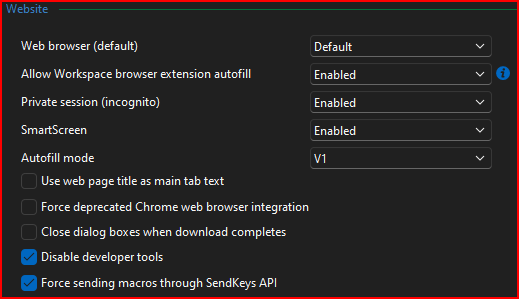
Changed to this and simply relaunched a saved entry. Did not perform as expected:
Just to verify changed back to V1, relaunched saved entry and performed as expected.
--- Chuck
Overgaard, AZ (-7 MST / Zulu Year-Round)
RDM Version: 2026.2.16.0 64-Bit - Free
9f67daf1-0fb5-4e1e-96da-6307ded4cef6.png
63f71c24-d9a7-49b9-a797-64e1d2a7852c.png