PowerShell script error: The method or operation is not implemented "Get-RDMDataSource"
PowerShell script error: The method or operation is not implemented "Get-RDMDataSource"

Found another problem. This one is with Powershell scripts that have worked flawlessly since v2023.x. I get this error in both the installed Beta version, as well as the Portable Beta version: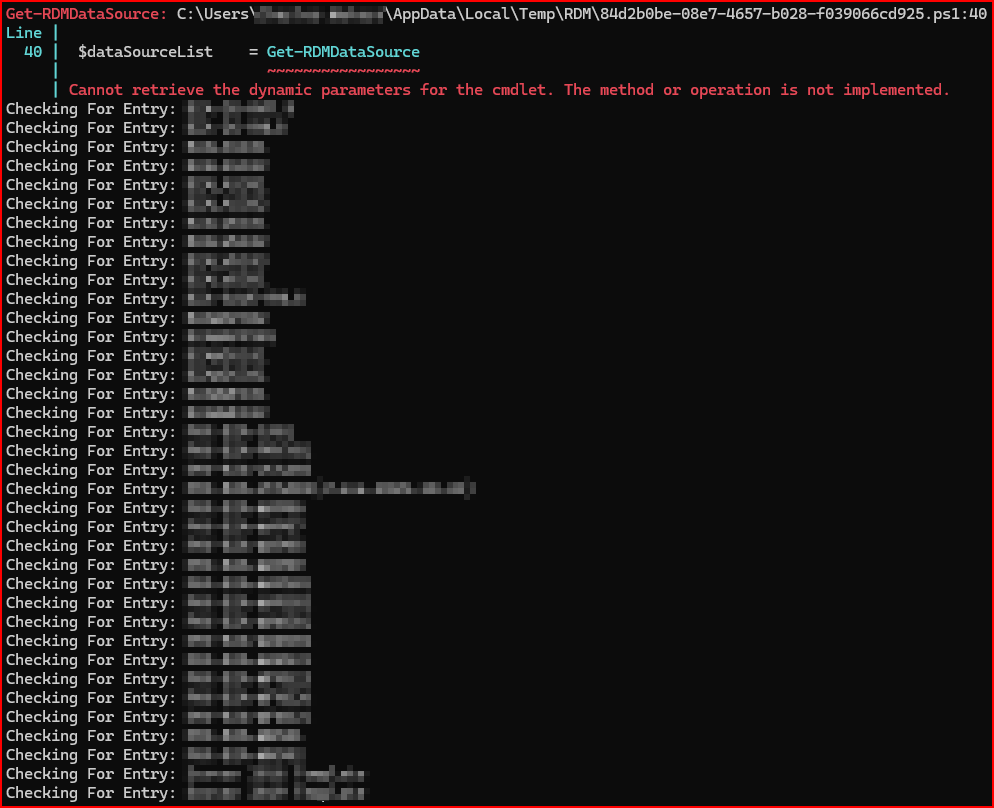
Here is the Script I am running for your reference (error is on the line > $dataSourceList = Get-RDMDataSource):
# Declare file & folder variables needed for the script
$csvData	= Import-Csv -Path "C:\RVTools\RDM Updates\ImportFiles.csv"
$OutputPath = "C:\RVTools\RDM Updates\Completed\"

# Check to see if the output path exists for the completed csv file
If(!(test-path -PathType container $OutputPath))
{
      New-Item -ItemType Directory -Path $OutputPath
}

# Fetch all RDM data sources currently loaded to RDM
$dataSourceList	= Get-RDMDataSource

# Prepare a list to hold the results
$results = @()

# Iterate through each row in the CSV
	foreach ($row in $csvData) {
		$deviceName			= $row.VM
		$VMID				= $row.VMID
        $Description		= $row.Annotation
		$SmartResize		= $row.SmartResize
		$customfield1		= $row.CF1
		$customfield2		= $row.CF2
		$customfield3		= $row.CF3
		$ClientTag			= $row.ClientCode
		$AlternateHosts     = $row.IPv4
		$Virtual			= $row.Virtual
		$vCenter			= $row.vCenter
		$VMType				= $row.VMType
		$oldVMID			= $null
		$oldDescription		= $null
		$oldSmartResize		= $null
		$oldcustomfield1	= $null
		$oldcustomfield2	= $null
		$oldcustomfield3	= $null
		$oldClientTag		= $null
		$oldAlternateHosts	= $null
		$oldVirtual			= $null
		$oldvCenter			= $null
		$oldVMType			= $null
		$updateResult		= "Entry Not Found / Mismatch"
		$updatedDataSource	= $null

	# Display the current entry name being processed by this script
	Write-host "Checking For Entry: $deviceName"

	foreach ($dataSource in $dataSourceList) {
		Set-RDMCurrentDataSource -DataSource $dataSource
		$rdmSessions = Get-RDMSession -IncludeSubFolders | Where-Object { $_.Name -eq $deviceName }

		if ($rdmSessions) {
			foreach ($session in $rdmSessions) {
#                $oldDescription		= $session.Description
				$oldAlternateHosts	= $session.AlternateHosts
				$oldVMID			= $session.VMRC.VMID
				$oldSmartResize		= $session.VMRC.SmartResize
				$oldcustomfield1	= $session.MetaInformation.CustomField1Value
				$oldcustomfield2	= $session.MetaInformation.CustomField2Value
				$oldcustomfield3	= $session.MetaInformation.CustomField3Value
				$oldClientTag		= $session.MetaInformation.Keywords
				$oldVirtual			= $session.MetaInformation.IsVirtualMachine
				$oldvCenter			= $session.MetaInformation.VirtualMachineName
				$oldVMType			= $session.MetaInformation.VirtualMachineType

		$result = [PSCustomObject]@{
			'Entry Name'			= $deviceName
			'Old VM ID'				= $oldVMID
			'New VM ID'				= $VMID
#            'Old Description'       = $oldDescription
#            'New Description'       = $Description
			'Old NIC #1 vLAN'		= $oldcustomfield1
			'New NIC #1 vLAN'		= $customfield1
			'Old NIC #2 vLAN'		= $oldcustomfield2
			'New NIC #2 vLAN'		= $customfield2
			'Old NIC #3 vLAN'		= $oldcustomfield3
			'New NIC #3 vLAN'		= $customfield3
			'Old Tag'				= $oldClientTag
			'New Tag'				= $ClientTag
			'Old Alternate Hosts'	= $oldAlternateHosts
			'New Alternate Hosts'	= $AlternateHost
			'Old Is Virtual'		= $oldVirtual
			'New Is Virtual'		= $Virtual
			'Old vCenter'			= $oldvCenter
			'New vCenter'			= $vCenter
			'Old VM Type'			= $oldVMType
			'New VMType'			= $VMType
			'Update Result'			= "No Change Needed"
			'Updated DataSource'	= $dataSource.Name
			}

#		# Check to see if Description needs to be updated or not.
#		if ($oldDescription -ne $Description) {
#			$session.Description						= $Description
#   			$result.'Update Result'						= "Success"
#
#			Write-Host "Updated ""Description"" from '$oldDescription' to '$Description' for RDM Entry '$deviceName' in data source '$($dataSource.Name)'"
#		} else {
#			Write-Host "No Change needed for ""Description"" on RDM Entry '$deviceName' in data source '$($dataSource.Name)'"
#		}

		# Check to see if VM ID needs to be updated or not.
		if ($oldVMID -ne $VMID) {
			$session.VMRC.VMID							= $VMID
   			$result.'Update Result'						= "Success"

			Write-Host "Updated ""VM Id"" from '$oldVMID' to '$VMID' for RDM Entry '$deviceName' in data source '$($dataSource.Name)'"
		} else {
			Write-Host "No Change needed for ""VM Id"" on RDM Entry '$deviceName' in data source '$($dataSource.Name)'"
		}

		# Check to see if CustomField1 (NIC #1 VLAN) needs to be updated or not.
		if ($oldcustomfield1 -ne $customfield1) {
			$session.MetaInformation.CustomField1Value	= $customfield1
			$result.'Update Result'						= "Success"

			Write-Host "Updated ""NIC #1 vLAN"" from '$oldcustomfield1' to '$customfield1' for RDM Entry '$deviceName' in data source '$($dataSource.Name)'"
		} else {
			Write-Host "No Change needed for ""NIC #1 vLAN"" on RDM Entry '$deviceName' in data source '$($dataSource.Name)'"
		}

		# Check to see if CustomField2 (NIC #2 VLAN) needs to be updated or not.
		if ($oldcustomfield2 -ne $customfield2) {
			$session.MetaInformation.CustomField2Value	= $customfield2
			$result.'Update Result'						= "Success"

			Write-Host "Updated ""NIC #2 vLAN"" from '$oldcustomfield2' to '$customfield2' for RDM Entry '$deviceName' in data source '$($dataSource.Name)'"
		} else {
			Write-Host "No Change needed for ""NIC #2 vLAN"" on RDM Entry '$deviceName' in data source '$($dataSource.Name)'"
		}

		# Check to see if CustomField3 (NIC #3 VLAN) needs to be updated or not.
		if ($oldcustomfield3 -ne $customfield3) {
			$session.MetaInformation.CustomField3Value	= $customfield3
			$result.'Update Result'						= "Success"

			Write-Host "Updated ""NIC #3 vLAN"" from '$oldcustomfield3' to '$customfield3' for RDM Entry '$deviceName' in data source '$($dataSource.Name)'"
		} else {
			Write-Host "No Change needed for ""NIC #3 vLAN"" on RDM Entry '$deviceName' in data source '$($dataSource.Name)'"
		}

		# Check to see if Tags needs to be updated or not.
		if ($oldClientTag -ne $ClientTag) {
			$session.MetaInformation.Keywords			= $ClientTag
			$result.'Update Result'						= "Success"

			Write-Host "Updated ""Tags"" from '$oldClientTag' to '$ClientTag' for RDM Entry '$deviceName' in data source '$($dataSource.Name)'"
		} else {
			Write-Host "No Change needed for ""Tags"" on RDM Entry '$deviceName' in data source '$($dataSource.Name)'"
		}

		# Check to see if Alternate hosts (IPv4 Address Reference) needs to be updated or not.
		if ($oldAlternateHosts -ne $AlternateHosts) {
			$session.AlternateHosts						= $AlternateHosts
			$result.'Update Result'						= "Success"

			Write-Host "Updated ""Alternate Hosts"" from '$oldAltertnateHosts' to '$AlternateHosts' for RDM Entry '$deviceName' in data source '$($dataSource.Name)'"
		} else {
			Write-Host "No Change needed for ""Alternate Hosts"" on RDM Entry '$deviceName' in data source '$($dataSource.Name)'"
		}

		# Check to see if Machine is marked Virtual.
		if ($oldVirtual -ne $Virtual) {
			$session.MetaInformation.IsVirtualMachine	= $Virtual
			$result.'Update Result'						= "Success"

			Write-Host "Updated ""Is virtual machine?"" from '$oldVirtual' to '$Virtual' for RDM Entry '$deviceName' in data source '$($dataSource.Name)'"
		} else {
			Write-Host "No Change needed for ""Is virtual machine?"" on RDM Entry '$deviceName' in data source '$($dataSource.Name)'"
		}

		# Check to see if vCenter Name needs to be updated or not.
		if ($oldvCenter -ne $vCenter) {
			$session.MetaInformation.VirtualMachineName	= $vCenter
			$result.'Update Result'						= "Success"

			Write-Host "Updated ""Is virtual machine?: Server"" from '$oldvCenter' to '$vCenter' for RDM Entry '$deviceName' in data source '$($dataSource.Name)'"
		} else {
			Write-Host "No Change needed for ""Is virtual machine?: Server"" on RDM Entry '$deviceName' in data source '$($dataSource.Name)'"
		}

		# Check to see if Virtual Type needs to be updated or not.
		if ($oldVMType -ne $VMType) {
			$session.MetaInformation.VirtualMachineType	= $VMType
			$result.'Update Result'						= "Success"

			Write-Host "Updated ""Is virtual machine?: Type"" from '$VMType' to '$VMType' on RDM Entry '$deviceName' in data source '$($dataSource.Name)'"
		} else {
			Write-Host "No Change needed for ""Is virtual machine?: Type"" on RDM Entry '$deviceName' in data source '$($dataSource.Name)'"
		}

		# Check to see if Smart Resize needs to be updated or not.
		if ($oldSmartResize -ne $SmartResize) {
			$session.VMRC.SmartResize					= $SmartResize
   			$result.'Update Result'						= "Success"

			Write-Host "Updated ""Smart Resize"" from '$oldSmartResize' to '$SmartResize' for RDM Entry '$deviceName' in data source '$($dataSource.Name)'"
			Write-Host ""
		} else {
			Write-Host "No Change needed for ""Smart Resize"" on RDM Entry '$deviceName' in data source '$($dataSource.Name)'"
			Write-Host ""
		}

		if ($result.'Update Result' -eq "Success") {
			Set-RDMSession -Session $session
		} elseif ($result.'Update Result' -eq "No Change Needed") {
#			$result.'New Description'	= $null
			$result.'New VM Id'			= $null
			$result.'New NIC #1 vLAN'   = $null
			$result.'New NIC #2 vLAN'   = $null
			$result.'New NIC #3 vLAN'   = $null
			$result.'New Tag'           = $null
			$result.'New Smart Resize'	= $null
			$result.'New Is Virtual'    = $null
			$result.'New vCenter'       = $null
			$result.'New VMType'        = $null
			}

		$results += $result
		} # -> foreach ($sesion in $rdmSessions) closure
	} # -> if ($rdmSessions) close
	else {
		$results += [PSCustomObject]@{
			'Entry Name'			= $deviceName
#			'Old Description'		= $null
#			'New Description'		= $null
			'Old VM Id'				= $null
			'New VM Id'				= $null
			'Old NIC #1 vLAN'		= $null
			'New NIC #1 vLAN'		= $null
			'Old NIC #2 vLAN'		= $null
			'New NIC #2 vLAN'		= $null
			'Old NIC #3 vLAN'		= $null
			'New NIC #3 vLAN'		= $null
			'Old Tag'				= $null
			'New Tag'				= $null
			'Old Smart Resize'		= $null
			'New Smart Resize'		= $null
			'Old Is Virtual'		= $null
			'New Is Virtual'		= $null
			'Old vCenter'			= $null
			'New vCenter'			= $null
			'Old VM Type'			= $null
			'New VMType'			= $null
			'Update Result'			= $updateResult
			'Updated DataSource'	= $dataSource.Name
			} # -> PSCustomObject closure
		} # else block closure
	} # foreach ($dataSource in $dataSourceList) closure
} # foreach ($row in $csvdata) closure

#Refresh the running RDM UI
Update-RDMUI

# Export the results to a CSV file named with the current date
$timestamp = Get-Date -Format "MMddyyyy-HHmmss"
$outputFileName = "C:\RVTools\RDM Updates\Completed\ImportFile.csv"
$results | Export-Csv -Path $outputFileName -NoTypeInformation

# Write-Host "Results have been exported to $outputFileName"
HOWEVER... I found that enabling "Load RDM CmdLet" which I have never had to enable before got it working: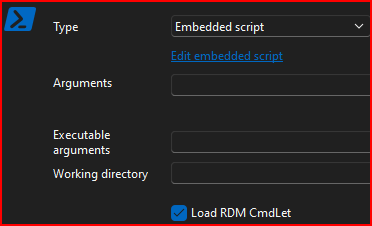
In the Portable version of v2025.1.11.0 Beta I get the same results.
However, in the latest Portable v2024.3.28.0, it works perfectly fine as it has since I implemented in middle v2023 without that option checked.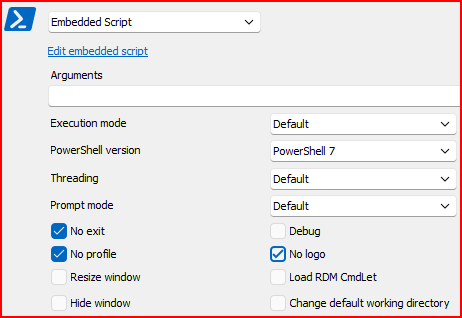
What changed? Should this be enabled by default?
--- Chuck
Overgaard, AZ (-7 MST / Zulu Year-Round)
RDM Version: 2026.3.2.0 64-Bit - Free
f7de442c-86a6-4a5c-bdff-a4f0ef8bae60.png
28fd102b-1799-4898-a0b8-05d161121720.png
e4f7f730-72b1-4666-8c58-237ea98c36f9.png
Recommended Answer
Hello,
Thank you for your feedback.
That's great news. The upgrade of the Devolutions PowerShell module to version 2025.1.0 has now made it work as expected.
Best regards,
Érica Poirier
All Comments (14)
Hello,
Thank you for reporting this issue.
Here are some suggestions to better understand what is happening:
- Add Get-RDMInstance before the error: This would allow us to see which version of the module is being called, with or without the LoadRDMCmdlet option. If there is a difference, we can specifically check the version causing the issue.
- We tested with PowerShell 7.5.0: If your version is different, it might be worth checking if updating resolves the issue. Otherwise, we will test your version of PowerShell.
- Check if multiple versions of the module coexist: Dynamic parameters are no longer used in Get-RDMDataSource, so there might be a conflict between two or more existing versions.
- Does the issue occur directly in PowerShell? This would help determine whether the problem is with the module itself or from the input.
Thank you for your collaboration.
Best regards,
Érica Poirier
Hello,
Thank you for reporting this issue.
Here are some suggestions to better understand what is happening:
- Add Get-RDMInstance before the error: This would allow us to see which version of the module is being called, with or without the LoadRDMCmdlet option. If there is a difference, we can specifically check the version causing the issue.
- We tested with PowerShell 7.5.0: If your version is different, it might be worth checking if updating resolves the issue. Otherwise, we will test your version of PowerShell.
- Check if multiple versions of the module coexist: Dynamic parameters are no longer used in Get-RDMDataSource, so there might be a conflict between two or more existing versions.
- Does the issue occur directly in PowerShell? This would help determine whether the problem is with the module itself or from the input.
Thank you for your collaboration.
Best regards,
Erica,Add Get-RDMInstance before the error: This would allow us to see which version of the module is being called, with or without the LoadRDMCmdlet option. If there is a difference, we can specifically check the version causing the issue.
So $datasource = Get-RDMInstance is the 1st line of actual code. The only thing above this are my variables that are used throughout the script.We tested with PowerShell 7.5.0: If your version is different, it might be worth checking if updating resolves the issue. Otherwise, we will test your version of PowerShell.
These are the settings I have my PowerShell entries set: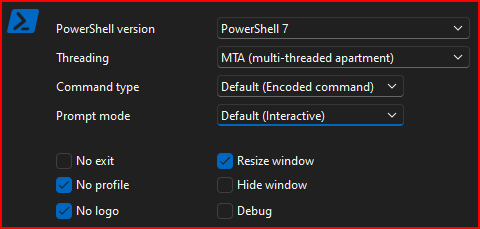
Check if multiple versions of the module coexist: Dynamic parameters are no longer used in Get-RDMDataSource, so there might be a conflict between two or more existing versions.
So I have it for both PowerShell v5 and PowerShell v7 which is my default.
In PowerShell v5, I get the following error both in RDM as well as PowerShell v5 core, so I have no idea how you folks got it to work in PS5 unless you are running outdated versions of your software:
In PowerShell v7, I get the following error both in RDM as well as PowerShell v7.5 core:
Again, those errors are both in RDM (without Load RDM CmdLet enabled) and PowerShell Core.
Within RDM, if the "Load RDM CmdLet" is enabled, RDM process the script using PowerShell v7 with no problems.Does the issue occur directly in PowerShell? This would help determine whether the problem is with the module itself or from the input.
Please refer to my references about "PowerShell Core" above.
--- Chuck
Overgaard, AZ (-7 MST / Zulu Year-Round)
RDM Version: 2026.3.2.0 64-Bit - Free
91019d1d-769a-4499-a0fb-1a6830c81b61.png
882e1092-bac0-4ad7-990f-8612221d5f04.png
1b81a848-bddc-44a1-b3ce-a8c34ab9a63f.png
Hello Chuck,
Thank you for your feedback.
Since the Devolutions PowerShell module can only run on PowerShell 7.4 or above, we cannot test it on PowerShell 5. What PS 7 version do you use? You can get it with the $PSVersionTable environment variable.
Your issue seems related to multiple versions of our module available on your machine. What do you get with this command?
get-module -ListAvailable | where {$_.Name -like "*Devolutions*"}
Could you make sure that only the latest version of our module is installed on your computer? Because the Get-RDMDataSource cmdlet no longer supports dynamic parameters, older versions can interfere and cause this error.
Thank you for keeping us updated.
Best regards,
Érica Poirier
Hello Chuck,
Thank you for your feedback.
Since the Devolutions PowerShell module can only run on PowerShell 7.4 or above, we cannot test it on PowerShell 5. What PS 7 version do you use? You can get it with the $PSVersionTable environment variable.
Your issue seems related to multiple versions of our module available on your machine. What do you get with this command?
get-module -ListAvailable | where {$_.Name -like "*Devolutions*"}
Could you make sure that only the latest version of our module is installed on your computer? Because the Get-RDMDataSource cmdlet no longer supports dynamic parameters, older versions can interfere and cause this error.
Thank you for keeping us updated.
Best regards,
Thank you for the reply, Erica.
Please see screenshot below for answer to both of your questions:
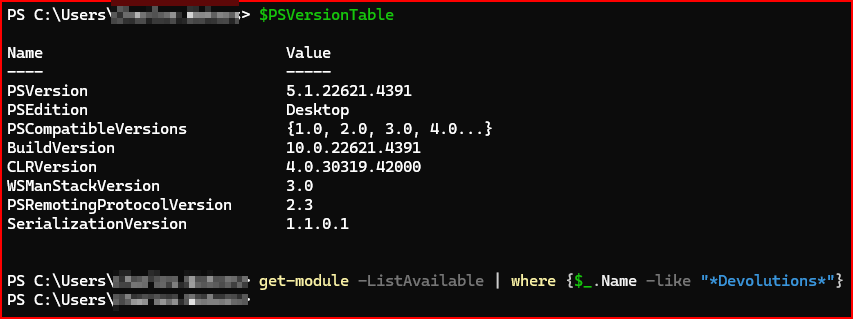
--- Chuck
Overgaard, AZ (-7 MST / Zulu Year-Round)
RDM Version: 2026.3.2.0 64-Bit - Free
1f2863b9-2568-418f-a124-685c5d815ae7.png
e8d4cc2a-9d96-48e6-af06-5b68bd8e7fb6.png
c03dc7ad-43b5-42d1-8585-787e3a1fb003.png
Good morning.
Any update to this?
--- Chuck
Overgaard, AZ (-7 MST / Zulu Year-Round)
RDM Version: 2026.3.2.0 64-Bit - Free
Hello,
Thank you for your feedback.
The last news I had, we were unable to reproduce your issue. The investigation didn't provide any clue yet on your issue.
What do you get if you run the command directly on a PowerShell prompt?
$dataSourceList = Get-RDMDataSource
Best regards,
Érica Poirier
Hello,
Could you try the latest version 2025.1.0 of the module? I have been told that the fix is available in this version.
Let us know if that works.
Best regards,
Érica Poirier
Hello,
Could you try the latest version 2025.1.0 of the module? I have been told that the fix is available in this version.
Let us know if that works.
Best regards,

--- Chuck
Overgaard, AZ (-7 MST / Zulu Year-Round)
RDM Version: 2026.3.2.0 64-Bit - Free
68529b59-570d-439e-be75-a2a7c3872b7d.png
Hello,
Could you try the latest version 2025.1.0 of the module? I have been told that the fix is available in this version.
Let us know if that works.
Best regards,
As you can see, that error message appears when the "Load RDMCmdLet" option is *NOT* checked: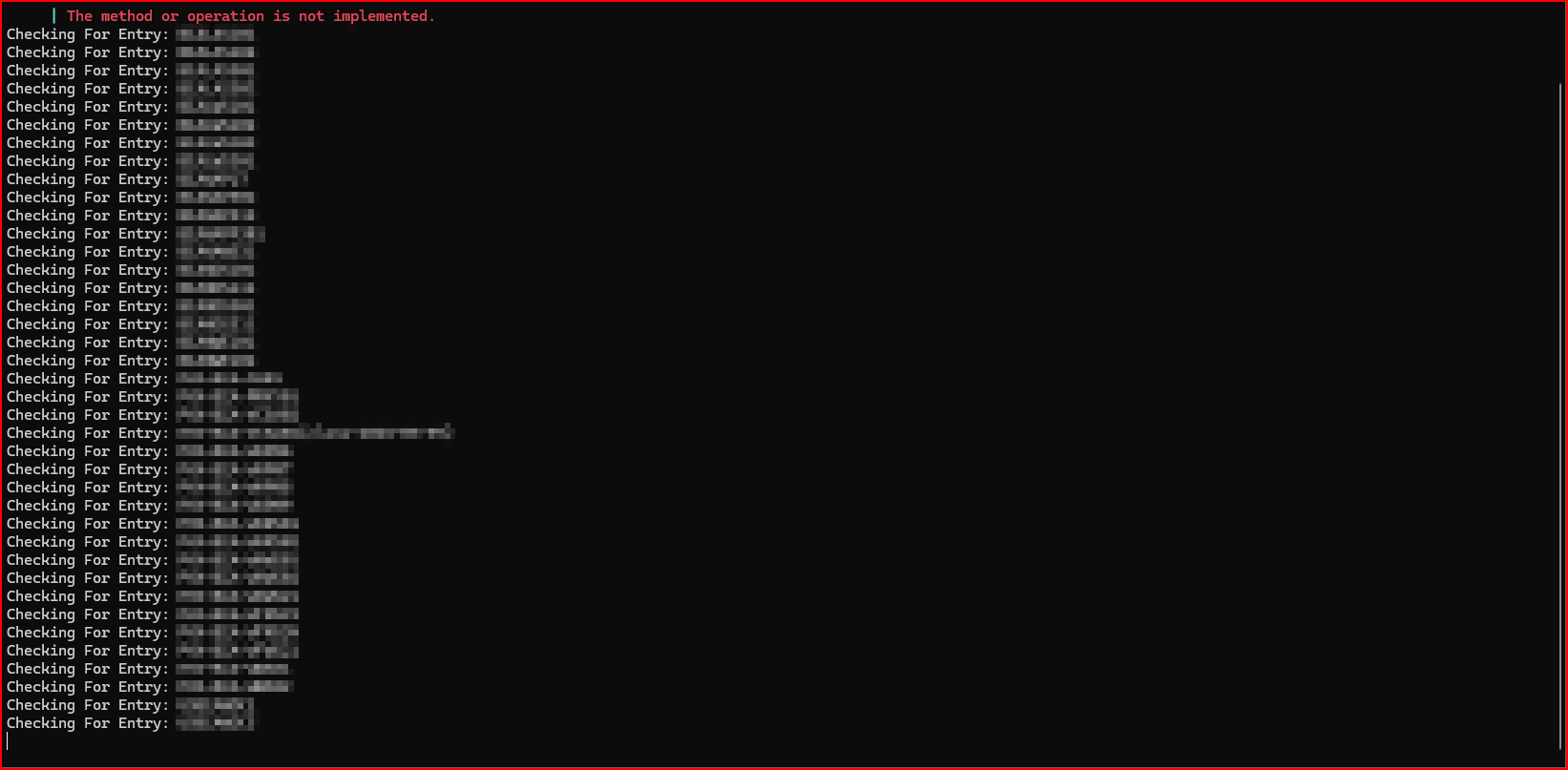
As long as it stays checked, it works: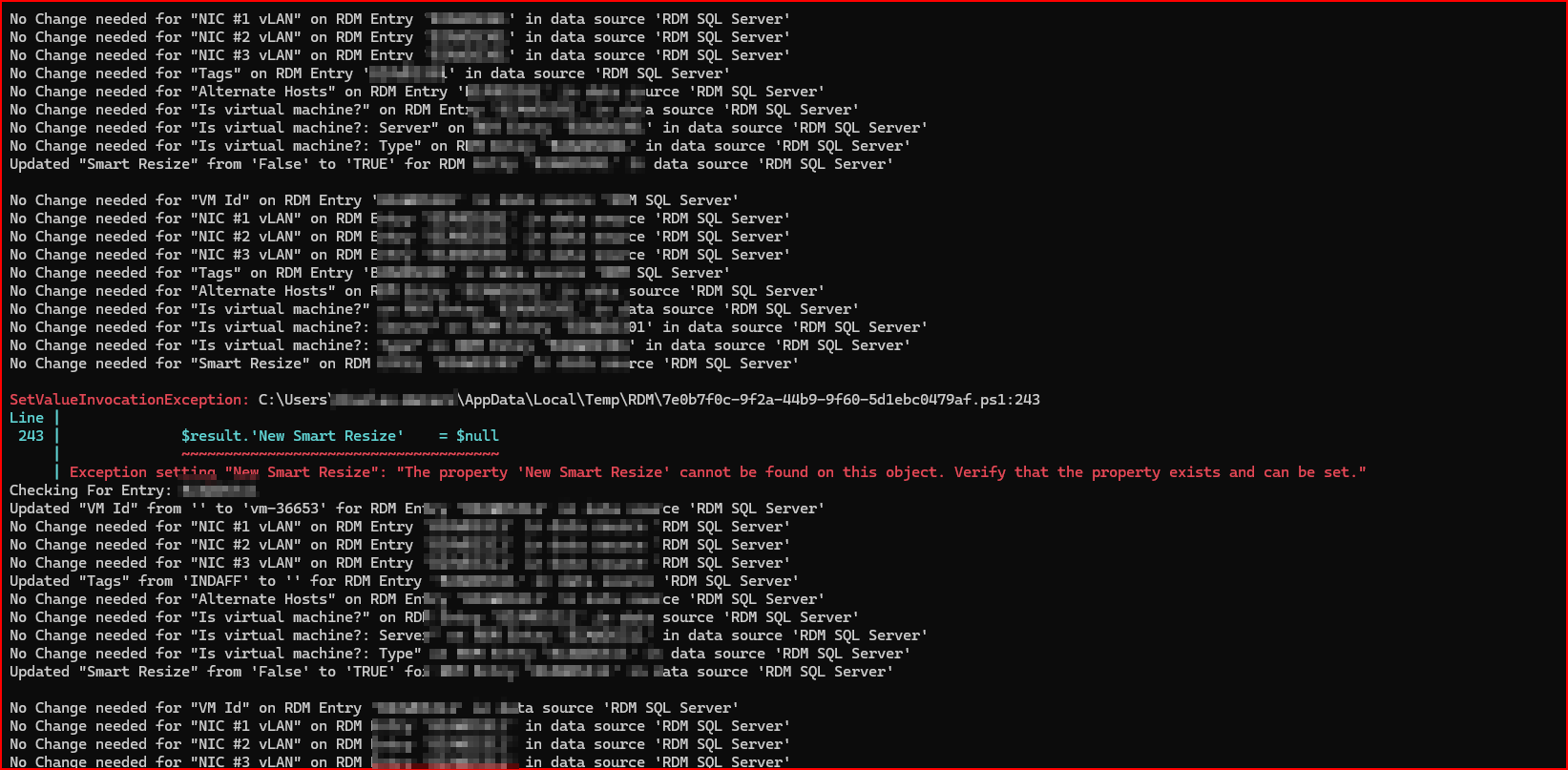
--- Chuck
Overgaard, AZ (-7 MST / Zulu Year-Round)
RDM Version: 2026.3.2.0 64-Bit - Free
e51f2c2c-66cc-429d-844e-63eaae04dced.png
ae8df923-44b8-4f34-b70f-aff14f820178.png
Hello,
Thank you for your feedback.
I still cannot reproduce your issue. Both Get-RDMInstance and Get-RDMDataSource provide an answer without any error.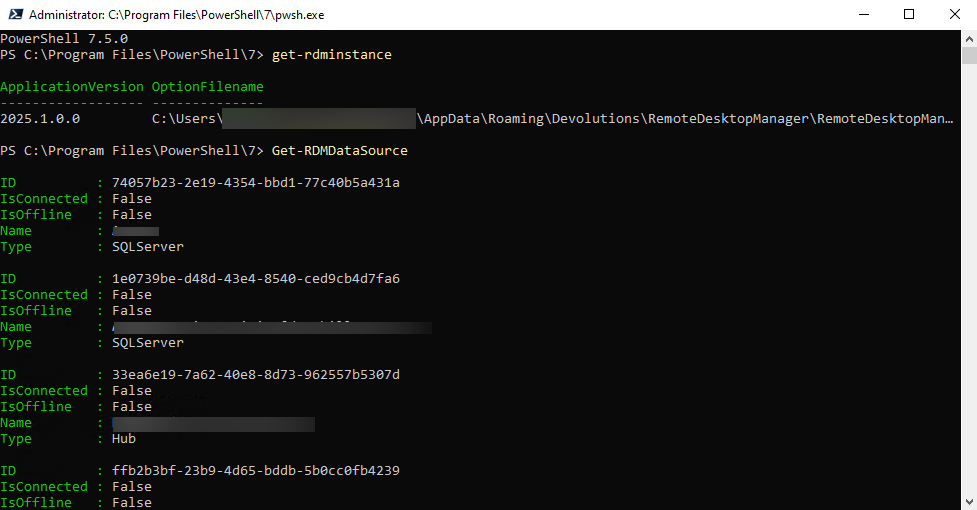
Have you restarted PowerShell after updating the module to 2025.1?
Could you make sure you have only this module version installed on this machine?
Best regards,
Érica Poirier
0ec469f4-6503-4447-bff2-42b5bf5127ea.png
Hello,
Thank you for your feedback.
I still cannot reproduce your issue. Both Get-RDMInstance and Get-RDMDataSource provide an answer without any error.
Have you restarted PowerShell after updating the module to 2025.1?
Could you make sure you have only this module version installed on this machine?
Best regards,
So, maybe the way you folks have it now, you have to load the DataSource 1st?
If I do RDMInstance before RDMDataSource, I get an error as seen below. If I do RDMDataSource before RDMInstance, it works fine: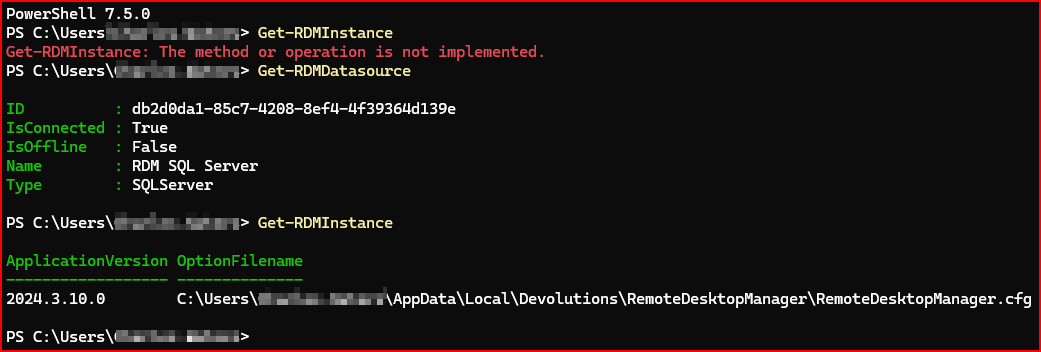
--- Chuck
Overgaard, AZ (-7 MST / Zulu Year-Round)
RDM Version: 2026.3.2.0 64-Bit - Free
2a019060-0be4-4e83-9c19-41f472b81832.png
Hello,
Thank you for your feedback.
Could you send us the error you get after the first command you run on opening PowerShell? You should get the information using this command: $Error[0].Exception
Also, I see you are still running the 2024.3.10 version of the module, even though the fix is available in version 2025.1.0.
Best regards,
Érica Poirier
Hello,
Thank you for your feedback.
Could you send us the error you get after the first command you run on opening PowerShell? You should get the information using this command: $Error[0].Exception
Also, I see you are still running the 2024.3.10 version of the module, even though the fix is available in version 2025.1.0.
Best regards,
Duh...
I was sitting here thinking "I just updated to RDM v2025.x.x", and overlooked the Devolutions.PowerShell module.
Just updated and looks like the "Load RDM Cmdlet" option no longer needs to be checked in order for PowerShell related RDM commands to function correctly.
Looks like you can mark this completed with the result that the end-user needs to update to the latest RDM Powershell module.
However...Update-Module -Name Devolutions.PowerShell will result in duplicate installations. It does not, in fact, perform an update to the module. I had to go in and delete the 2024.3.11 folder manually.
--- Chuck
Overgaard, AZ (-7 MST / Zulu Year-Round)
RDM Version: 2026.3.2.0 64-Bit - Free
Hello,
Thank you for your feedback.
That's great news. The upgrade of the Devolutions PowerShell module to version 2025.1.0 has now made it work as expected.
Best regards,
Érica Poirier