Dashboard Display Issue - v2025.1.11.0

Good morning.
Just upgraded to v2025.1.11.0. First off, want to say THANK YOU for finally pushing the update to show User Vault Expiring entries. This is EXTREMELY helpful.
However, I have found an issue with ONE item and that's the "Checkouts" List.
As you can see, I have everything (except one Never) set to "If not empty":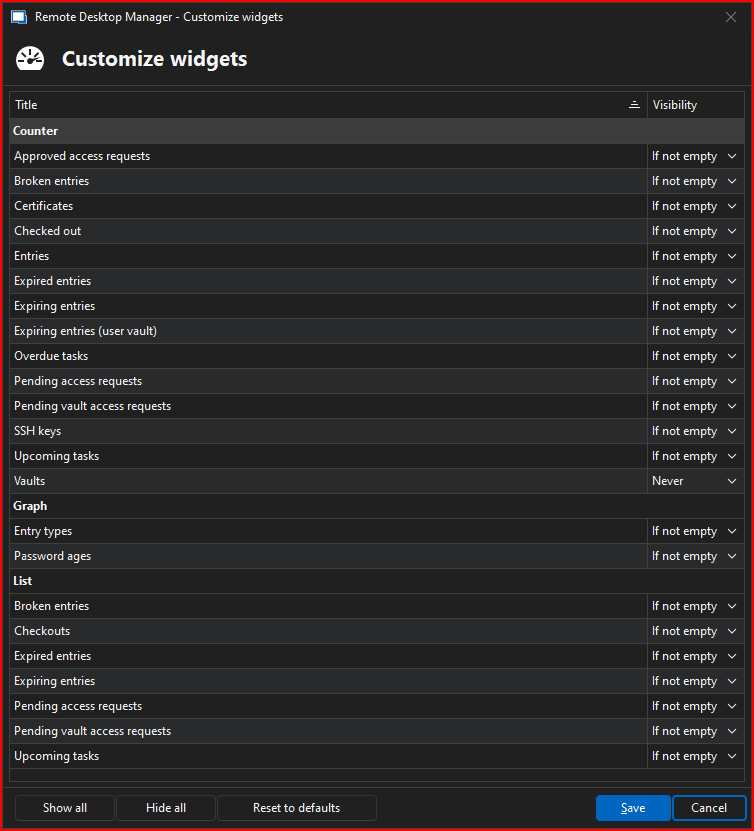
The list shows 0 checkouts so therefore, it shouldn't be displayed.
Otherwise, haven't found any issues with the Dashboard for either System or User vault. Showing my user vault settings for reference here:
Only suggestion I can think of, is maybe (if feasible) is to have a growing window? You can see my Expiring entries has a scroll bar. It would be nice to see them all without having to scroll. Maybe an option in settings to show how many entries appear in all the windows?
--- Chuck
Overgaard, AZ (-7 MST / Zulu Year-Round)
RDM Version: 2026.2.16.0 64-Bit - Free
f8b52bcb-449a-49b4-8ee1-de5d2436b506.png
fd490cbd-f703-4734-a356-932dee117fdb.png
41426b2d-e202-4e01-8141-f11def63d880.png
All Comments (4)
I spoke too soon.
The same issue with Dashboard not saving that I reported a few versions back is happening again.
Every time RDM is exited, it reverts the Dashboard settings back to the defaults you folks push out.
Please compare the two Dashboard Settings screenshots listed in this post. The 1st one is what I selected. The one directly above this line is after closing and re-launching the program.
--- Chuck
Overgaard, AZ (-7 MST / Zulu Year-Round)
RDM Version: 2026.2.16.0 64-Bit - Free
9b6e52a8-45f4-417d-9654-ec42692a0dc3.png
Hello Chuck,
Thank you for reaching out to us regarding this,
What type of data source are you using? I'm assuming this is your SQL Server is that correct?
I've not been able to reproduce the behavior so far with the Beta version. Could you install a portable instance and let me know if you encounter the same issue?
https://cdn.devolutions.net/download/Devolutions.RemoteDesktopManager.Bin.2025.1.11.0.zip?_gl=1*7tm9d8*_ga*NTI1MjMyNzQwLjE3MzE5Njg0MTM.*_ga_P11646PR82*MTczODgwMjU5NS4yMDIuMS4xNzM4ODAyOTc2LjYwLjAuMA..
https://docs.devolutions.net/rdm/kb/how-to-articles/portable-rdm-installation/
Best regards,
Samuel Dery
Hello Chuck,
Thank you for reaching out to us regarding this,
What type of data source are you using? I'm assuming this is your SQL Server is that correct?
I've not been able to reproduce the behavior so far with the Beta version. Could you install a portable instance and let me know if you encounter the same issue?
https://cdn.devolutions.net/download/Devolutions.RemoteDesktopManager.Bin.2025.1.11.0.zip?_gl=1*7tm9d8*_ga*NTI1MjMyNzQwLjE3MzE5Njg0MTM.*_ga_P11646PR82*MTczODgwMjU5NS4yMDIuMS4xNzM4ODAyOTc2LjYwLjAuMA..
https://docs.devolutions.net/rdm/kb/how-to-articles/portable-rdm-installation/
Best regards,
My apologies, sir. I should have put I checked both versions as I always do before posting a found issue.
I get the exact same results with the portable version, I just didn't display the results for that one as well, so here you go.
I even attached the taskbar so you can see the time and notice the change in exiting / relaunching RDM.
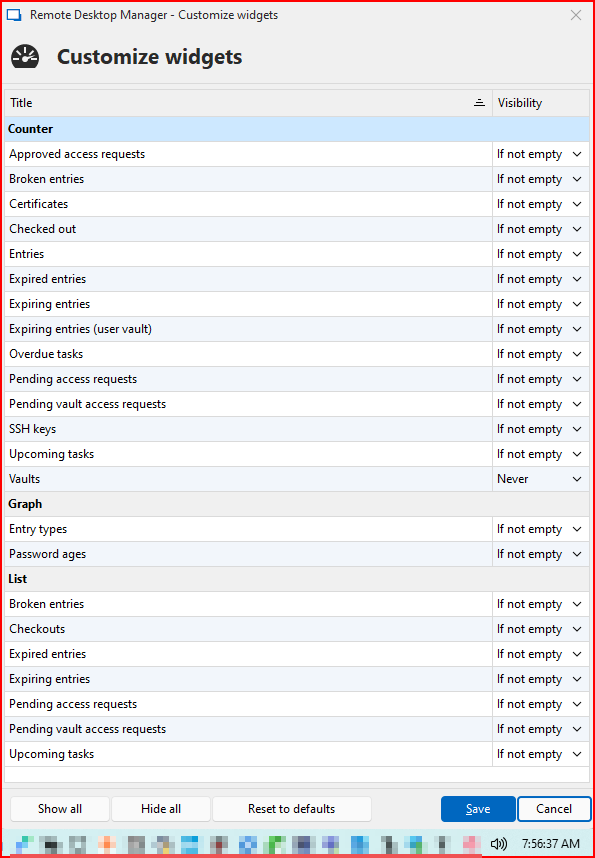
First startup after downloading:

This is what I changed the settings to, which is my preferences.
After exiting RDM, waiting a couple minutes and relaunching, it reverts back to what you folks push out: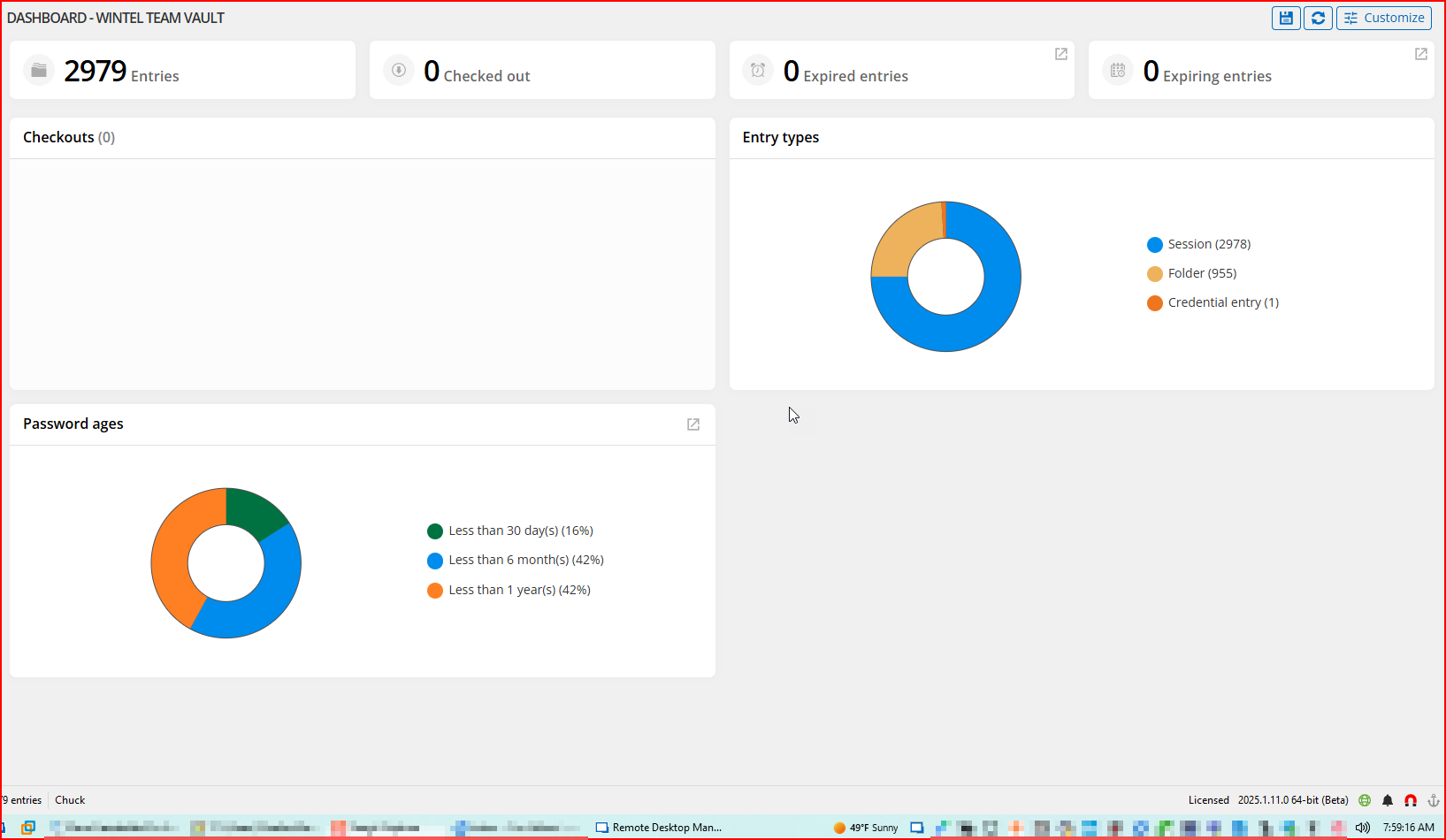
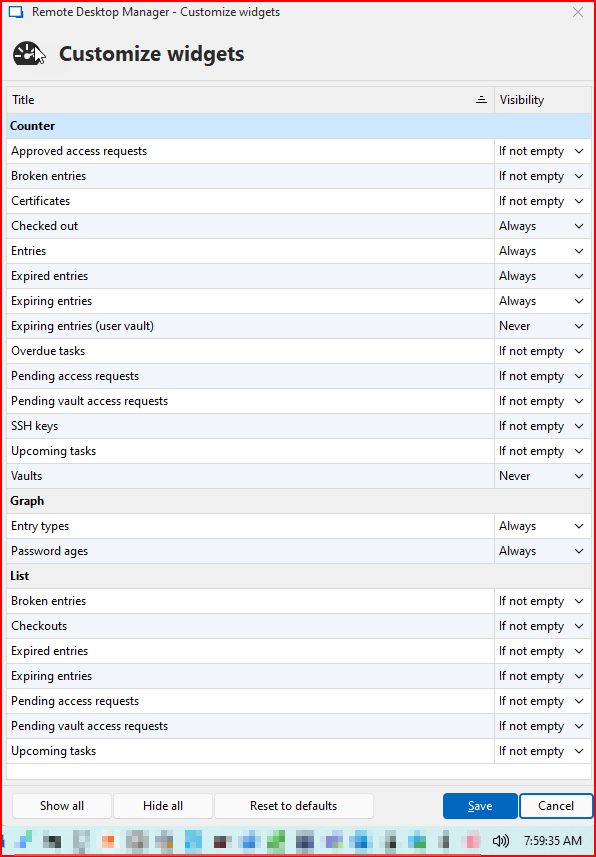
I have confirmed this same behavior on two different instances. My main instance which is on my laptop, and my VM instance which is utilized for when I need to connect to different VPN's.
Both machines work perfectly fine on the latest v2024 that I had installed. When I make a change to my Customize list, it saves it and loads as expected on each launch. The Beta version (both installed and Portable) goes back to this issue. It is the exact same behavior that I reported as a bug the last time you folks made a change to the way the Dashboards were viewed. Something was found and fixed in the next release.
Thanks.
--- Chuck
Overgaard, AZ (-7 MST / Zulu Year-Round)
RDM Version: 2026.2.16.0 64-Bit - Free
022f0988-8dc9-4d8d-9561-cb5585d01594.png
23045f2f-f65f-4106-a8ec-af8889a69c3e.png
58d1956f-7c5c-479e-a1d6-8b8b96d43540.png
6ff91d7a-7f1b-4290-ac7b-2b8758de6fd7.png
28e9890b-d4fa-43df-b7e3-866c8d36140f.png
4ae96394-c3a7-4aed-8e6b-7f9ccea0a6cc.png
Hello Chuck,
Thank you for your reply,
Indeed, I remember being able to reproduce this issue at the time you reported it,
Would you be able to provide me with a recording of the behavior? There might be something we are doing differently.
I will send you a link in a private message so that you can provide me the recording.
Best regards,
Samuel Dery