Workspace random lockout

Hello Devolutions team,
We have setup master password on user's Workspace app on Windows and set auto-lock to 5 minutes.
Seems that it gets locked randomly, sometimes every 10-20 seconds, which is really annoying, and sometimes during working inside the app.
Since I haven't found this bug already reported, please check it out.
P.S. on same machines, RDM app password is set, and locks with screen as intended (on windows lock & on standby).
Would be very useful if Workspace would have the same lock application settings as RDM.
All Comments (8)
Hello,
Thank you for reaching out to us!
To better understand the issue, could you please provide the following details?
- Which version of Devolutions Workspace are you currently using?
- Did you have auto-lock configured in an older version of the Workspace app (if so, which one)? If yes, was it working as expected before updating to the current version?
Once we have these details, we'll investigate further and provide the best possible solution.
Looking forward to your response!
Best regards,
Phillipe Boucher
Hi Phillipe,
Workspace is latest version 2024.3.5, earlier it was RDM for business users, but now we moved to Workspace as more convenient and without unnecessary options for non admin users.
Hello,
Thank you for your response!
To further investigate this issue, could you confirm if the Background Lock option is enabled in your Workspace settings? You can find this setting under Workspace > Security > Background Lock.
Let us know if this option is currently enabled and if disabling it makes any difference in the locking behavior.
Looking forward to your response!
Best regards,
Phillipe Boucher
Hello,
Thank you for your response!
To further investigate this issue, could you confirm if the Background Lock option is enabled in your Workspace settings? You can find this setting under Workspace > Security > Background Lock.
Let us know if this option is currently enabled and if disabling it makes any difference in the locking behavior.
Looking forward to your response!
Best regards,
Phillipe Boucher
Hi Phillipe,
No, background lock is not enabled, only auto lock.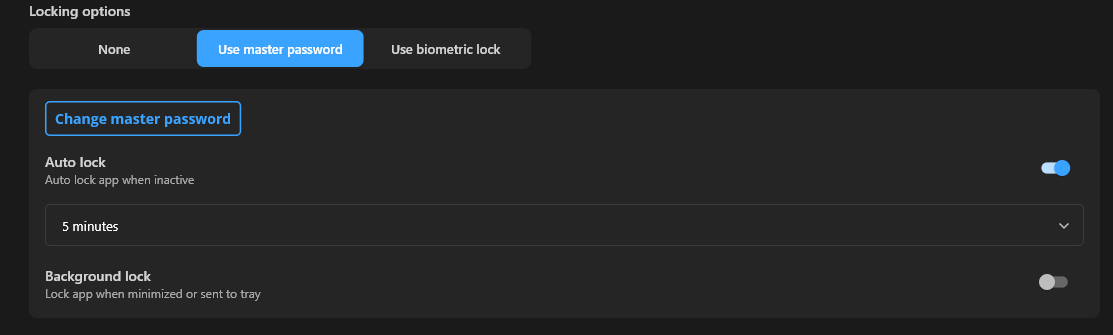
81db36c2-b193-4bb8-9cc7-7384e91b97ed.png
Hello,
Thanks for the details you’ve provided so far. Since Background Lock is disabled and Auto-Lock is set to 5 minutes, the app should only lock in these cases:
- After 5 minutes of inactivity
- If manually locked
- If the app is closed and reopened
However, since you’re experiencing random locks (sometimes within 10-20 seconds, even while working inside the app), I’d like to gather a bit more information to help troubleshoot:
- Does the app lock even when you are actively typing or clicking inside it?
- If so, it might not be detecting activity properly.
- Are you using Remote Desktop (RDP) or a virtual desktop environment (Citrix, VMware, etc.)?
- Some remote environments can interfere with inactivity detection.
- Do you have any security software running (e.g., CrowdStrike, McAfee, Bitdefender, etc.)?
- Some security tools may enforce additional session lock policies.
- Does the app fully close or refresh before locking?
- If Workspace is briefly restarting, it could be triggering an auto-lock.
- Are multiple user accounts being used on the same machine, or do you frequently switch users?
- Fast user switching might affect session tracking.
If you can check these points, it will help us narrow down what’s causing the issue. Let me know what you find!
Best regards,
Phillipe Boucher
Hi Phillipe,
Answers are highlighted below:
- Does the app lock even when you are actively typing or clicking inside it?
- If so, it might not be detecting activity properly.
A: Yes, during activity inside the app (e.g. editing an entry, you can see background lock in place, as soon as you close the editing window app is locked.
- Are you using Remote Desktop (RDP) or a virtual desktop environment (Citrix, VMware, etc.)?
- Some remote environments can interfere with inactivity detection.
A: No, standard windows session on client end device
- Do you have any security software running (e.g., CrowdStrike, McAfee, Bitdefender, etc.)?
- Some security tools may enforce additional session lock policies.
A: Yes, but no session lock policies are enforced via security agent, only via other policies (GPO, intune...etc.), None of these policies had such short inactivity time.
- Does the app fully close or refresh before locking?
- If Workspace is briefly restarting, it could be triggering an auto-lock.
A: Yes, during activity inside the app (e.g. editing an entry, you can see background lock in place, as soon as you close the editing window app is locked, and when unlocked, entry is updated with changes done during locked background.
- Are multiple user accounts being used on the same machine, or do you frequently switch users?
- Fast user switching might affect session tracking.
A: No, single session/accounts logged in
Hello,
Thank you for the detailed information! I'll be using this to try and reproduce the issue on my side.
I'll get back to you as soon as I have any findings or if I need any additional details from you.
I appreciate your patience, and I'll keep you updated!
Best regards,
Phillipe Boucher
Hello,
Thank you for your patience while we investigate this issue. To rule out any potential configuration
issues, I’d like you to reset the app settings by deleting the shared preferences file.
Please follow these steps:
- Close Devolutions Workspace completely.
- Open Run (Windows + R), then enter the following path:
C:\Users\YourUsername\AppData\Roaming\net.devolutions\Workspace
(Replace YourUsername with your actual Windows username.)
- Locate and delete the file named:
shared_preferences.json
- Restart Devolutions Workspace and set up the Auto-Lock feature again from scratch.
Once you've completed these steps, please test whether the issue persists and let me know the results.
Looking forward to your feedback!
Best regards,
Phillipe Boucher