Damware Mini with PAM
0 vote

Hello, I would like to be able to choose a PAM account to use when launching Dameware mini session. It states that the 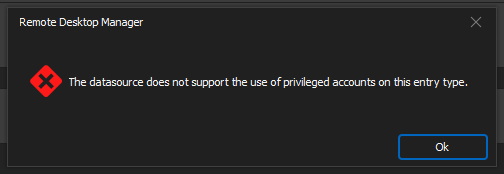
Is this going to be supported or is there a way to get the credential to populate the correct fields?
I have also tried "setting up a new "My Privilege acct" cred. and "find by name"" also.
1677fe83-808c-4a00-8685-813baeb231d5.png
641ff93b-74e3-4451-993e-02509299d1e5.png
451ec2df-8bf7-43f2-a9e5-6df9759b7f8f.png
All Comments (9)
Hi,
Sorry about the delay.
We've added "Usage policies" to allow you to specify where privileged accounts could be used. 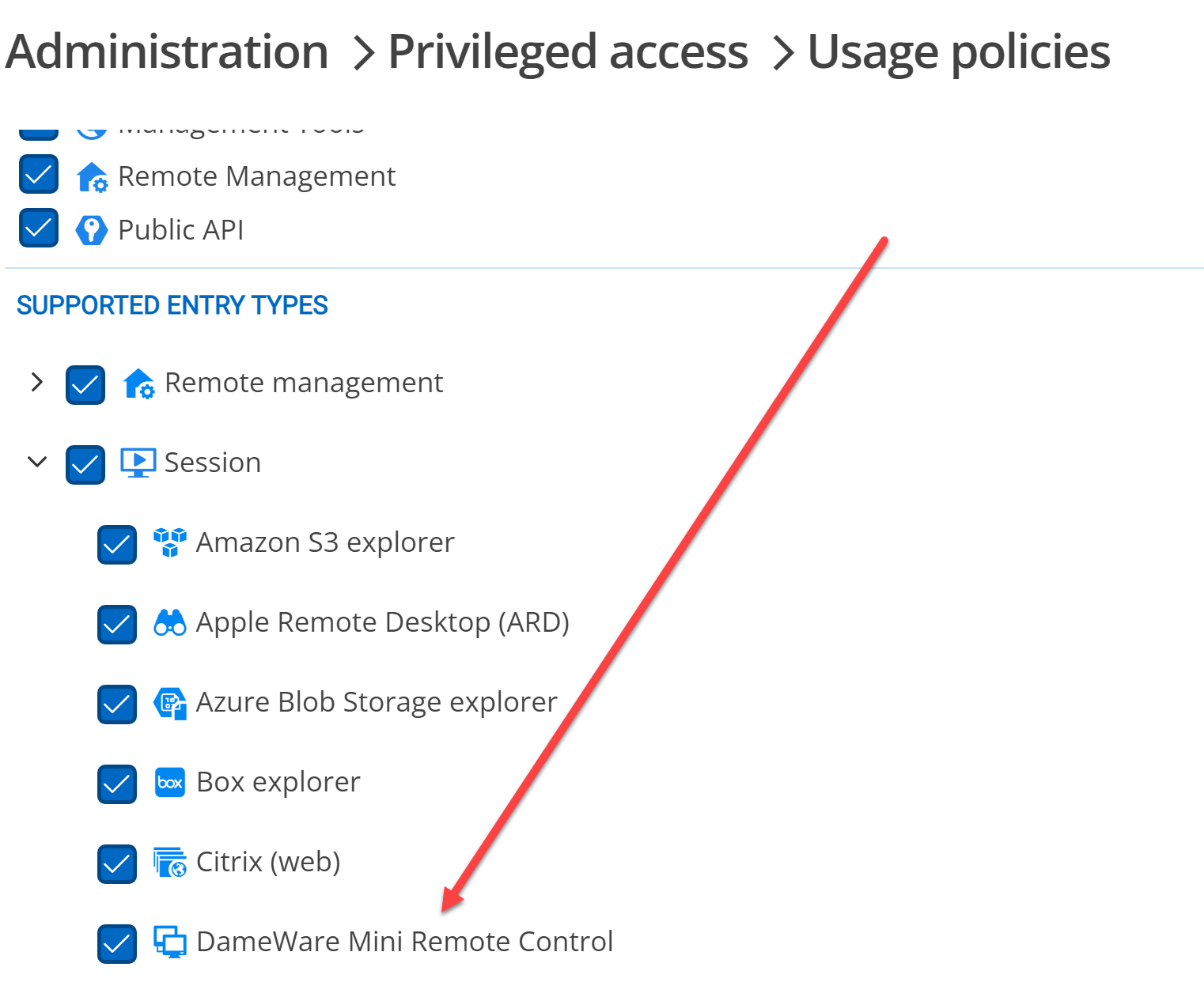
Is this turned on?
Best regards,
Maurice
bded801c-7090-4c39-9484-fa0a93eda232.png
Thank you this was not enabled and is now and working, however, DVLS GW proxy does not work and that would be a nice addition
ok, I will ask someone to look into this
Maurice
Hi!
I'm not particularly aware of what DameWare does exactly, but have you tried using the "Devolutions Gateway Tunnel" from the VPN/Tunnel/Gateway tab?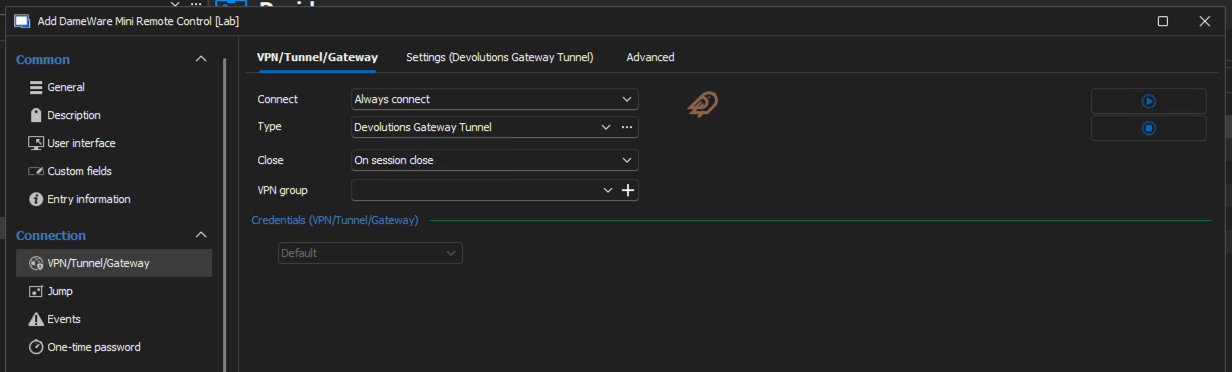
Best regards,
Xavier Fortin
e544ed9c-4323-4dd7-8e62-5a0093e399dc.png
Thanks for the idea, however, we are using the Devolutions Gateway solution and works differently for our PAM needs:
Devolutions Gateway (GW):
- Purpose:
- Acts as a bridge to securely connect to remote resources without exposing them to the internet.
- Enables remote access to servers, desktops, and other resources hosted on private networks.
- Usage:
- Typically used for point-to-point connections.
- It provides access to specific resources through protocols like RDP, SSH, and VNC.
- Primarily integrates with Devolutions Remote Desktop Manager (RDM) to simplify remote connections.
- How It Works:
- The Gateway manages session brokering and directs traffic to the desired internal resource.
- Access is limited to predefined targets, offering an additional layer of control.
- Key Features:
- Does not require VPNs or changes to firewall configurations.
- Enables secure session monitoring and management.
Let's take a step back here. Could you describe in details your exact use case, and where and what roles does the Devolutions Gateway plays in it? What is it exactly you are trying to do, and how does the Gateway fits in it?
As stated, I'm not personally aware of DameWare functioning, so add as much details as possible.
Best regards,
Xavier Fortin
like RDP sessions, we also want these DameWare sessions to go through the Devolutions GW. Simple as that.
Hi,
I understand the feature request, and we're taking note of it, but it may take a while before we can work on a built-in integration where you just have to associate the Dameware connection entry with Devolutions Gateway. This integration hasn't been touched in a while, and I don't think we have a working lab environment to test it anymore.
For most of our built-in integrations, we could add direct support for the modified connection sequence in the protocol implementations that we have, but this is usually limited with third-party clients like Dameware.
Looking at the Dameware command-line interface, it looks like it can accept proxy settings, but it's not so clear if it's a custom proxy or a standard SOCKS5 proxy: https://documentation.solarwinds.com/en/success_center/dameware/content/cli_functionality.htm
The Devolutions Gateway tunnel entry can be used to create an HTTP or SOCKS5 proxy on a localhost port: https://docs.devolutions.net/dgw/kb/knowledge-base/gateway-tunnel/
What would really help us determine if we can integrate the Dameware client with Devolutions Gateway would be if you can experiment with getting the client connecting through a standard proxying protocol (HTTP or SOCKS5). If it's possible, then we'd look into doing the same thing as the Devolutions Gateway tunnel, but automatically.
For quick proxy testing, CCProxy (https://www.youngzsoft.net/ccproxy/) is easy to run in a Windows VM and supports HTTP and SOCKS5 proxying, this should be enough to try launching the Dameware client from the command-line, trying to get it to connect through CCProxy. If you can confirm that it is indeed possible to inject proxy settings this way, it would help resolve the biggest unknown for the work to be done.
Best regards,
Marc-André Moreau
Hi,
So we created a SolarWinds account and registered for a Dameware Mini Remote Control trial. I've managed to get it working in standalone mode, and see how our existing integration works: we map connection properties to dwrcc.exe command-line arguments, launch the process and reparent the window inside Remote Desktop Manager.
I've searched for potential dwrcc.exe proxy options, and it unfortunately only seems to accept a custom proprietary protocol for a proxy server similar to Devolutions Gateway:
https://solarwindscore.my.site.com/SuccessCenter/s/article/How-to-use-the-Proxy-functionality-within-the-DameWare-Mini-Remote-Control-program
This leaves port forwarding as the only way to make this work. Dameware uses TCP/6129 by default, so I created a Devolutions Gateway tunnel entry, mapping 127.0.01:6129 to my destination host on TCP/6129: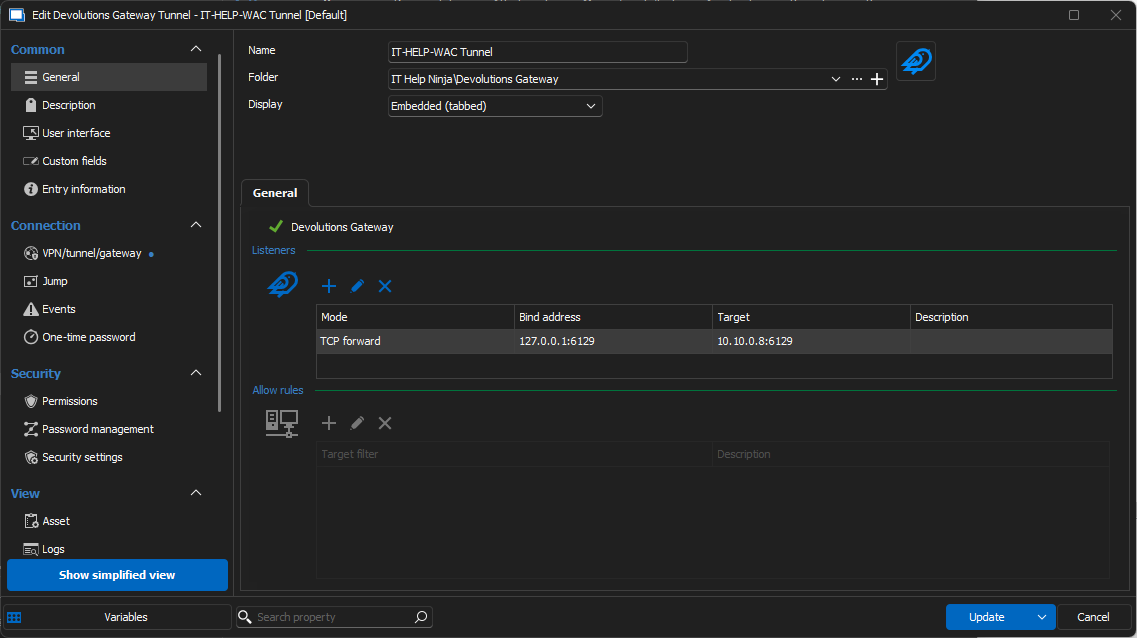
My Dameware connection entry is configured to use the Devolutions Gateway tunnel entry as my "VPN", which is enough to ensure it gets launched automatically before launching the Dameware connection: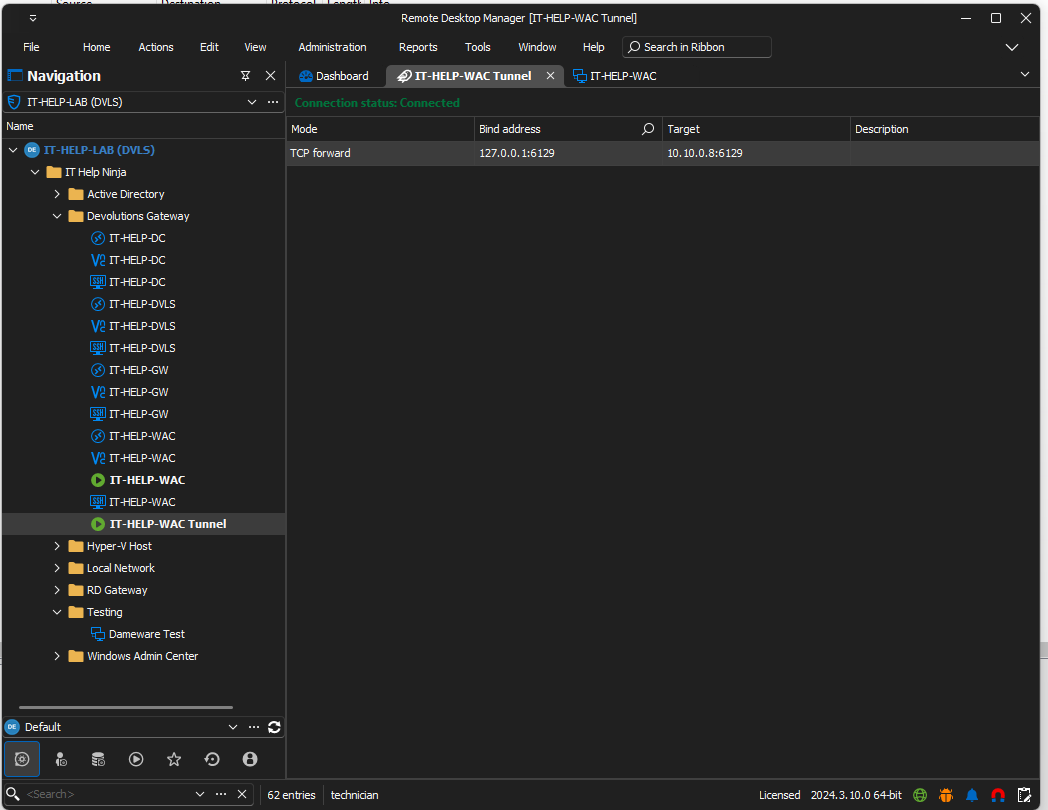
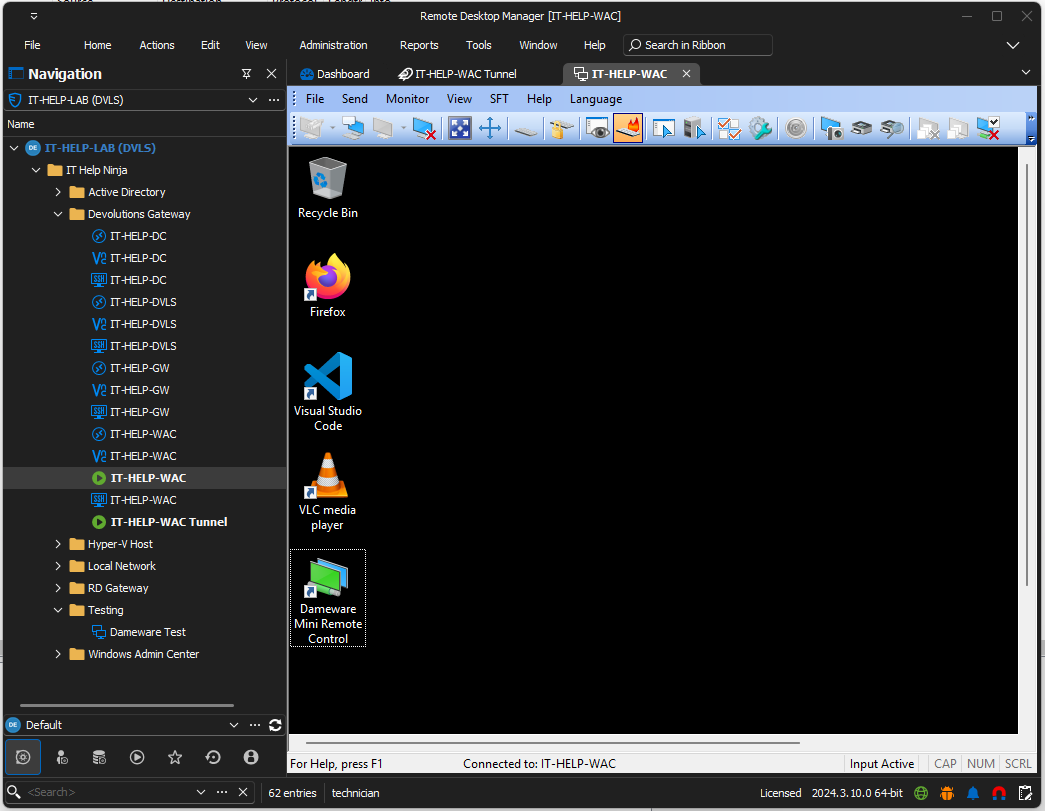
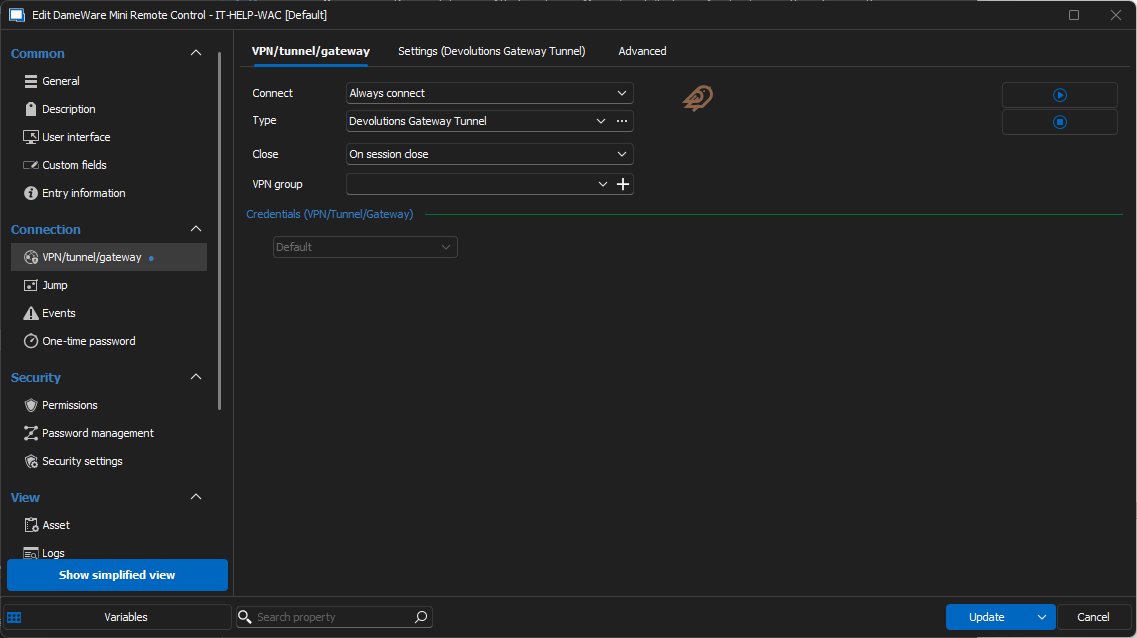
You can find more information on Devolutions Gateway tunnel entries here: https://docs.devolutions.net/dgw/kb/knowledge-base/gateway-tunnel/
This should be a sufficient solution to get Dameware supported through Devolutions Gateway. It's a bit more manual, but we've made the Devolutions Gateway Tunnel entry specifically to handle cases where a built-in integration was not available (or could not really be done because it involves a third-party client with limited integration, which appears to be the case here).
Best regards,
Marc-André Moreau
3cc735b6-1faa-4157-95d2-202f71270ddf.png
382daca7-d955-47a8-8995-29b3cd9974ec.png
8a200c6d-6ecf-4cc3-9758-686c1eadbee1.png
b4cd1a2a-1d3e-46d8-b5f9-713f3322bead.png