OTP Autofill, if field without id tag

Hi
Following this guide: https://docs.devolutions.net/rdm/kb/rdm-windows/how-to-articles/otp-autofill-workspace-browser-extension/
How should I setup OTP autofill on DVLS's OTP page? You don't have any ID
DVLS: 2024.2.10 (But not really that product relevant, as the same goes for other sites where there isn't an ID.
Regards Lars
Remote Desktop Manager connected with Devolutions Server running newest versions.
------------------------Signature------------------------
Sorry if any of above sounds harsh or provoking, it is NOT meant as such, but I have Asperger's and don't always know.
My intentions is always to be friendly.
-------------------------------------------------------------
d9bdb6a7-4add-4158-ac9f-7a3d9183c052.png
All Comments (3)
Hi,
When available, the id or name value can be used. If neither is present, the placeholder value can be used. In the scenario shown in the screenshot, the value would be Authenticator code
Best regards,
Olivier Désalliers
Ahh, perfect!
What about here, have they deliberately done so auto-fill can't work or is there a way?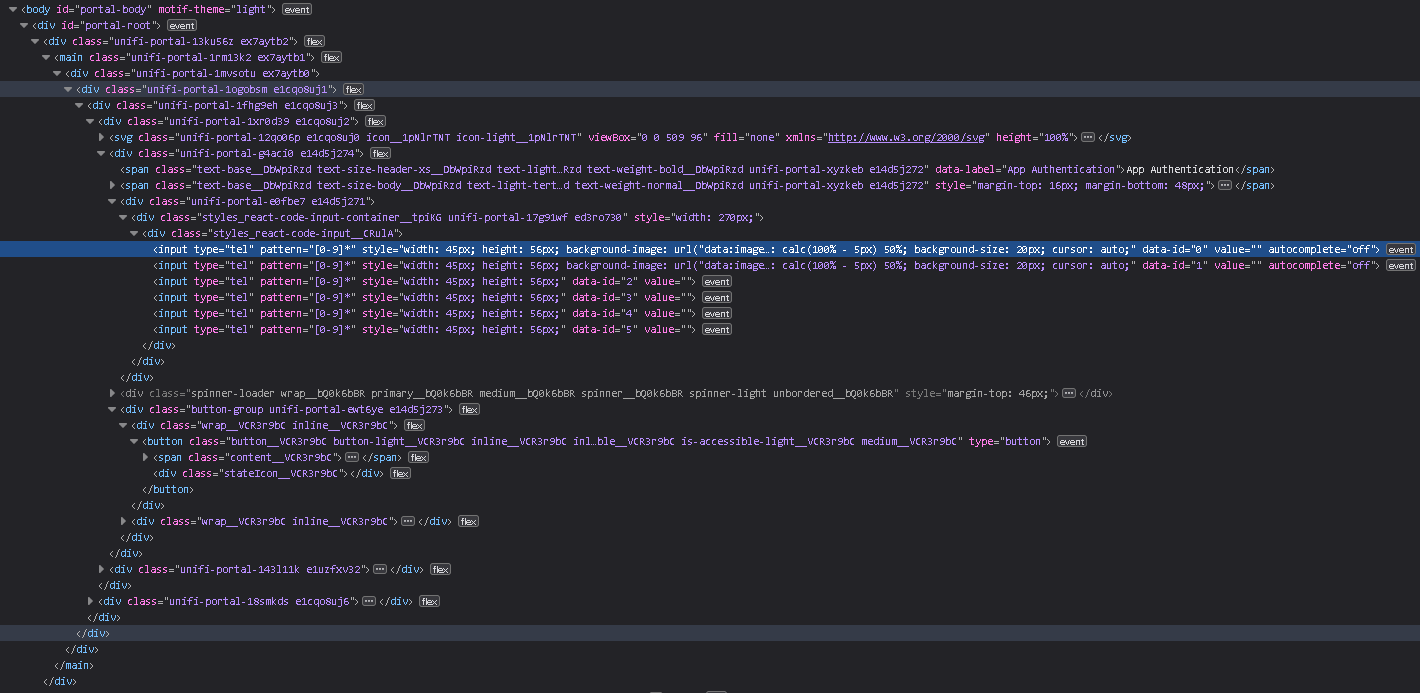
The selected (blue) line, is the first input field for OTP key.
I have tried to put 0 in DVLS if the data-is could be used, but doesn't seam to work.
Regards Lars.
Remote Desktop Manager connected with Devolutions Server running newest versions.
------------------------Signature------------------------
Sorry if any of above sounds harsh or provoking, it is NOT meant as such, but I have Asperger's and don't always know.
My intentions is always to be friendly.
-------------------------------------------------------------
e54482c3-3cf1-42fc-a2ca-5b6fa647b732.png
Hi,
Currently, it is not possible to auto-fill an OTP field if it lacks standard attributes such as id, name, placeholder, or aria-label.
The extension does not recognize data-id, which is a custom data attribute used by the website, as detailed here: https://developer.mozilla.org/en-US/docs/Learn/HTML/Howto/Use_data_attributes
Best regards,
Olivier Désalliers