Server backup not running

Good evening everyone,
I have just moved over to using Devolutions Server (Server 2024.2.10.0) and RDM (2024.2.20.0 64bit) mainly for having backup codes for MFA.
So far everything is working fine. Moved the database from MsSQL to Dev Server, setup users and it is working great. However, I cannot get automated backups to work.
This is what I have in options: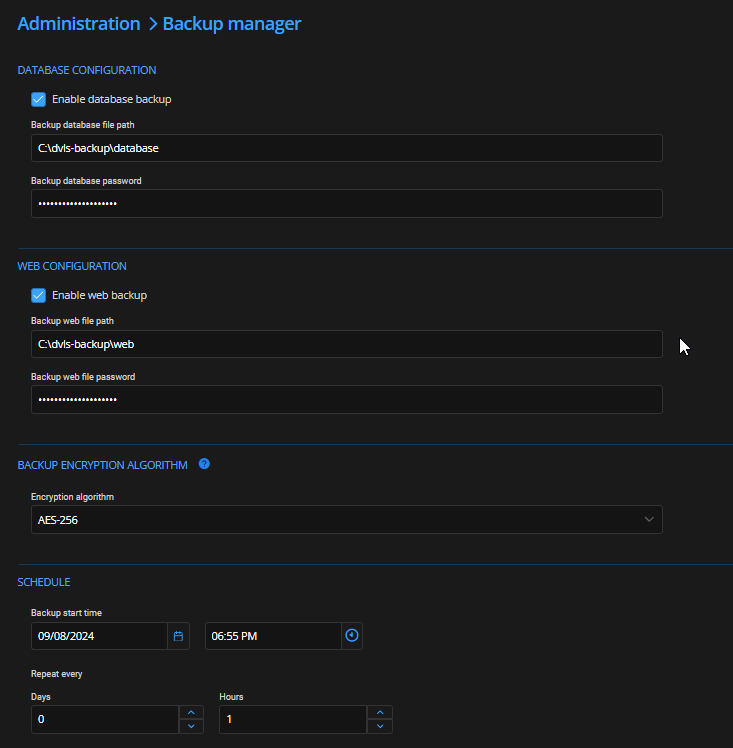
(Note: Repeat every 1 hour is just for testing. When working, it will only be 1 day).
Here is the permissions on the folder:
(Note: Everyone permission is just for testing. Once working, I will lock it down)
The Scheaduler service is running using my user account.
When I set the backup to run, the time comes and passes and nothing comes up in the folder. I set logging debug but looking at the log, there is nothing there about the backup.
Is there a specific log I should be looking at?
file perms.png
options.png
All Comments (2)
Hello ,
Thank you for reaching out. Since the backup command is running on the SQL Server and on the machine where Devolutions Server is hosted, this path must be accessible from both.
The service account set on the Scheduler Service requires the "write" permission on the destination folder to delete exceeding backup files set in Keep number of backups. The backup process is called from Devolutions Server(Scheduler Service or IIS Application Pool Identity), but SQL Server is the actual process dropping the file; therefore the Path should also allow SQL Server service account write permissions.
Database backups are always handled by the SQL Server service account. Initially, a .bak file is created, which is then deleted by the account that initiated the backup (either the application pool identity or the scheduler service account), leaving only the .zip file.
Actually most of Devolutions Server logs are in the Data source logs.
Best regards,
Michel Audi
Turns out it was working fine the entire time, it was just triggering at a weird time :P Thanks for the help!