Adding Multiple PAM accounts in Succession

Server version 2024.6.0
See attached video of behavior and that all three accounts added one-by-one in succession were added in image below, but just an error message.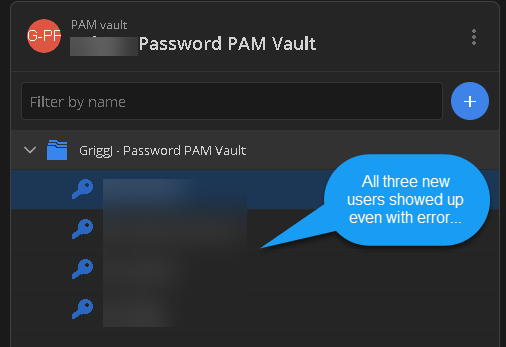
1364d165-96e7-4b41-badd-2a829d412a7b.png
2024-07-10_10-45-05.mp4
All Comments (17)
Hello,
Would it be possible to send us a screenshot of the error you are getting on the accounts that were imported?
Best regards,
It's in the video, but here you go...
784e2771-d819-42df-b085-23a9bb9984bc.png
Hello,
I want to apologize for the delayed response.
I see that you are trying to import the same accounts multiple times. Once the account is imported, it is not possible to reimport it again. In the same or a different PAM vault.
Best regards,
that would be true if I were. I am not trying to import to the same account. this is a sequential process of four accounts. They all import fine, just with this error.
Hello,
Once they are imported, are they working correctly in the PAM module?
Best regards,
Yes, just an erroneous error message
Hello,
Would it be possible to confirm the account type you are importing?
Best regards,
sure, they are not PAM accounts. The are part of our PAM Scan account listing to make them managed PAM acounts
a40830aa-35e5-497a-87f8-5a162f93c52a.png
Hello,
I was referring to the provider type you are using, AD, AAD, SQL or windows accounts?
Best regards,
My apologizes, Active Directory
Hello,
I'm currently talking with our development team to see what might be causing this issue. In the meantime, could you try changing the Provider credential for a Domain admin and see if you are still experiencing the same errors?
Best regards,
The account is working fine. This is more informational that there is an erroneous error that has no tangle affect on importing the accounts...
Hello,
I understand that the account is working fine, I'm just wondering if configuring the provider with a domain admin account which wouldn't have any limitation on the domain would result in the same error when importing an account. If we are not getting the same error, then it could point to a permission issue where we're not able to correctly confirm the user information when importing.
I know this is a stretch, but in the meantime I get an answer from our development team, it would be interesting to test out.
Best regards,
same result...they are added, but erroneous message error
Hello,
I was reviewing the forum to see if I might have missed anything, and I'm seeing that you are using version 2024.2.6.0 of Devolutions Server.
Would it be possible to upgrade to version 2024.2.8.0 and test the import again to see if you are still getting the same error message?
Best regards,
we are on 2024.2.8 and same result
Hello,
Thank you for the information, I'll send them over to our development team. I will keep you posted when I'll have more information.
Best regards,