Do not use LSASS to retrieve credentials during update
0 vote

When updating devolutions server instance and scheduler the updater accesses LSASS.
This is a very well known attack technique used for lateral movement. https://attack.mitre.org/techniques/T1003/001/
It would be better if we did not have to make exceptions to our security to be able to update devolutions, and the updater fetches the credentials from somewhere that is not LSASS. 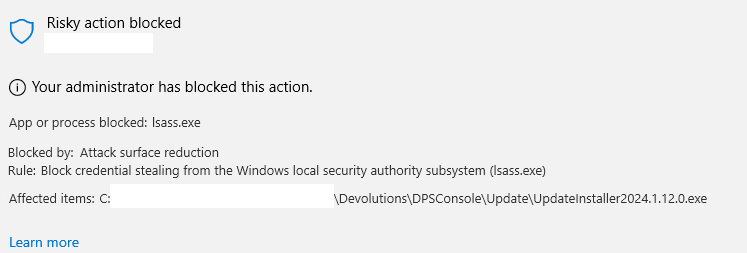
cb196053-fd81-4cfd-ad7a-c1af4ea24e4c.png
All Comments (12)
Hello,
I'm sorry to hear that. You said that you got this when updating Devolutions Server instance and scheduler. Do you mean that when you click here, you get the action blocked message ? 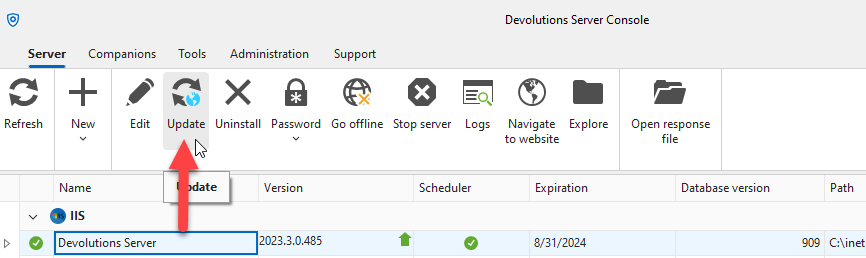
Or you got the issue after and update of Devolutions Server Console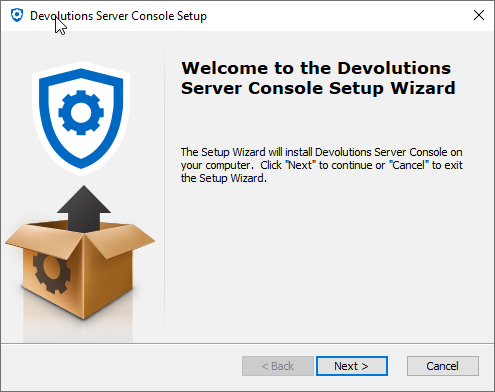
Best regards,
François Dubois
5a0a580d-6205-431a-a71d-eeba17624e50.png
a4557cf7-9ab5-4afa-b3c8-98c669b84b1f.png
I have made an exception so I don't get the error anymore.
Before though I only saw the error when looking through logs.
The updater ran fine but when the service needed to start up again it would fail because it was not allowed to hook into LSASS (with good reason).
To update we had to uninstall the scheduler, then update and then install the scheduler again. Very annoying.
Hello,
Before though I only saw the error when looking through logs.
Which logs are you talking about ?
The updater ran fine but when the service needed to start up again it would fail because it was not allowed to hook into LSASS (with good reason).
The error was happening when the scheduler was starting ? Am I correct ? But the scheduler start was failing. You had to uninstall it, reinstall it and then, it was working. Am I understanding correctly ?
Best regards,
François Dubois
Defender for endpoint logs.
And yes, you are correct.
In the picture I have attached above you can see that the updater is blocked from accessing LSASS:
Only reason to access LSASS would be to fetch the credentials for the service account.
When that is blocked and the scheduler tries to start it can't authenticate, and so the startup fails.
When I install it again I input the credentials and so it does not need to hook into LSASS and that works without issue.
Hello,
I think there is many issue here and maybe they are not related. In your screenshot above, it seems to affect that executable
That executable is downloaded when you want to update the Devolution Server Console. Do you have that installer on your server ? Could you validate if that exe file exist and is running ? I don't expect it to run since you don't update the Console. I would suggest you to delete it and restart the Console. Then there is no reason why you would get the error above because that path will not exist anymore.
And finally, if you scheduler can't be stopped or started, it is probably something else. I'm not sure there is a link between the screenshot above and the install/update/uninstall of the scheduler.
Best regards,
François Dubois
fdf1e404-1c5d-4b19-a42f-499b5e199c0c.png
Hi ,
Thank you for your patience and detailed explanations. I’m happy to inform you that with version 2024.2.9.0, the issue with the updater accessing LSASS has been addressed.
You should no longer encounter this problem. However, if you run into any other issues or need further assistance, please don't hesitate to reach out to us.
Best regards,
Zacharia
Zacharia Ellaham
Hi Zacharia,
I can confirm that the issue have been fixed :)
/Tobias
Hi Zacharia,
I updates just now and the issue is happening again.
When I go in the "Devolutions Server Console" and set my server to be Offline for when I update, my antivirus informs me that the upgrade package (AppData\Roaming\Devolutions\DPSConsole\Update\program files\UpdateInstaller2024.3.3.0.exe) are trying to access lsass.
If I shut the service down with a powershell command (Get-Service DevolutionsSchedulerServiceDVLS | Stop-Service) there is no issue.
No issue when the service starts up again
/Tobias
Hello,
Could you please provide us with the specific versions of your operating system (Windows) and Microsoft Defender? Knowing both the exact OS version and Defender version will help us better understand the issue and assist you more effectively.
Best regards,
Zacharia Ellaham
Windows Server 2022 Standard 21H2. OS build 20348.2700.
Defender version: 1.419.281.0
Here is the event log:
Microsoft Defender Exploit Guard has blocked an operation that is not allowed by your IT administrator.
For more information please contact your IT administrator.
Detection time: 2024-09-30T15:09:57.557Z
Path: C:\Users\admintto\AppData\Roaming\Devolutions\DPSConsole\Update\program files\UpdateInstaller2024.3.3.0.exe
Process Name: C:\Windows\System32\lsass.exe
Target Commandline: "C:\Users\T0admintto\AppData\Roaming\Devolutions\DPSConsole\Update\program files\UpdateInstaller2024.3.3.0.exe"
Parent Commandline:
Involved File:
Inheritance Flags: 0x00000000
Security intelligence Version: 1.419.281.0
Engine Version: 1.1.24080.9
Product Version: 4.18.24080.9
Thanks for the update!
We’re looking into the LSASS access issue during the latest update and will investigate it thoroughly. In the meantime, your PowerShell workaround is a great temporary solution. We’ll keep you posted as we make progress.
Best regards
Zacharia Ellaham
Hi,
I was unable to reproduce the LSASS issue using Defender antivirus version 1.419.757.0. Could you please confirm if the problem persists with the latest versions of both Microsoft Defender and Devolutions Server? Additionally, is your Defender configured with the default settings?
Best regards,
Zacharia Ellaham