Adding the possibility to unlock AD accounts during password reset
2 votes

Hello,
I'm opening this on behalf of user bdemsky in an attempt to reduce back and forth.
If a PAM Account is locked on ADDC due to too many failed logon attempts, it would be nice if "Unlock Account" was flagged when a check-in or password rotation occurs in the PAM module.
It would also be nice to improve the log in DVLS regarding this event so it's clear that this is what occurred as currently the log is generic.
I've attached screenshots of the current behaviour when an account is locked.
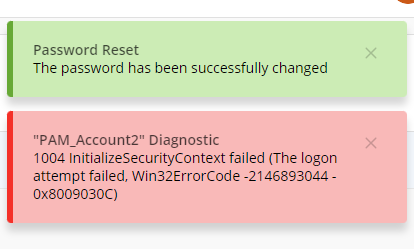
Error in text:
1004 InitializeSecurityContext failed (The logon attempt failed, Win32ErrorCode -2146893044 - 0x8009030C)
bdemsky, I invite you to continue this discussion if required.
Best regards,
Marc-Antoine Dubois
Marc-Antoine Dubois
1.png
2.png
All Comments (14)
Please also note that the notification for a password synch failure would also include the reason for the sync failure. In particular, if the account was locked.
thanks
Hello,
Thank you for your request. I will create a ticket in our backlog to improve the error message when the heartbeat fails. Additionally, I think it makes sense to unlock an account during the password rotation. I will discuss this with our security team to ensure it is not a problem, but it is likely something that can be done. We will post back here once we have an update.
Best regards,
François Dubois
I'll add my 2 cents here, the heartbeat failures when accounts are locked are really annoying, when migrating to prv accounts users tend to close the session without logging off, we are implementing automatic session timeouts but it's not always helpful.
As long as the password rotates unlocking shouldn't be and issue.
I'll even add to it if unlocking could be a seprate feature that uses the PAM abilities that would be awosome, so that I could delegate a team leader to be able to unlock his members instead of having to go through helpdesk and wasting time and resources.
Ben
Hello Ben,
Thank you for your input. Do you think that if we unlock the account during password reset, it would be enough ? With that, it would allow the user to force a password reset and the account would be unlocked. Would it work for you ?
Best regards,
François Dubois
It could be a good start but I don't think it would be the most convinient end product.
If a user has a few already opened sessions and was locked reseting the password would either cause him to lock up again more frequently from these active sessions or the user will have log off all active sessions and stop whatever he was doing.
Also it would require to do a check in and check out again, doubt they would even do that and just call helpdesk.
Thanks,
Ben
Hello Ben,
I understand your point. But I have one more question if you don't mind: Why an account that you just checked out would be locked ? Does the user try to change the password himself ? I just want to be sure that I understand your flow. Thank you in advance.
Best regards,
François Dubois
I'll give a general example of how it works why the locks are happening:
When a user authenticates to an AD joined server the current password is "cached" in a way for that session.
If while that session is active the password is then changed the session still uses the "cached" password.
If anything on that session tries to authenticate with AD it will get access denied, if it retries a few more times the accoutn will get locked.
So if a user already has active sessions to a server or more and changes the password without intiating a relog to these servers there is a higher chance for lockouts.
Before we started to use PAM accounts we were used to disconnecting from sessions and not logging out so we can return to what we were doing on a server.
After my team moved to PAM we had a TON of lockouts (sometimes every mintue) until we got used to logging out from most servers when we were done.
It's going to be the same for the users, we could unlock ourselves, they can't so even if they forget to log off from a single servers there may be random lockouts.
Our organization has been using a PAM solution for over 8 years now and this is an issue that is on-going and is a daily occurrence with many users over and over... All sessions have a auth token that will time-out and request to re-auth to get a new one. It is not uncommon for users to forget to logoff and this is generally when lock-outs start to occur. This is how we combat this:
- Train people on proper logoff process (seems hopeless for some)
- Our PW reset policy will unlock the PW after xx time. This can help elevate if the PW has not changed already.
- We have a website that we created to report on two AD errors 4740 and 4625 which allows us to identify what system the user is still logged into. This is also very helpful for everyday user lockouts also. See a snippet below as to what we report on. We have 305 records, many duplicative based on re-locking, for the last 36 hours.
Offering this as a way to deal with the madness and that it is unfortunately the side effect of good security practices.
Remember, "People will People"
7f55e113-7c57-444c-a546-e52e388a2246.png
Hello,
Thank you for your explanation, I understand your issue now and why it would be helpful to be able to unlock easily. We will discuss internally of what could be done and I will keep you posted when we have an update.
Best regards,
François Dubois
Hello,
I know it's been a while and I just stumbled across this thread.
If anyone is having issues with users not logging off from the session and their accounts are getting locked, we have a feature in RDM to automatically logoff users when they are closing the session:
On an RDP entry:
In the RDM settings (File > Settings > Entry types > Sessions > Remote Desktop (RDP)):
@dtech-uma I think this could be helpful in your case.
Best regards,
80e7ea4a-3b19-4fcb-a776-fed5229526f5.png
2e334f70-7a79-4527-b765-74290ba1bce1.png
Hi.
We're facing the same challenges as described above. We use a jump host architecture to jump further into our solution, and even though the first jump made with RDM could be solved with RDM entry parameters, the secondary sesisons from the jumphost won't be solved by changing RDM entry logoff settings.
Being able to unlock a locked account with PAM (or unlocking being part of checkout if locked or something), would be a great addition to solve the challenges with lingering sessions trying to reauthenticate, resulting in locked accounts.
Hello Tony,
Thank you for reaching out!
Have you considered using Devolutions Gateway for your jump host setup? With Devolutions Gateway, you can apply the logoff configuration I mentioned in my earlier post, while also benefiting from a secure, encrypted connection to your remote hosts.
Additionally, Gateway provides session recording capabilities, allowing you to monitor and audit activity directly through Devolutions Server, which can be especially useful when working with multiple hops or shared privileged accounts.
This approach simplifies session handling and provides better control over user access through centralized policies.
Best regards,
Hi William.
We don't use shared privileged accounts. All our users have their own personal accounts.
And yes. We are leveraging the Devolutions Gateway as well. But we want to limit the first jump to a jump-server, which is performed with the help of Devolutions Gateway. The subsequent jumps, we want to do from the jump server however. I.e. we don't want to be able to access all the servers directly from our workstations, but rather push us to go via a jump-server. The sessions that's being initiated from the Jump-server is therefore not performed via RDM or Devolutions gateway.
We have due to this experienced that some accounts have been locked out after the PAM has reset the password, probably due to sessions or tickets being tried to renew. This would not be an issue if each user itself would be able to unlock it's account via the PAM.
Hello,
Alright, I understand, this might be caused by accounts not being disconnected from the remote server. This then causes the account to try and reauthenticate against the domain with old credentials, and then being locked. To prevent this, you can also utilize the logoff on disconnect from RDM:
With this setting to yes, it will automatically force the use to be logged off before closing the session (it simply does a Win+R > Logoff).
Let me know if this helps.
Best regards,
3a189c26-d2b4-4c49-848f-388e2d6109c0.png