Devolutions Server Setup AuthenticateRequest Error

First time user here. Trying to install Devolutions server and getting this error. I've attempted multiple workarounds. Unable to find any path forward, unfortunately.
I attempted to remove both line 73 and 74 and that got rid of the error, but now I get an "HTTP Error 500.30 - ASP.NET Core app failed to start".
Unable to embed or attach pictures (won't save - sigh).
All Comments (5)
Managed to post a pic finally (your system is being very odd with such).
I attempted to change 73 and 74 from false to true and that didn't work. Removing them gets rid of the error, as noted, but then I get the other error.
Hello,
Normally we don't have to edit or removes lines in the web.config file to get the DVLS web application working.
Let us know if the solution I provided in this post, uninstalling the Basic Authentication from the Web Server roles helps.
Best regards,
Érica Poirier
Hi Erica and appreciate the reply. I have my minimum required server roles set exactly the same and Basic Authentication is not enabled.
Here’s a pic: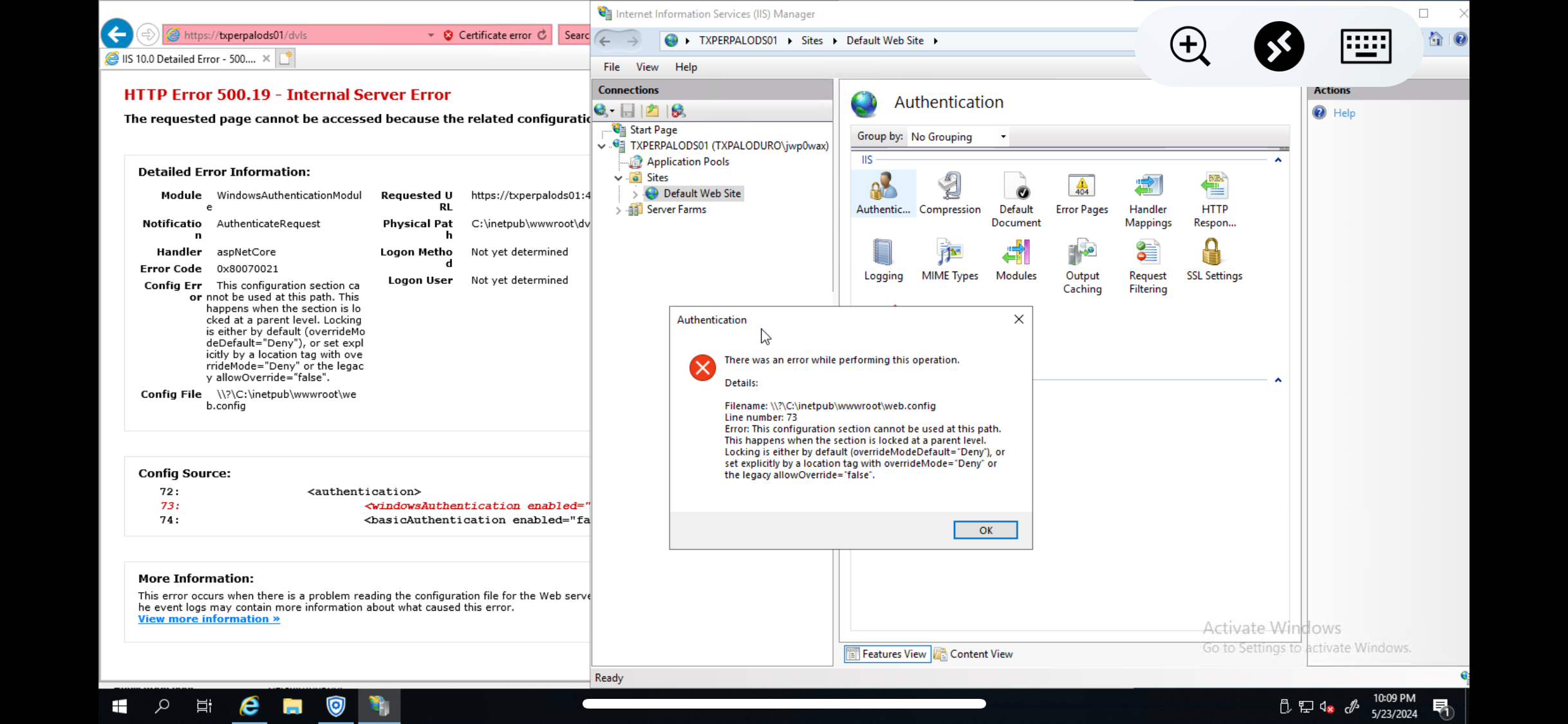
IMG_7112.png
I was able to get Devolutions Server working without error. I honestly am unsure what was the fix, but I did reinstall Windows and update it to latest patch and use SQL Server Express 2019 instead of 2022. I did also manually download and install the prerequisites myself and ensure that I setup "Configure domain single sign-on (SSO)" properly.
Thanks!