user with 2FA - Phone Lost and no recovery keys

Hello,
A user in my org lost their phone with 2FA (Application Push) and did not setup another Factor.
User does not use Peroanl Vault.
I tried deleting user and recreating user in the administrative console, but it's still asking for 2nd Factor (App Push) - which is lost.
I tried re-invite user to follow "Forgot Password" process, but same problem. It's always asking for 2nd Factor.
What am I missing?
All Comments (5)
Also, note this message when trying to add the user again
7e7f4d33-952c-43a2-a36d-99b62baf15d4.png
I feel like email is used also as a personal account (?) - But we are using the link https://COMPANYNAME.devolutions.app to access
Hello,
Unless you are using the SSO feature, which allows you to enforce a specific domain for login, an invitation to a Hub will utilize the email address provided in the invitation. When the invitee connects for the first time, if no existing account is found, a new account is created in our database. This account stores the password and MFA details. You can access this account via the portal at: portal.devolutions.com.
Please note, deleting a user from the Hub does not remove their account from our database. To delete the account, the user must do so through the portal. This is why, when re-inviting, the system continues to request MFA and displays the "Devolutions Account found" message.
If the person in question has lost access to their MFA device and does not have recovery codes or any other set-up MFA methods, the only remaining option is to verify their identity. Once confirmed, someone from our support team can remove the MFA flag from the account, allowing the user to set up a new one.
To do so, they can send an email to service@devolutions.net
Best regards,
Etienne Lord
Hi there,
we have a similar problem.
Our User lost his device, but we dont use the Devolution Hub only RDM with our SQL.
We use the internal MFA.
Du you have any Idea?
Thx
Boris
Hello Boris,
If you are using SQL Server, you can go in the ribbon > administration tab > Users, and from there, if you select your user, there is a button to remove their MFA.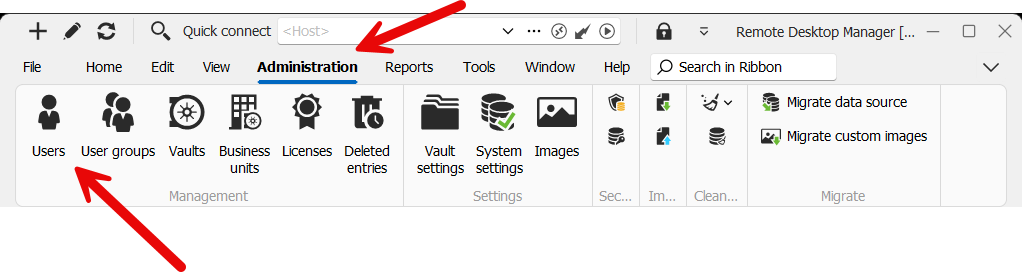
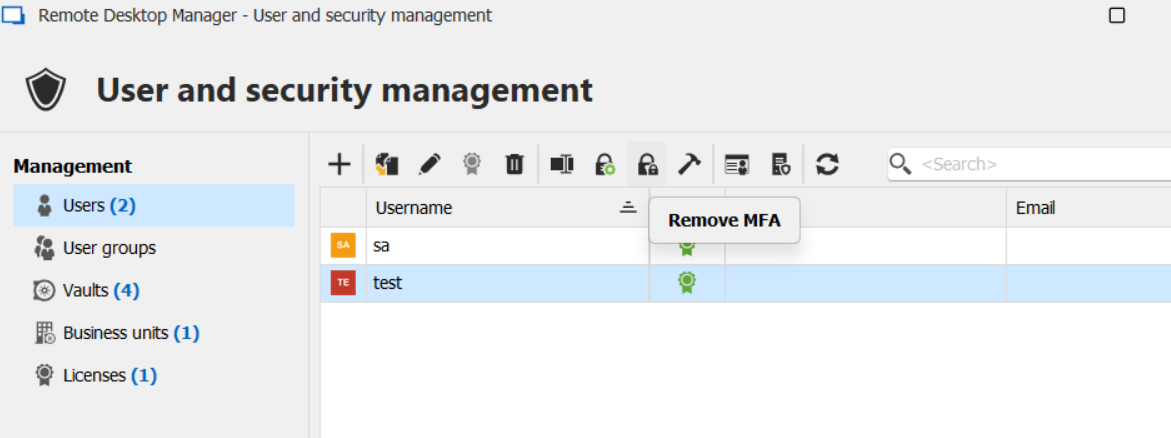
Regards,
Hubert Mireault
cc7a0767-de96-4c2d-a4ac-25ccffd2c272.png
5514e22b-70cb-4a15-b3f3-527bfa1f10bc.png