Devolutions Cloud Chrome browser extension won't log in anymore

I have been using Hub Personal for a few months now - love it - however yesterday it suddenly stopped working due to the Workspace browser extension from Chrome not logging in anymore. After clicking CTRL+SHIFT+Z I am asked to login, which takes me to the 2FA screen for my 6-digit code which I enter. This process succeeds and tells me I can close the page.
Returning to the page where I want to auto-fill a credential, I press CTRL+SHIFT+Z again and the extension window now shows me a circular spinner which never completes. See screenshot below.
I tried removing and re-adding the extension (with latest version 2024.1.7.1) and restarting my machine but that did not help. Manually logging into my Hub Personal account succeeds and I can see all my passwords, but unfortunately doesn't solve the extension problem either.
Any help would be much appreciated.
Screenshot 2024-05-03 13.47.21.png
All Comments (7)
Hello Neal1,
Thank you for contacting us on that matter!
Could you reproduce the issue with the background page's DevTools open to call network and potential errors in the console?
To do this, all you need to do is go to chrome://extensions/ click on Developer in the top right-hand corner and then click on background/background.html on the Devolutions Workspace map, which will open a DevTools window. Once you get the loop, you can go back to DevTools and check the console tabs for errors/logs and the Network tab for red lines. If so, click on them to see more information.
If there's any information please provide us with a screenshot of the information.
Could you also try to clear the cache of your Web Browser and see if the problem differs?
Thank you for letting us know. If you have any other questions, feel free to let us know.
Best regards,
Maxim Robert
Hi Maxim
Thank you for your quick response!
I cleared my cache and browsing history but it unfortunately did not help. However, these errors were captured in the Console window of DevTools ->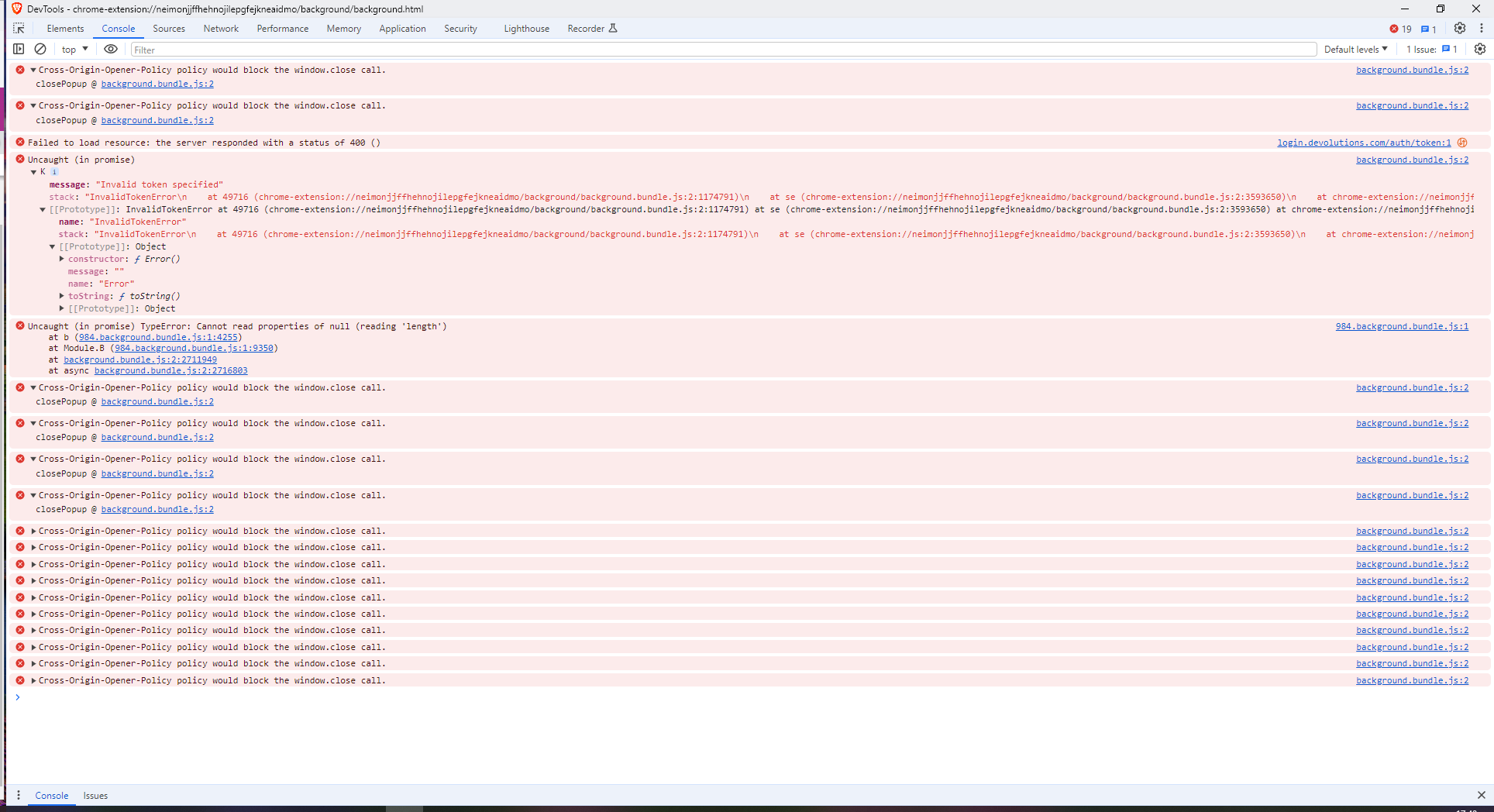
Sorry, I hope you can see the details of the image above? There were no errors reported under Network.
Thanks very much!
Screenshot 2024-05-03 17.40.29.png
Hi,
Thank you for sharing the screenshot. I noticed you are using Brave, which likely means you downloaded the extension from the Chrome Web Store. If you are using other browsers, could you try installing Devolutions Workspace version 2024.1.7.2 on Opera or Firefox to see if the issue persists?
Please use the following links to download the extensions:
- Firefox: Download for Firefox
- Opera: Download for Opera
The extensions for Chrome and Edge are currently under review in the Chrome Web Store and Microsoft Store, respectively.
Best regards,
Olivier Désalliers
Hi Olivier
I installed Opera and the Workspace extension for Opera from your link above, and indeed the program works under Opera. So... I guess that means it must either be a Brave setting or perhaps the Chrome version of the extension that is the problem?
I have been using Hub Personal in Brave successfully for months prior to this hiccup so I can't see that it would necessarily be Brave that is the problem, although being Chrome based it does receive periodic updates and maybe a recent update has broken it.
I see the extension versions for FireFox and Opera are newer than the one for Chrome. Do you suspect that the latest version for Chrome currently under review might fix this issue?
Thanks for your help.
Neal
Hi,
Because the Opera version is working, I believe that when the version becomes available for Chrome, it will also work on Brave.
We will keep you updated when it becomes available for Chrome, which should be very soon.
Best regards,
Olivier Désalliers
Hi Olivier
Today my Chrome browser extension updated to version 2024.1.7.2 and it started working again under Brave/Chrome. :-)
Cheers
Neal
Hello Neal1,
Thank you for your feedback!
We are glad to hear that this is now working. Please let us know if you have any other questions or if the problem reappears.
Best regards,
Maxim Robert