PowerShell "Set-HubEntryPermission" issues

Hi,
I am making a script that will go through an check and update user groups and roles at the folder level inside a vault.
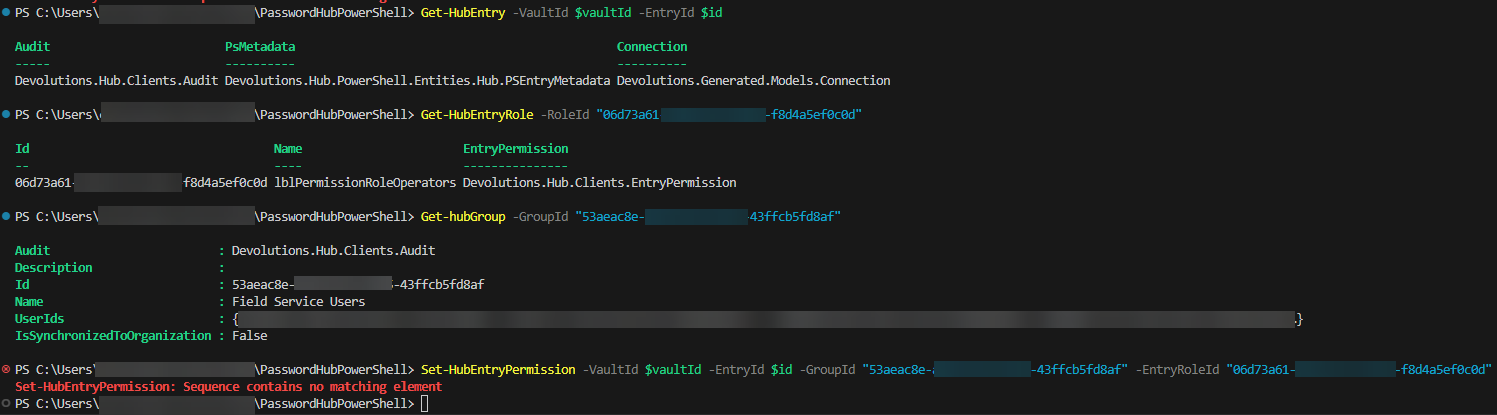
So far its been going well, I have been able to find and check my folders but not update their permissions. Each time I try to execute the Set-HubEntryPermission command I get a error "Set-HubEntryPermission: Sequence contains no matching element"
The below doc shows an example of setting a user group to a role it uses the flag "-PSEntryRole" however this flag appears to be no longer in use as the command errors when I try to use it; vscode also does not show it as a valid parameter.
This is what I have been referencing:
https://docs.devolutions.net/hub/powershell-module/powershell-commands/#set-hubentrypermission
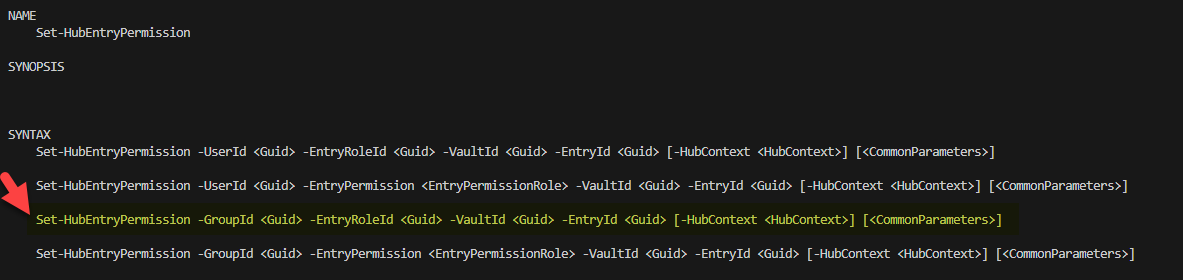
I have been substituting "-PSEntryRole" with "-EntryRoleId" as this is what the powershell help says to use:
Here is my output, as you can see the vauldId, entryId, groupId and roleId Ids are all valid as they are used successfully in the three commands before I use them all in Set-HubEntryPermission:
I am invested in this and I would really like to find out what I am doing wrong.
Thanks in advance for any help I can get.
4aa8b373-f8f1-4980-864b-b5456776bb5e.png
67b496ca-6a37-4984-9f81-e8027f2829d9.png
All Comments (2)
Hello,
The Set-HubEntryPermission is meant to be used when updating user or group permission on the entry. The permission must exist already prior to updating.
Have you tried to use New-HubEntryPermission instead? It should be the same parameters.
Have a good day!
Maxime Morin
That's exactly what I needed.
New seems a bit odd initially; however, now that I have seen what it does and how it differs from 'set' in practice it makes more senses.
Thank you. :)