Attachments-Preview

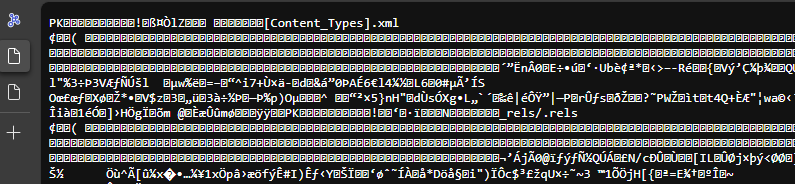
Is there a way to correctly display an attached document (e.g. Word) in the preview?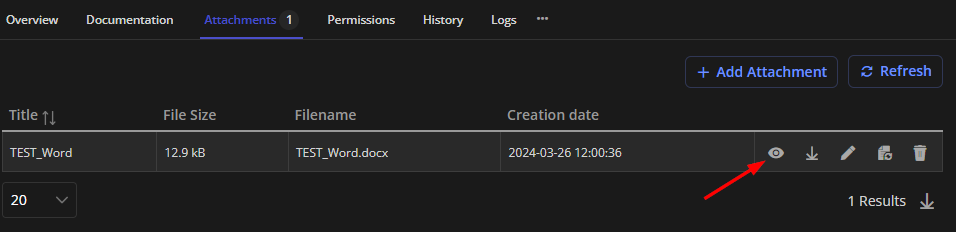
f8714ca1-9ee5-439f-96b7-3159b3885508.png
cb432cc9-c1c3-4275-aa53-1a337830f06a.png
All Comments (4)
Hello,
It depends on the type of document, if you try an image, the browser should be able to render it. In some cases, when the browser detects that it can't handle it, it will prompt to download the file. Here, I'm guessing the browser thinks it's a text file and wants to render it.
I've created an issue to take a look and see if we can improve the detection mechanism so that it doesn't display non-text files. We will let you know as soon as we find or fix something.
Have a good day!
Maxime Morin
Hello there,
I would be interested to see if there has been any evolution on this question ?
I would like to preview Excel and Word files also and I'm getting the same type of result as the person who started this thread.
Best regards,
Hello,
The investigation and hopefully a fix is in our todo list for 2024.2, which is planned for mid-June.
Have a good day!
Maxime Morin
Hello,
Please when will this issue of viewing attachments without download be fully resolved?
Attachments with pdf, txt and images (.png) works.
However, attachments with .doc, .docx, .xls, .xlsx, .ppt, .pptx, .vsd etc do not work. When you click on the view button, attachments with these extensions get downloaded to the download folder.