Security problem on Devolutions Cloud
0 vote

Hello,
I tested your password management solution to replace Bitwarden but to my huge surprise the main password is not required by the “Devolutions
Workspace” extension each time the browser is opened, or the computer is started.
All passwords are available without password after the first entry.
I am very surprised that the default configuration doesn’t ask for the password every time the computer is started, or the browser is opened.
The support team told me this option is available on HUB Business.
Ok why not! Your solutions are very useful, but I can’t buy only one, I must buy 3 licenses!
Is it a strategy that you don’t want too many personal users? 😊
All Comments (14)
Hello,
There's a setting that allows you to control that behaviour; even with Hub Personal. It's in our portal, you can then click on Hub Personal, then the "more" menu (...) and settings.
https://portal.devolutions.com/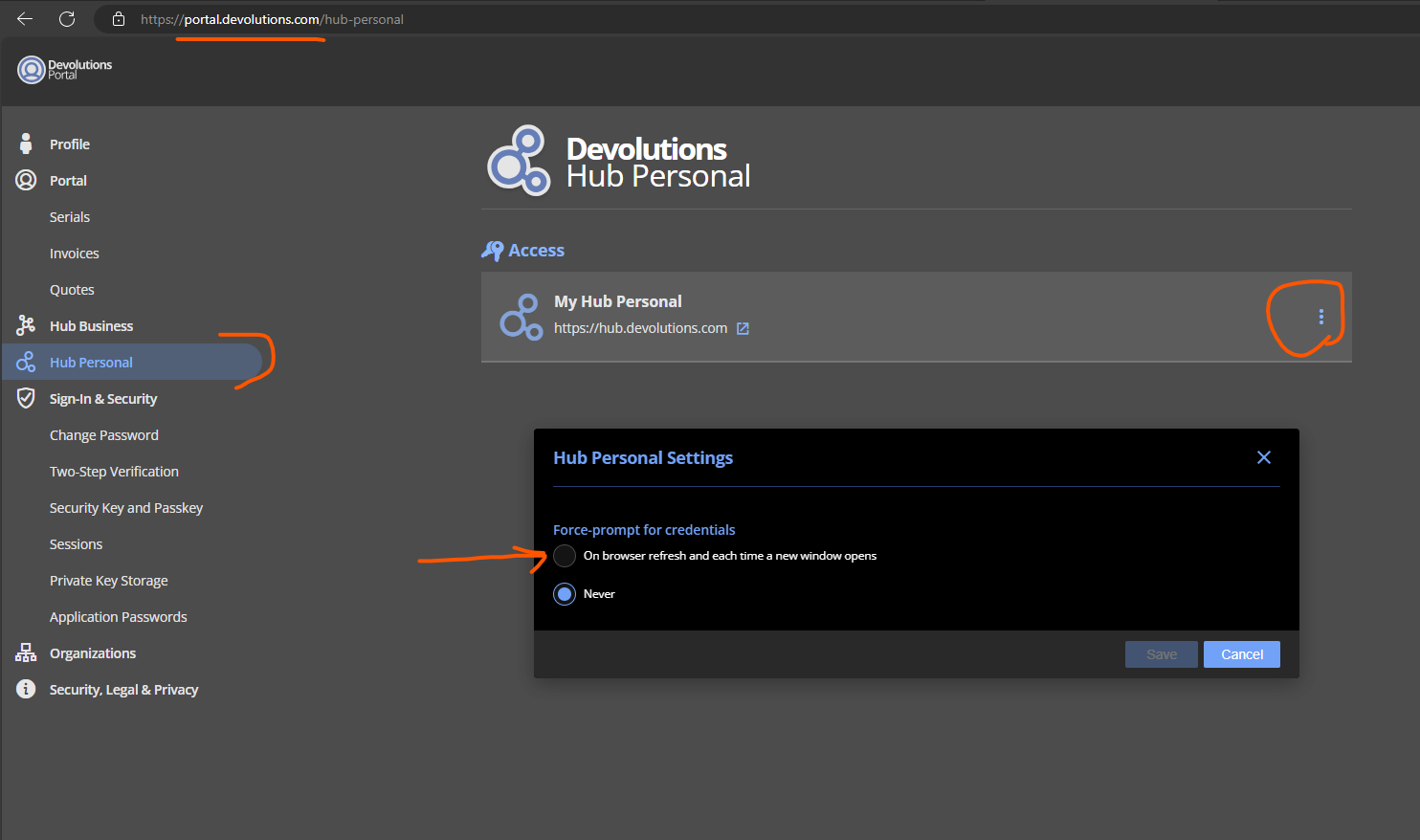
Let us know if it doesn't work as expected. Meanwhile, I will do a gentle reminder to our support team.
Have a good day!
Maxime Morin
ca0d8a8a-6a5d-4c52-9a1a-174cc1e94609.png
Hello,
The difference with Hub Business is that we can push some security policies to all the organization.
Regards
David Hervieux
Thanks for your replies,
Yes, the support gave me this option and it works for web access to Hub Personal Devolutions but no modification on the Edge Devolutions
Workspace extension.
The access is authorized without password prompt, all accounts and passwords are available.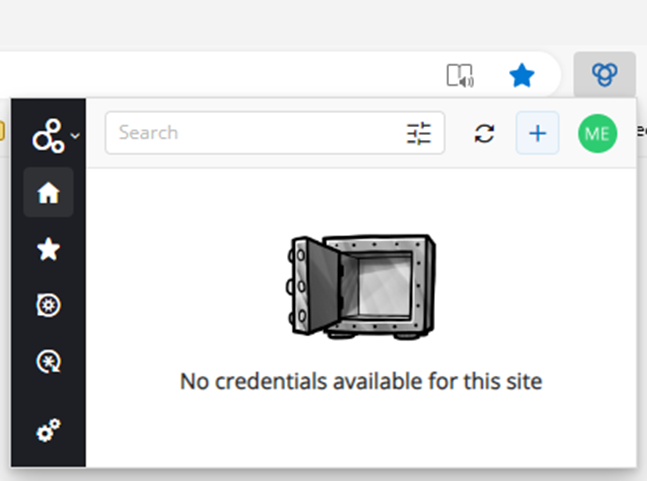
BR,
Marc
868523f9-cb82-4084-beb5-6244546c2ab6.png
Hi Marc,
According to the lead developer, it's supposed to prompt even in the browser extension. We will investigate this and get back to you as soon as possible.
Have a good day!
Maxime Morin
Hello,
Our development team has just informed us that the problem you raised has now been resolved.
Please let us know if it persists on your side.
Best regards,
James Lafleur
Thanks but not totally.
When I am opening my browser Edge I am not logged in: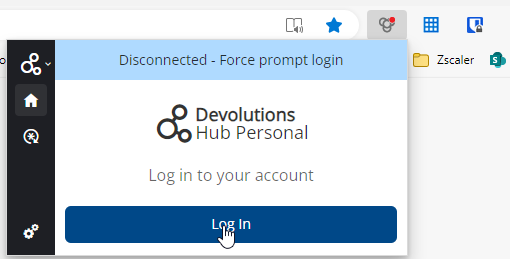
But no need password to retrieve the access, just click on "Log In".
I need to make an update somewhere, my version of the extension is Version: 2024.1.1.1
Best regards,
Marc
f3220f6b-f12b-4afa-b631-5360595849f1.png
download.png
Hello Marc,
Thank you for your swift reply!
Would it be possible for you to clear your browser cache and see if this issue still occurs afterward?
Best regards,
James Lafleur
Hello,
This password should be not in the cache, or only for the cache session.
Currently, if I close my browser, my children take the computer, open the browser and without password they have access to all passwords.
It is bad.
It must no need to clean the cache to be safe.
I did a support session with your team today to show the problem.
I hope that will help
The workaround suggested is add the MFA, agree but really a workaround.
Thanks for all.
Best Regards
Marc
Hi Marc,
It should be resolved in Devolutions Workspace browser extension 2024.1.2.3. that is now available.
Best regards,
Olivier Désalliers
Hello,
Thanks for the update.
Yes, the version 2024.1.2.3 asks me the password when I open the browser, It is good.
But if I close the browser and re-open, the password is not asked.
I think it is more secure if it was asked.
In a business usage, it should be fine : one login/session = one user.
But in a personal usage, the computer is shared with family, the session of a user could be shared and it is better to ask the password each opening of Edge.
Or perhaps to give us to enable it with an option.
Best regards.
Marc
I wanted to jump in as I’m facing the same issue.
When I store passwords in a vault, I expect everything to lock as soon as I step away from my computer. Even though I’ve set this option at the hub, if I lock my computer, leave, and then remote in via RDP, all passwords remain accessible.
Wouldn’t it be possible to auto-logout once the computer is locked? My mobile is already linked to my PC, and it locks the computer automatically when I leave my desk. RDM does this already, requiring a PIN (or full password over RDP, since biometrics wouldn’t work).
The same security should apply to the browser extension, as it feels insecure without this. I’m still testing the personal hub—does the paid version handle this differently?
Coming from KeepassXC, they managed this in another manner: the app requires authentication on open, locks when the computer is locked or after a timeout, and the browser extension only works when the app is unlocked.
Is there a way to couple this behavior with the Hub or RDM or have the lock when signing off?
Lastly, can I set the browser extension to prioritize biometric login? I’d like it to default to biometrics for quicker logins.
Hello Neuner,
Thank you for contacting us on that matter!
Regarding the lock of the Workspace plugin, it is possible with Hub Business and RDM connected to the plugin.
For Hub Business, go under Administration > Authentication and set an Inactivity Logout Time. This will lock Hub Business and the Workspace Plugin after the time set. 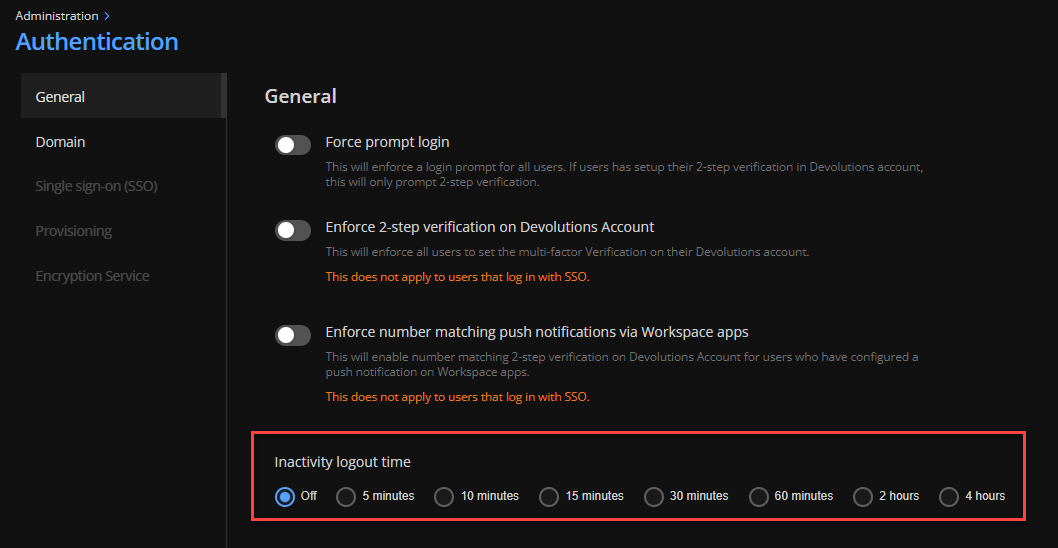
For RDM, if you go under File> Settings > Security > Set an Application Security, you can set the Lock Application to "On Idle" or Windows Lock. This way, when RDM is locked, the Workspace plugin will also be locked.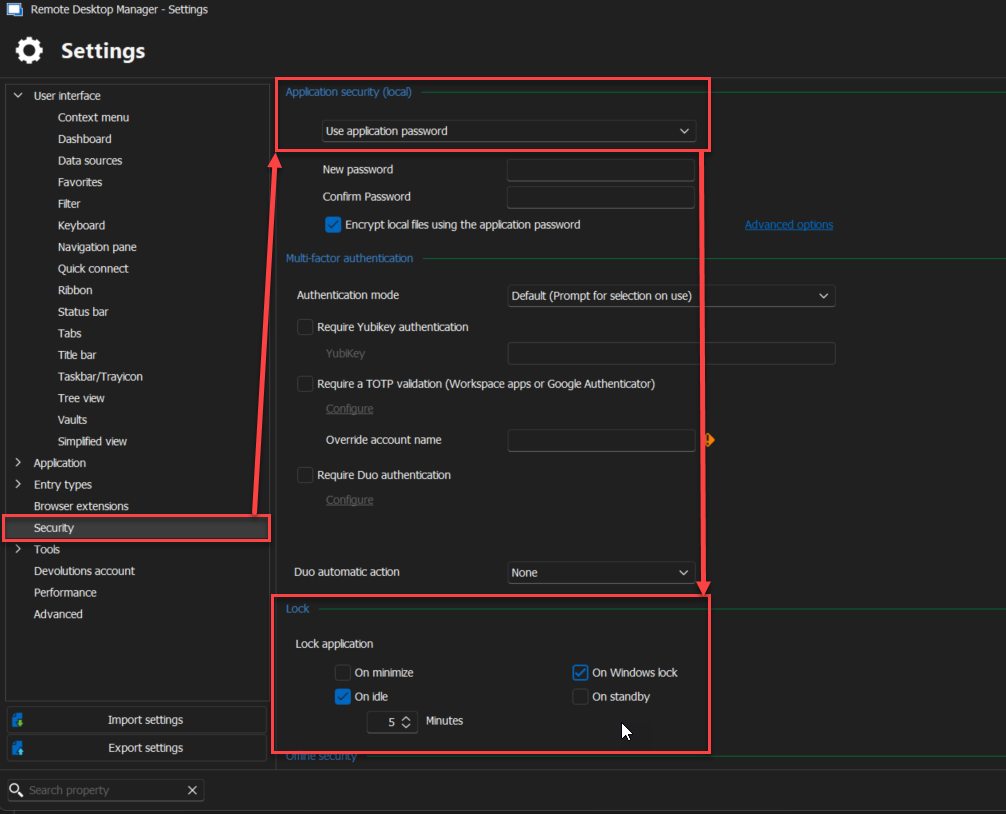
Regarding the possibility of accessing the Plugin and the entries when connecting remotely, would you like the plugin to remain locked because the main machine is locked even when connecting remotely?
I will investigate whether using a biometric login with the Browser extension is possible and let you know as soon as possible.
If you have any other questions, feel free to let us know.
Best regards,
Maxim Robert
2024-10-17_16-28-27.png
2024-10-17_16-26-25.png
I think we misunderstood each other.
I know that RDM has this option, but it wouldn't lock the Browser Extension aswell. It would be great if that would happen, or the Extension has the same functionality. A Lock of the PC is always a good point where everything with passwords should be locked.
About RDP:
I just wanted to mention, that even I was away from the computer, it was locked, hours later I RDP into my Workstation, and without login all my passwords where available. That wouldn't happen if it would lock the passwords out with PC Lock.
I should be able to see my passwords, but only when reentering credentials.
Windows PIN works like this: In front of the computer, PIN is enough, Remote (not local) it won't accept PIN or Fingerprint, whatever you use, but Computer Password. This way, if lets say anything gets installed on the workstation, which would be bad enough, they couldn't at least gatter any passwords by not knowing the login password.
Hope that clarifies it.
Thanks Patrick
Hello Neuner,
Thank you for your response!
After providing the information you've sent to the development team, a ticket has been opened to add the Auto-Lock feature for the Workspace Plugin.
We will let you know with more details as soon as possible. If you have any other questions, feel free to let us know.
Best regards,
Maxim Robert