Fix two-step verification for Yubikey
3 votes

Could you fix your two-step verification process for Devolutions Hub please?
If you set a Yubikey, we should be able to:
- Not being forced to register a recovery email
- Considering two step verification process complete
- Allowing us to connect to Devolutions Hub with Yubikey + PIN and nothing more
- Being able to login in RDM with the Yubikey (WebAuthn and not Yubico OTP)
Let me give you more context / troubleshooting:
We're using Devolutions account instead of Microsoft for our administrators since we can't link a licence between two account like with the on premise version of DVLS...
Obviously we would like to enforce MFA configuration on these accounts so I tried to implement this today.
I went on portal.devolutions.com and configured multiple Yubikey on my account and check the "Use for passwordless login" option.
In the "Two-Step Verification" menu I was forced to create a recovery mail to allow Yubikey being used as a 2FA. That's already odd since we already have recovery code...
But I still have a message stating two step verification is partially configured. (See the screenshots)
I tried to re-login on portal.devolutions.com, everything worked fine: prompting for Yubikey and asking pin. Great.
I did the same for ourcompany.devolutions.app and it prompted Yubikey, then asking for the pin, then asking me a code sent by mail as a 2FA check.
Once I entered the code received by mail it show an error message "You signed in using a recovery 2nd factor method, we reccomend that you configure a strong 2nd factor in your account to fix this issue". Available options are Push via Devolutions Workspace or TOTP. Neither of them are better than Yubikey regarding security.
I retried but canceled the Yubikey prompt and clicked on another way of to sign in and choose password. I had to enter my password, it prompted for the Yubikey then asked for the pin. Without asking me to configure another 2FA method.
This cause multiple issues:
- I can't enforce MFA for Devolutions account in the Hub Console, or we will all be forced to configure TOTP / Devolutions Workspace push.
- Obviously, not enforcing MFA isn't acceptable too
- We're forced to configure weaker factor than Yubikey, so it's decreasing the whole security level
So from my interpretation, you didn't impleted security keys how it should work.
Just to remember some basic concepts:
- Secure authentication: something you know, something you own. Yubikey is the physical device you own (instead of your phone), the PIN is the something you know.
- The strongest protocol MFA is webauthn and resident credential, TOTP is strong but still vulnerable, mail isn't really good, SMS/Phone is the worst and should be avoided
Some company also use Yubikey with the account password and the touch confirmation on the device (without pin).
In both scenario, you should keep recovery codes in case of device loss.
I will be more than happy to show you in live if we schedule a call.
Best regards
Second factor.png
Partially configured.png
All Comments (9)
Hi Arnaud S.
I understand your confusion and I hope my answer will address these concerns.
Firstly I would like to specify that the "Use for passwordless login" checkbox is meant to make your security key replace your password but still be paired with an other MFA method (some users rather this functionality as they can increase account security by having 1 key as a first factor and an other as a second factor). If you want your security key to be used as a second factor, do not enable passwordless login and it will act as a regular MFA with the password.
I agree with requiring an additional MFA to be setup being less ideal and that the recovery codes should be enough. We will look into enforcing recovery 2FA and if it is still pertinent as the platform may have evolved beyond the need for it.
If you wish to enforce security keys as a FIRST factor for your whole hub, we think this might be interesting as a separate option to the Enforce 2FA option as one option enforces a SECOND factor where as the other changes your FIRST factor. If you wish to enforce the specific type of SECOND factor (security key vs Push Notification), this could also be an interesting option for administrators that we could implement in our roadmap. Let us know which one would suit your needs better.
If my reply is missing any information, I'm open to scheduling a call with you and a member of our support staff to further address your concerns. However, the value of having this conversation in our forums is still interesting as other users with your concerns could read these responses.
Thank you for reaching out.
Luc Fauvel
Hi Luc,
Firstly I would like to specify that the "Use for passwordless login" checkbox is meant to make your security key replace your password but still be paired with an other MFA method (some users rather this functionality as they can increase account security by having 1 key as a first factor and an other as a second factor). If you want your security key to be used as a second factor, do not enable passwordless login and it will act as a regular MFA with the password.
It's interesting but work only if you disable the passwordless login for all the keys you registered.
For Devolutions hub it's effectively working with password + key without pin.
But for Devolutions portal I need to put password + key + pin.
In this scenario the portal should not ask for the pin.
If you wish to enforce security keys as a FIRST factor for your whole hub, we think this might be interesting as a separate option to the Enforce 2FA option as one option enforces a SECOND factor where as the other changes your FIRST factor. If you wish to enforce the specific type of SECOND factor (security key vs Push Notification), this could also be an interesting option for administrators that we could implement in our roadmap. Let us know which one would suit your needs better.
Well, I don't think using a second factor other than a pin is a good thing for a security key. For example:
- Yubikey + TOTP = something you own (Yubikey) + something you own (Your phone with TOTP).
- Yubikey + Passkey = it's the same
- Yubikey + PIN + TOTP = something you own + something you know + something you own again... It's looking more annoying than useful for me
I think the best way is to offer the choices to the customers:
- Password required + second factor of their choice but
- no PIN request if Yubikey
- Administrators should be allowed to select which second factors are available for users (Like on a Microsoft tenant)
- Password less: Yubikey + pin
- But RDM need to be compatible
In both scenarios:
- No more recovery mail to configure
- We should be able to enforce MFA, password less + pin should be considered as MFA too and not triggering the security score.
I think this would be best choice since everyone could use a way to secure their accounts with the security level they want to have.
However, the value of having this conversation in our forums is still interesting as other users with your concerns could read these responses.
Yes, that's intentional since there is a lot of sysadmin reading this forum.
Thanks for your feedback
Hi Arnaud,
After internal discussions, we largely came to similar conclusions as what you described in your response.
Before summarizing our conclusions, I'd like clarify how we handle PINs with Security Keys. We sadly do not have 100% control of when the PIN is required with WebAuthn as it is managed by the browser itself. Different browsers behave differently and in order to have a key as a first factor we require the key to support a WebAuthn flag named User Verification (UV for short).
Now when we do not require UV, the browser handles what happens next and most of the time it will not prompt for the PIN, other times it will. So we can't really rely 100% on the PIN to be a second factor on itself, but we can discourage it for scenarios where the Security Key is the second factor.
We will be creating tickets for the following and putting them on our roadmap:
- Remove the need for recovery 2FA with Security keys and Enforce 2FA option.
- Allow administrators to select specific 2FA type enforcement with the Enforce 2FA option.
- Only require UV for Security Key sign in if the key is being used as a first factor (even if it supports it).
- Allow administrators to specify if passwordless sign-in is allowed to bypass the enforce 2FA option.
Lastly, I would like to specify that no additional configurations are required within RDM with Devolutions Hub as RDM will prompt the default browser to authenticate you and use the same flow as the web version.
Hopefully these changes will address all of your concerns.
Thank you again for your detailed response.
* This message was written by a human and no artificial intelligence was used to generate or alter this response.
Luc Fauvel
Hi Luc and sorry for the long time between my answers.
I'm surprised that you can't really choose if PIN prompt or not but I trust you. I'm not developper so I can't verify it myself.
Thanks you for the changes and your quick response time.
Would you mind update this topic when these changes will be implemented and have you any idea about the timeline?
Best regards
Hi Arnaud,
For this issue: "Only require UV for Security Key sign in if the key is being used as a first factor (even if it supports it).", we expect to have it available soon within 2024.1. For the remaining issues we don't expect them to be available before 2024.2.
I will update this thread as we release the changes accordingly.
Best regards,
Luc Fauvel
Hi,
I don't see any updates on this request and two years passed...
I saw you allowed Yubikey as a second factor, but not in the right way... Using Yubikey OTP is useless and less secure than regular TOTP.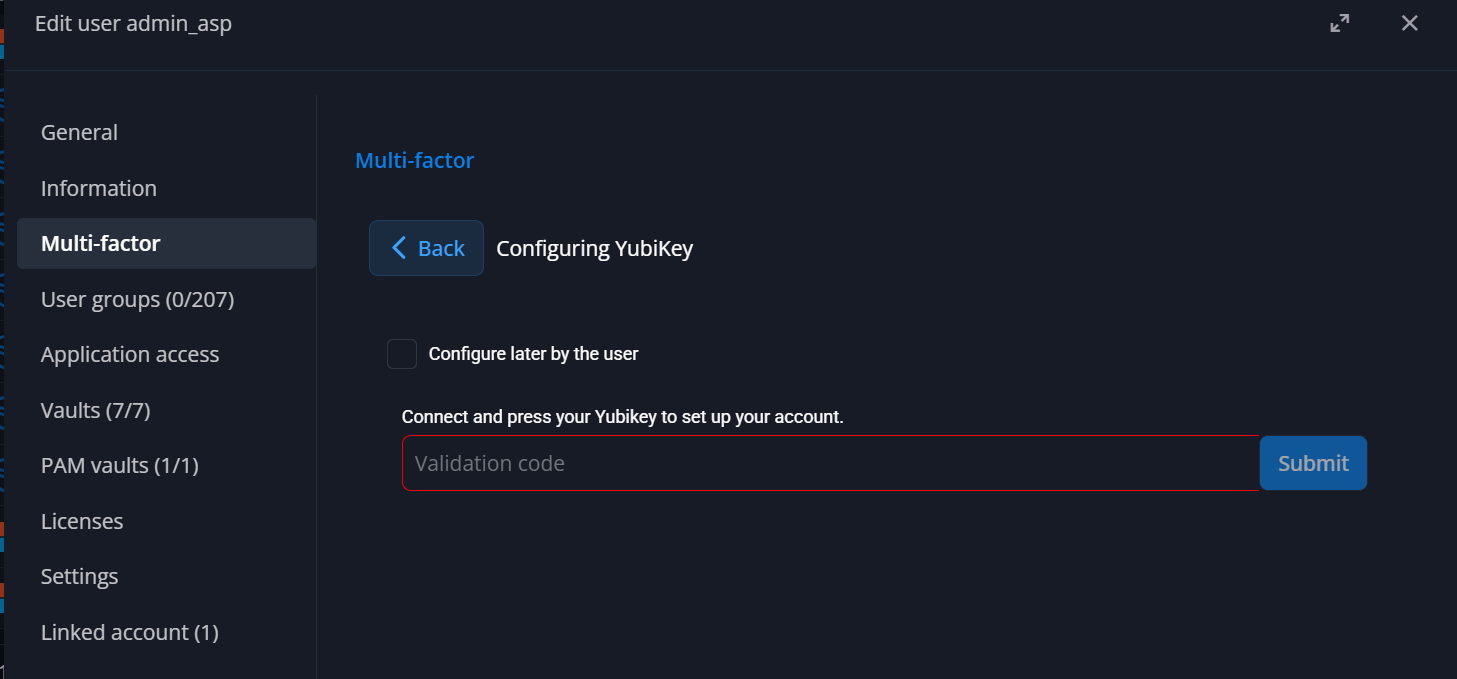
Could you please implement it as I asked in the original request please?:
- Password (1st factor) + Yubikey with FIDO2 (2st factor)
Or the best solution:
- Yubikey as 1st and 2st factor using resident credential, no password needed anymore. This is the best way to secure correctly local admin accounts.
This would be really, really appreciated.
Best regards
412ad24c-aa1e-4a62-8917-a4d1c4902c3b.png
Hi @Arnaud S.,
in DVLS 2026.1, we’ve added the possibility to create passkeys (2nd factor only for now). Which creates a FIDO2 credential.
It is in our plans to allow full passwordless sign-in using passkeys but I cannot provide an ETA for now.
Cheers,
Luc Fauvel
Hi Luc,
It doesn’t seem to be working. I’m able to register the passkey using the YubiKey, as shown in the first screenshot below. However, right after clicking the update button, when I edit the user again, I get the message: “Failed to save 2FA changes: Invalid password entered,” as shown in the second screenshot.
Needless to say, I double-checked the password.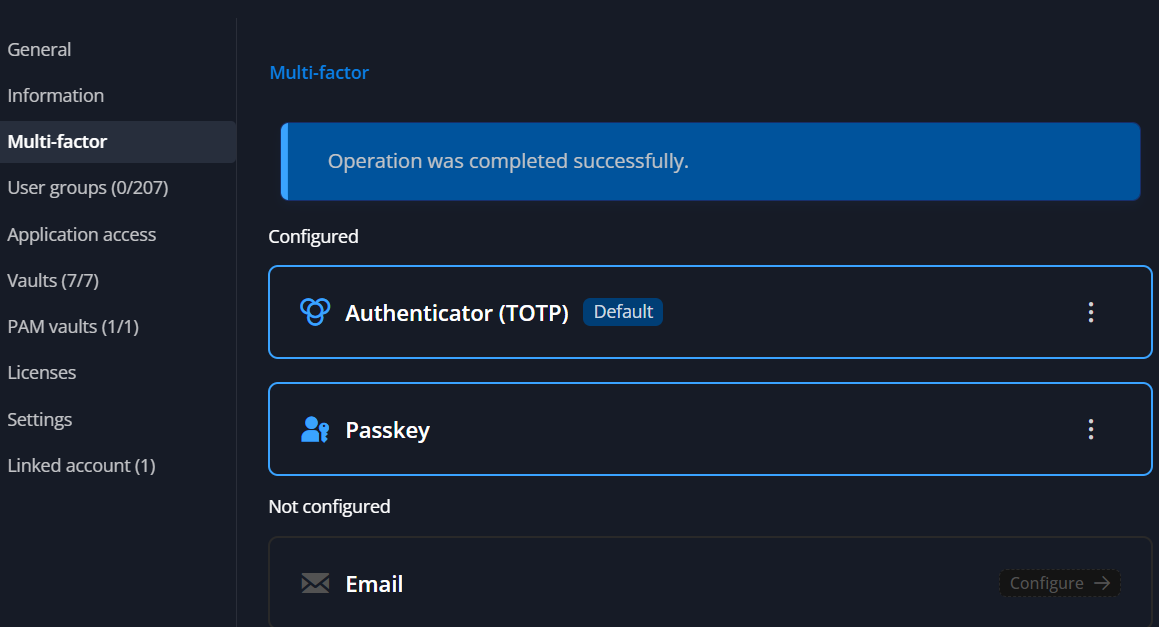

daa830c3-b49c-4dd8-b20c-4b021426a0f8.png
77de2513-635a-4271-9a1f-e24642be7e3d.png
Hi @Arnaud S.,
Thank you for reporting this issue, we'll attempt to reproduce internally and fix it.
Cheers,
Luc Fauvel