2024.1.7.0 64-bit (Beta) - RDM hangs when closing UltraVNC clients
2024.1.7.0 64-bit (Beta) - RDM hangs when closing UltraVNC clients

The vast majority of my clients in RDM are UltraVNC, but I also use RDP, SSH, and URL. All other clients I can open/close with no issue. With UltraVNC clients, when I attempt to close it appears the session ends, but RDM locks up on a grey screen and I have to force close every time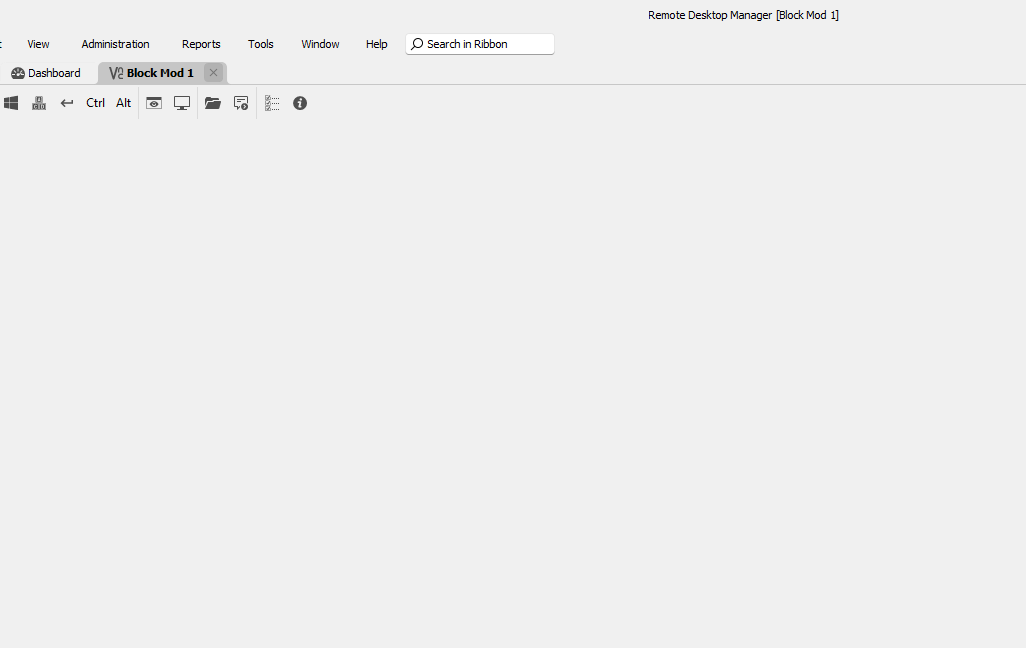
c08c9f87-44dd-477e-94da-17c8f0622424.png
All Comments (20)
Hello
Thank you for the feedback. Which VNC application do you have configured in the connection settings? Is it FreeVNC, or UltraVNC?
Please let me know if something isn't clear
Thanks and kind regards,
Richard Markievicz
UltraVNC is configured
I did try using FreeVNC, and it does work for the few unencrypted connections I have, however my company uses an encryption key for the majority and FreeVNC does not connect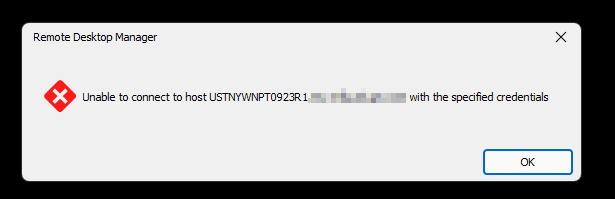
70ece1c6-9250-4728-9d5b-4b4ac682098d.png
Hello again
Thanks for confirmation and bringing this to our attention.
I'm going to take a look at this, however my concern is that the UltraVNC integration is quite unwieldy to maintain. I suspect this relates to RDM 2024.x updating to a new .NET version and it has different handling and capabilities for ActiveX controls.
In the meantime, could you try switching to FreeVNC (or maybe you've done that in the past, but an issue or feature gap prevented you from using it). A medium term goal of mine is to deprecate the UltraVNC integration and support only FreeVNC, but that would obviously be a problem if a bug or missing feature prevents you from using it. However, it could be easier on my side to close whatever bugs or feature gaps exist on that side.
Please let me know if something isn't clear or you have further questions
Thanks and kind regards,
Richard Markievicz
Thank you, if depreciation is the case, can I roll back to 2023 version with no issues?
Hello again
I did try using FreeVNC, and it does work for the few unencrypted connections I have, however my company uses an encryption key for the majority and FreeVNC does not connect
Ok, thanks for that information. Are you using the DSM encryption plugin? If so, which one? Or is it some other kind of encryption?
Thanks and kind regards,
Richard Markievicz
Hello again
Thank you, if depreciation is the case, can I roll back to 2023 version with no issues?
Deprecation isn't happening in 2024.1 so I will take a look at this issue and post back here once I have some more information. If you can let me know the details of the crypto you're using in the meantime, that would be great.
Kind regards,
Richard Markievicz
OK thank you for looking into this then!
I believe we are using SecureVNCPlugin64.dsm
Hello again
The good news is that I believe I found and fixed the issue with the embedded UltraVNC client. All being well, that fix should arrive in the next 2024.1 (beta) release and I encourage you to reevaluate that after updating and post back with any feedback.
I'm confused why the DSM encryption would work for you with the UltraVNC integration but not FreeVNC (on my side, they seem to be basically equivalent).
Do you have the client key(s) copied to the same directory that RDM is running from?
Thanks and kind regards,
Richard Markievicz
Hi Richard,
Thank you, I can't wait to try it out. We do use a pkey, and that was copied into the install directory along with the DSM plugin files
Hello
I'm really curious why DSM is not working for you with FreeVNC. If you ever have the chance, I'd appreciate some extra diagnostics.
- Go to Settings > Types > Sessions > Apple Remote Desktop
- Under "Advanced", check "Enable logging for ARD and VNC" and provide a path to create a log file (e.g. c:\users\username\desktop\vnc.log)
- Save the changes, then restart RDM
- Switch your connection to the "FreeVNC" application and try to connect
- You should observe a log file created in the given path, which you could send to me by PM
Afterwards, uncheck "Enable logging for ARD and VNC" again as it has a non-zero performance penalty.
Please, let me know if something isn't clear or you have further questions
Thanks and kind regards,
Richard Markievicz
Absolutely!
I enabled logging, attempted connection, rejected. Here's the log details:
[15:16:06:411] [45844:000035fc] [DEBUG][freevnc.mvs] - [freevnc_mvs_configure_simd]: enabling SSE2 optimization
[15:16:06:498] [45844:0000ae74] [DEBUG][freevnc] - [freevnc_trace_server_protocol_version]: << ServerProtocolVersion: RFB 003.008
[15:16:06:498] [45844:0000ae74] [DEBUG][freevnc] - [freevnc_trace_client_protocol_version]: >> ClientProtocolVersion: RFB 003.008
[15:16:06:499] [45844:0000ae74] [DEBUG][freevnc.auth] - [freevnc_recv_security_types]: numberOfSecurityTypes: 3
[15:16:06:499] [45844:0000ae74] [DEBUG][freevnc.auth] - [freevnc_recv_security_types]: [0] Ultra (17)
[15:16:06:499] [45844:0000ae74] [DEBUG][freevnc.auth] - [freevnc_recv_security_types]: [1] DsmPlugin (115)
[15:16:06:499] [45844:0000ae74] [DEBUG][freevnc.auth] - [freevnc_recv_security_types]: [2] DsmPluginOld (114)
[15:16:06:499] [45844:0000ae74] [INFO][freevnc.auth] - [freevnc_client_authenticate]: Selected security type 17 (Ultra)
[15:16:06:550] [45844:0000ae74] [DEBUG][freevnc.auth] - [freevnc_client_authenticate_ultra]: << AuthStatus: -1
[15:16:06:550] [45844:0000ae74] [DEBUG][freevnc.auth] - [freevnc_recv_security_types]: numberOfSecurityTypes: 2
[15:16:06:550] [45844:0000ae74] [DEBUG][freevnc.auth] - [freevnc_recv_security_types]: [0] DsmPlugin (115)
[15:16:06:550] [45844:0000ae74] [DEBUG][freevnc.auth] - [freevnc_recv_security_types]: [1] DsmPluginOld (114)
[15:16:06:550] [45844:0000ae74] [INFO][freevnc.auth] - [freevnc_client_authenticate]: Selected security type 115 (DsmPlugin)
[15:16:06:550] [45844:0000ae74] [WARN][freevnc.auth] - [freevnc_client_authenticate_dsm_plugin]: dsm plugin auth requires a dsm plugin to be loaded
I also tried reconnecting with UltraVNC, but nothing else was added to this, maybe because of RDM hanging
--Kris
Hi Kris
Thanks for that. I think I understand: for FreeVNC we need you to explicitly select the DSM module in RDM.
Is is possible you don't have that?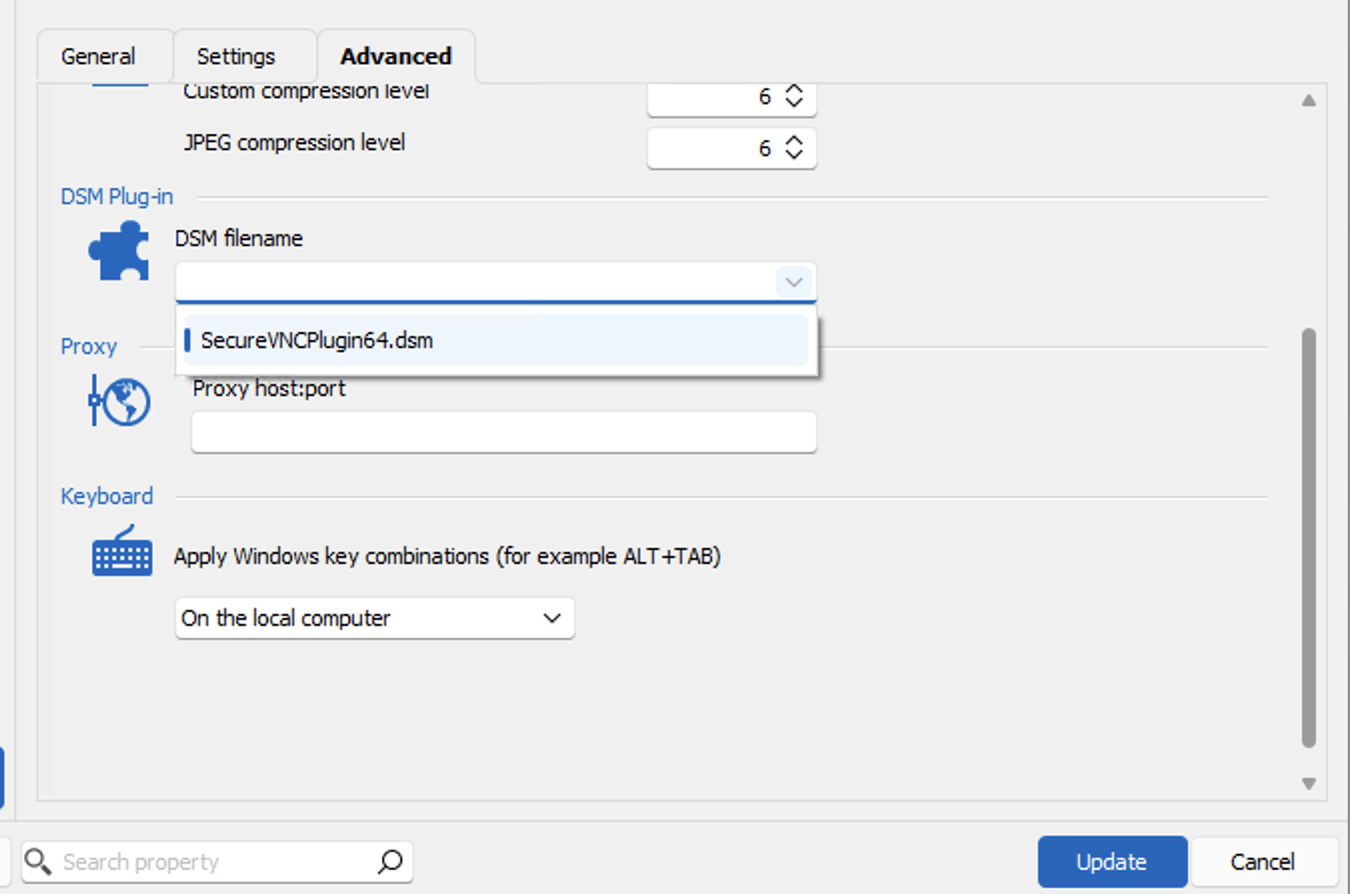
I'd appreciate if you could try choosing "SecureVNCPlugin64.dsm" in that menu item and let me know if it works for you!
Thanks again and kind regards,
Richard Markievicz
Screenshot 2024-02-15 at 20.32.10.png
Good morning Richard,
Yes, that is correct. Now that I selected it, it does work! Now how can I easily modify 300+ clients in RDM? Thanks!
[07:21:32:07] [31876:00007238] [DEBUG][freevnc.mvs] - [freevnc_mvs_configure_simd]: enabling SSE2 optimization
[07:21:32:16] [31876:0000645c] [INFO][freevnc.dsm] - [freevnc_dsm_load_plugin]: freevnc_dsm_load_plugin: SecureVNCPlugin
[07:21:32:16] [31876:0000645c] [INFO][freevnc.dsm] - [freevnc_dsm_load_plugin]: freevnc_dsm_load_plugin: 2.4.0.0
[07:21:32:16] [31876:0000645c] [INFO][freevnc.dsm] - [freevnc_dsm_load_plugin]: freevnc_dsm_load_plugin: May 10 2010
[07:21:32:17] [31876:0000645c] [INFO][freevnc.dsm] - [freevnc_dsm_load_plugin]: freevnc_dsm_load_plugin: Adam D. Walling
[07:21:32:17] [31876:0000645c] [INFO][freevnc.dsm] - [freevnc_dsm_load_plugin]: freevnc_dsm_load_plugin: SecureVNCPlugin.dsm
[07:21:32:23] [31876:0000645c] [DEBUG][freevnc] - [freevnc_trace_server_protocol_version]: << ServerProtocolVersion: RFB 003.008
[07:21:32:23] [31876:0000645c] [DEBUG][freevnc] - [freevnc_trace_client_protocol_version]: >> ClientProtocolVersion: RFB 003.008
[07:21:32:23] [31876:0000645c] [DEBUG][freevnc.auth] - [freevnc_recv_security_types]: numberOfSecurityTypes: 3
[07:21:32:24] [31876:0000645c] [DEBUG][freevnc.auth] - [freevnc_recv_security_types]: [0] Ultra (17)
[07:21:32:24] [31876:0000645c] [DEBUG][freevnc.auth] - [freevnc_recv_security_types]: [1] DsmPlugin (115)
[07:21:32:24] [31876:0000645c] [DEBUG][freevnc.auth] - [freevnc_recv_security_types]: [2] DsmPluginOld (114)
[07:21:32:24] [31876:0000645c] [INFO][freevnc.auth] - [freevnc_client_authenticate]: Selected security type 17 (Ultra)
[07:21:32:27] [31876:0000645c] [DEBUG][freevnc.auth] - [freevnc_client_authenticate_ultra]: << AuthStatus: -1
[07:21:32:27] [31876:0000645c] [DEBUG][freevnc.auth] - [freevnc_recv_security_types]: numberOfSecurityTypes: 2
[07:21:32:27] [31876:0000645c] [DEBUG][freevnc.auth] - [freevnc_recv_security_types]: [0] DsmPlugin (115)
[07:21:32:27] [31876:0000645c] [DEBUG][freevnc.auth] - [freevnc_recv_security_types]: [1] DsmPluginOld (114)
[07:21:32:27] [31876:0000645c] [INFO][freevnc.auth] - [freevnc_client_authenticate]: Selected security type 115 (DsmPlugin)
[07:21:34:12] [31876:0000645c] [DEBUG][freevnc.auth] - [freevnc_client_authenticate_ultra]: << AuthStatus: -1
[07:21:34:12] [31876:0000645c] [DEBUG][freevnc.auth] - [freevnc_recv_security_types]: numberOfSecurityTypes: 1
[07:21:34:13] [31876:0000645c] [DEBUG][freevnc.auth] - [freevnc_recv_security_types]: [0] MsLogon (113)
[07:21:34:13] [31876:0000645c] [INFO][freevnc.auth] - [freevnc_client_authenticate]: Selected security type 113 (MsLogon)
[07:21:34:28] [31876:0000645c] [DEBUG][freevnc.auth] - [freevnc_client_authenticate_security_result]: << AuthStatus: 0
[07:21:34:28] [31876:0000645c] [DEBUG][freevnc] - [freevnc_trace_client_init]: >> RfbClientInit: SHARED (0x01)
[07:21:34:655] [31876:0000645c] [DEBUG][freevnc] - [freevnc_trace_server_init]: << RfbServerInit: 1280x1024 name: ustnyvbescrap1 ( 120.2.163.33 ) - service mode
[07:21:34:656] [31876:0000645c] [DEBUG][freevnc] - [freevnc_trace_server_init]: << RfbServerInit: PixelFormat: bitsPerPixel: 32 depth: 32 bigEndian: 0 trueColor: 1 R: 255/16 G: 255/8 B: 255/0
[07:21:34:656] [31876:0000645c] [DEBUG][freevnc] - [freevnc_trace_rfb_set_encodings]: >> RfbSetEncodings: numberOfEncodings: 12
[07:21:34:656] [31876:0000645c] [DEBUG][freevnc] - [freevnc_trace_rfb_set_encodings]: [0]: Hextile (5)
[07:21:34:656] [31876:0000645c] [DEBUG][freevnc] - [freevnc_trace_rfb_set_encodings]: [1]: CopyRect (1)
[07:21:34:656] [31876:0000645c] [DEBUG][freevnc] - [freevnc_trace_rfb_set_encodings]: [2]: ZRLE (16)
[07:21:34:656] [31876:0000645c] [DEBUG][freevnc] - [freevnc_trace_rfb_set_encodings]: [3]: Tight (7)
[07:21:34:656] [31876:0000645c] [DEBUG][freevnc] - [freevnc_trace_rfb_set_encodings]: [4]: Zlib (6)
[07:21:34:656] [31876:0000645c] [DEBUG][freevnc] - [freevnc_trace_rfb_set_encodings]: [5]: Raw (0)
[07:21:34:656] [31876:0000645c] [DEBUG][freevnc] - [freevnc_trace_rfb_set_encodings]: [6]: CursorImage (-239)
[07:21:34:656] [31876:0000645c] [DEBUG][freevnc] - [freevnc_trace_rfb_set_encodings]: [7]: VncCursorPosition (-232)
[07:21:34:656] [31876:0000645c] [DEBUG][freevnc] - [freevnc_trace_rfb_set_encodings]: [8]: DesktopSize (-223)
[07:21:34:656] [31876:0000645c] [DEBUG][freevnc] - [freevnc_trace_rfb_set_encodings]: [9]: ZlibCompression (-250)
[07:21:34:656] [31876:0000645c] [DEBUG][freevnc] - [freevnc_trace_rfb_set_encodings]: [10]: JpegQuality (-26)
[07:21:34:656] [31876:0000645c] [DEBUG][freevnc] - [freevnc_trace_rfb_set_encodings]: [11]: UltraFileTransfer (-32766)
[07:21:34:656] [31876:0000645c] [DEBUG][freevnc] - [freevnc_trace_rfb_framebuffer_update_request]: >> RfbFramebufferUpdateRequest: incremental: 0 x: 0 y: 0 width: 1280 height: 1024
[07:21:34:764] [31876:000069c8] [DEBUG][freevnc.ultra] - [freevnc_trace_ultra_file_transfer]: << UltraFileTransfer: type: 7 contentType: 17 contentParam: 3 size: 0 length: 0
[07:21:34:968] [31876:000069c8] [DEBUG][freevnc] - [freevnc_client_recv_cursor_position]: << CursorPosition: x: 834 y: 219
[07:21:35:104] [31876:000069c8] [DEBUG][freevnc] - [freevnc_trace_rfb_framebuffer_update_request]: >> RfbFramebufferUpdateRequest: incremental: 1 x: 0 y: 0 width: 1280 height: 1024
[07:21:35:108] [31876:000069c8] [DEBUG][freevnc] - [freevnc_recv_cursor_image]: << CursorImage: pixelSize: 4096 bitmaskSize: 128
[07:21:35:108] [31876:000069c8] [DEBUG][freevnc] - [freevnc_trace_rfb_framebuffer_update_request]: >> RfbFramebufferUpdateRequest: incremental: 1 x: 0 y: 0 width: 1280 height: 1024
[07:21:35:112] [31876:000069c8] [DEBUG][freevnc] - [freevnc_trace_rfb_framebuffer_update_request]: >> RfbFramebufferUpdateRequest: incremental: 1 x: 0 y: 0 width: 1280 height: 1024
Hello again
I do find this strange since Ultra should also only load the DSM plugin if you have it explicitly configured; however what I suspect is happening is that by using the standalone vncviewer.exe at some point Ultra generated a configuration file, and it simply applies the RDM options on top of that configuration. I'm not sure that automatically trying to load a DSM if we detect that the server requires it is a good approach (for example, there might exist multiple plugins).
For now, if you're happy with Ultra, there's not a great reason on your side to change things but it's good to know that you do have another option if and when we deprecate the UltraVNC integration. That said, the integration is in "maintenance" mode and I'd be happy if you used FreeVNC and contributed any feature requests or bug reports to help us improve that.
Fortunately it should be easy to switch: you can select your VNC entries and choose Edit > Batch Edit > Edit Entries (Session Type Settings). Go to the "Advanced" tab, check "Override" and select the DSM plugin. The change will be applied to all the selected entries. If your entries are scattered about your vault; you can go to "Advanced Search" and search by "Connection Type" is "VNC". This will list all your VNC entries which you can select and choose to batch edit, directly from the Advanced Search window.
Please, let me know if something isn't clear or you have further questions
Kind regards,
Richard Markievicz
Hello again,
So is UltraVNC able to be fixed in the near future or should I just migrate then?
Batch Edit looks like it will be tedious for me, since I have a mix of Host addresses to accomodate. How can I Override the Session Type without modifying the Host?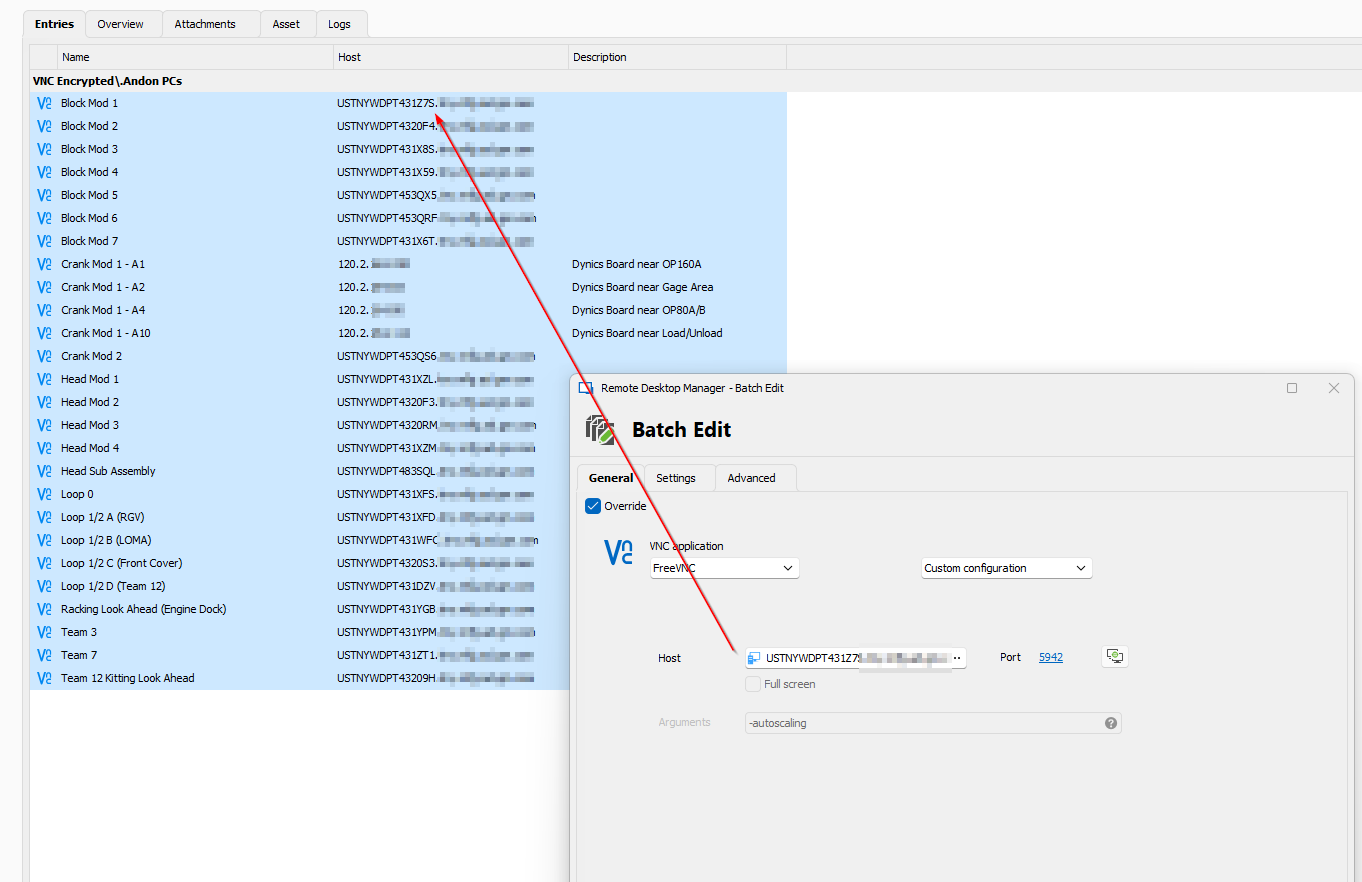
36923ee4-8a94-4908-8b5b-68f42a457c3b.png
Hello
The issue is indeed fixed for the next 2024.1.x release. I'm not sure when the next beta will be but I'd expect it this week or next. If you're blocked on this right now I'd suggest rolling back to 2023.3 temporarily.
I'll have to check for batch editing your entries - what do you have configured currently for the VNC Application? Do you explicitly have "UltraVNC" configured, or is it set to take the default from the application options?
Please let me know if something isn't clear or you have further questions
Kind regards,
Richard Markievicz
OK I can sit tight until then!
I have UltraVNC explicitly set everywhere
Good morning, just reporting that 2024.1.11.0 has fixed this issue :)
Hello
Good news! Thank you for the feedback.
Thanks and kind regards,
Richard Markievicz