VBScript arguments not working with variables.

I am attempting to create a vbscript that will take variables passed into the Arguments section of the Macros/Scripts/Tools window. The variable is not being passed into the script, only the $PARENT_HOST$ as literal text. The vbscript in this test scenario just takes the first argument passed and echos it to the window. 
FQDN = Wscript.Arguments(0)
WScript.Echo FQDN
2024-02-06 09_20_42-Edit VBScript - Testing.png
All Comments (10)
Hello Kevin,
Thank you for reaching out to us regarding this,
- Could you please specify the version of RDM you are currently using?
- What type of data source are you using?
From your initial message I'm assuming this is a new configuration is that correct?
Let me know
Best regards,
Samuel Dery
Hello Samuel, thanks for responding. I am running version 2023.3.39.0 64-bit
I am using the individual SQLite data source.
I have a host entry that has a FQDN defined in the Host Field, I have created numerous sub entries that use the variable $PARENT_HOST$ to populate the FQDN defined in the parent host entry inside of the sub entries. For example, I have a website entry setup and place the variable $PARENT_HOST$ inside of the Website input box. This populates the URL to be launched with a browser and I can add additional custom variables to modify the subpages. This is working flawlessly for webpages, SCP, and SSH sessions, but when I attempt to use the variables as an argument in a VBScript entry, they are not interpreted correctly, and instead become free text.
I am getting this: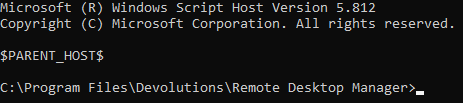
when I expect this:
*Edit* - I am attaching a testing.rdm file that you can import to see how I have this setup. Entry and Parent variables do not work in a vbscript entry.
Thanks,
Kevin Dulaney
Testing.rdm
659b14e7-4776-47f9-a661-798358540764.png
e4eedcb4-7498-4a90-aecf-78cc77dad967.png
Hello Kevin,
Thank you for your reply,
I've been able to reproduce the behavior and will open a case with our development team regarding this,
I will keep you updated with any news I receive,
Best regards,
Samuel Dery
Hi Kevin,
I'm pleased to let you know that we've implemented a fix for this issue.
The fix will be included in the upcoming release, version 2024.1.10.0.
Regards,
David Godin
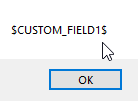
Hello again, since the VBScript functionality has been deprecated and the scripts cannot be directly executed from RDM, I am shifting over to AutoIt to perform some automations. I am currently running version 2025.2.20.0 and I am having the same issue with AutoIt that I had with the VBscript as far as the Arguments not passing custom variables. I created an embedded AutoIt script that takes two arguments. The value of $CUSTOM_FIELD1$ does not become the value of that variable it just sends the literal text.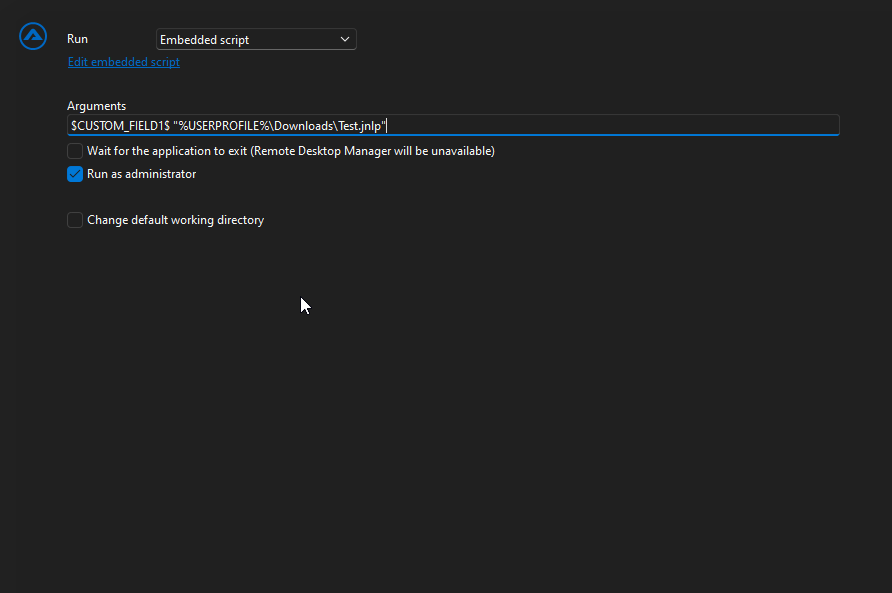
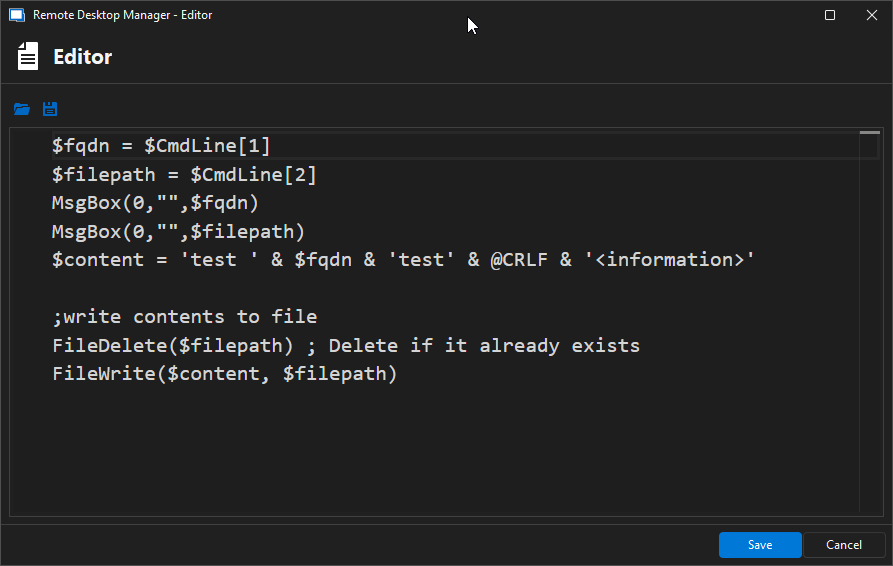
$fqdn = $CmdLine[1]
$filepath = $CmdLine[2]
MsgBox(0,"",$fqdn)
MsgBox(0,"",$filepath)
$content = 'test ' & $fqdn & 'test' & @CRLF & '<information>'
;write contents to file
FileDelete($filepath) ; Delete if it already exists
FileWrite($content, $filepath)
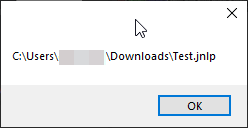
Thanks
Kevin Dulaney
f670021f-46d3-4ad8-82a4-5434cfd17f3b.png
1d086b44-9e48-4d4f-85de-91f13723b86b.png
dba25cbf-5da9-4d34-ba65-d812c74bacfa.png
19f721b7-0eea-456e-9af6-9db3505276b0.png
Hello Kevin,
Thank you for your reply,
I see, did you change to this method on this version of RDM or have you been using it for some time? I would like to confirm if this was working for you in a previous version of RDM using this entry type.
Let me know,
Best regards,
Samuel Dery
I just switched over to AutoIt, but it is possible that it never worked. Even if I compile the AutoIt script into an executable and pass the variables over as arguments it still displays the same behavior.
Thanks,
Kevin Dulaney
Hello Kevin,
Thank you for your reply,
I have been able to reproduce the behavior,
I will open a case with our development team and keep you updated with any news I receive.
Best regards,
Samuel Dery
Hello Samuel, I wanted to follow up with you to see if you had any updates on this request.
Thanks,
Kevin Dulaney
Hello Kevin,
Thank you for your reply,
Following a discussion with our development team regarding this case, they mentioned that variable resolving in macros is currently designed to be done concurrently with the entry it's used with, which is why you experienced this behaviour. Unfortunately, there are currently no plans to change this.
If you would like, I can transfer this thread to the feature request section. Simply let me know,
Best regards,
Samuel Dery