Remote Desktop Manager 2024.1 - BETA

Hello everybody,
We are really happy to release RDM 2024.1 beta version.
This is a major update and requires a database update, but the new database format is compatible with the previous version. Please back up your database before installing this beta for maximum safety.
Please report your issues in a separate thread to simplify the follow-up. We have some instructions depending on the data source you use:
- Devolutions Server users: DVLS 2024.1 BETA is required: https://devolutions.net/server/home/download/
- SQL Server, XML, SQLite: Make sure to back up your database.
- Devolutions Hub Business and Hub Personal: This version is not compatible for now.
Download:
- https://cdn.devolutions.net/download/Setup.RemoteDesktopManager.2024.1.11.0.exe
- https://cdn.devolutions.net/download/Devolutions.RemoteDesktopManager.Bin.2024.1.11.0.zip
New features:
- Updated to .NET 8
- Added asciinema format for terminal recording
- Added Favorite Vaults to the vault dropdown and vault selection
- Added Javascript entry type
- Added Script Dashboard feature
- Added support for Passkey integration with Devolutions Workspace
- Added support for sending passwords through in-app messaging or Devolutions Send
- Added Terminal Command Palette
Release notes:
https://devolutions.net/remote-desktop-manager/release-notes/beta/
David Hervieux
All Comments (8)
We have a new release but we found an error in the updater (related to .NET 8 migration). Only the original beta is impacted. You need to manually download RDM new version and execute the installer. The auto update will not work.
https://cdn.devolutions.net/download/Setup.RemoteDesktopManager.2024.1.7.0.exe
Regards
David Hervieux
Hello,
Thank you all for the feedback. RDM 2024.1 is now officially available:
https://devolutions.net/remote-desktop-manager/home/download/
We will activate the auto update notification in one week.
Regards
David Hervieux
Great, thank you for this release. Could you explain how to enable the new asciinema recording format ? I have not been able to find it in RDM user interface.
Hello,
If you go in the ribbon's Administration tab and click on System Settings, in the Session Recording tab there is the setting to change between the recording modes for the terminal (Terminal Playback, Video and Asciicast):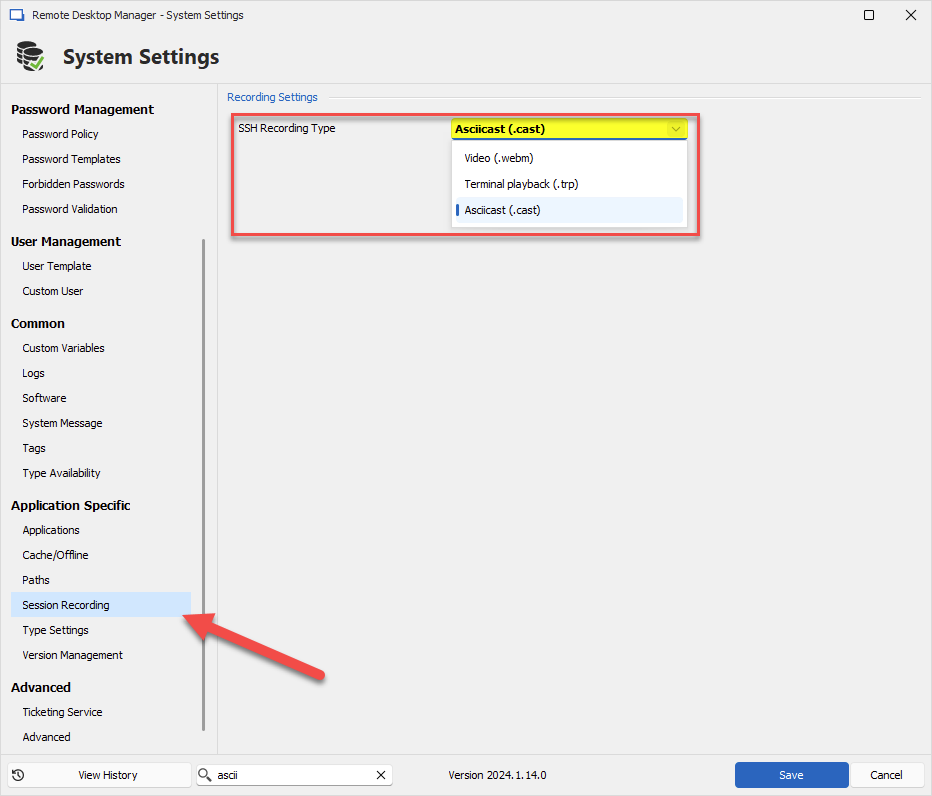
Let us know if you have any other question.
Regards,
Hubert Mireault
34839bc1-0fa1-4b3c-a7c7-f83d18c9f57a.png
Administration menu is greyed out and I only have Vault settings (no System Settings menu). Maybe it's because I'm on the free version (2024.1.15.0) with a local datasource ?
Hello,
Yes, that would explain why. I will open a ticket to add a way to configure this for single user data sources like SQLite.
Regards,
Hubert Mireault
Hello,
Yes, that would explain why. I will open a ticket to add a way to configure this for single user data sources like SQLite.
Regards,
Thank you very much :-)
On the latest Beta - 2024.1.28 and this version plus many before, it constantly hangs and goes in, not responding many times throughout the day. Why is this version so unstable and constantly freezing?
It makes me want to switch from RDM to another application if this cannot get fixed.