Autologin for Office365 / Microsoft365

As an MSP, we have to login to our customers Microsoft365 quite often.
The login forms of the office-portal is not really compatible with the standard tooling in RDM.
You can work around that by using an "After-Open"-macro, but that is prone to breaking when the device is slow or Microsoft is being slow.
I have written a custom script that can automate the login.
It works by waiting for the input elements to become visible and fills them as soon as they appear.
It can even handle the OTP.
The script is available on my Gitlab as I might need to update it, if Microsoft decides that the current login experience is not painful enough.
Link to the script on Gitlab
To use the script you will need to insert it into the Custom-Script option in your website entry.
You will also need to allow the password to be used in a script.
A preconfigured .rdm file can also be found on gitlab.
I hope it helps someone who might be stuck with a macro or even a manual login.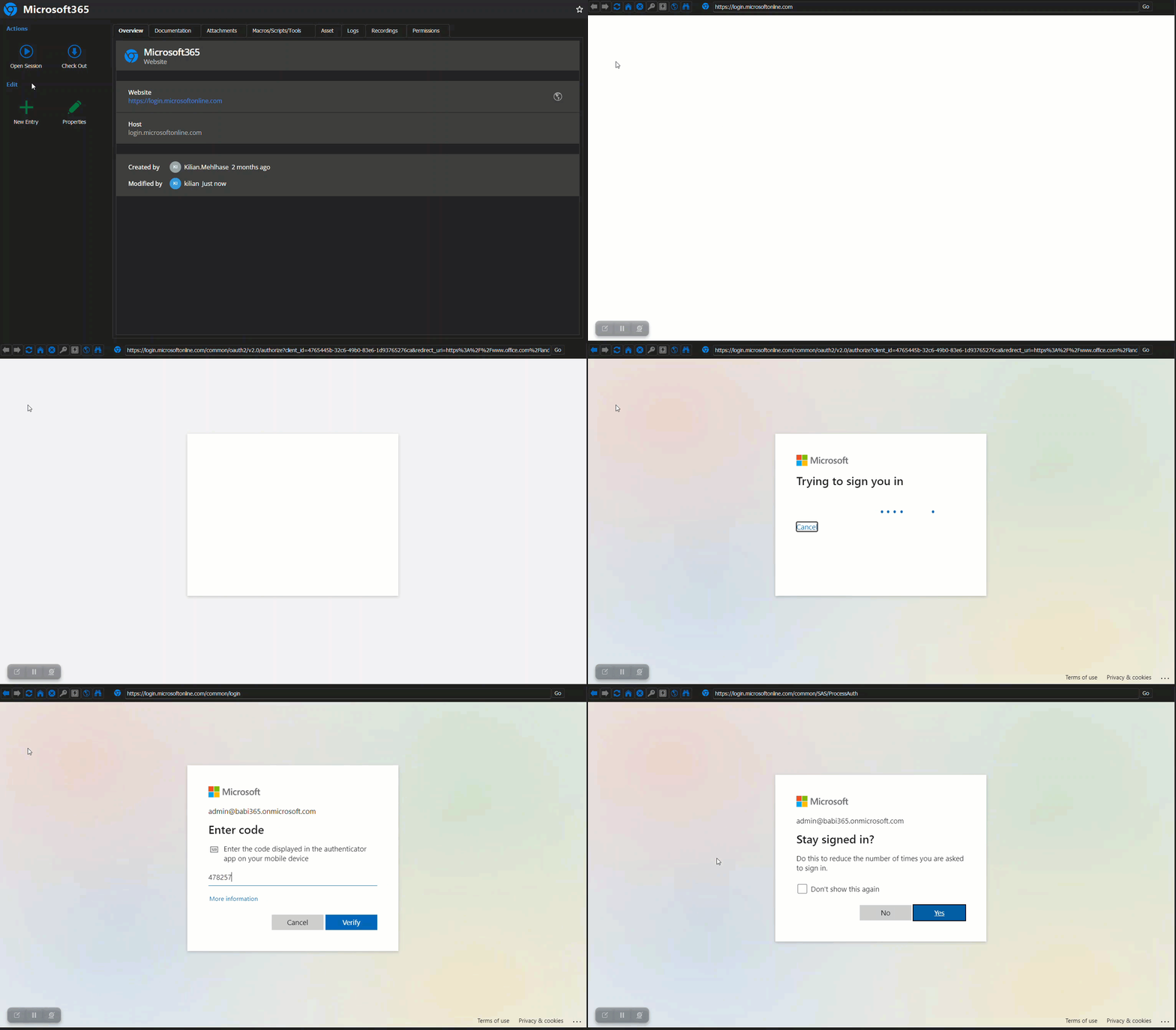
2023-12-05_21-53-06.gif
All Comments (10)
Hello,
Thank you very much. I think we could do a native integration with your script.
Regards
David Hervieux
Your are more than welcome to integrate my script into RDM.
Hello,e
I have added a new Script type called JavaScript and it's not possible to link it an entry. This means that you will be able to reuse it in multiple entries and even share it in the System Vault. This will be in RDM 2024.1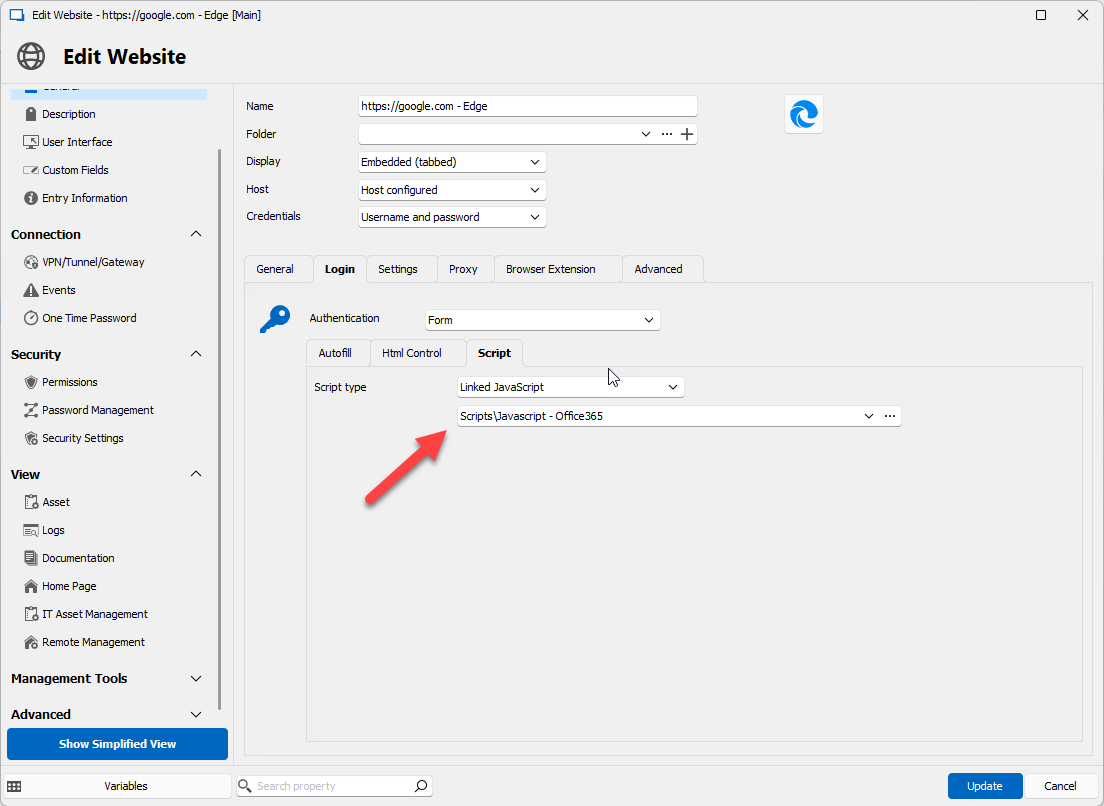
Regards
Regards
David Hervieux
de79854f-1c65-4540-b0c2-8896c7e0395a.png
Hi,
I have added this script to a Javascript entry. I attached it to the website session and it does not seem to autofill. Is there a step I am maybe missing?
Edit:
It autofills $USERNAME$ in Chrome, but not with Edge. Password does not autofill and I have checked the box on both the credential and session to allow password in variable. If I uncheck allow password in variable in one or both of them it will autofill (I assume it is passing $PASSWORD$ as a password). When launching undocked, it tries to press the submit button before email autofill.
I have tested the script manually on Edge and Chrome, and it performs an autofill without issue. I am either missing a setting or this is a bug in the RDM version 2024.2.19.0.
Hi Camron,
Does it not autofill at all or does it autofill but with the wrong information ?
Also, what did you use as the website URL ? Mine is: https://login.microsoftonline.com
The script works by waiting for the elements with the correct HTML-IDs and then fills them when they appear.
I have heard that the IDs might be diffrent if you login via a diffrent URL.
Then the script would just sit there and wait for the elements that will never come and it would look like the autofill is not working.
Regards,
Kilian
Hi Kilian,
I have used the one you did, tested on admin.microsoft.com and entra.microsoft.com. They all autofill the username on Chrome, but no password. On Edge, nothing happens at all for any URL.
Would you be able to DM me the username that you are trying to login to?
I would love to check out the HTML-IDs of the password-screen.
This happens on all usernames, I am using random credentials to test the auto-filling. The HTML IDs that show up are correct, see my edits in the post above. The username fills in and goes to the password screen (in embedded, undocked still has the submit before filling username issue). The password does nothing while "allow password in variable" is checked in one or both of the credential and session entries. At this point this doesn't seem like a script problem, but rather an RDM issue.
Username HTML ID is showing = id="i0116"
Password HTML ID is showing = id="i0118"
I do not know if this is an RDM issue.
I have updated the script in my Gitlab to add variables to set the timeout between elements appering and the script filling them out.
There is now also a variable to set timeout between the input beeing filled and the continue-button being pressed.
Maybe it helps!
The update with delays now has embedded functioning the same way as undocked, where it tries to submit the username before it has been filled. It is sporadic as well if I start adding delays between 1000 - 1400ms in RDM. Taking away autofill delay has Edge not filling anything.
New script: Chrome doesn't autofill now either.
In either scenario, the password variable is not filling in RDM while the boxes for using passwords in variables are checked does not autofill a variable, but outside of RDM it works.