Urgent: DVLS Update from 2023.2.10.0 to 2023.3.6.0 impossible to work

DVLS: 2023.3.6.0
RDM: 2023.3.24.0
We Updated yesterday from DVLS 2023.2.10.0 to 2023.3.6.0 but the usability is absolute no more.
We're talking about Loading Times only for displaying a Password which takes about 5-10 Seconds.
Changing a Vault takes 60 Seconds and more.
We completely restored all Systems back to 2023.2.10.0 and now all Connections are back fine, but due the Problem that you dont have a downgrade ability in the new RDM Version, all Users are now locked into a Read-Only Mode. The only workaround right now is to use the Webinterface for changing Entries.
What i thought could be a Problem is our old SQL Server (2016). So i created and moved to a new Instance on a 2022 SQL Server and updated the Fallback DVLS Server back to 2023.3.6.0. The Performance is absolute horrible after upgrading.
I need urgent Remote Support to fix that Issue on our Side.
Can please someone get in touch wich me for a remote Investigation today?
Best Regards,
Andreas
PS: DB and DVLS Server are in the same Subnet. Loads on all Machines are very low. Downgrade/Restore brought back a usable performance.
Here is a small profiler Log from a Client. I noticed on a past not saved Log that every click in RDM also triggers a WebAPI.GetAccessRequest which needs about 1.5 to 2 Seconds.
Main thread (UI)
----------------------------------------
Silent: Devolutions.RemoteDesktopManager.Business.TryGoOfflineException: Request failed on background thread.
   at Devolutions.RemoteDesktopManager.Business.DataSources.RDMSWebApiClient.RetryAction[T](ExecuteActionDelegate`1 action, String label)
   at Devolutions.RemoteDesktopManager.Business.DataSources.RDMSWebApiClient.ExecuteAction[T](ExecuteActionDelegate`1 action, ExecuteActionLogMode logMode)
   at Devolutions.RemoteDesktopManager.Business.DataSources.RDMSWebApiClient.ExecuteActionMultipleData[T](ExecuteActionDelegate`1 action)
   at Devolutions.RemoteDesktopManager.Business.DataSources.RDMSWebApiClient.GetAllConnectionStates(Guid repositoryId)
   at Devolutions.RemoteDesktopManager.Business.DataSources.RDMSStateSubDataSource.GetAllConnectionStates()
   at Devolutions.RemoteDesktopManager.Managers.ConnectionStateManager.RefreshConnectionStates()
   at Devolutions.RemoteDesktopManager.Managers.ThreadManager.<>c__DisplayClass11_0.<Execute>b__0(Object _)
DVLS - Api - GetCheckOut...
    DVLS - Api - GetPublicWebInstanceInformation : 96 ms
DVLS - Api - GetCheckOut : 68303 ms
REMOTE:   POST - /api/info_entity...
REMOTE:     UserManager.GetUser : 0 ms
REMOTE:     LoginManager.InitRoles : 133 ms
REMOTE:     SessionManager.SetCurrentUser : 3 ms
REMOTE:     GetConnectionsWithRolesForRepository...
REMOTE:         Filter version : 0 ms
REMOTE:         Filter security : 0 ms
REMOTE:         GetConnectionsForRepositories : 0 ms
REMOTE:     GetConnectionsWithRolesForRepository : 6 ms
REMOTE:   POST - /api/info_entity : 188 ms
REMOTE:    GET - /api/private-instance-information : 14 ms
DVLS - Api - GetEntrySensitive...
    DVLS - Api - GetPrivateWebInstanceInformation : 9265 ms
REMOTE:    GET - /api/data-source-settings/807cd140-4505-4527-98e5-0fa7ddaa7c3f/entry-sensitive : 156 ms
DVLS - Api - GetEntrySensitive : 90582 ms
ConnectionInfos.Foreach...
    DecryptData : 0 ms - Count : 1
    DeserializeData : 0 ms - Count : 1
ConnectionInfos.Foreach : 0 ms
REMOTE:   POST - /api/logentry/add : 163 ms
DVLS - Api - AddLogEntry : 9239 ms
SelectionChanged - Default : 52 ms
REMOTE:    GET - /api/accessrequest/all : 1 ms
DVLS - Api - GetAccessRequests : 6178 ms
REMOTE:    GET - /api/connection/states...
REMOTE:     RefreshConnections : 22 ms
REMOTE:     GetAllConnectionStates...
REMOTE:         GetAllConnectionStates.CanView : 1690 ms - Count : 12
REMOTE:     GetAllConnectionStates : 1692 ms
REMOTE:    GET - /api/connection/states : 1714 ms
Silent: Devolutions.RemoteDesktopManager.Business.TryGoOfflineException: DVLS server did not respond in time. Check your connection or try increasing the connection timeout.
   at Devolutions.Server.ApiWrapper.RDMSWebClient.RunSynchronous[T](Task`1 task)
   at Devolutions.RemoteDesktopManager.Business.DataSources.RDMSWebApiClient.<>c__DisplayClass77_0.<GetAllConnectionStates>b__0()
   at Devolutions.RemoteDesktopManager.Business.DataSources.RDMSWebApiClient.ExecuteAction[T](ExecuteActionDelegate`1 action, ExecuteActionLogMode logMode)
   at Devolutions.RemoteDesktopManager.Business.DataSources.RDMSWebApiClient.ExecuteActionMultipleData[T](ExecuteActionDelegate`1 action)
   at Devolutions.RemoteDesktopManager.Business.DataSources.RDMSWebApiClient.GetAllConnectionStates(Guid repositoryId)
   at Devolutions.RemoteDesktopManager.Business.DataSources.RDMSStateSubDataSource.GetAllConnectionStates()
   at Devolutions.RemoteDesktopManager.Managers.ConnectionStateManager.RefreshConnectionStates()
   at Devolutions.RemoteDesktopManager.Managers.ThreadManager.<>c__DisplayClass11_0.<Execute>b__0(Object _)
REMOTE:    GET - /api/connection/states...
REMOTE:     RefreshConnections : 23 ms
REMOTE:     GetAllConnectionStates...
REMOTE:         GetAllConnectionStates.CanView : 1737 ms - Count : 12
REMOTE:     GetAllConnectionStates : 1740 ms
REMOTE:    GET - /api/connection/states : 1763 ms
SelectionChanged - Default : 8 ms
REMOTE:    GET - /api/accessrequest/all : 2 ms
DVLS - Api - GetAccessRequests : 10071 ms
Silent: Devolutions.RemoteDesktopManager.Business.TryGoOfflineException: DVLS server did not respond in time. Check your connection or try increasing the connection timeout.
   at Devolutions.Server.ApiWrapper.RDMSWebClient.RunSynchronous[T](Task`1 task)
   at Devolutions.RemoteDesktopManager.Business.DataSources.RDMSWebApiClient.<>c__DisplayClass77_0.<GetAllConnectionStates>b__0()
   at Devolutions.RemoteDesktopManager.Business.DataSources.RDMSWebApiClient.ExecuteAction[T](ExecuteActionDelegate`1 action, ExecuteActionLogMode logMode)
   at Devolutions.RemoteDesktopManager.Business.DataSources.RDMSWebApiClient.ExecuteActionMultipleData[T](ExecuteActionDelegate`1 action)
   at Devolutions.RemoteDesktopManager.Business.DataSources.RDMSWebApiClient.GetAllConnectionStates(Guid repositoryId)
   at Devolutions.RemoteDesktopManager.Business.DataSources.RDMSStateSubDataSource.GetAllConnectionStates()
   at Devolutions.RemoteDesktopManager.Managers.ConnectionStateManager.RefreshConnectionStates()
   at Devolutions.RemoteDesktopManager.Managers.ThreadManager.<>c__DisplayClass11_0.<Execute>b__0(Object _)
REMOTE:    GET - /api/connection/getcheckout/d5971cf6-645d-43d9-8788-b248cca10823 : 322 ms
DVLS - Api - GetCheckOut : 5052 ms
REMOTE:    GET - /api/data-source-settings/d5971cf6-645d-43d9-8788-b248cca10823/entry-sensitive : 155 ms
DVLS - Api - GetEntrySensitive : 6843 ms
ConnectionInfos.Foreach...
    DecryptData : 0 ms - Count : 1
    DeserializeData : 0 ms - Count : 1
ConnectionInfos.Foreach : 0 ms
REMOTE:   POST - /api/logentry/add : 169 ms
DVLS - Api - AddLogEntry : 6350 ms
REMOTE:    GET - /api/connection/states...
REMOTE:     RefreshConnections : 32 ms
REMOTE:     GetAllConnectionStates...
REMOTE:         GetAllConnectionStates.CanView : 1875 ms - Count : 12
REMOTE:     GetAllConnectionStates : 1877 ms
REMOTE:    GET - /api/connection/states : 1909 ms
SelectionChanged - Default : 14 ms
REMOTE:    GET - /api/accessrequest/all : 1 ms
DVLS - Api - GetAccessRequests : 13257 ms
REMOTE:    GET - /api/connection/getcheckout/6c657745-1a2b-46a5-8dc6-780f430f29d0 : 277 ms
DVLS - Api - GetCheckOut : 5821 ms
REMOTE:    GET - /api/data-source-settings/6c657745-1a2b-46a5-8dc6-780f430f29d0/entry-sensitive : 162 ms
DVLS - Api - GetEntrySensitive : 13350 ms
ConnectionInfos.Foreach...
    DecryptData : 0 ms - Count : 1
    DeserializeData : 0 ms - Count : 1
ConnectionInfos.Foreach : 0 ms
REMOTE:   POST - /api/logentry/add : 154 ms
DVLS - Api - AddLogEntry : 9458 ms
REMOTE:    GET - /api/connection/states...
REMOTE:     RefreshConnections : 22 ms
REMOTE:     GetAllConnectionStates...
REMOTE:         GetAllConnectionStates.CanView : 1913 ms - Count : 12
REMOTE:     GetAllConnectionStates : 1914 ms
REMOTE:    GET - /api/connection/states : 1937 ms

Thread : 11
----------------------------------------
11 - Connection States: Refresh...
11 -     ClearClosedRunning...
11 -         GetOpenedConnections...
11 -             Opened - by process...
11 -                 PowerShell (Local) : 1 ms
11 -             Opened - by process : 6 ms
11 -         GetOpenedConnections : 6 ms
11 -     ClearClosedRunning : 6 ms
11 -     GetAllConnectionStates...
11 -         DVLS - Api - GetAllConnectionStates : 15009 ms
11 -     GetAllConnectionStates : 15009 ms
11 - Connection States: Refresh : 15016 ms
11 - Connection States: Refresh...
11 -     ClearClosedRunning...
11 -         GetOpenedConnections...
11 -             Opened - by process...
11 -                 PowerShell (Local) : 3 ms
11 -             Opened - by process : 9 ms
11 -         GetOpenedConnections : 9 ms
11 -     ClearClosedRunning : 9 ms
11 -     GetAllConnectionStates...
11 -         DVLS - Api - GetAllConnectionStates : 9286 ms
11 -     GetAllConnectionStates : 9286 ms - Count : 12
11 - Connection States: Refresh : 9296 ms

Thread : 23
----------------------------------------
23 - Connection States: Refresh...
23 -     ClearClosedRunning...
23 -         GetOpenedConnections...
23 -             Opened - by process...
23 -                 PowerShell (Local) : 1 ms
23 -             Opened - by process : 8 ms
23 -         GetOpenedConnections : 8 ms
23 -     ClearClosedRunning : 8 ms
23 -     GetAllConnectionStates...
23 -         DVLS - Api - GetAllConnectionStates : 8839 ms
23 -     GetAllConnectionStates : 8839 ms - Count : 12
23 - Connection States: Refresh : 8847 ms

Thread : 24
----------------------------------------
24 - Connection States: Refresh...
24 -     ClearClosedRunning...
24 -         GetOpenedConnections...
24 -             Opened - by process...
24 -                 PowerShell (Local) : 1 ms
24 -             Opened - by process : 7 ms
24 -         GetOpenedConnections : 7 ms
24 -     ClearClosedRunning : 7 ms
24 -     GetAllConnectionStates...
24 -         DVLS - Api - GetAllConnectionStates : 15008 ms
24 -     GetAllConnectionStates : 15008 ms
24 - Connection States: Refresh : 15016 ms

Thread : 41
----------------------------------------
41 - Connection States: Refresh...
41 -     GetAllConnectionStates...
41 -         DVLS - Api - GetAllConnectionStates : 10231 ms
41 -     GetAllConnectionStates : 10231 ms - Count : 12
41 -     Invoke Refresh : 31 ms
41 - Connection States: Refresh : 10263 ms

Thread : 42
----------------------------------------
42 - Connection States: Refresh...
42 -     ClearClosedRunning...
42 -         GetOpenedConnections...
42 -             Opened - by process...
42 -                 Microsoft Hyper-V Dashboard : 1 ms
42 -                 PowerShell (Local) : 1 ms
42 -             Opened - by process : 8 ms
42 -         GetOpenedConnections : 8 ms
42 -     ClearClosedRunning : 8 ms
42 -     GetAllConnectionStates...
42 -         DVLS - Api - GetAllConnectionStates : 11873 ms
42 -     GetAllConnectionStates : 11873 ms - Count : 12
42 - Connection States: Refresh : 11882 ms
All Comments (14)
Same for us after the Upgrade to 2023.3.6.0 everything is a lot slower. Also a lot more waiting for authentication pop ups showing
Hello Andreas,
We've opened a case on your behalf; we will contact you very soon.
On a side note, reverting RDM, although it may be annoying, is quite straightforward. Uninstalling and installing the previous one will keep all configurations from the previous one.
Would it be an option?
Stay tuned!
Best regards,
Alex Belisle
Hello Mkober,
Do you have the option of reverting DVLS to the previous version?
Did this happen in a staging environment?
Thanks for keeping us posted.
Best regards,
Alex Belisle
Thanks Alex.
We've deployed the new RDM due the needed Upgrade before DVLS Upgrade company wide.
So a downgrade would be possible yes, but needs a lot of work; thats why we want to go forward, not backward.
An Update with a needed Upgrade of client and server at once is just a tail biter in such a case.
Hopefully we can fix the Problem soon.
Best Regards,
Andreas
Hi Andreas,
Thanks for the update.
Richard is in direct contact with you; we'll channel the conversation through the case.
We'll keep this topic updated when we reach a resolution.
Thanks for your cooperation.
Best regards,
Alex Belisle
Hi Alexandre,
i was able to downgrade to 2023.3.5.0.
Performance is immediately better.
Hello,
The performance in 2023.3.5 for Andreas was also drastically better.
The Devolutions Server developers are currently investigating the issue; we will keep you posted.
Best regards,
Richard Boisvert
Hi!
Fyi, we have the same problem. Loading vaults takes about 10 seconds here. I'll not downgrade for now and wait for a patch to be available hopefully soon :)
Thank you!
Hello Daniel,
The team is investigating the issue but has not yet found the root cause. I would recommend installing 2023.3.5 for now over your existing instance; it will only take a few moments.
You can keep the console to the 2023.3.6 version, simply hit update and use this .zip file: https://cdn.devolutions.net/download/RDMS/DVLS.2023.3.5.0.zip
Best regards,
Richard Boisvert
Hello,
The developers were able to replicate the issue and have found its source.
As a temporary solution, could you try to disable the "Block Tor Clients", under Administration > Server Settings > Features, and see if the performance is back to normal?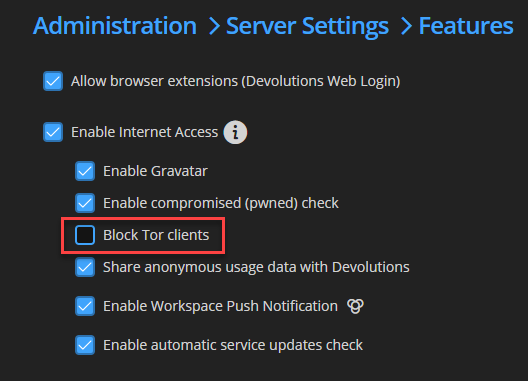
Best regards,
Richard Boisvert
e2852757-a548-430b-bd56-474aed9ee79a.png
Hi Richard,
Confirming that we also had similar symptoms and unchecking the "Block Tor clients" checkbox resolved the poor performance issues.
Looking forward to an update that resolves this properly.
Hi Richard
I also can confirm, that the "Block Tor Clients" Option has caused the Performance Issues on our Side.
I just upgraded all Systems Back to 2023.3.6.0 and the Systems performs normaly.
Looking also forward for a Fix for this.
Best Regards,
Andreas
Hello,
Thank you both for confirming it resolved the issue. The fix will be available in the next release; you can subscribe to this page to be notified when it is available: https://forum.devolutions.net/forums/105/general-availability-releases
Best regards,
Richard Boisvert
Hello,
The 2023.3.7 version is now available, which contains the fix for the performance issue.
Best regards,
Richard Boisvert