Why are there unsupported Entries in DVLS when created via RDM

rdm 2023.2.22.0
dvls 2023.2.5.0
hi all
to be honest, im a little frustrated.
we are using now RDM and DVLS since over 2 Years, but the new devolutions.powershell module makes me a little nervous.
with the old powershell module, there was the possibility of cloning "unsupported" entries.
after implementing the new Powershell Module, unsupported entries are just "unsupported" and can not be handled anymore via powershell which leads me to a dead end in automatization dvls/rdm; in my case ssl-vpn entries and subtype "AccessCode".
what doesn't bother me is the point that an entry is not or not yet supported in dvls/powershell. what really bothers me is the fact that although the client and the server software are made by the same company and sold together, but neither a solution nor a workaround is given for my problem. no, I'm downright rejected with the answer "just not supported and no solution or workaround for you".
this makes me very stuck in the thought of whether we should continue to work with this software/company in the future or not, because at the beginning of using/implementing rdm/dvls no one told us to NOT use specific entry types when using dvls as database and in the poc phase with the old module everything worked.
we have several hundret customer vaults with several thousand entries per vault and our employees used almost every entry type in rdm, because rdm is our main client for connecting dvls.
and we are currently using the old powershell module to automate ssh vpn entries. however, as soon as a dvls update appears that no longer allows the old powershell module, we have a big problem and can no longer use the product because, as mentioned, we have automated all session entries and are dependent on the automation process since we feed all customer servers into a central database.
therefore i have some questions about the rdm/dvls construct:
- why are there unsupported entries in dvls when created via rdm and are there still no plans to support them in future dvls?
- why are there no informations in rdm when using dvls server which tells our employees that the specified entry type is not supported yet in dvls before creating?
- why are entries in dvls unsupported, when the unsupported entry is complete stored in the dvls database? rdm is just a remote client in our case
- and finally: how to handle ssl-vpn entries in devolutions
without the option to handle ssl-vpn entries directly in dvls, we cannot use devolutions in future after the old module will be unsupported.
i really hope there is a solutions for our problem.
thanks and best regards,
andreas
All Comments (15)
Hello Andreas,
I will try to answer all your questions:
why are there unsupported entries in dvls when created via rdm and are there still no plans to support them in future dvls?
RDM is the original application. The goal is to support the same entries in DVLS, but it will take time to achieve it. I have communicated with them to raise the priority for VPN entries (SSH firstmost) and Access Code credentials.
why are there no informations in rdm when using dvls server which tells our employees that the specified entry type is not supported yet in dvls before creating?
On the back-end, the entries are supported. It is the front-end that does not allow the modifications. So when creating entries from RDM, it is assumed that RDM is stil accessible to edit them. We will see how we can mention that the entry is not editable from the website.
why are entries in dvls unsupported, when the unsupported entry is complete stored in the dvls database? rdm is just a remote client in our case
It is the front-end that does not allow it yet. If the entry is linked, it still should work.
how to handle ssl-vpn entries in devolutions
To edit unsupported entries, you can use the PowerShell module with the RDM cmdlets. Even if RDM is not installed, it will still work. Else, you will have to use RDM. As previously mentioned, I asked the DVLS team the raise the priority for the mentionned entries to allow those entries from the web.
Concerning the old module vs the new module, what are the tasks you cannot complete anymore? You have mentionned that you could clone an unsupported entry using New-DSEntryBase. I tried with both modules (Devolutions.Server and Devolutions.PowerShell) for an SSH VPN, and ended up with the same result. I had to remove some fields as my colleague mentionned in the forum you've linked. If you could provide an example working in the old module, I will try to reproduce it.
Hi Maxime
Thank you for your answers.
To edit unsupported entries, you can use the PowerShell module with the RDM cmdlets. Even if RDM is not installed, it will still work. Else, you will have to use RDM. As previously mentioned, I asked the DVLS team the raise the priority for the mentionned entries to allow those entries from the web.
Yes, the cloning itself works. But as written by me it removes the data.vpn part from the Object which makes the newly created Object still not working:

Would be nice if you can show me how you get a successfully working clone of an SSH VPN Entry on your side.
Currently working solution with old module and the available WebSession: devolutions-server/Powershell Module/Samples/NonSupportedEntry.ps1 at main · Devolutions/devolutions-server · GitHub (WebSession Variable isnt set anymore in the new Module).
The only Point i see now is the option to write my own API Connection to get the WebSession:
- Session via '/api/login/partial'
- Direct API Calls via Invoke-WebRequest and -WebSession Param
Would be great if there could be an Update to get this working again.
Thanks,
Andreas
PS: Is the API Documentation still under Construction? Never found one, would be nice to get a Documentation for it.
Edit:
The new written function by me works for creating a new Websession.
Its mostly based on the old New-DSSession function.
With this option im able to work with the new Module to get my old Entries cloned.
Still looking forward to get the Entries supported directly in DVLS!
0f718d04-18e4-4b9b-a2ab-f02f998dcf34.png
27417ccc-eb10-4e15-b6e3-0e58c42ede4e.png
Hello,
Would be nice if you can show me how you get a successfully working clone of an SSH VPN Entry on your side.
I had the same incorrect result in both cases. However, with your example, I have a better grasp of the problem.
Currently working solution with old module and the available WebSession: devolutions-server/Powershell Module/Samples/NonSupportedEntry.ps1 at main · Devolutions/devolutions-server · GitHub (WebSession Variable isnt set anymore in the new Module).
Thank you for your example. I have a better grasp at what has changed since the old module. A ticket will be created to allow an entry to be created from the result of Get-DSEntry -AsRDMConnection.
The only Point i see now is the option to write my own API Connection to get the WebSession:
Session via '/api/login/partial'
Direct API Calls via Invoke-WebRequest and -WebSession Param
Would be great if there could be an Update to get this working again.
Do you use it for other things than creating entries? For the moment, it is not expected to be added.
Hi Maxime
I need it for create and cpdate SSH Tunnel Entries.
If you can provide me a Function which is able to create or update SSH Tunnel Entries i should be fine.
Whats about the the Question about the API Documentation?
Best Regards,
Andreas
Hello Andreas,
I will probably add a parameter to existing cmdlets, so for the moment, WebSession will not be added.
For the API, it is currently in development. There could be a preview version, but it will likely change over time, including breaking changes. If that does not bother you, I will mention it the DVLS team.
Feel free to ask for a new feature if it will improve your experience.
Maxime
Hello Andreas,
From version 2023.2.0.6 of the module, it is possible to save an entry obtained with the switch AsRDMConnection. New-DSEntryBase and Update-DSEntryBase now have the FromRDMConnection switch to accept this format. This will accept a ConnectionInfoEntity, who will keep all informations of the entry, even the unsupported one.
Let us know if this accomplish what you expected.
Maxime Bernier
Thank you very much Maxime, i really appreciate it.
Does the Snipped now keep the VPN object?
I will try it soon as i find internal Time for it.
Best Regards
Andreas
Hello Andreas,
I am not sure what you mean by 'Snipped'. For the complete vpn object, you must use the -AsRDMConnection switch. Without the switch, the vpn object will not be complete.
Hi Maxime
With snipped i meant the code snipped New-DSEntryBase -AsRDMConnection and Update-DSEntryBase -AsRDMConnection
I think that should do the Trick respectively fit everything i need!
I will check soon.
Thanks a lot Maxime!
Best Regards,
Andreas
Hi Maxime
I just tried to implement the new Switch Parameter.
But im getting the following Error:
$result = Get-DSEntry -EntryID $sourceTemplate -AsRDMConnection
if($result.isSuccess)
{
  $SSH_VPN = $result.Body.data.connectionInfo
  ... connectionInfo mods which are working via api/connection/save

  $response = New-DSEntryBase -FromRDMConnection -JsonBody ConvertTo-Json ($SSH_VPN) -Depth 6
}
Current used Module:
Do i missunderstand something or is -FromRDMConnection not a Switch?
Best Regards,
Andreas
3f67f6c9-f195-4e07-a4e0-c68bac4aa95f.png
98623e00-9657-4c8c-9985-d1aaeeb20730.png
Hello Andreas,
FromRDMConnection takes a ConnectionInfoEntity object as value. There is no need to use it with JsonBody. So in your case:
$response = New-DSEntryBase -FromRDMConnection $SSH_VPN
Hi Maxime
I just tried it and the response ist "Success", but the newly created Session isnt visible.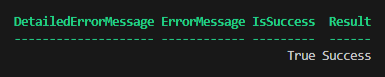
The Vault does not contains the newly created Session.
I used 1:1 the same Code, which works via /api/connection/save
When i check the Templates, then a clone of the Template exists:
Best Regards,
Andreas
906d915c-7851-4bff-bdac-7132999c8772.png
60a3c80b-24f0-49b3-be6e-ae79bf6a7936.png
Hello Andreas,
The templates are in their own vault, so make sure to change the RepositoryID. Also, you can remove template fields in the data field. SharedTemplate and TemplateName are two fields I found, but there might be other fields.
Based on the example, adding those lines should do the trick:
After Line 59:
$ConnectionData.Connection = $ConnectionData.Connection | Select -ExcludeProperty SharedTemplate, TemplateName
After line 71:
$BaseEntryConnectionInfo.RepositoryID = 'desired vault id'
If this does not work, let me know,
Maxime
Thank you Maxime
I just tried, but without Luck. Still exact the same behaviour.
Can you please show me your complete Code to get a Template Clone in a specified Vault?
Thanks,
Andreas
Here is a simple example:
$templateRes = Get-DSEntry -EntryID df8aaa54-a8a2-436c-bd03-55113e74c2ac -AsRDMConnection
$BaseEntryConnectionInfo  = $templateRes.Data.ConnectionInfo

$ConnectionData = Convert-XMLToPSCustomObject ([xml]$BaseEntryConnectionInfo.Data)

#$ConnectionData.Connection.ID = $NewGUID.ToString()
$ConnectionData.Connection.Name = 'Test'
$ConnectionData.Connection = $ConnectionData.Connection | Select -ExcludeProperty SharedTemplate, TemplateName

$ConnectionDataXML = Convert-PSCustomObjectToXML $ConnectionData

$BaseEntryConnectionInfo.Name = 'Test'
$BaseEntryConnectionInfo.Data = (Convert-XMLToSerializedString $ConnectionDataXML)
$BaseEntryConnectionInfo.RepositoryID = '00000000-0000-0000-0000-000000000000'

New-DSEntryBase -FromRDMConnection $BaseEntryConnectionInfo
In this example, the template already exists (ID = df8aaa54-a8a2-436c-bd03-55113e74c2ac). The new entry is created in the default vault and its ID is set by the cmdlet New-DSEntryBase. To see what is the associated ID, use -Verbose on that cmdlet.
Hope that helps,
Maxime