DVLS Module: DSSession Var?

Hi All
On old Devolutions.Server Powershell Module there was a Global Variable "DSSessionToken" (before that it was DSSessionKey) after successfull New-DSSession.
Both Variable doesnt exists anymore and the only Variable i found is DSSession, which doesnt removes after Close-DSSession.
Whats the intended Way to check the current Session Token?
Thanks,
Andreas
All Comments (32)
Hi Andreas,
You can use Get-DSIsLogged to see if your session is active. It will throw an error, like the others cmdlets, if New-DSSession was never called. If the session is expired, the Get-DSIsLogged will return false in the Data field. The token is not present anymore because it was deemed unnecessary. How are you using it?
For the DSSession variable, I do not recall the module setting it. Is it set after a specific command?
Hi Maxime and thanks for the explanation.
I used the Session Token for Log purposes.
But i just switched back to Git Module (Devolutions.Server) because there are too many missing Parts, which are necessary for me.
Best Regards,
Andreas
What are the missing parts?
Devolutions.Server will not be maintained, so it is preferable to add what is missing in the new module. Also, if you have any request to improve your experience, let us know.
What are the missing parts?
Devolutions.Server will not be maintained, so it is preferable to add what is missing in the new module. Also, if you have any request to improve your experience, let us know.
Just played about 30-45 Minutes with the Module, but noticed the following:
- Missing enum SecurityRoleOverride and SecurityRoleRight
- Missing Class ConnectionPermission
- Function Convert-XMLToPSCustomObject looks like it has still doesnt have a default statement (missing Members)
- Set-DSEntityPermissions doesnt work
After above findings and the changed Session Thing i decided to cancel the Powershell Module. Too many missing or bugged Parts for me since my Scripts are productive (I've automated our whole DVLS/RDM Environment).
Best Regards,
Andreas
Edit: Just noticed, that Set-DSEntityPermissions also not works anymore with old DVLS Module (same as on new Module).
I've updated today to DVLS Version 2023.1.6.0. Is this maybe the Reason, that something changed with the Permissions in the Entity Object?
This is exactly how im using Set-DSEntityPermissions cmdlet: https://forum.devolutions.net/topics/39275/update-root-session-permissions-with-dps-instead-of-rdm#174872
Script Output: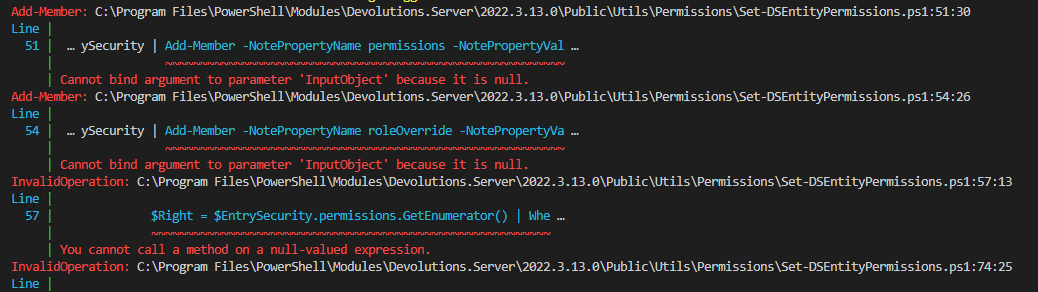
Then i noticed in the Module the Following:
Get-DSEntry doesnt returns a security Object. With or without -AsRDMConnection Parameter.
Best Regards,
Andreas
Edit2:
I really dont get it. Same on a different Machine. Now i changed the Entity to a different Vault and there it works.
I will investigate tomorrow for a possible solution.
7fb7d55a-817f-4639-af37-d6a3a3a404c2.png
0e3f4143-5c6d-4dac-afb9-fa5553f3140e.png
In the new Devolutions.PowerShell module, SecurityRoleOverride, SecurityRoleRight and ConnectionPermission are present.
Since the new DS module uses C# now, the class and enums now need a namespace. I forgot to update the function's example and will update them for the next release. Here how to use them.
> $Permissions = @(
            [RemoteDesktopManager.PowerShellModule.Private.models.ConnectionPermission]@{
                IsEmpty  = $false
                Override = [RemoteDesktopManager.PowerShellModule.Private.enums.SecurityRoleOverride]::Custom
                Right    = [RemoteDesktopManager.PowerShellModule.Private.enums.SecurityRoleRight]::View
                Roles    = @($UserId1, $UserId2, $RoleId1)
            },
            [RemoteDesktopManager.PowerShellModule.Private.models.ConnectionPermission]@{
                IsEmpty  = $false
                Override = [RemoteDesktopManager.PowerShellModule.Private.enums.SecurityRoleOverride]::Inherited
                Right    = [RemoteDesktopManager.PowerShellModule.Private.enums.SecurityRoleRight]::Edit
                Roles    = @($UserId1, $UserId2, $RoleId1)
            }
        )
> Set-DSEntityPermissions -EntityId $ID -Permissions $Permissions
There is a code path to handle the System.Object[] case. Here's what I get
> $pso = Convert-XMLToPSCustomObject -Xml ([xml]$entry.Body.data.connectionInfo.data)
> $pso.Connection.Security

PasswordComplexityCustomMinimumLength : 100
PasswordComplexityId                  : <<Custom>>
Permissions                           : @{ConnectionPermission=System.Object[]}
RoleOverride                          : Custom
ViewOverride                          : Inherited

> $pso.Connection.Security.Permissions

ConnectionPermission
--------------------
{@{Override=Everyone; Right=Delete}, @{Override=Everyone; Right=Edit}}
Jonathan Lafontaine
Thanks Jonathan for the Informations.
Im doing Step by Step, and looking good so far in updating all my Functions.
But currently im Stuck at Set-DSEntityPermissions:
My Code matches 1:1 with your Example.
First i created an Array and filling it later with the specified/needed Permissions: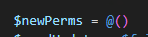

The Model is loaded:
Used PS Module:
Do you have an Idea?
Best Regards,
Andreas
76deee24-5fd9-4f36-8c8a-cad47a0ca78a.png
ffa00375-e213-4178-a061-31568dd68fbb.png
fdd076be-1a1e-4f55-806b-1b4c869a6903.png
69a8a187-7bc1-42ee-b39a-c6513084e0b4.png
19918062-6251-4963-ab1b-aa60d3797f3f.png
I copied what I could from your example but couldn't reproduce your issue.
In order to get as close to your setup as possible I'll spin a new system and try again.
I assumed your call to Set-DSEntityPermissions was Set-DSEntityPermissions -EntityId "d04348e4-0572-47c4-b517-6160f87aa8a6" -Permissions $newPerms ?
Jonathan Lafontaine
I assumed your call to Set-DSEntityPermissions was Set-DSEntityPermissions -EntityId "d04348e4-0572-47c4-b517-6160f87aa8a6" -Permissions $newPerms ?
Hey Jonathan
Yes, exactly:
Best Regards,
Andreas
0f9bf36c-35a8-4141-b71b-dbbca547a678.png
Hey Jonathan
Any News from your Tests?
When i run a Decompiler, then i see that the Parameter Permissions from Set-DSEntityPermissions is declared as [ConnectionPermission[]].
But the Class [ConnectionPermission], which is [RemoteDesktopManager.PowerShellModule.Private.models.ConnectionPermission] is declared as an Object:
Even if i declare the $newPerms as [ConnectionPermission[]], the Type will not be changed to an Object, since @() is an Array.
Example Declaration in the Module Function is Array:
Declaration in Parameter is [ConnectionPermission[]], which is invalid in my opinion:
So it looks like a Bug in the Parameter Declaration on Set-DSEntityPermissions for me:
The Parameter "Permissions" should be [Array] and no [Connectionpermission[]]
Im curious why this is working on your Side.
If you need more Informations from my Side, please let me know!
Best Regards,
Andreas
8469d505-08ea-43f2-8584-f06966310c6a.png
22430317-fc27-497b-81d5-199f33221988.png
2c03ca20-59cb-4116-905c-d16b021706bf.png
Hi Andreas,
Unfortunately, no, I haven't been able to reproduce your issue so far.
Here's my latest run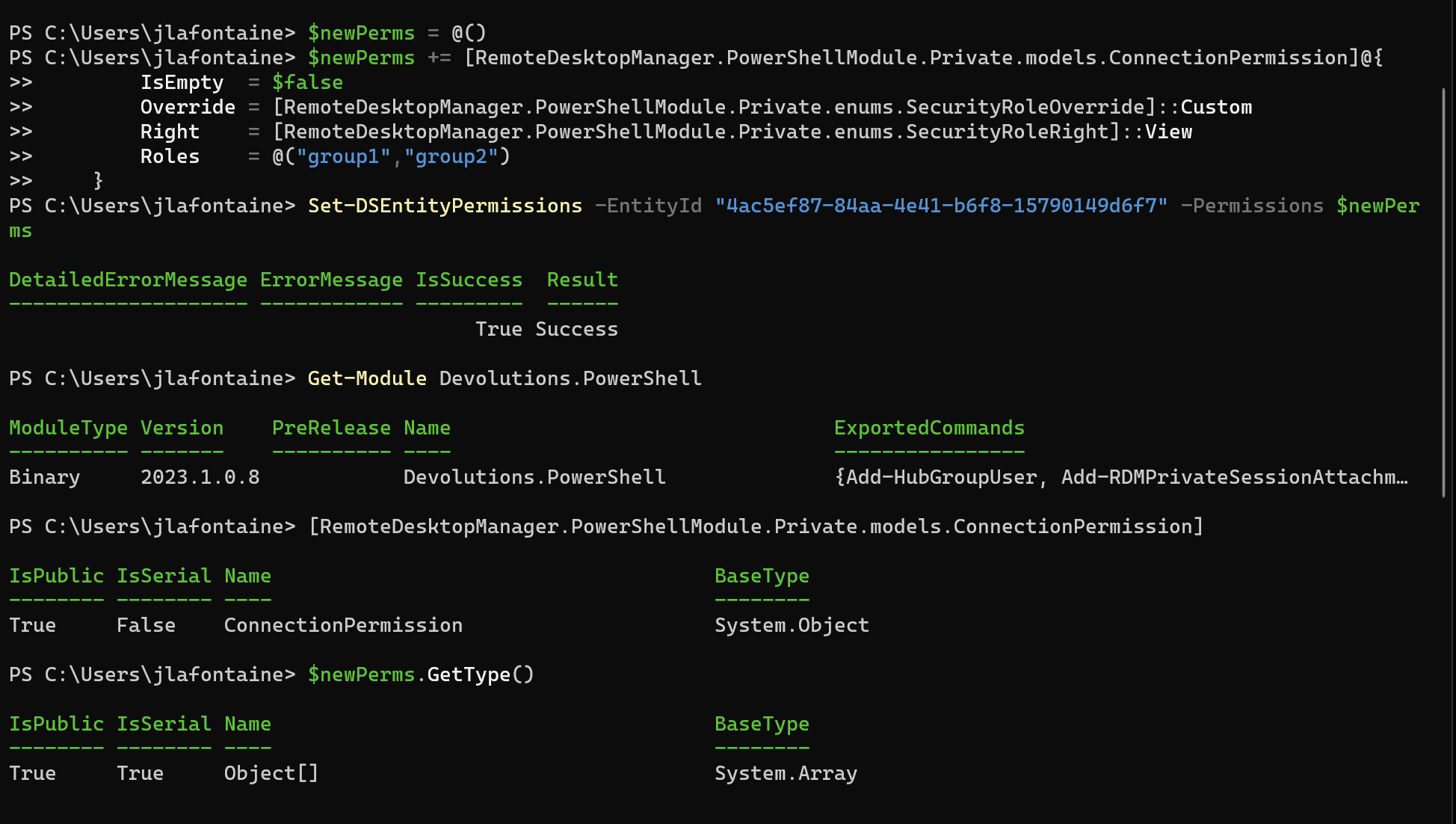
Since the conversion from Object[] to ConnectionPermission[] is done on the C# side, maybe the problem is PS.
What version of PS7 are you running?
Jonathan Lafontaine
ccae5b5e-28cc-47e0-9135-5de50684daf1.png
Hey Jonathan
Currently im using PS 7.3.4.
Did you also loaded your PS Module from PSG?
I just declared a NEW Object like follow (no Array!):
$newPerms = [RemoteDesktopManager.PowerShellModule.Private.models.ConnectionPermission]@{
     IsEmpty  = $false
     Override = [RemoteDesktopManager.PowerShellModule.Private.enums.SecurityRoleOverride]::Custom
     Right    = [RemoteDesktopManager.PowerShellModule.Private.enums.SecurityRoleRight]::View
     Roles    = @()
}
Now im 99.999% sure that there is a bug and/or you must have a different Function Version on your Side, because an Array is impossible to load in my current PSG Version of the Devolutions.PowerShell Module.
What is your suggestion to proceed here? Maybe a Module Dev around which can take a look at my Screenshots above?
Best Regards,
Andreas
Edit: With the newly found Workaround by calling Set-DSEntityPermission for each right, i buildt this into my Script and it works.
A lot of API Calls, but at least that works for now.
81cf4978-64ae-4733-a24c-383d6226fb3c.png
The screenshot from my last post was taken on a Windows VM using the module from PSG in PS 7.3.4.
I can send you a debug build you could load manually.
If that module gives you errors at least adding logging would be a possibility.
Jonathan Lafontaine
Hi Jonathan
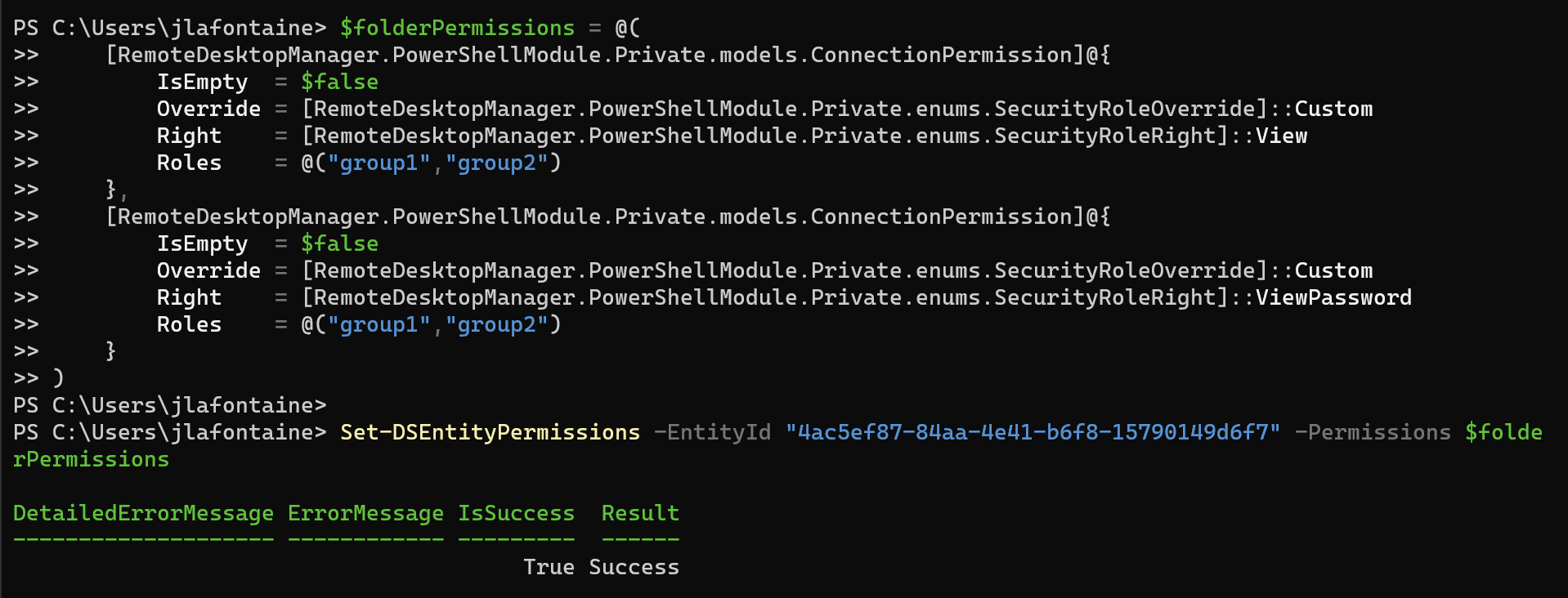
Can you please check your Script with more then 1 Permission Entries?
I think this must be the Difference.
$newPerms = @(
	[...]@{ ... perm1 }
	[...]@{ ... perm2 }
)
Best Regards,
Andreas
Jonathan Lafontaine
6a87742f-caf3-4a87-ac1d-c475f2c57eb2.png
Hi Andreas,
The next release of the module will include the variables $DSBaseURI, $DSInstanceVersion, and $DSSessionToken. You will be informed when it will be released. If you need more information, let us know.
Hey Maxime
Thanks for the Information.
Hey Jonathan
Thanks also for the given Informations and Tests. I will investigate further.
It looks that SecurityRoleRight doesnt support 'ViewSensitiveInformation' yet:
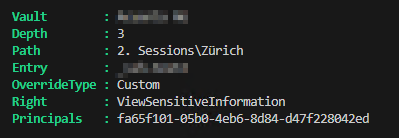

Seems currently not listed in:
> [RemoteDesktopManager.PowerShellModule.Private.enums.SecurityRoleRight].GetEnumNames()
View
ViewPassword
Add
Delete
Edit
EditStatus
EditDescription
EditSecurity
PasswordHistory
ConnectionHistory
RemoteTools
Attachment
EditAttachment
Inventory
ViewLogs
Handbook
EditHandbook
WebManagementTools
ConsoleManagementTools
MacroScriptTools
MacroScriptToolsEntry
EditPassword
Execute
ViewSessionRecording
ViewInformation
Export
EditInformation
Move
Im also wondering, if you can get the "View" Permissions via Get-DSEntriesPermissions.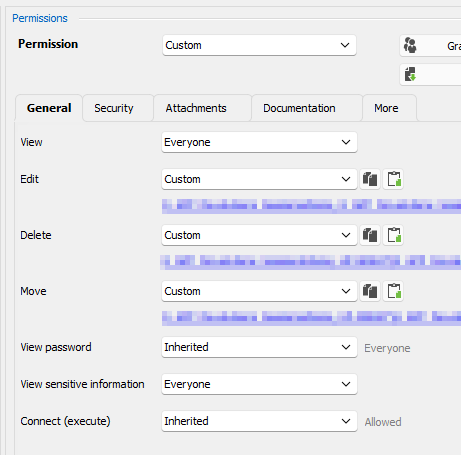
PS Return:
$GetDSEntriesPermissions = Get-DSEntriesPermissions -VaultId $connectionInfo.repositoryID
$checkPermissions = $GetDSEntriesPermissions | Foreach-Object { if($_.Path -eq $connectionInfo.group -and $_.Entry -eq $connectionInfo.name){ $_ } }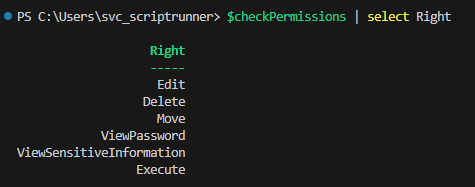
PS: Im using Foreach-Object instead of Where-Object because of the Performance boost.
Best Regards,
Andreas
Edit:
I have also some Problems with New-DSEntryBase
Im trying to clone and modify from a SSH VPN Template.
Simple code:
$result = Get-DSEntry -EntryId $sourceTemplate -AsRDMConnection
$sshbody = $result.Body.data.connectionInfo
$jsonBody = ConvertTo-Json ($sshbody ) -Depth 6
$response = New-DSEntryBase -JsonBody $jsonBody

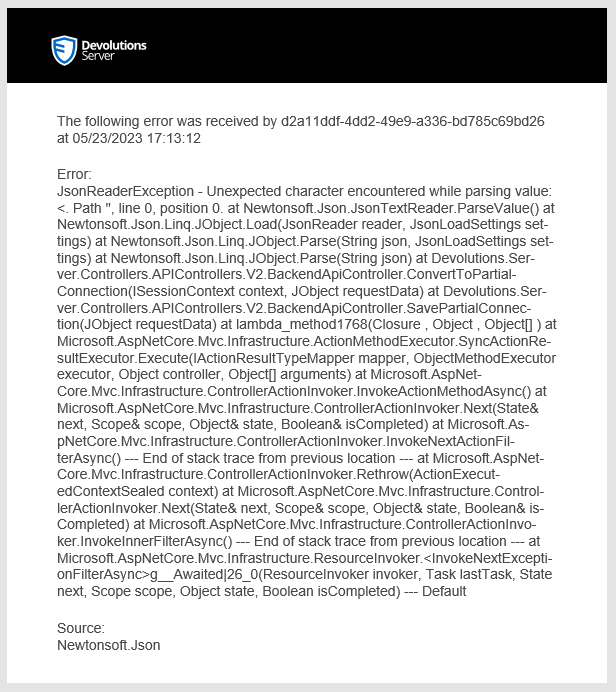
When im using $result.Body.data (not .connectionInfo) as body, im getting this Error: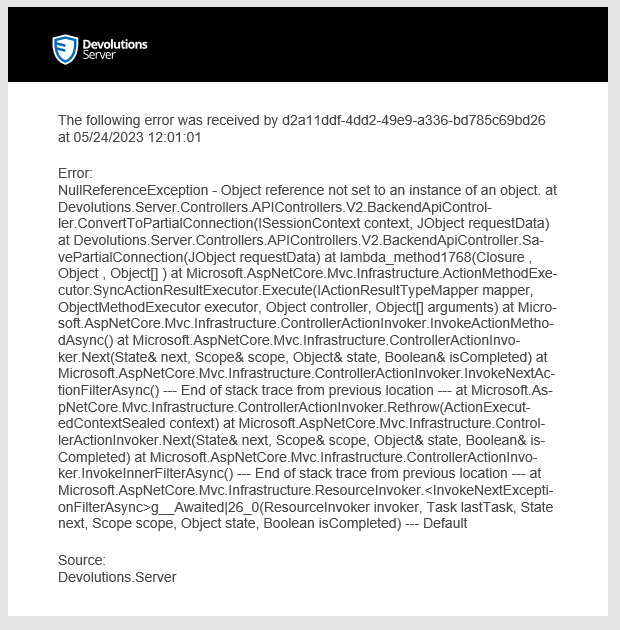
If there is another proper way to create an SSH VPN via Powershell, please let me know!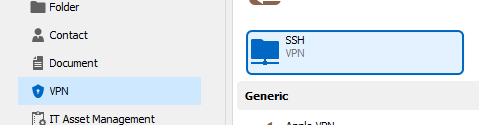
Best Regards,
Andreas
484c19c9-c103-43ad-9cf2-782bb2bfc1ca.png
0f12965e-de22-4077-8232-25e61efa195b.png
8f731696-ad34-42e4-b008-e1f8016f5b03.png
e8127360-cf08-4365-a25d-51479a6ec9e6.png
9e13cea2-a2a8-4911-8072-71d17acb6f3e.png
2deebf2d-1fca-464d-a7a1-5524e8d86a0a.png
99289e7a-1187-4d2f-857e-d951e48c7a6e.png
0c014dda-3ffa-4554-8ca1-e6d24c72db80.png
ec44b731-0689-47ba-9991-4fda34dc919f.png
Okay, i just tried it again with the Set-DSEntityPermissions Problem.
This works:
$newPerms = @(
	[RemoteDesktopManager.PowerShellModule.Private.models.ConnectionPermission]@{
		IsEmpty  = $false
		Override = [RemoteDesktopManager.PowerShellModule.Private.enums.SecurityRoleOverride]::Inherited
		Right    = [RemoteDesktopManager.PowerShellModule.Private.enums.SecurityRoleRight]::View
		Roles    = @()
	}
	[RemoteDesktopManager.PowerShellModule.Private.models.ConnectionPermission]@{
		IsEmpty  = $false
		Override = [RemoteDesktopManager.PowerShellModule.Private.enums.SecurityRoleOverride]::Inherited
		Right    = [RemoteDesktopManager.PowerShellModule.Private.enums.SecurityRoleRight]::Add
		Roles    = @()
	}
)
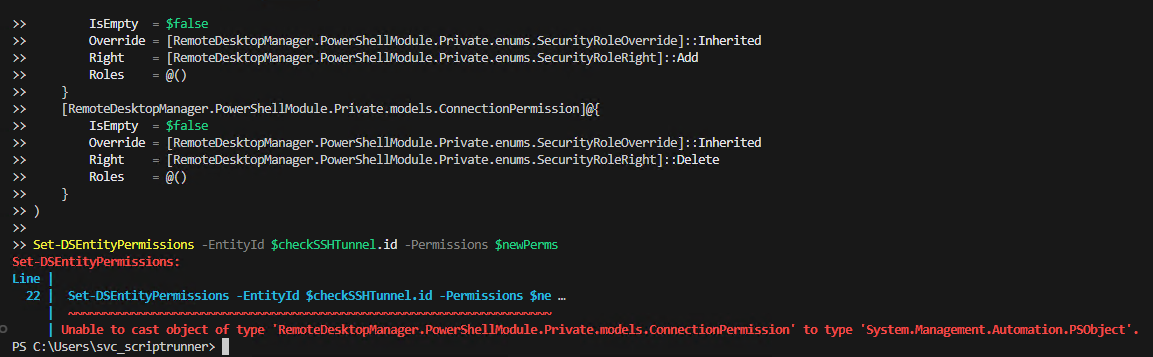
But this doesnt work:
$newPerms = @(
	[RemoteDesktopManager.PowerShellModule.Private.models.ConnectionPermission]@{
		IsEmpty  = $false
		Override = [RemoteDesktopManager.PowerShellModule.Private.enums.SecurityRoleOverride]::Inherited
		Right    = [RemoteDesktopManager.PowerShellModule.Private.enums.SecurityRoleRight]::View
		Roles    = @()
	}
	[RemoteDesktopManager.PowerShellModule.Private.models.ConnectionPermission]@{
		IsEmpty  = $false
		Override = [RemoteDesktopManager.PowerShellModule.Private.enums.SecurityRoleOverride]::Inherited
		Right    = [RemoteDesktopManager.PowerShellModule.Private.enums.SecurityRoleRight]::Add
		Roles    = @()
	}
	[RemoteDesktopManager.PowerShellModule.Private.models.ConnectionPermission]@{
		IsEmpty  = $false
		Override = [RemoteDesktopManager.PowerShellModule.Private.enums.SecurityRoleOverride]::Inherited
		Right    = [RemoteDesktopManager.PowerShellModule.Private.enums.SecurityRoleRight]::Delete
		Roles    = @()
	}
)
Doing all Permissions one by one then it works.
Looking forward for a fix for this.
Best Regards,
Andreas
d79670ae-aecd-4f63-ad26-577d42df3731.png
9a48264e-9b72-4e69-b589-5b3f9fd51c87.png
Thank you for the investigative work, looks like you have isolated the issue.
I'll get on it right away.
Jonathan Lafontaine
Thanks Jonathan
I've also posted some other Issues above with SecurityRoleRight, Get-DSEntriesPermissions and New-DSEntryBase.
Do you have any Inputs about them?
Would be great to get the Sync Script finished with the New Module 😊
Best Regards,
Andreas
I haven't had the time to look into the New-DSEntry yet but will do so right after checking the permission issue.
Jonathan Lafontaine
No Problem.
If there is another Way to get an SSH VPN Entry or if i made some misstakes, please let me know.
Best Regards,
Andreas
I think I was able to fix all problems related to getting/setting permissions.
I'll upload a new version with those fix soon.
VPN entries are not supported on DVLS so applying a vpn template won't work.
RDM uses different APIs and object to bypass this limitation so using the RDM powershell module would probably be your best bet if you want to work with those templates.
Jonathan Lafontaine
I think I was able to fix all problems related to getting/setting permissions.
I'll upload a new version with those fix soon.
VPN entries are not supported on DVLS so applying a vpn template won't work.
RDM uses different APIs and object to bypass this limitation so using the RDM powershell module would probably be your best bet if you want to work with those templates.
Hey Jonathan
Thanks for the Fix, will test it today with the permissions.
EDIT: Works perfect with 2023.1.0.9, thanks a lot!
But for the New-DSEntryBase Error, i've also the same Error when trying to clone a Website Entry.
In the old Devolutions.Server Powershell Module the New-DSEntryBase cmdlet works flawlessly.
Can you please recheck the Function? I need it for creating Entries from predefined Templates
Another Question: It looks like there is no var $Global:WebSession set anymore with the Devolutions.Powershell Module.
How to access the WebSession Details from the current Devolutions Session via PS Module? With this Var i should be able to invoke a Web Request via REST Endpoint /api/connection/save
Thanks,
Andreas
Hi Andreas
Glad to know the fixes for the permissions worked for you.
Can you try this script to clone your website entry?
$result = Get-DSEntry -EntryId $webEntry -AsRDMConnection
$sshBody = Convert-XMLToPSCustomObject -XML $result.Body.data.connectionInfo.data
$jsonBody = ConvertTo-Json ($sshbody ) -Depth 6
$response = New-DSEntryBase -JsonBody $jsonBody
$Global:WebSession doesn't exists because we are not using Invoke-WebRequest anymore.
We manually constuct the request in C# which allows us to support requested feature like O365 authentication.
Regards
Jonathan Lafontaine
Hey Jonathan
Can you try this script to clone your website entry?
$result = Get-DSEntry -EntryId $webEntry -AsRDMConnection
$sshBody = Convert-XMLToPSCustomObject -XML $result.Body.data.connectionInfo.data
$jsonBody = ConvertTo-Json ($sshbody ) -Depth 6
$response = New-DSEntryBase -JsonBody $jsonBody
This doesnt work on my side: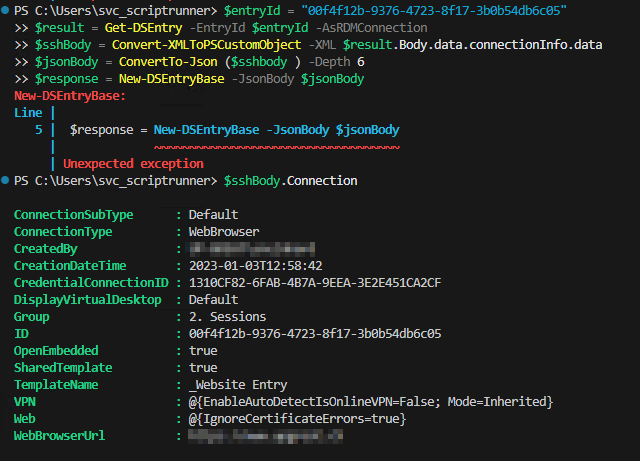
I also tried it with random generated ID and a completely new created Template. Still the same: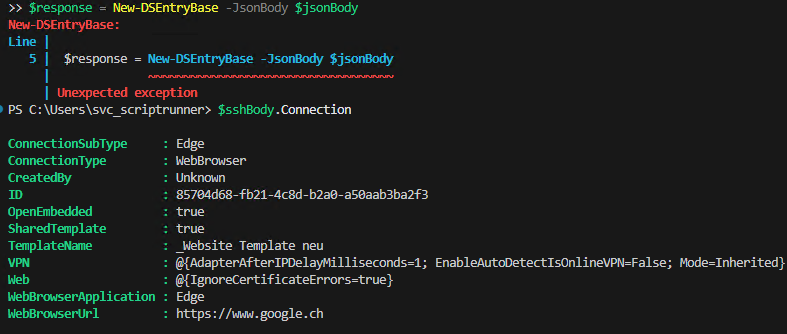
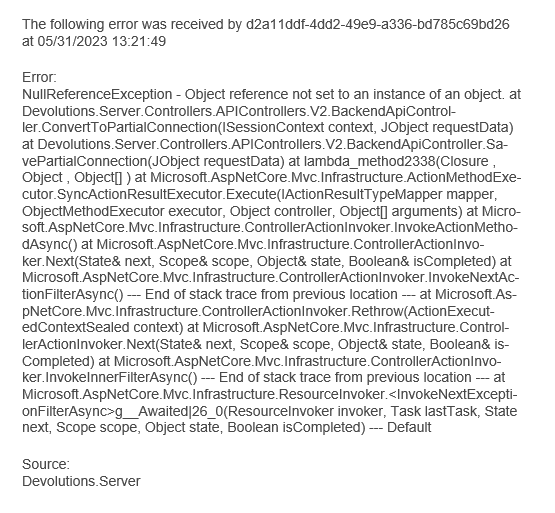
With only connectionInfo i think there will be some needed Parts missing and needs an additional editing after modify.
It should be usable with $result.Body.data.connectionInfo in my opinion.
Best Regards,
Andreas
dcea829c-78c4-4fcd-9dc2-45f01df7ed35.png
efe9f78b-4012-4fef-8855-02d5cb4bd8c2.png
84c4d573-8e40-4fec-b1ed-838e39661381.png
Hi,
After some more back and forth with the DVLS team, we were able to figure out the problem and here's a script that should work.
$template = (Get-DSEntry -EntryId $templateID).Body.data
$NewEntry = $template.PSObject.Copy()

$NewEntry.PSObject.Properties.Remove('id')
$NewEntry.PSObject.Properties.Remove('metaInformation')
$NewEntry.PSObject.Properties.Remove('resolvedInheritedPermissions')
$NewEntry.PSObject.Properties.Remove('resolvedTimeBasedUsageSettings')
$NewEntry.PSObject.Properties.Remove('templateName')

$NewEntry.name = 'newEntry'
$NewEntry.repositoryId = $repoID

$NewEntryRes = New-DSEntryBase (ConvertTo-Json $NewEntry -Depth 6)
It should even let you create unsupported template entries so your SSH VPN should be covered.
Let me know if this solves your issue.
Regards
Jonathan Lafontaine
Hey Jonathan
Thanks for the Snippet!
Your Code above creates an Entry, that works. And if i clone from a Web, it looks good.
But if i clone an SSH Tunnel Object, it removes the data.vpn part from the Object.
The JSON has all the Informations, but it simply ignores and after creation, the Objects data.vpn is almost empty:
Is it possible that New-DSEntryBase removes oder ignores some Parts in the given array?
Best Regards,
Andreas
54b89891-ee30-42d2-94f2-42fe77cb4ff6.png
Hi Andreas
It looks like it, indeed.
Creating the entry, using a template, from the web interface seems to give the same outcome.
Since DVLS doesn't support VPN entries, I wouldn't be surprised they don't have the backing model needed to keep that part of the xml.
Jonathan Lafontaine
Thanks Jonathan.
It seems definitively supported via DVLS. Here is a Shot from the Webinterface: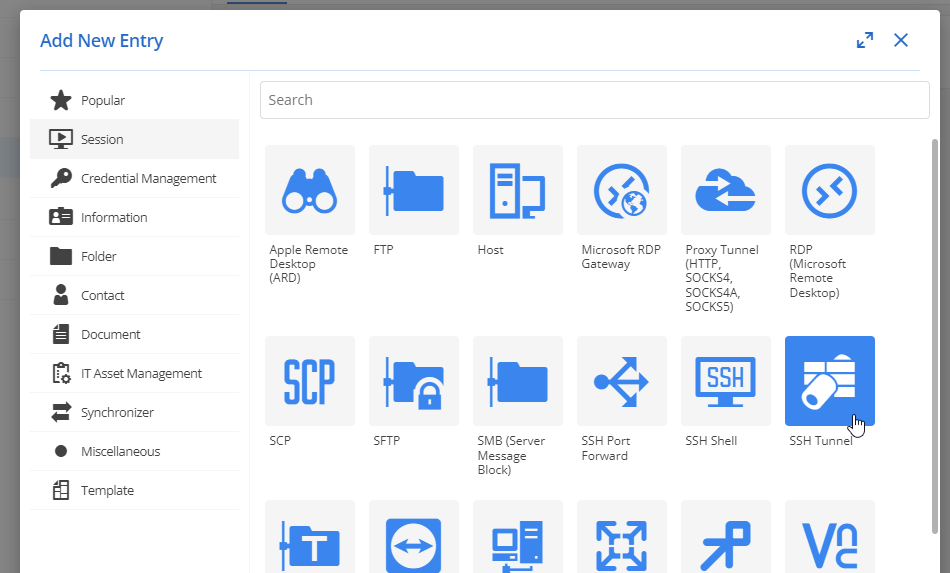
May i ask when it will be implemented into the Powershell Module?
Its very important for us, because this is the only Type we are using to connect to our Customers which means, im not able to switch to the new Module without this Functions since the whole Session Part is completely automated on our DVLS Instance for all Vaults.
Thanks,
Andreas
98267b0f-693b-4fb3-93e4-ad6bb2ab7512.png
Oh, my bad. I thought you were still referring to the vpn template entry.
If the web supports it, we should be able to too with the module.
Lemme look into it.
Jonathan Lafontaine
Oh, my bad. I thought you were still referring to the vpn template entry.
If the web supports it, we should be able to too with the module.
Lemme look into it.
One Second, i think i made a misstake.
Im really talking about SSH VPN - my misstake with the SSH Tunnel.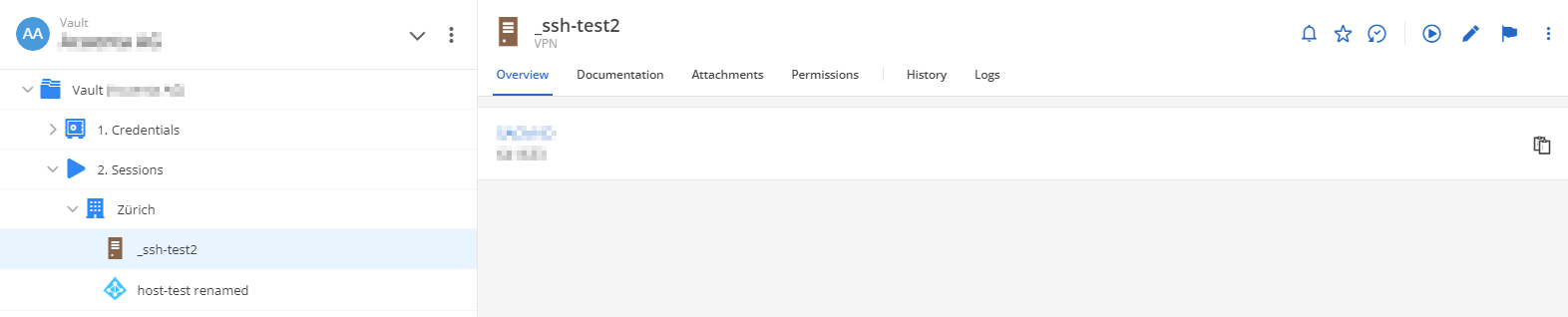
Indeed it looks like this Type isnt available to be created directly in DVLS Web.
But the Type is being used via Web and Launcher.
Sorry for the confusion!
Best Regards
Andreas
5a05bad9-3728-4dd7-b644-3aa72415a1c0.png
Launcher is a lite version of RDM so it knows what a SSH VPN is and probably uses $entry.Body.data.Data (which contains the vpn info) instead of the DVLS data structure.
Jonathan Lafontaine