Multiple issues with PAM LDAPS providers (unable to connect, unable to verify password, account discover failures, scheduled PAM system credential checks failing etc)
Multiple issues with PAM LDAPS providers (unable to connect, unable to verify password, account discover failures, scheduled PAM system credential checks failing etc)

Hello,
Check Syncronization Failures occur multiple times per day correlating to the frequency of the PAM heartbeat interval setting (6 hours).
All of the domain credentials for which the password has been entered manually into PAM are failing during the scheduled periodic syncronization test, however if a manual test is performed a few minutes later there is no issue.
The issue does not seem to occur for accounts that have allready had the password reset via PAM.
This is causing email alerts, as well as a lot of PAM accounts showing a red status even though a manual synronization check was successful previously.
Have restarted the scheduler service but that has not made a difference.
Is this expected behaviour, or any suggestions on how to troubleshoot this further?
Thanks
Joe
All Comments (14)
Hello,
What DVLS version are you using?
Is the Scheduler service running with a service account?
Is the Reset password on check in option enabled for these privileged accounts?
Best regards,
Érica Poirier
Hi Erica,
We are using the latest version of DVLS
The scheduler runs under a service account with the same credentials used on the PAM provider which is able to successfully validate and reset passwords
The reset password on checkin option is not enabled, as we do not want to rotate credentials automatically, at least for the majority of accounts currently.
Pls let me know if you would like more info.
Thanks
Joe
Hi Joe,
Thank you for your feedback.
I tried to reproduce your issue without any luck even if I manually created the privileged account.
Do you see any error messages in the DVLS logs or in the logs of the privileged account?
Best regards,
Érica Poirier
Hi Erica,
The logs on the privelleged account show 'The account can't be found on domain or domain unreachable' for the Check Syncronization error by PamSystem. Interestingly over the past few days, some of the checks succeeded, and others failed. The failures occured at different times during the day, and succeeed at the same time the following day.
There are no correlating events in the data source logs that I could see.
Joe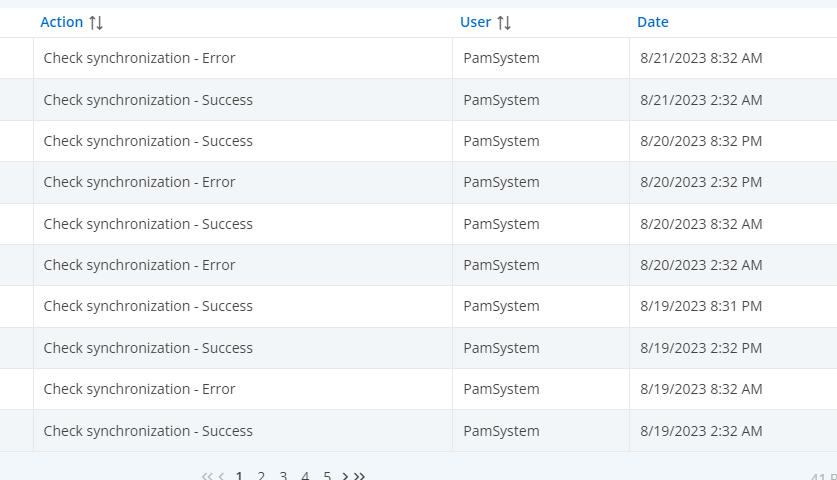
bc39fa31-1ab3-44ef-bb5a-88ff06cc81f8.png
Hi Joe,
Have you tried to restart the Scheduler service in the Companions tab of the DVLS Console?
What DVLS version are you using?
In the latest DVLS version, it should provide more logs about similar behaviours.
Best regards,
Érica Poirier
Hi Erica,
I just updated to 2023.2.6.0 and now the manual check sync does not work at all for active directory accounts and the error below is logged in the DVLS console logs. I know the password is correct on the PAM accounts, because they can be used to authenticate to servers when checked out by RDM. The test connection button in the DVLS PAM Provider config says the connection is successful, but password sync check is now broken. The manual sync was previously working fine with 2023.2.4.0, it was only the scheduled PAM system check was failing 50% of the time.
In addition, the resetting of passwords for domain admin accounts no longer works, it was working previously with v2023.2.4.0 with the changes detailed in https://forum.devolutions.net/topics/39996/dvls-pam-reset-ad-password--exception-has-been-thrown-by-the-target-of#179761
Joe
LdapException - The LDAP server is unavailable.
at System.DirectoryServices.Protocols.LdapConnection.Connect()
at System.DirectoryServices.Protocols.LdapConnection.BindHelper(NetworkCredential newCredential, Boolean needSetCredential)
at System.DirectoryServices.Protocols.LdapConnection.Bind(NetworkCredential newCredential)
at System.DirectoryServices.AccountManagement.CredentialValidator.lockedLdapBind(LdapConnection current, NetworkCredential creds, ContextOptions contextOptions)
at System.DirectoryServices.AccountManagement.CredentialValidator.BindLdap(NetworkCredential creds, ContextOptions contextOptions)
at System.DirectoryServices.AccountManagement.CredentialValidator.Validate(String userName, String password)
at System.DirectoryServices.AccountManagement.PrincipalContext.ValidateCredentials(String userName, String password)
at Devolutions.Server.Common.Managers.Domain.PamActiveDirectoryManager.ValidateUserCredentials(ADQueryParams parameters, String username, String password, PrincipalContext& principalContext)
---
The LDAP server is unavailable.
Hello Joe,
Could you please send an email to service@devolutions.net with a reference to this forum's thread to open a service ticket?
We will then send you a link to book a support session to investigate this problem.
Best regards,
Érica Poirier
Hello @everyone,
For your information, a ticket has been submitted to our developer team regarding this issue.
Once an update will be available, we will post it here.
Best regards,
Érica Poirier
Hi jm2,
We have reworked our AD provider in version 2023.3.X. Can you tell me if your problem still exists?
Best regards,
Marc-Andre Bouchard
Hi Marc-Andre,
Thanks for following up. I've updated to latest version (2023.3.6) and the LDAP/S issues still remain, in fact its now worse. For example:
1) With a domain user provider in same forest, but seperate domain, the 'test connection' works in the provider's configuration (ldaps), but manually checking password sync status for a PAM credential fails. The logs tab in the DVLS PAM web page shows 'The account can't be found on domain or domain unreachable', but if I use the same account when launching a connection via RDM it works fine. Also the respective scan configuration / account discovery returns zero results since updating from 2023.2 to latest 2023.3 version.
2) With a domain user provider in different forest/domain, the 'test connection' does not work in the provider configuration, nor does checking password sync status for a PAM credential. Using the Microsoft utility ldp.exe, a successful LDAPS bind connection is possible using the same address and credentials from the DVLS server.
3) Nothing is logged in DVLS console logs for these failures
4) I still have to verify whether the scheduled PAM account checks are broken in cases where a manual check succeeds. However, there isn't much point focusing on this until the other issues are resolved, and from memory it was only happening 50% of the time anyway.
Could you coordinate some serious prompt attention to these issues pls, its been over 3 months since I reported the issues, and they are significant.
Thanks
Joe
Hello Joe,
Marc-Andre asked me to follow up on this, I am the developer of the LDAP/S connection and I can diagnose what is happening and get a fix for you asap. I have some tools you can also run that I can send you in a DM to diagnose the exact problem.
The first thing I would like to find out why the scan configuration is returning zero results. If you are saying the "Test Connection" button succeeds, but then the scan returns zero results. My first intuition is problem a problem with detecting the scan configuration domain container being used. Can you send me a DM with some screenshots of your Provider configuration as well as you Scan configuration? You can do this in a DM and we can continue the conversation there until we resolve the issue.
Thank you for your help while we diagnose this problem and fix it.
Best regards,
Paul
Hello Joe,
Thank you for working with me on these problems. I think that the issue with AD PAM Provider "Test Connection" has been resolved in our latest version, to remind you the issue was with the domain name in the username, can you tell me if this is still an issue?
Also can you let me know if the second problem with the Password Sync is still broken or not in the latest version?
Thanks,
Paul
Hi Paul,
Thanks for checking on this one. Yes all LDAP issues seem to have been sorted out now with the new version, and the scheduled password heartbeat is behaving better now.
The only issue I noticed, is that I cant update the properties of a PAM account (i.e. set to unmanaged) if the provider is unavailable. Have allready created nother forum post for this, https://forum.devolutions.net/topics/40693/unable-to-update-pam-account-attributes-when-provider-unreachable-need#184242
Appreciate you assistance.
Joe
Hi Joe,
Thanks, happy that this issue has been resolved. We will track that other issue in the other thread.
Paul