Search for all words in Devolutions Web Login
0 vote

At the moment, when a website entry name is like: Service.name - Company.name, we cant search for "Company.name Service.name",
It filters only from the beginning of an entry. Whit lastpass we could search for any words of an entry in any order.
Could you please change the search, so we can just search for any word combination and it shows all entries which have these words in it's name.
Example entry: Barracuda - Devolutions
If we search for: Devolutions Barracuda: No result ->New: it shows the entry whit these two words in it.
Thanks!
All Comments (38)
Hi,
An improvement ticket has been submitted to the engineering team to analyze the search with your case. The title specifies Devolutions Web Login, are you also talking about the search in Devolutions Server (DVLS) Web UI and Remote Desktop Manger (RDM)?
Thank you for your feedback!
Olivier Désalliers
Hi Olivier
Thanks for the feedback.Yes the most important place is the Devolutions Web login, as there is no folder structure or Filters, that can help to search for an entry. So this is the most important one. But yes it would also make a lot for sense for RDM/DVS. I found this article regardint the Boolean search: https://docs.devolutions.net/rdm/windows/user-interface/status-bar/search-filter/ But it did not work in neither RDM or DVS. If I search for Devolutions & Barracuda, there are no results in RDM.. it seems like the Boolean search is not working there anymore.
Kind regards
Patrick
Hey Olivier
What's the status here? The Devolutions Web Login is really unusable like that.
It needs to search for words anywhere in an entry instead of from the beginning to the end. Like everywhere else in The Devolution universe.
The same for the folder where I want to save something. I don't want to enter VaultXY\credentials\accounts\customers\Name123 :I just want to enter Name123 and see the filters folder name.
Also it is still not possible to change the entries, it will delete the password completely when someone hits save.
Please give this module some love, we really like the DVLS but the Browser Plugin ist completely horrible and not the standard of the other Devolution products.
Thanks!
Hi,
The search already searches for words anywhere like everywhere else in "The Devolution universe"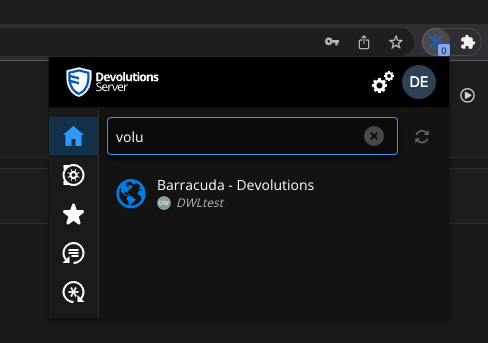
For cases like “Devolutions Barracuda” in the search input and for the “folder destination” when saving, it should be available in the next DWL version.
We will investigate for the password issue when editing.
Best regards,
Olivier Désalliers
BarracudaDevolutions.png
Hi Olivier
Thanks for the reply. A lot of issues were fixed with the release today, thank you.
So these for are left:
-Search entries, if both words are in there (Devolutions Barracuda) is found in an entry like: Devolutions Login Barracuda)
-Folder Destination Search
-Search for ALL entries without a filter of the URL, when using the search of the field (described here under 1: https://forum.devolutions.net/topics/39528/devolutions-web-login-problems)
-Tokens are living for the defined amount of days of DVLS (perhaps this is fixed already in this release?)
Thanks!
Cheers
Patrick
Hi,
The fix related to the tokens lifetime was in today release. (2023.2.1.0)
Everything related to the search is planned for the next release.
Best regards,
Olivier Désalliers
I share a Vault with someone else, but she has only permissions for a subfolder of my Vault.
When I search for entries in the Search Window (which are in this folder) it does not display any of them. But when I choose the Vault first and search for it, it finds it.
So it would be nice, that it also finds the entries without selectin the Vault first, as it has access to the subfolder.
Thanks.
Hi,
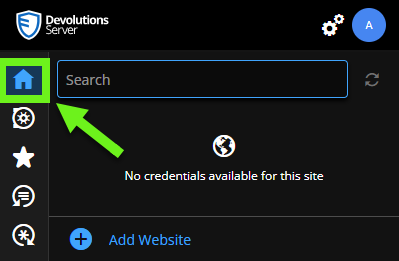
For the “Search Window” do you mean there: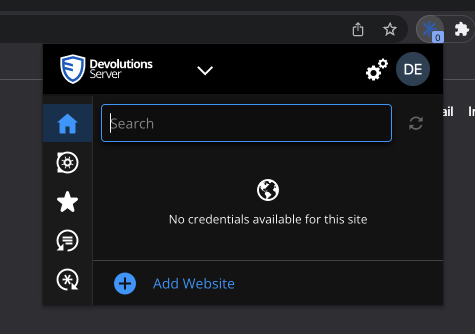
And for selecting the vault first and then searching in it you mean there: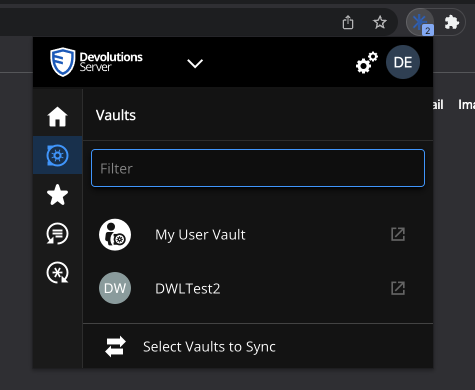
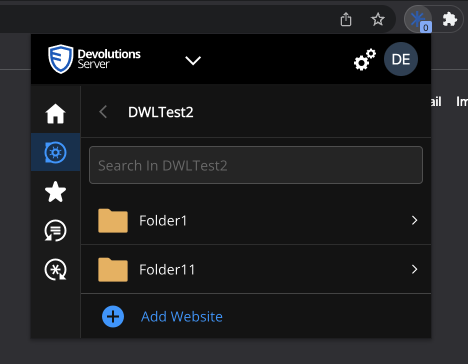
You can find website entries in synced vaults where the user has the “View” and “Connect (Execute)” permission allowed on them when searching them in the “Home/Search Window”.
Best regards,
Olivier Désalliers
VaultSelector1.png
SearchinVault.png
HomeSearch.png
Hey Olivier
Yes that's exactly what I mean. And it work when I select the vault and search, but it does not when I just search in the search of the first Screenshot, but she has only view access to the subfolder not the whole folder. That is the difference between the other vaults where it works.
As it works when I select the vault, it seems to be just a setting, that it also finds it from the main search over all vaults too.
Cheers
Patrick
Hi Patrick,
I'm currently trying to replicate the behavior your user has... Would you be willing to verify with her if she is able to see the entries that have the issue, but directly in the UI of DVLS Web, or RDM (without DWL)?
I also wonder if the sub-folder of the Vault she has access to is directly in the root of the Vault, or if that folder is inside another folder in which she doesn't have the permission to view it?
Lastly, I'd like to know the DVLS version you are using.
Best regards,
Jonathan Iannone
Jonathan Iannone
Hi Jonathan
I just sent you some detailed screenshots explaining it.
Cheers
Patrick
Hi Patrick,
Are you able to find the entries you are looking for by using the Search bar inside the "Matching" section rather than in the "All Entries" one?
Here:
Regards,
Jonathan Iannone
Matching.png
Hi Jonathan
Yes it is working there, I did not even see that she was in the Menu below. So I tell her to use the home search.
But shouldn't it find it also in the vault menues as well? As it finds other entries in other vaults there.
Thanks a lot!
Cheers
Patrick
Hi Jonathan
Is there an update to the search behavior? It should just search for all words in an entry not a specific order, otherwise we can't find entries anymore.
Thanks
Patrick
Hi Patrick,
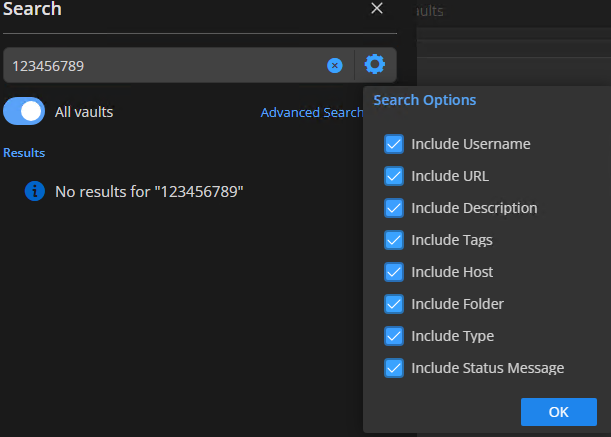
We've been working on implementing some improvements regarding this in the last internal DWL version. This upcomming version will have search options to treat the space character as AND or as OR, just like RDM does : 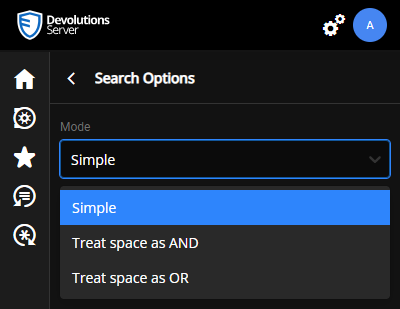
Plus, we renamed some of the tooltips and placeholders to avoid confusion regarding where to search for Matching entries/Vaults/Entries within a specifc Vault.
Best regards,
Jonathan Iannone
Search modes.png
Hi Jonathan
Sounds good! Any idea in which version this will work?
Kind regards.
Patrick
Hi,
It's now available in Devolutions Web Login 2023.2.2.1 by clicking on "Search Options" next to the Search field: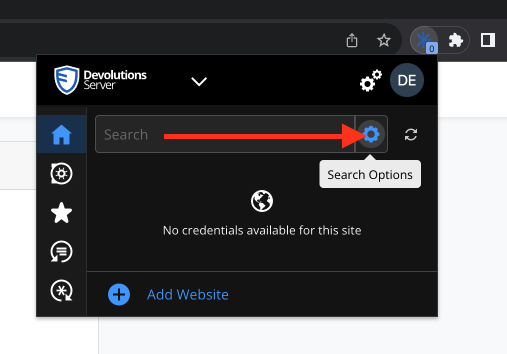
Best regards,
Olivier Désalliers
SearchOptions.png
Hi Olivier
It works like a charm! Thank you so much!
Cheers
Patrick
Hey Olivier
One other thing about the Plugin. Would it be possible to add the function "alternative URL" in the plugin when hitting edit? At the moment we need to login into the DVLS server every time just to add it. And it would really belong in the edit dialog. Thanks!
Another question if SSO for DVLS is activated, will the plugin also work without an additional login?
Thanks and best regards.
Patrick
Hi,
If you are editing an entry with the plugin connected to DVLS 2024.1, you should be able to add equivalent/alternative URLs.
You can log in to the plugin with DVLS the same way you log in to the DVLS web interface. Therefore, you can use SSO to log in to the plugin without an additional login.
Best regards,
Olivier Désalliers
Hello,
I am new to this Forum and saw this thread, before opening a new one, this might be better here?
I am currently setting up our DVLS Server and would like to add to this discussion.
In my Tests i had no trouble with the search, it worked fast and realiable.
Now that I have specific entrys, I have noticed a flaw (at least for my use case).
Places the search does not work at:
- Custom fields
- Entry Values -> (Cant search for "Beraternummer" nor the "Value" also cant search for Usernames or Domain Names)
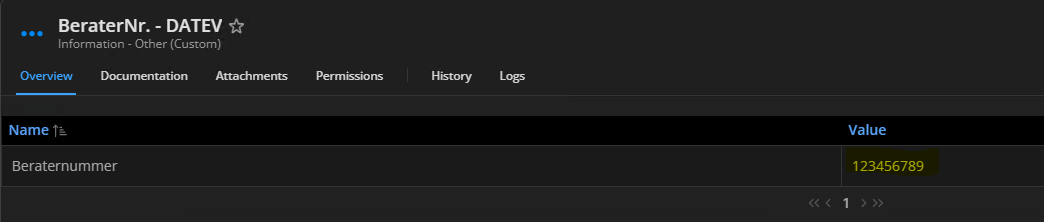
Is it planned to add this capability to the search?
I would have to ajust my implementation depending on the answer =)
Thanks a lot!
001aefae-dcee-4325-a648-836b69ddb601.png
473a373f-7d85-471c-8ff7-eedd8c9d576b.png
Hello,
Thank you for your suggestion. This product development is not currently planned. We are taking note of your feedback and will analyze how we could improve. We will also follow this topic to see if there is any additional interest or input from other users.
Best regards,
François Dubois
Hi Olivier
I tested again with version 2024.1.7.2 and I don't see any option to do add an alternative URL via the web plugin: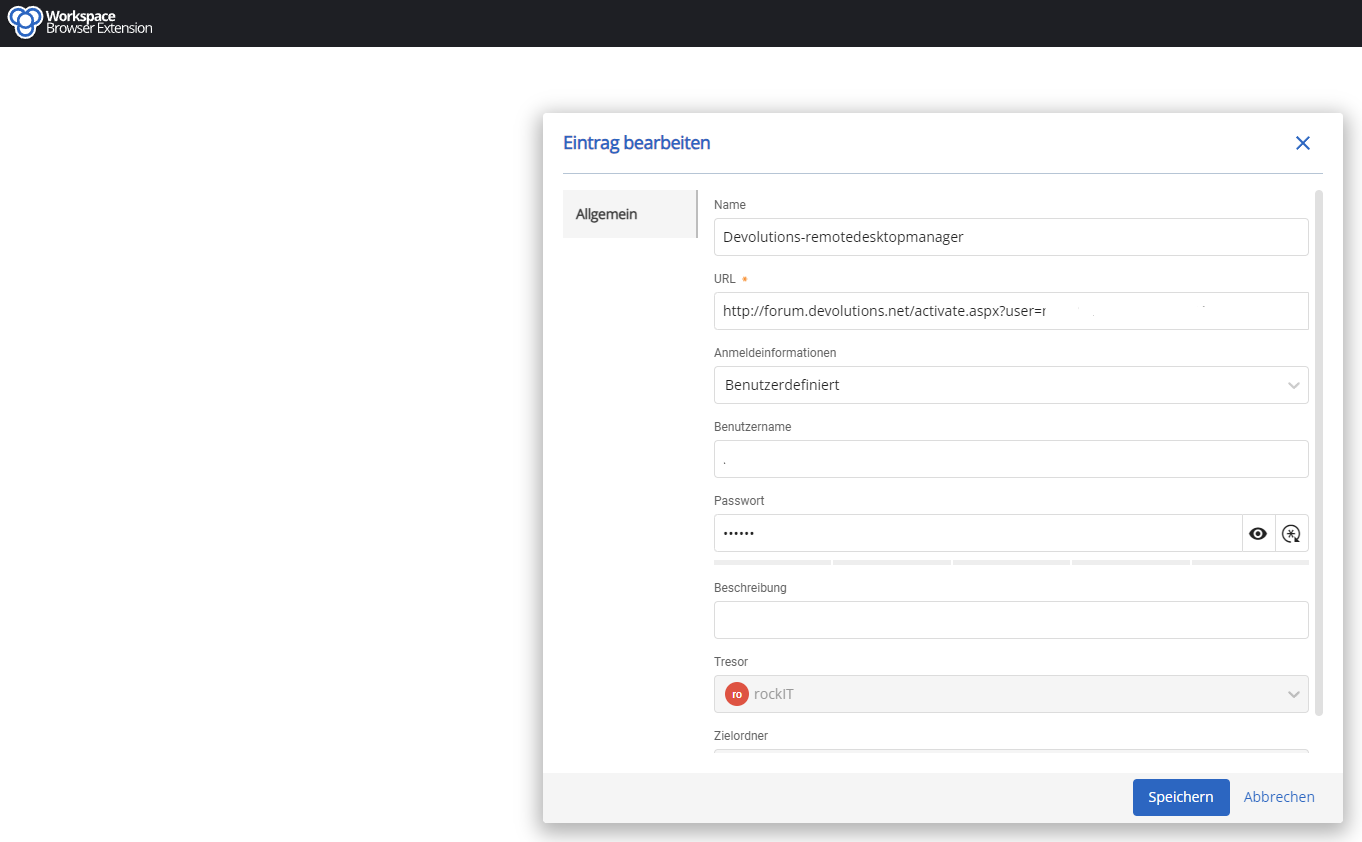
Thanks and Kind regards.
Patrick
Hi,
If you are editing an entry with the plugin connected to DVLS 2024.1, you should be able to add equivalent/alternative URLs.
You can log in to the plugin with DVLS the same way you log in to the DVLS web interface. Therefore, you can use SSO to log in to the plugin without an additional login.
Best regards,
Alternative.png
Hi,
2024.1.7.2 is the Devolutions Workspace browser extension version. What is your Devolutions Server (DVLS) version? Both need to be at least version 2024.1.
Best regards,
Olivier Désalliers
Hi Olivier
That was it, now it open the entry directly in DVLS with all options. Perfect!
I saw in one of the last videos, that DVLS will also support credit card infos in the future, is this already implemented in the newest version?
Thanks a lot.
Patrick
Hi,
This feature is already supported in Devolutions Hub (Business/Personal) and will be available in Devolutions Server in the future.
Best regards,
Olivier Désalliers
Hi Olivier
I can't search for a folder in the Workspace Plugin anymore, before it would find any folder that has a specific word in it. Can you please fix that search, so we can easily find a folder again. 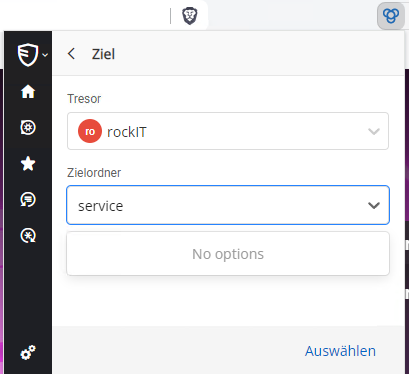
Thanks and best regards
Patrick
search.png
Hi,
The version (2024.2.1.0) that finds any folders that has a specific word in it is now available. You should receive it automatically when your browser attempts to update your extensions.
Best regards,
Olivier Désalliers
Hi Olivier
It works like a charm, thanks a lot!
One thing I recognized, that sometimes after using an entry, it gets greyed out with a donut turning circels.Even if I hit refresh it wont get away. I need to logoff and logon to get it working again. 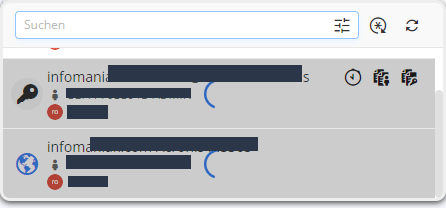
Thanks and best regards.
Patrick
greyed.out.png
Hi,
Regarding the "grey out" issue, does it occur when using the “Copy Username/Password/OTP” buttons, when filling out a website, or both? What is your Devolutions Server version? Does it happen only on Chrome or on other browsers as well?
Best regards,
Olivier Désalliers
Hi Olivier
Yes exactly it happend when I used these buttons to copy it but I don't think when filling it out normally. I had DVLS 2024.2.5 and updated it now to 2024.2.6. O perhaps it is fixed?
And I only used Brave (Chrome based).
Cheers
Patrick
Just had it again, also with the new version.
Since this new version .6 of the DVLS server, we van't login into the workspace App with 2 Factor anymore. On all users, seems like a bug.
We already tried disabling 2 factor (DUO) an reenable it. We can login with 2factor into the DVLS server, only the Plugin is not working anymore.
Hi,
A new Devolutions Workspace browser extension version (2024.2.3.0) is now available on Google Chrome. Do you still have the “grey out” issue and the login issue with it?
Best regards,
Olivier Désalliers
Hi
The login works via AD login and 2 factor again, but with SSO it still brings the error: Invalid MFA
Cheers
Patrick
@mad,
This is a known issue with DVLS 2024.2.6.0 that the SSO is broken with MFA. Our development team is currently working on a fix.
Sorry about that.
Best regards,
Jeff Dagenais
Hi Jeff
When I fill out credentials with workspace on my mobile and the entry has a one time code as well. It copies the one time code in the clipboard, so I can just past it afterwards.
Can you implement that as well in workspace for chrome? Would be nice if it would work the same like the workspace on mobiles.
Cheers
Patrick
Hi,
Yes, it is already on the roadmap to copy the OTP to the clipboard after filling credentials with Devolutions Workspace Browser extension.
Thank you for your feedback.
Best regards,
Olivier Désalliers