RDM crashes after 2FA key entry (Ubuntu 22.04)

The RDM application starts up without issue, and asks for the 2FA key.
The key is accepted, data is being loaded, then crashes with a core dump.
But the data fetching is not the cause: when I provide a wrong 2FA key, the application also crashes.
Then, on startup, it requests to (re-)configure 2FA
-> 'Configure'
-> 'Type None' -> click Change
-> choose TOTP -> click Apply
-> scan code
-> provide correct key -> click Validate
-> accepted -> click Close
-> asks for key -> provide invalid code -> click OK
-> "Invalid Authenticator code" -> click OK
-> "Invalid username or password, please verify your credentials" -> click OK
-> briefly shows the popup where it asks for the 2FA key again
crash with core dump
running on Ubuntu 22.04 LTS, kernel 5.19.0-32-generic
data source: SQL Server
All Comments (30)
Hi davidl,
I created a ticket for this issue we will investigate as soon as we can.
Regards,
Gabriel Dubois
My laptop has been setup to be compliant with CIS specifications (to some degree). That might have an impact on file/folder access, for example. I have sent a DM with an strace trace of accessed files. Not sure if it can help.
Hi Davidl,
I am currently investigating your issue and I would like to know if you could share with me your logs and/or the core dump ?
Also, are you using the flatpack version or the .deb version of RDM ?
David Ringuet
> I am currently investigating your issue and I would like to know if you
> could share with me your logs and/or the core dump ?
Where can I find the logs?
> Also, are you using the flatpack version or the .deb version of RDM ?
I am using the .deb version.
Since you are using the .deb, we can start by having you run rdm through a terminal window and reproduce the issue. Then you can paste me the output the terminal gives you.
David Ringuet
$ remotedesktopmanager

(RemoteDesktopManager:29378): Gtk-CRITICAL **: 10:24:59.006: gtk_widget_grab_default: assertion 'gtk_widget_get_can_default (widget)' failed

(RemoteDesktopManager:29378): GLib-GObject-CRITICAL **: 10:25:00.893: g_object_remove_toggle_ref: assertion 'G_IS_OBJECT (object)' failed
Segmentation fault (core dumped)
Scenario:
- RDM starts up
- shows me a dialog 'You need to configure a 2-factor authentication to get access to this data source'
- click 'Cancel'
- same dialog pops up again, but RDM crashes before I get the chance to click the 'Cancel' button again
Before this issue, I have seen Gtk and Glib-GObject messages in the past. Not sure if those were the same, however.
EDIT:
- the first message (gtk) appears on startup
- the second message (glib) appears at the moment I click the 'Cancel' button in the mentioned dialog
video, see attachment
rdm.mp4
update: because of stability issues with my display, I have been switching back and forth between the xorg and wayland X-server, and I've been trying different video card drivers (nouveau, nvidia)
I did not even realize I was still on Wayland. Switched back to Xorg this morning. And, surprise: RDM plays nice :-) (still very slow, but that's another issue).
So, this issue's title should be 'RDM crashes at 2FA dialog when run on Wayland'.
very interesting piece of information, thank you so very much
David Ringuet
Hi david !
Earlier in the conversation, you mentionned that your computer had been set up to be CIS compliant.
Would you be able to provide some general information as per what has been modified / set up on the machine for it to be CIS compliant ?
Perhaps some settings + wayland + rdm are not playing nice together.....
Regards,
David Ringuet
most probably, the CIS playbook is based on https://github.com/florianutz/ubuntu2004_cis
Hello
One of our users reported a similar issue.
Suddenly, RDM crashes after entering the TOTP-token. He received the error stack attached.
Below, you can find the details of his operating system.
Operating System: EndeavourOS (X11)
Kernel: Linux 6.1.20-1-LTS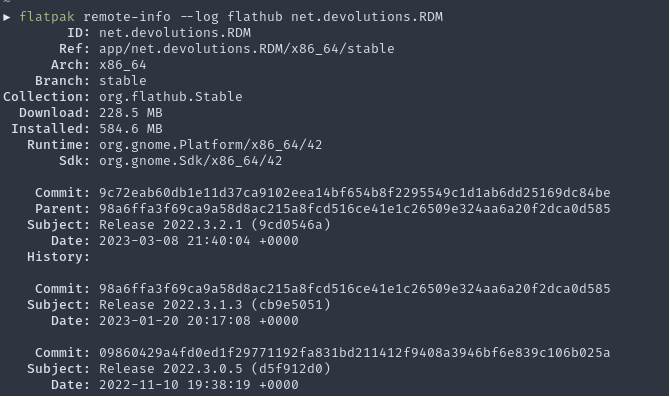
He tried RDM 2022.3.2.1 & 2022.2.2.7, but no luck to have it running again. The datasource is a MS SQL server.
With kind regards,
Nick
stacktrace.txt
image.png
Hello Nick,
We just release the 2023.1.0.3 version on flathub. Please let us know if the problem still persist with that version.
Regards,
Gabriel Dubois
Hello Gabriel
We try to plan the upgrade as soon as possible.
With kind regards,
Nick
Hello
We've been testing the latest version (2023.1.0.4) and are still experiencing the same issue.
I've been able to find a potential cause of the issue.
It seems that the Linux application at some point is no longer able to handle an extremely large vault and is now crashing instead of operation slow (as discussed in this forum thread, RDM application slow).
With kind regards,
Nick
Hello Nick,
Is it possible to provide us a video of the last issue? That could be really helpfull to see when exactly the crash occur.
Regards,
Gabriel Dubois
Hello Gabriel
I hope you had a great weekend.
I provided you the screen recording via a direct message.
Colleagues running Linux are starting to report that older versions are now also breaking (same behavior as shown in the screen recording). These versions were still functional on Friday.
With kind regards,
Nick
Hello
I've received notification of some users that apparently they also have the same behavior when trying to edit entries.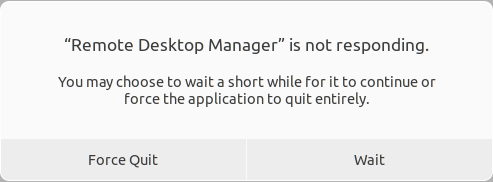
I'm at this point not sure if it are three different issues or one issue that is triggering the same behavior in all these cases.
With kind regards,
Nick
9b6582ce-29fb-48b2-9805-bd1e28e95e20.png
Hello Nick,
Just to confirm, are the edit causing the issue has been done on the same big vault that you sent me in direct messages or it happen even if the vault have a few entries? Is it happening 100% of the time when editing or just sometime?
Regards,
Gabriel Dubois
Hello Gabriel
I hope you enjoyed Easter.
It happens in the same vault and happens 100% of the time. The users that reported the issue can only edit in that vault.
Some users are suspecting issues with the SQL operations and the lack of loading screens that is causing Ubuntu to set the application in an unresponsive state.
We do notice that one core will go to 100%.
With kind regards,
Nick
Hello Nick,
Thank you for these informations, it helps a lot.
Regards,
Gabriel Dubois
No problem. Hopefully it can be resolved soon.
If we find additional information, I'll let you know.
With kind regards,
Nick
Hello Nick,
I was able to reproduce your issue by enabling "Multiple Active Result Sets (MARS)". This feature from the library we are using has some issue with Linux. That could explain why this is fast on RDM Windows but not on RDM Linux. In RDM Linux, there is no way to change that setting. It may be possible that this feature was enabled in RDM Windows and then the datasource (.rdd) has been exported and imported in RDM Linux.
If you imported the datasource can you edit the .rdd file and see if there is the line "<AdvancedParameters>MultipleActiveResultSets=True</AdvancedParameters>" and delete it? Then re-import the datasource and test again if that was the case.
If the datasource is not exported/imported with that feature, I will continu to investigate.
Regards,
Gabriel Dubois
Hello Gabriel
The data source file was in fact created on Windows around August of 2021.
I've checked the file, and I have send it to you in DM to reference.
The mentioned line is not present.
With kind regards,
Nick
Hello Nick,
I am sorry for the late answer.
Thank you for the file, we continue to investigate the issue.
Regards,
Gabriel Dubois
Hi Nick,
In your RDM Windows, can you send me a screenshot of that window (File -> My Data Source Information). Please make sure that you are in the big vault.
In your RDM Linux, can you tell me which value is selected for the "Caching mode" in your datasource configuration? (Disabled, File or In-Memory?)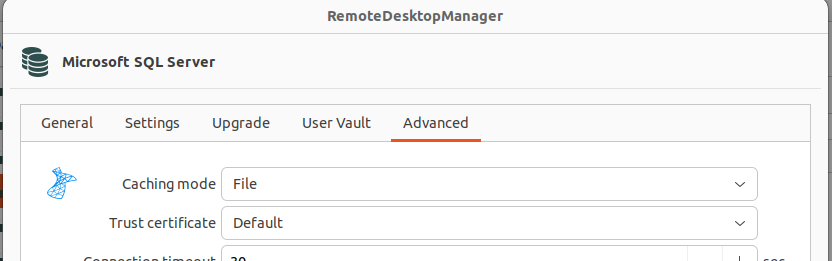
Does the datasource have a security provider?
In your RDM Windows, can you send me the result of the system diagnostic (Help -> Diagnostic -> Tab: Data Source). I'm aware that you have already send me that info, but it was when the vault was slow but still working. I want to see if I can see a difference in the result with that moment. Please make sure that you are in the big vault.
In your RDM Windows, can you send me a screenshot of your entries with the biggest size (Help -> Diagnostic -> Tab: Data Source -> Button: Data Source Diagnostic -> Tab: Size and sort the list with "size")
Regards,
Gabriel Dubois
eb1a2728-50c7-4ccc-ab0b-2924b3933832.png
Hello Gabriel
I've send you the information in Windows in a direct message.
The caching mode is set to intelligent.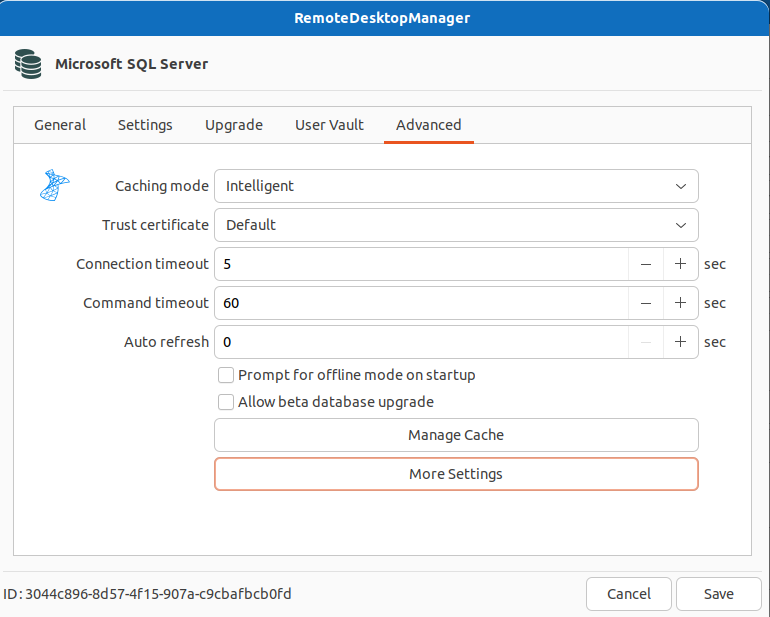
Security provider is set to default.
We I started RDM om my Linux test system, I got disturbed and it took almost half an hour before I could get back to my system. When I then clicked cancel on the pop-up, I could use RDM in the large vault on the Linux system... I'm going to test this a bit further if I can find some more information, but this makes me believe that due to the abcance of a loading screen that even the OS thinks that RDM has crashed while it is in fact still loading...
With kind regards,
Nick
----------------------------------------------------------------------------------------------------------------------------------------------------------------------------------------------------------------------------------------
Update:
I did some testing and requested a few of our linux users to test my hypothesis and we found that when to notification is showing, you just have to wait some time.
This can be anywhere between a few minutes to half an hour. At this moment I have no clue what is the reason of the time difference is between the different systems.
After that, RDM can be used, but is slow, to say the least, and often the pop-up will show and one has to wait a few moments to continue working. Not ideal, to say the least. It's hardly workable.
I guess that to the operation systems, it is not clear that RDM is busy, and that this is causing the issues.
27ecbc20-28f6-4759-9b32-19eaedc2065f.png
Hello Nick,
With the information and profiler result you sent me in direct messages it appears that this is not a SQL issue. It helps a lot to know that.
Can you please unselect the "Dashboard" button in the View tab and tell me if there is any difference with the time it takes to load the vault?
Regards,
Gabriel Dubois
Hi Gabriel
I'm sorry for the late response, I was in holiday.
I've tested it with the custom version I received (2023.1.0.99) and I don't experience any improvements. Ubuntu is still saying that RDM has crashed but just wait some time (I timed it this time, it is just under one and a half minutes best case, worst case it took just under 5 minutes when switching vaults).
Launching RDM to that vault, the fastest I could record is just over 6 minutes.
With kind regards,
Nick
Hi Nick,
No problem and thank you for testing.
I am currently working on an other build that will help to identify where is the slowness more precisely.
Regards,
Gabriel Dubois