Kein Zugriff auf Datenbank möglich

Guten Morgen und ein Frohes Neues! :)
Wir benutzen seit mehreren Jahren die Enterprise Version des RDM und sind damit auch sehr zufrieden.
Wir haben allerdings unter bestimmten Voraussetzungen das Problem, nicht auf unsere Datenbank hier zugreifen zu können.
Das Problem betrifft aber nicht alle Rechner sondern nur die, die Windows 11 "frisch" installiert haben.
Alle Rechner die vorher Windows 10 hatten und dann ein inplace Update auf Windows 11 bekommen haben, können weiterhin auf die Datenbank hier zugreifen.
Betroffen sind nur die neu eingerichteten Windows 11 Geräte. Wir benutzen SQL Server 2003.
Das verwirrt uns etwas und wir hoffen, das hier vielleicht jemand helfen kann.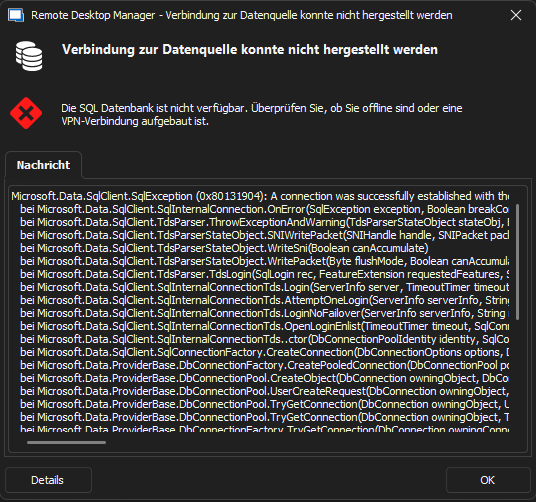
Hier noch einmal der komplette Auszug als Text:
Microsoft.Data.SqlClient.SqlException (0x80131904): A connection was successfully established with the server, but then an error occurred during the login process. (provider: SSL Provider, error: 0 - Eine vorhandene Verbindung wurde vom Remotehost geschlossen.) ---> System.ComponentModel.Win32Exception (0x80004005): Eine vorhandene Verbindung wurde vom Remotehost geschlossen
bei Microsoft.Data.SqlClient.SqlInternalConnection.OnError(SqlException exception, Boolean breakConnection, Action`1 wrapCloseInAction)
bei Microsoft.Data.SqlClient.TdsParser.ThrowExceptionAndWarning(TdsParserStateObject stateObj, Boolean callerHasConnectionLock, Boolean asyncClose)
bei Microsoft.Data.SqlClient.TdsParserStateObject.SNIWritePacket(SNIHandle handle, SNIPacket packet, UInt32& sniError, Boolean canAccumulate, Boolean callerHasConnectionLock)
bei Microsoft.Data.SqlClient.TdsParserStateObject.WriteSni(Boolean canAccumulate)
bei Microsoft.Data.SqlClient.TdsParserStateObject.WritePacket(Byte flushMode, Boolean canAccumulate)
bei Microsoft.Data.SqlClient.TdsParser.TdsLogin(SqlLogin rec, FeatureExtension requestedFeatures, SessionData recoverySessionData, FederatedAuthenticationFeatureExtensionData fedAuthFeatureExtensionData, SqlClientOriginalNetworkAddressInfo originalNetworkAddressInfo)
bei Microsoft.Data.SqlClient.SqlInternalConnectionTds.Login(ServerInfo server, TimeoutTimer timeout, String newPassword, SecureString newSecurePassword)
bei Microsoft.Data.SqlClient.SqlInternalConnectionTds.AttemptOneLogin(ServerInfo serverInfo, String newPassword, SecureString newSecurePassword, Boolean ignoreSniOpenTimeout, TimeoutTimer timeout, Boolean withFailover, Boolean isFirstTransparentAttempt, Boolean disableTnir)
bei Microsoft.Data.SqlClient.SqlInternalConnectionTds.LoginNoFailover(ServerInfo serverInfo, String newPassword, SecureString newSecurePassword, Boolean redirectedUserInstance, SqlConnectionString connectionOptions, SqlCredential credential, TimeoutTimer timeout)
bei Microsoft.Data.SqlClient.SqlInternalConnectionTds.OpenLoginEnlist(TimeoutTimer timeout, SqlConnectionString connectionOptions, SqlCredential credential, String newPassword, SecureString newSecurePassword, Boolean redirectedUserInstance)
bei Microsoft.Data.SqlClient.SqlInternalConnectionTds..ctor(DbConnectionPoolIdentity identity, SqlConnectionString connectionOptions, SqlCredential credential, Object providerInfo, String newPassword, SecureString newSecurePassword, Boolean redirectedUserInstance, SqlConnectionString userConnectionOptions, SessionData reconnectSessionData, ServerCertificateValidationCallback serverCallback, ClientCertificateRetrievalCallback clientCallback, DbConnectionPool pool, String accessToken, SqlClientOriginalNetworkAddressInfo originalNetworkAddressInfo, Boolean applyTransientFaultHandling)
bei Microsoft.Data.SqlClient.SqlConnectionFactory.CreateConnection(DbConnectionOptions options, DbConnectionPoolKey poolKey, Object poolGroupProviderInfo, DbConnectionPool pool, DbConnection owningConnection, DbConnectionOptions userOptions)
bei Microsoft.Data.ProviderBase.DbConnectionFactory.CreatePooledConnection(DbConnectionPool pool, DbConnection owningObject, DbConnectionOptions options, DbConnectionPoolKey poolKey, DbConnectionOptions userOptions)
bei Microsoft.Data.ProviderBase.DbConnectionPool.CreateObject(DbConnection owningObject, DbConnectionOptions userOptions, DbConnectionInternal oldConnection)
bei Microsoft.Data.ProviderBase.DbConnectionPool.UserCreateRequest(DbConnection owningObject, DbConnectionOptions userOptions, DbConnectionInternal oldConnection)
bei Microsoft.Data.ProviderBase.DbConnectionPool.TryGetConnection(DbConnection owningObject, UInt32 waitForMultipleObjectsTimeout, Boolean allowCreate, Boolean onlyOneCheckConnection, DbConnectionOptions userOptions, DbConnectionInternal& connection)
bei Microsoft.Data.ProviderBase.DbConnectionPool.TryGetConnection(DbConnection owningObject, TaskCompletionSource`1 retry, DbConnectionOptions userOptions, DbConnectionInternal& connection)
bei Microsoft.Data.ProviderBase.DbConnectionFactory.TryGetConnection(DbConnection owningConnection, TaskCompletionSource`1 retry, DbConnectionOptions userOptions, DbConnectionInternal oldConnection, DbConnectionInternal& connection)
bei Microsoft.Data.ProviderBase.DbConnectionInternal.TryOpenConnectionInternal(DbConnection outerConnection, DbConnectionFactory connectionFactory, TaskCompletionSource`1 retry, DbConnectionOptions userOptions)
bei Microsoft.Data.SqlClient.SqlConnection.TryOpenInner(TaskCompletionSource`1 retry)
bei Microsoft.Data.SqlClient.SqlConnection.TryOpen(TaskCompletionSource`1 retry, SqlConnectionOverrides overrides)
bei Microsoft.Data.SqlClient.SqlConnection.Open(SqlConnectionOverrides overrides)
bei Devolutions.RemoteDesktopManager.Business.DataSources.SQLServerConnectionDataSource.CreateDbConnection(String connectionString, Boolean openConnection)
bei Devolutions.RemoteDesktopManager.Business.DataSources.DatabaseConnectionDataSource.CreateDbConnection(Boolean master, Nullable`1 connectTimeout)
bei Devolutions.RemoteDesktopManager.Business.DataSources.DatabaseSecuritySubDataSource.GetRepositories(String repositoryID)
bei Devolutions.RemoteDesktopManager.Business.DataSources.DatabaseSecuritySubDataSource.GetRepository(String repositoryID)
bei Devolutions.RemoteDesktopManager.Managers.ConnectionEngine.get_Repository()
bei Devolutions.RemoteDesktopManager.Managers.SecurityProviderEngine.Reset()
bei Devolutions.RemoteDesktopManager.Managers.ConnectionEngine.ResetSecurity()
bei Devolutions.RemoteDesktopManager.Managers.ConnectionManager.HasSecurityChanged(BaseConnectionDataSource dataSource)
bei Devolutions.RemoteDesktopManager.Managers.ConnectionManager.LoadConnections(BaseConnectionDataSource dataSource)
ClientConnectionId:eb1c6a63-4191-472f-b105-3e15368647a6
Error Number:10054,State:0,Class:20
Wir würden uns freuen wenn jemand dazu eine Idee hat, vielleicht gibt es ja irgendeinen Workaround oder so.
Screenshot 2023-01-11 095206.png
All Comments (3)
Hallo,
ich tippe auf eine TLS Cipher Thematik. Kannst du mal versuchen die Ciphers laut diesem Artikel zu ergänzen / anzupassen.
LG,
Min
Hallo nochmal,
das war die Lösung, vielen lieben Dank! :)
Hallo,
perfekt, danke für die Rückmeldung! 😎
LG,
Min