Zwischenablage fehlerhaft

Hallo zusammen,
wir haben das Problem, dass sporadisch die Ablage (Zwischenablage) falsch getippt wird, wenn man "Zwischenablage tippen" wählt.
RDP Manager macht dann kryptische Zeichen teilweise und vertauscht die Buchstaben, ebenso sind manchmal Passwörter falsch.
Der Fehler ist ab und an reproduzierbar.
Neueste RDP Version installiert.
All Comments (50)
Hallo,
welche Datenquelle hast du in Verwendung?
RDM = 2022.3.29.0 ?
LG,
Min
Local Data Source
mit 3.29.0 testen wir nochmals jetzt
Hello,
Sorry to intervene in English, I understand that the issue doesn't happen every time? Do you have any specific ways of reproducing the behavior or is it totally random?
Best Regards,
Etienne Lord
Hello,
with newest version bug is away.
Hello,
Thank you for letting us know! We are glad to see that this version works for you.
Best regards,
James Lafleur
Hello again,
we have the bug now again.
The letters are changed / mixed when we paste it with the button "input Clipboard".
We have newest version installed.
Example of one Command, which changed the letters with the button:
Command i had sent:
Set-ReceiveConnector "EXCH01\Default Frontend EXCH01" -TlsCertificateName $tlscertificatename
Command which received in the RDP session:
Set-ReceiveConnector "EXCt01\Drfaulcatenamend EXCH01" -TlsCertificateName $tlscertificatename
Hello,
Thank you for the details, I will have a look on my side!
Best Regards,
Etienne Lord
Perfect, thank you Etienne!
Hello,
Would it be possible to have a quick video recording of the behavior? You can send the video using the link I will send you via Private Message.
Best Regards,
Etienne Lord
Hello,
the same problem is still there. Now i record video and send it. It really disappointing to have this big issue!
Hello,
Thank you for the recording, we will continue to investigate.
Best Regards,
Etienne Lord
Hello,
I'm still investigating the behavior in order to reproduce, can you simply confirm if you are still on version 2022.3 (or other) or you are on version 2023.1.x.x?
Best Regards,
Etienne Lord
Hi,
do you have any results from this bug?
Its really disappointing to work with this bug!
We have the newest version installed.
Hello,
We are still looking into it with the engineering department, could you confirm the keyboard language on both your local and remote computer, I will see with our QA team if they can do further test to reproduce the behavior on our side!
Best Regards,
Etienne Lord
Hello,
this problem is still.
Now in newest build always the @ is missing in every password or username which i do want to type....
Thanks, Max
Hello,
Can you confirm which version build this issue is being reproduced in ?
I ask as the issue can not be replicated for me in version 2023.3.34.0 of RDM Windows.
I've added 6 "@" characters in my clipboard and they all get typed without fail when I execute the "Typing Clipboard" option.
Best regards,
No, in newest version also the same problem
Characters "|" and "@" are again not typed with "Type Clipboard".
Okay, now we know why: Every character build with "Alt- Gr" not working! You can try it!
This issue is really a big problem!
Hello,
I've tried to reproduce this behaviour on my end, but it looks like I'm unable to - could you please give me more details about your environment?
Which RDM version, data source and OS are you using?
Data sources: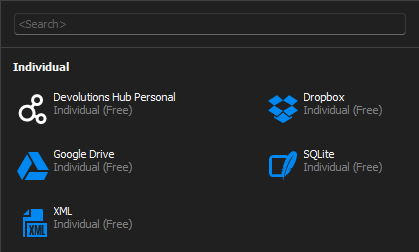
Attached a short video with RDM 2023.3.34.0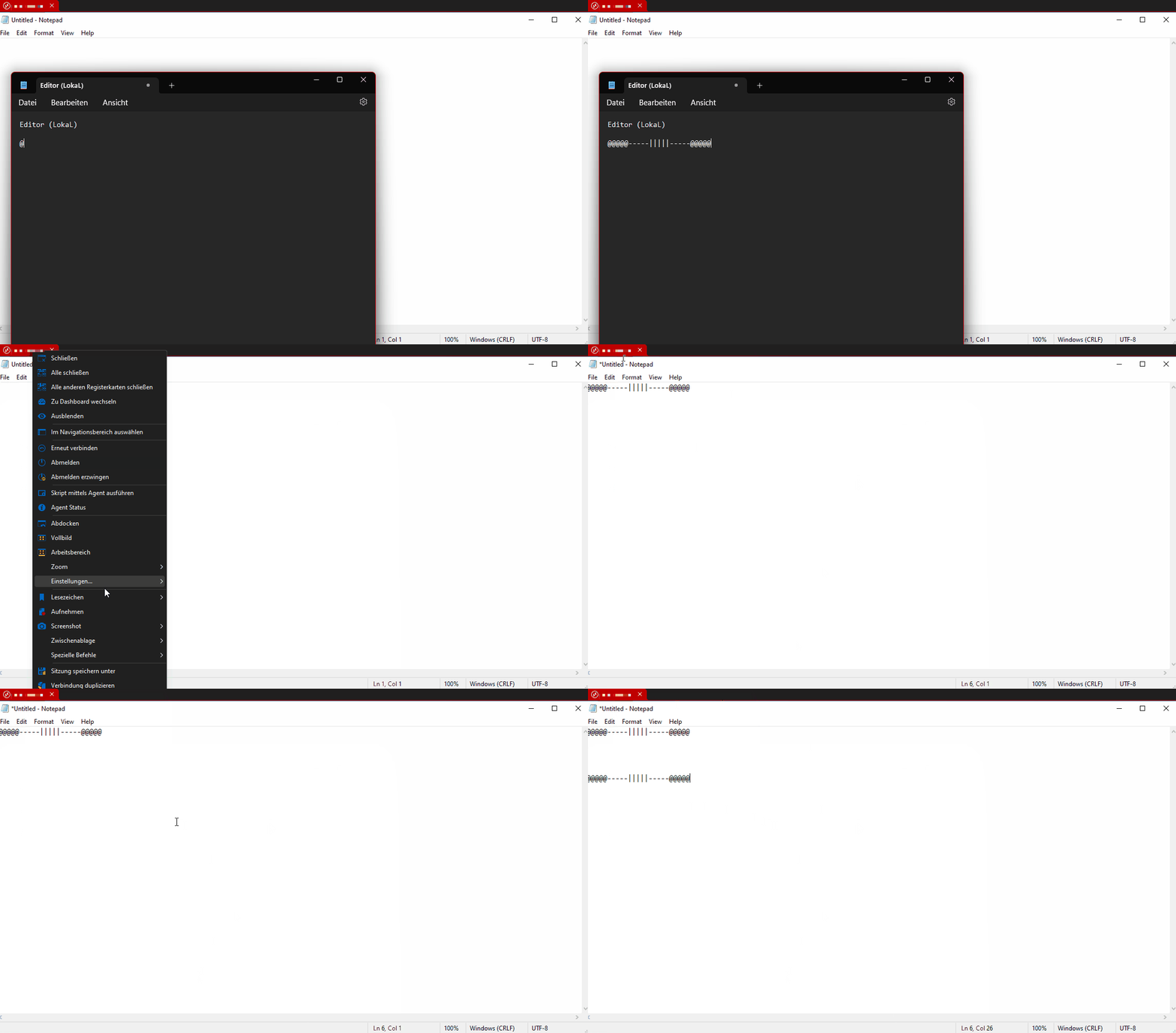
Regards,
Min
e5b952a4-dc56-4773-9848-0ee8655c6068.png
Type-Clipboard.gif
Hi,
now i have also captured it.
I hope now you understand it.
Its a big problem still.
Max
2023-12-22-11-RDP MAnager Clipbaord Bug 37-00.mp4
Hello,
Thank you for the recording! I completely understand, therefore I've asked for more information regarding your environment, especially because of the fact I'm still unable to reproduce it on my end: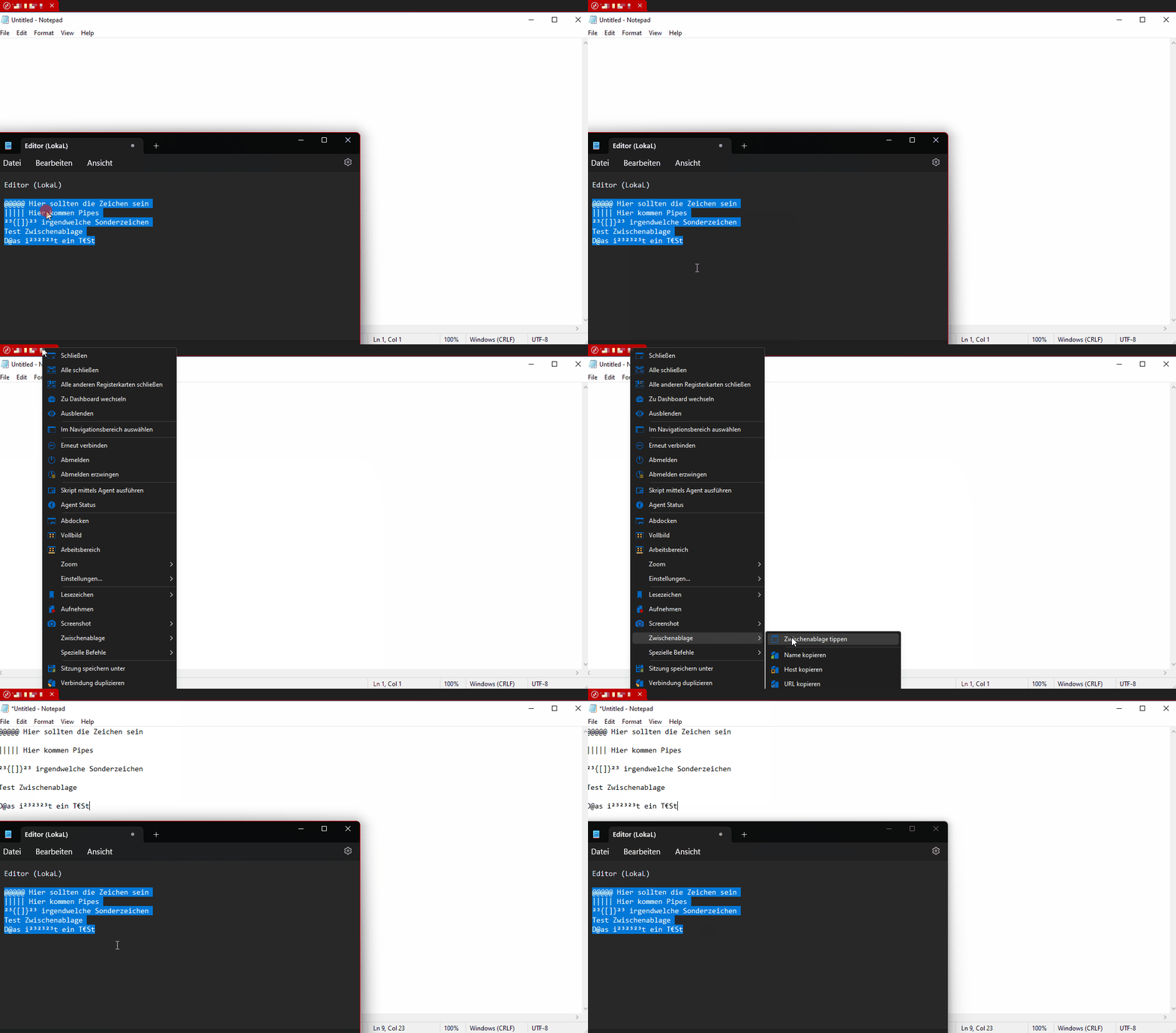
Regards,
Min
Type-Clipboard-2.gif
Environment: Windows Server 2022
There are running the RDM Manager
Than Clipboard to Windows Server 2019 Standard
(but its also to other machines)
Hello Max,
Would it be possible to try the the portable version and verify if you get the same behaviour?
https://docs.devolutions.net/kb/remote-desktop-manager/how-to-articles/portable-rdm-installation
Regards,
Min
Same Problem!
Hello
Please can I asked you to try the following:
First, locate RDM's configuration file. Typically this is located in %USERPROFILE%/AppData/Local/Devolutions/RemoteDesktopManager and is named "RemoteDesktopManager.cfg". If you can't find it in that path, the "Advanced" tab in the Options window can give you a clue to the proper location: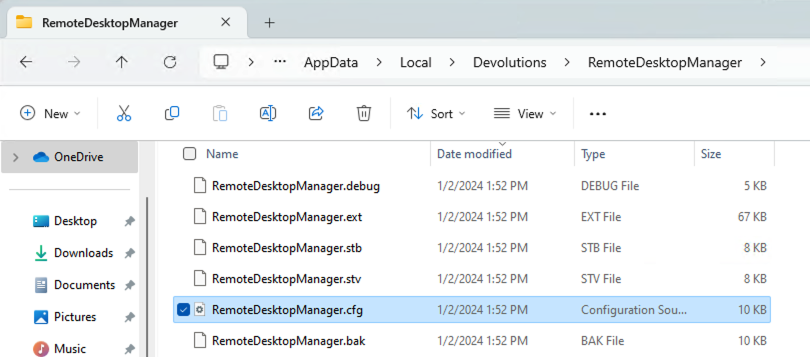

Next, ensure RDM is closed and make a backup of that file (this is important before editing it).
Now, open RemoteDesktopManager.cfg in a text editor and scroll to the end. Find the closing "</Option>" tag (it should be the last line in the file) and immediately before that, insert a new line and add the following:
<UseKeyboardSimulatorForTypeClipboard>true</UseKeyboardSimulatorForTypeClipboard>
So it should look something like this: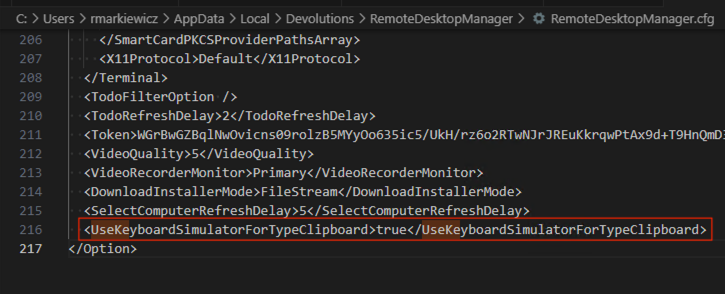
Save the file, close it and then relaunch RDM. Does your issue persist or is changed in some way?
Please don't hesitate to post back if you have questions or feedback.
Thanks and kind regards,
Richard Markievicz
Screenshot 2024-01-02 at 14.00.45.png
Screenshot 2024-01-02 at 13.54.50.png
Screenshot 2024-01-02 at 13.54.34.png
Hi,
i have tried. No changing something. Same problem still persist.
Hello again
Can you share the keyboard layout you can configured on both the client and server?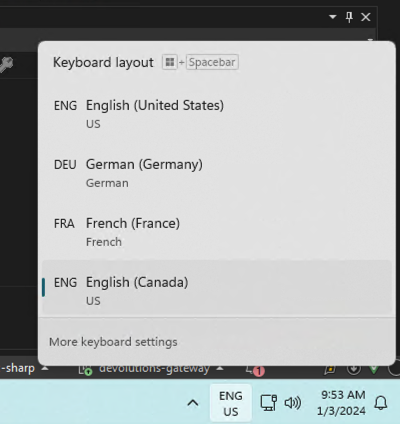
Furthermore, do you have some configured for the Keyboard Layout in the RDP session "Local Resources" tab?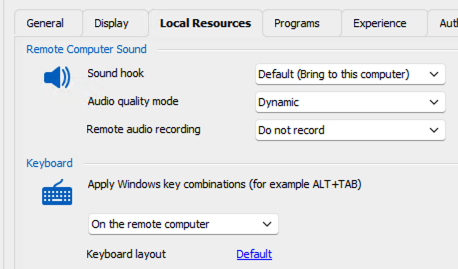
Thanks and kind regards,
Richard Markievicz
Screenshot 2024-01-03 at 09.54.40.png
Screenshot 2024-01-03 at 09.53.40.png
I have configured germany - germany
in RDP session Local Resources:
same how in your screenshot
Hello again
Thanks for the information. I think I'm narrowing down the cause of the issue.
Can you also share what you have configured for Local Resources > Apply Windows key combinations?
It's the same section as the keyboard layout in the screenshot of my previous post.
Thanks and kind regards,
Richard Markievicz
Same how you: Remote Computer
Hello again
Thanks for the information.
And if you change that setting to "On the local computer", does it behave better?
It's quite confusing: on our side, my colleague Min can't reproduce the issue at all. I do seem to get the same behaviour as you with key combinations set to "On the remote computer", but changing it to "On the local computer" makes things work better.
I'm trying to narrow down the issue.
Thanks and kind regards,
Richard Markievicz
Hi Richard,
yes, thats the solution!
When i change it, it works. But why?
Please fix that, this is the biggest problem since the manager exist.
Thank you
Hello again
Ok, thanks for confirmation. I have some understanding of why it's that way, I'm still looking at the details.
However: regarding my earlier suggestion of adding the hidden setting key to RemoteDesktopManager.cfg; on my side this completely fixes the issue regardless of whether key combinations are kept on the local computer or sent remotely. So I'm really curious why you didn't notice any difference.
Are you absolutely sure of the following:
- You got the correct file? The .cfg file is saved every time RDM closes; so you can close RDM and check the "Last modified" date and time of that file to be sure we are working with the correct file
- You modified the file while RDM is closed. Closing RDM will rewrite the file and overwrite any changes you made while RDM was open.
- You put the setting key in the correct location (as per my screenshot)
- You entered the setting key correctly, without any typo or mistake
Please, let me know if something isn't clear or you have further questions
Thanks and kind regards,
Richard Markievicz
Hi again, now i tried again and i can say it works with the key in the CFG File.
Okay, when you think you fix it by new version?
Hello again
Thanks for confirming my assumption. It's valuable information.
To give some background: sometime last year, RDMW changed the API it uses for synthetic text input. I note that the new API may have issues with international keyboards. They did put this behaviour change behind an option, but didn't expose it in the Options UI (likely because they may want to remove that option in the future if everything is working well).
So: the fix is going to be, to run with this setting enabled. However I realize that hand-editing the .cfg file is far from ideal; I'd suggest we either provide a UI for this setting and/or enable it based on the current keyboard language. Since I'm not sure of the motivation for the original change, I'm going to raise this question with the RDMW team and I'll get back to this post once I have an update.
Thank you for your patience
Kind regards,
Richard Markievicz
Okay thank you. So i change the key myself and you fix it for everybody.
Nice to find the bug. It makes me happy :)
Hi again, i think its not the solution...
We have another bug, that now the typing of big letters and small wrong is. So when i type clipboard some letters are now big and some small. Its change the words...
For example i type the password: Test1234
I get: Test123$
Or: Test345
I get: TEst345
You understand?
Hi again, i think its not the solution...
We have another bug, that now the typing of big letters and small wrong is. So when i type clipboard some letters are now big and some small. Its change the words...
For example i type the password: Test1234
I get: Test123$
Or: Test345
I get: TEst345
You understand?
Good morning
Yes, I understand the issue and I'm sorry to hear that.
I've been discussing this with the RDM team internally. There is some history here.
Until mid last year, RDM used the Win32 `SendInput` API function to generate synthetic key input. There were a number of tickets reporting issues with this (sometimes easy to reproduce, sometimes hard, but overall a lot of inconsistency in the reported behaviour).
RDM switched to an alternative API that seems more reliable _but_ it transpires that it has issues sometimes with international keyboards (and again, these issues are sometimes easy and sometimes hard to reproduce).
I've been studying this last week (looking at plenty of different tickets) and I think I know how to fix it and make it work reliably in all scenarios. I'm working on those changes currently and hope to have some updates soon (within the next couple of weeks).
I do apologize for the inconvenience and thank you for your patience. This issue has my attention and we're actively working on it.
Thanks and kind regards,
Richard Markievicz
Thank you Richard!
New Status?
Hello
Thank you for your patience. I've done some research on the proper way forward, but I've been busy with other tasks for the past couple of weeks. I should have time to finish the changes this week and hopefully be done for the 2024.1 release (or very shortly afterwards).
Thanks again and kind regards,
Richard Markievicz
Hello
Thank you for your patience. I've integrated an update for the "Type Clipboard" feature that I hope will iron out these issues and improve accuracy. With the changes, the custom entry in the RDM .cfg file is no longer necessary (although leaving it present won't have a negative side-effect).
Those changes should be available with the 2024.1.19 release; I'll confirm by updating this post at that time.
Once again, thank you for your patience
Thanks and kind regards,
Richard Markievicz
Okay, than please inform me.
Hello
Thanks for your patience. RDM 2024.1.19 is now available and should contain some fixes for this issue. No action is needed on your side except to update.
Please, let me know if you notice improvements or continue to experience issues.
Thanks and kind regards,
Richard Markievicz
Hello Richard,
thank you, but i can't try, because this new version has big bugs: I can't use Powershell now! So i can't use RDM in this version actually...
Newest version same problems! i type 3 times "type clipboard" and i get 3 different results!
Thats not normal!!!
Hello again
Ok, I'm surprised and very sorry to hear that.
If you don't mind there is now so debug logging around this that should help me. Can you try opening Help > Profiler, switching to the "Debug Only" tab and setting the "Debug Level" at "1"?
Then leaving the profiler open, repeated the same test.. Finally you can send me the output from the profiler (directly here, by PM or to service@devolutions.net mentioning this forum thread).
I apologize for the inconvenience
Thanks and kind regards,
Richard Markievicz
Hi Richard,
now i tried newest version 2024.1.20 and now i think its good.
I will have a look at this version and test again, if i find a mistake with type clipboard.
Thanks, i will follow up a note.
Hello again
Good news! Please, don't hesitate to post back if you notice any issues.
Thanks and kind regards,
Richard Markievicz