Not able to RDP to Raspberry Pi

Hello,
I have similar issue to this thread https://forum.devolutions.net/topics/37347/rdp-sessions-on-linux-mint-requesting-installation-path-version-202212
I am unable to remote desktop from my Kubuntu 22.04.1 computer to my raspberry pi 4 running Ubuntu Mate 22.04.1. Remmina works fine.
Running the xfreerdp command mentioned in the other thread doesn't work because there is nothing in /tmp/RDM other than the HtmlAssets folder which has a truetype font in it.
Currently running 2022.3.0.8 of RDM.
Many Thanks for any assistance and advice that can be provided.
All Comments (11)
Hello,
Thank you for contacting us on that matter!
Are you able to establish this RDP connection outside of RDM Linux?
Also, what type of data source are you using?
Best regards,
James Lafleur
Hello,
Thank you for contacting us on that matter!
Are you able to establish this RDP connection outside of RDM Linux?
Also, what type of data source are you using?
Best regards,
Hello,
As mentioned in my original post, I can RDP just fine to the host from Remmina. My data source is a local data source (.db file)
Many Thanks
Hi auroragamer1,
Just to be sure, when you say that the rdp file is not there in /tmp/RDM do you let the "Installation Path" prompt opened without clicking on "Cancel" or "OK"?
Regards,
Gabriel Dubois
Hi auroragamer1,
Just to be sure, when you say that the rdp file is not there in /tmp/RDM do you let the "Installation Path" prompt opened without clicking on "Cancel" or "OK"?
Regards,
Hello,
That option does not come up when I try to open the session unless I try to open it up externally rather than embedded. If I open up externally and choose the 'Normal' installation path I then see the following:
If I enter in my password, the login works okay.
If you run RDM from a terminal using the remotedesktopmanager command, do you have any stacktrace printed when the connection fail (in embedded)?
Gabriel Dubois
If you run RDM from a terminal using the remotedesktopmanager command, do you have any stacktrace printed when the connection fail (in embedded)?
Interestingly that works. It works fine too if I launch it from my Favourites menu in KDE. It seems to only be an issue when RDM is launched through the Autostart settings in KDE.
Do you still have the issue with the autostart when you restart your computer?
Gabriel Dubois
Do you still have the issue with the autostart when you restart your computer?
Yes. I also tried removing the entry for RDM from the Autostart and added it back in, but that did not help.
Ok, I opened a ticket for that issue and we will investigate.
Regards,
Gabriel Dubois
Hi auroragamer1,
I managed to find the issue. It should be resolved in the next version of RDM Linux. In the meantime, I can tell you how to resolve this issue on your end. The problem has to do with the application's working directory not being set correctly when not running the application from the .desktop created with the installation of the package (which is the case when running with autostart). In the autostart programs' properties, you can set a working directory (usually labelled "work path") manually. If you set it to "/usr/lib/devolutions/RemoteDesktopManager", it should fix the issue while we work to get the new version out. Another way to fix this would be to run your connection with RDP Sandboxing set to OFF (which you can do in the advanced settings of the connection itself or by changing the default behaviour in the application's preferences).
I hope this helps.
Best regards.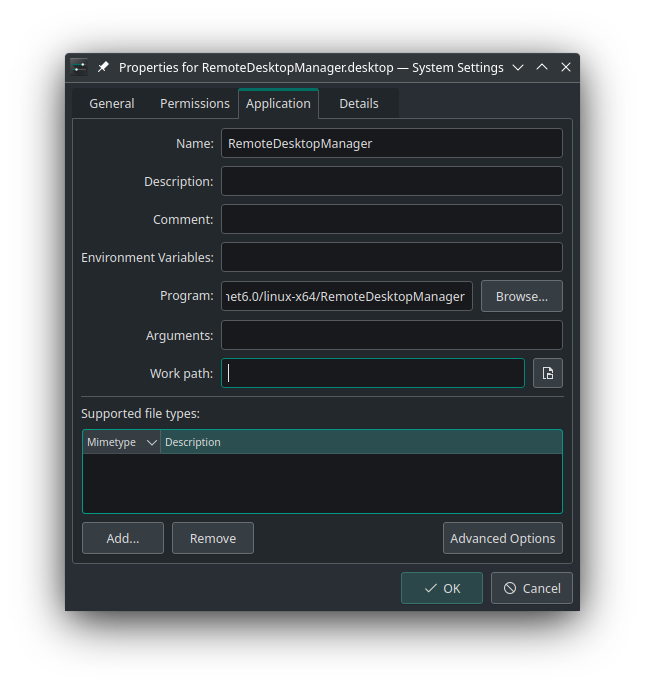
Nicolas Parr
work directory.png
Hi auroragamer1,
I managed to find the issue. It should be resolved in the next version of RDM Linux. In the meantime, I can tell you how to resolve this issue on your end. The problem has to do with the application's working directory not being set correctly when not running the application from the .desktop created with the installation of the package (which is the case when running with autostart). In the autostart programs' properties, you can set a working directory (usually labelled "work path") manually. If you set it to "/usr/lib/devolutions/RemoteDesktopManager", it should fix the issue while we work to get the new version out. Another way to fix this would be to run your connection with RDP Sandboxing set to OFF (which you can do in the advanced settings of the connection itself or by changing the default behaviour in the application's preferences).
I hope this helps.
Best regards.
Okay, thank you for the update on this. I greatly appreciate it.
I've already had the work path set to '/usr/lib/devolutions/RemoteDesktopManager/' and the command set to '/usr/lib/devolutions/RemoteDesktopManager/RemoteDesktopManager' but it still has the issue. In any event, if the next version will fix it then I am happy to wait.
Many Thanks!