Overwriting text color value when copying from the terminal
Overwriting text color value when copying from the terminal
0 vote

Dear Team
If I select and copy an area of text on Terminal (SSH) and paste this on an editor, the text is pasted with the exact same color .
What I mean;
consider that I use white text on black colored terminal (standard config). If I copy a group of text and paste it on an editor that supports HTML (such as Evernote), text is pasted with white color.I have to change text colors for every paste operation on the editor.
If I could overwrite this text color settings for copying operations (such as copy color), It would greatly help me and others.
Thanks
Best Regards
Samet
All Comments (8)
Hi sametkalkanci,
This should already be possible. You just need to set the Preferences -> Types -> Terminal -> General -> Copy mode to "Plain Text".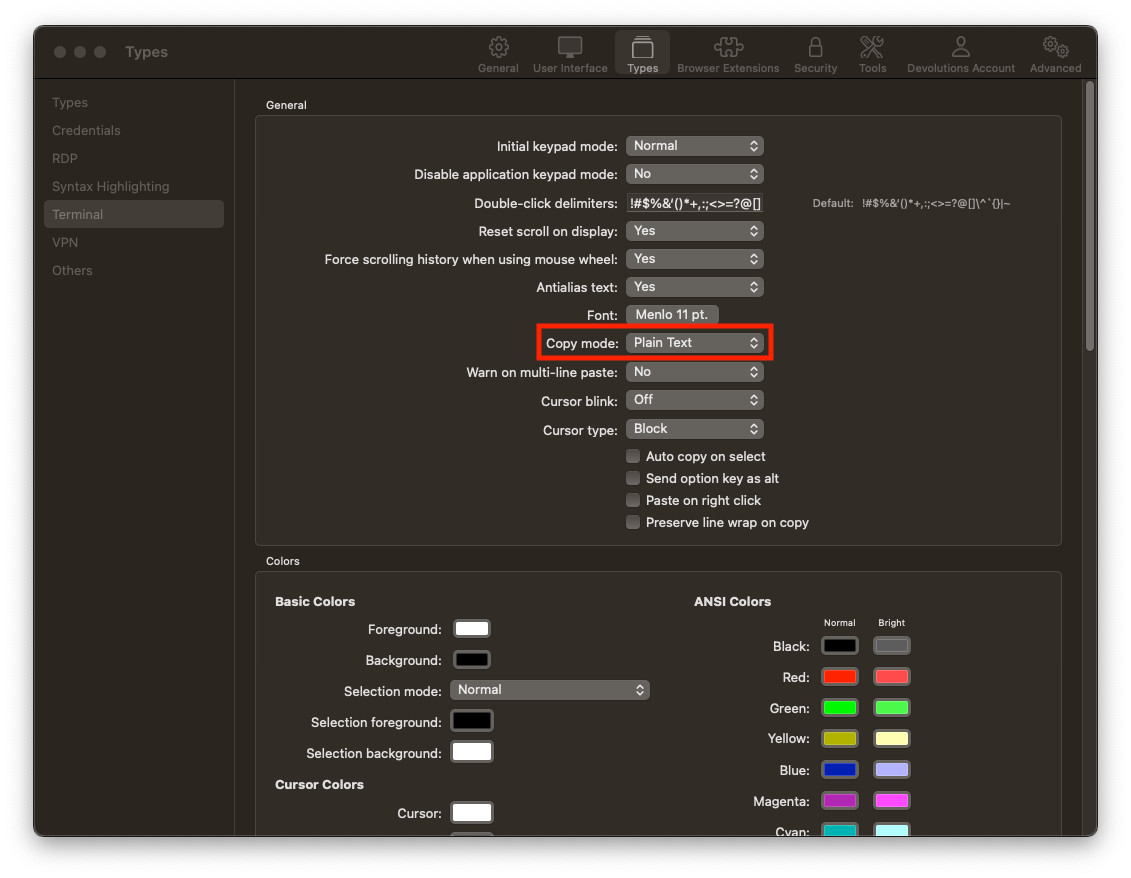
Please, do tell me if this is not what you had in mind.
Best regards,
Xavier Fortin
CopyMode.png
Hi Xavier,
Thanks for the info and sorry for wasting your time :)
"Plain text" option works exactly as I want.
Best Regards
Samet
Hi sametkalkanci,
Glad to hear this has resolved your issue!
Do not hesitate if you have any other issues/questions.
Best regards,
Xavier Fortin
Hey,
thanks for the support,
I have version 2023.1.26.0 , I do not see that option there.
in Windows terminal, it can copy as HTML and I can paste it in outlook with colors as the terminal ?
is this a different version.
Hi maas187,
2023.1.26.0 is a RDM Windows version, right? If so, the option might not be available in RDM Windows. I'll ping the Windows team.
Best regards,
Xavier Fortin
It is windows , thanks for the support.
It would be a great options for html and code colors to be pasted. I know windows terminal does it if you enable the html rendering on it
Thanks again
Hello,
We've opened a ticket to investigate how feasible this would be on RDM Windows.
We'll keep you updated with the progress.
Regards
Jonathan Del Signore
Thank you for the support