offline mode graceful on/off
0 vote

Currently, Whenever you need to re-auth all of RDM becomes unusable so the tranistion from offline to online mode requires a re-auth. Example it seems RDM after some period of time the Devolutions Server requires a re-auth. If i am in the middle of a ssh session and try to use system-wide Find Quickly or hotkey for User vault entry I am blocked. Which often opens another browser window to re-auth, which moves you between windows. Causes a workflow speed bump and random browser windows open i have to remember to close.
In the case where offline mode caching is an option and using some sort of Local Application security these should apply.
I have few thoughts.
1- User Vault it seems like it should always be available. I hit a chicken and egg problem. I need my password from my User Vault to auth to the Devolutions Server, but I am blocked from my entries even though I have auth'd to get into RDM to access my user vault.
2- Offline mode doesnt allow you to add/modify entries that would later be pushed when online mode becomes available. It is not unheard of I am in the field need to create a temp password I want to save, but I don't have network access on my laptop. If I am modifying an entry and there is conflict. RDM could create a conflict folder and offer maybe "merge entry" option. Also if access to the devolutions servers that requires a VPN not having a mechanism to have some interaction puts me in a bind. I am often in the field in offline mode situations.
3-using an embedded webview or view controller and move the auth to the background to not block all interaction with RDM and entries if you have authenticated with Local Application security.
All Comments (22)
Hi georgesnow,
For the general needs to reconnect occasionally, this might actually just be a bug, I'll have to get in touch with the DVLS team to be sure.
1- User Vault it seems like it should always be available. I hit a chicken and egg problem. I need my password from my User Vault to auth to the Devolutions Server, but I am blocked from my entries even though I have auth'd to get into RDM to access my user vault.
Unfortunately, I do not think this would be possible. In the end, your User Vault, like any of the Shared Vaults, is still stored inside the database of the Devolutions Server, if the authentication as expired, your User Vault is as unavailable as any of the Shared one.
2- Offline mode doesnt allow you to add/modify entries that would later be pushed when online mode becomes available. It is not unheard of I am in the field need to create a temp password I want to save, but I don't have network access on my laptop. If I am modifying an entry and there is conflict. RDM could create a conflict folder and offer maybe "merge entry" option. Also if access to the devolutions servers that requires a VPN not having a mechanism to have some interaction puts me in a bind. I am often in the field in offline mode situations.
This should be possible, do you have the "Offline mode" of your server System Settings set to Read/Write? See: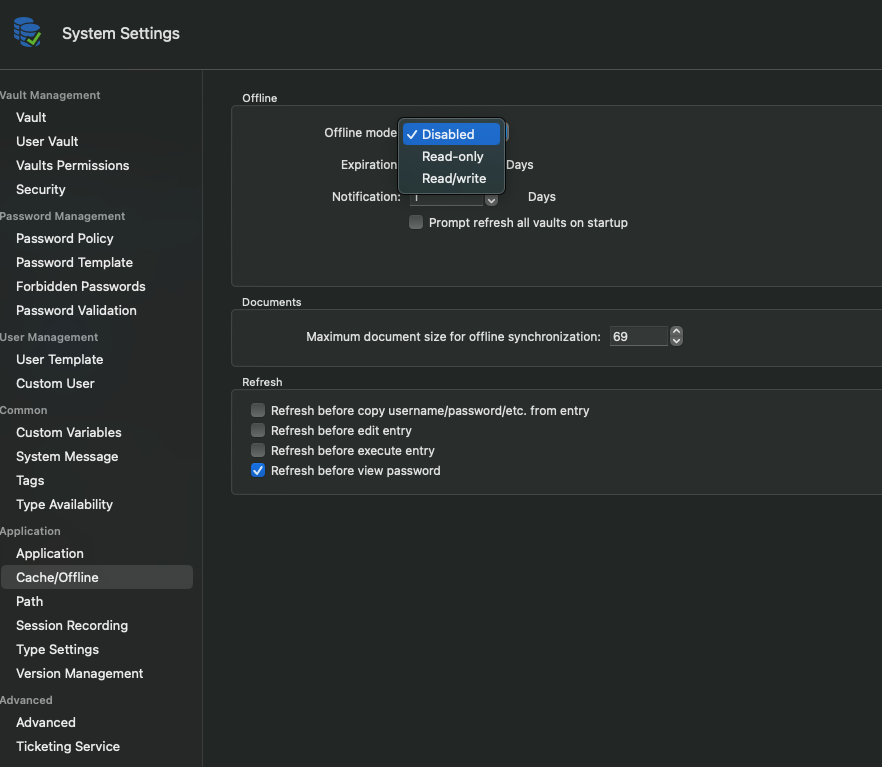
3-using an embedded webview or view controller and move the auth to the background to not block all interaction with RDM and entries if you have authenticated with Local Application security.
We've actually moved away from using embedded webviews for Oauth authentication, I don't know if we intend to add back support for it. As for doing it in the background, I believe this is what is supposed to be done currently, hence why I believe you might be hitting a bug.
Best regards,
Xavier Fortin
ReadWrite.png
Hmm, i can't to locate "System Settings" that you show in your screenshot. The closest thing I have is under data sources->Advanced tab. And I have caching mode, Prompt for offline mode, auto go offline, Connection timeout, auto refresh and manage cache.
how do you navigate to that view?
If you are admin in your data source, you should find it here: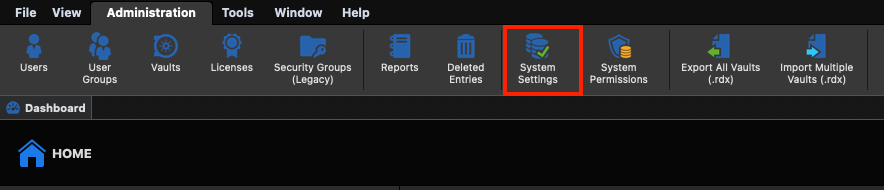
Best regards,
Xavier Fortin
SystemSettings.png
so we have a "shared" vault I am suppose to be an admin on, which I have Vault Settings no System Settings. maybe the server is an older version? What's strange is if i choose the vault i am admin on I have "Adminstration" tab, but I pick my user vault it disappears. So that makes me think I am not admin on my own "User Vault"?
Hmmm... Is it possible you've configured your User Vault to be a Devolutions Online Drive? Like so: 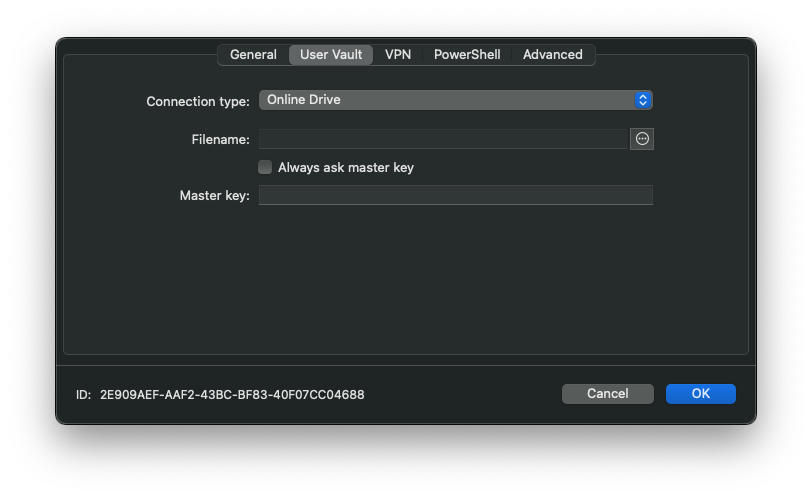
Also, for the System Settings not being available, what type of data source are you using? I was under the impression you were using a Devolutions Server?
Xavier Fortin
OnlineDrive.png
Hehe, I was under the same impression that I am using Devolutions Server as the web browser version shows this:
Under user vault Connection type is set to "Default"
when I set up the account. I selected "Devolutions Server Enterprise"
Well then, so long as your DVLS user is an Administrator and you are not presently in Offline mode, you should have access to the System Settings panel, and that, even if you are in your User Vault.
If it's not the case, I really can't fathom why. Is it maybe visible from the Administration main menu item?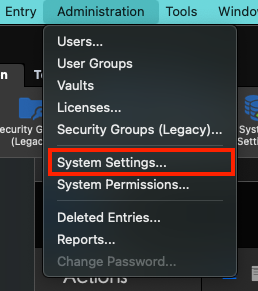
In this screenshot, I am in a DVLS data source with an admin user.
Best regards,
Xavier Fortin
SystemSettingsMenuItem.png
so I have the menu item but the only option in there is "Vault Settings" and it's grayed out on the shared vault. My user vault the menu item is empty.
I have reached out to the folks who support our Devolutions Server and asked about the admin rights for my user vault and the share one. Is there further context you could provide that I might give them to determine how to get it so I can use the offline mode as you described?
Thanks!
You most likely do not have Admin rights then. Which is fine, you can just ask one of the admin of the server to make the setting changed I mentioned earlier (Administration -> System Settings -> Application -> Cache/Offline -> Offline -> Offline Mode -> "Read/write").
Best regards,
Xavier Fortin
I made this request and confirmed with the sys admin. However, this didn't resolve the issue. Under settings it still shows I only have read only permissions for offline mode.
Is there some setting or requirement to enable this option?
Hi georgesnow,
For the offline mode to work in Read/Write, it must be enabled:
1) At the Data Source level, from the aforementioned Administration -> System Settings -> Application -> Cache/Offline -> Offline -> "Offline mode" option: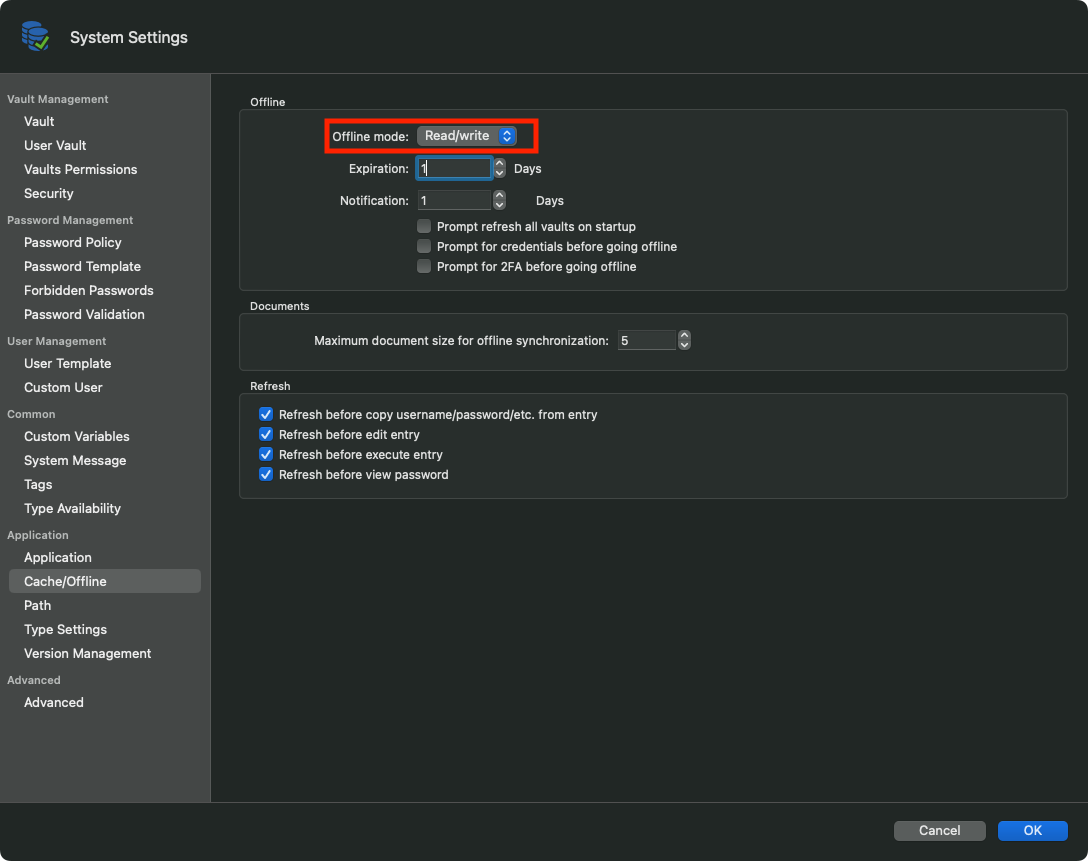
2) At the User level (and I believe I missed this one last time we spoke). This can be done by an administrator from the Web interface of DVLS when editing a user: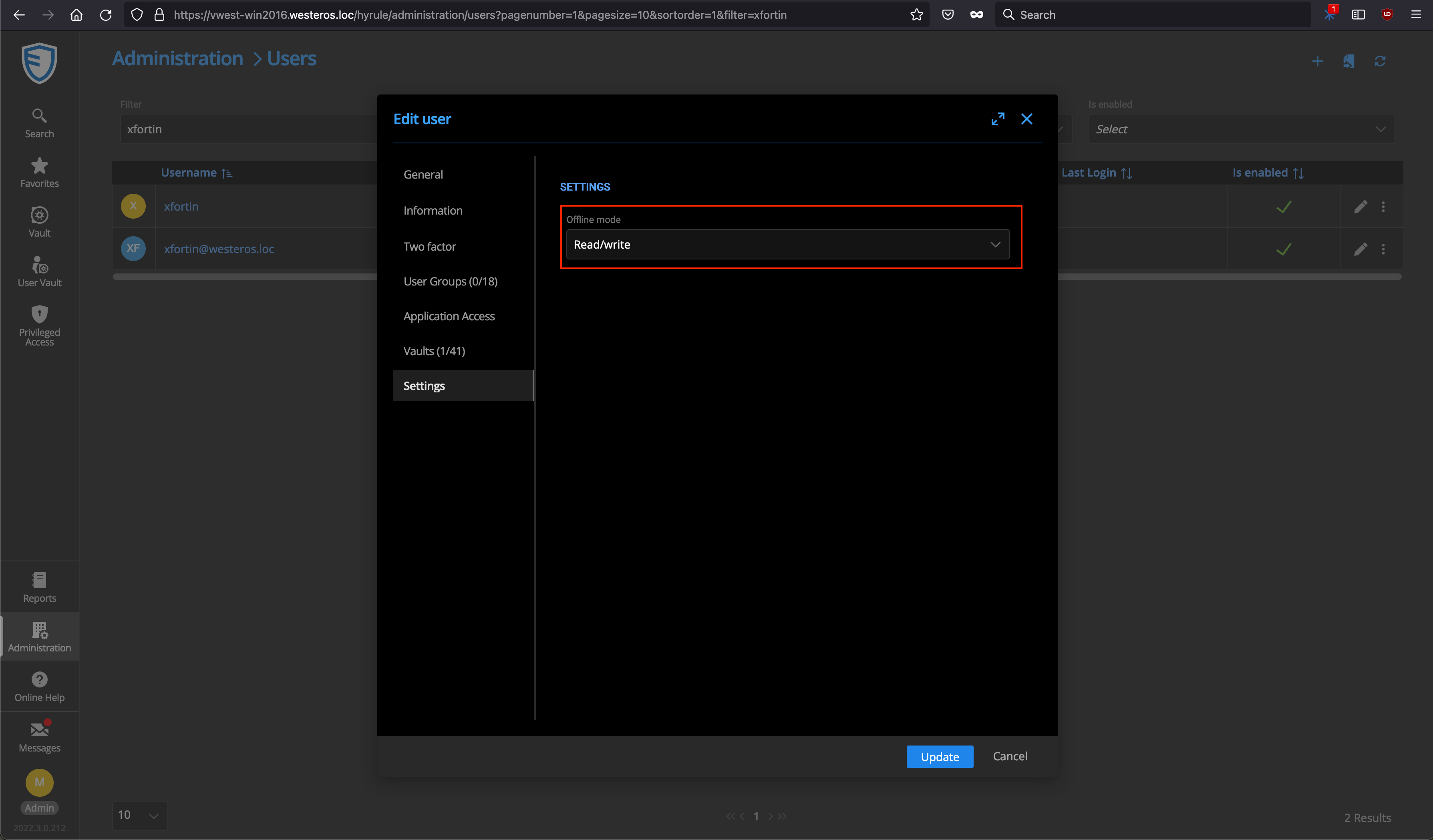
Also, this can be enabled/disable in a more granular way on a per session basis (with a principle of inheritance). The setting for this is available from the entry settings -> Security Settings -> Offline -> Allow offline: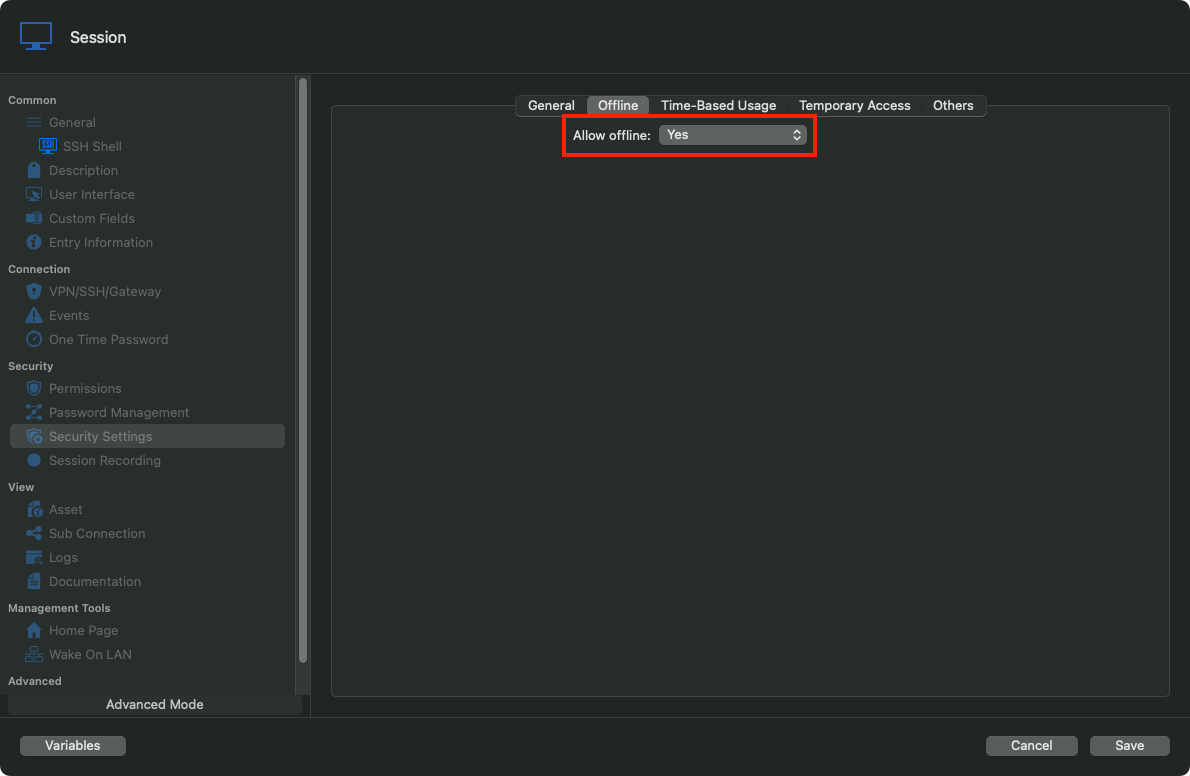
And I believe this covers pretty much all options pertaining to this.
Please, do tell me if you're still unable to make it work afterwards.
Best regards,
Xavier Fortin
SessionSettings.png
User.png
SystemSettings.png
still seem to be missing something. screenshots below. it looks as though "User settings" are set to read only, but i have no idea if that is why it is read-only still and how that option gets set if that is indeed the issue.
the change as you mentioned:
this is what i see on the share vault and personal vault:

Hi,
This is the first second point I mentioned in my previous post, an admin needs to grant your user the Read/Write permission from the DVLS server web interface in the Administration -> User page.
Best regards,
EDIT: switched first to second point
Xavier Fortin
so it shows I have read/write for offline mode. however, if i go offline or lose wifi. I can't add or edit entries on either my user vault or shared vault.
🤷♂️

For your shared vault, did you check the "Allow Offline" setting on the root of the vaults you want to be able to edit offline? This is the third step described in this post. By default, it's set to "No" on the Root.
For your Private Vault, I really don't know what is the issue. With Read/Write enabled in the System Settings and on a non-admin user, I have no issue editing and adding in my User Vault while being offline.
Best regards,
Xavier Fortin
yes to both points except I dont have System Settings button for my User vault or the shared vault. I assuming that is because I am not adminstrator.
i would provide screenshots of the app, but it seems the app uses a protected window or something. it is the only app i can't seem screenshot.
also it seems it won't cache anything based on running the analyze even though it is set to "intelligent"
File Information
===========
File: /Users/****/Library/Application Support/com.devolutions.remotedesktopmanager/****f.mcdf2
File size: 0 Byte
Meta Information
===========
Connections: 0
Cache ID: 00000000-0000-0000-0000-000000000000
Expires: 10/7/2022 3:58:15 PM
Version: 0x0000000000000000
Hello,
Sorry to jump in but we would like to have a remote session with you to take a closer look at this issue. If that is something you would be interested in, could you please do the following:
1- Go under the Help section of RDM's ribbon
2- Open the "Submit a support ticket" menu
3- Make sure that both "Send data source information" and "Diagnostic Information" are checked
*We will use this information to gather more details on your settings and help us troubleshoot this issue
4- Fill in the ticket form, just make sure to add the URL of this forum thread in the "Message" section of the form so your ticket can be easily identified and linked to this forum topic.
Best regards,
James Lafleur
done.
Thank you for your swift reply!
An agent will provide you a link to schedule a remote session through your case 00009922 shortly.
Just make sure to invite your administrator as well to allow us to validate the settings that we will need to see.
James Lafleur
I actually already had a call scheduled for 3:30pm EST today with our Devolution's Admin. Is this time workable?
EDIT: I ask cause I haven't received anything from support yet.
Hello,
I just created an appointment to look into your case with you. I will forward you the link to the session shortly.
Best regards,
Gabriel Degrandpré