A few usability improvements
0 vote

coming from other password managers and ease of sifting through multiple entries. There is a few things that would be nice to have.
A permanent list view with quick copy buttons or copyable fields in-line of the entry. This allow to just quickly double click on the field in the list view to have it copy.
- keyboard shortcuts for copying username, password, and TOTP
- even better customizable keyboard shortcuts
- when naviageting from search it seems focus should shift to the list view but it moves to the tree view pane on the left
- list view would show password

Example:
macOS when copying items set the pasteboard type to Concealed or Transient so by default clipboard more managers will ignore the copied text. (http://nspasteboard.org/)
All Comments (11)
Hi georgesnow,
As for your first point, it's already possible to customize shortcuts in RDM: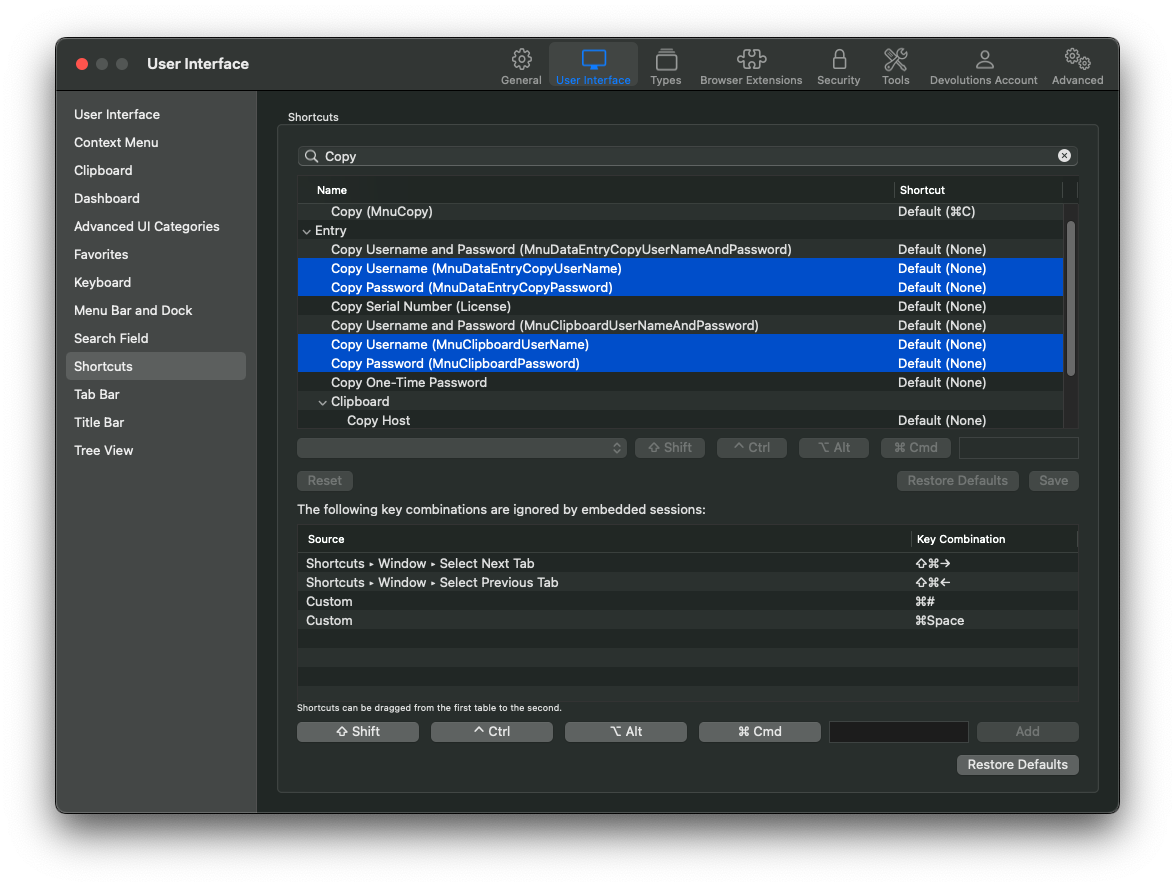
I'm not sure I understand what you mean with your second point, the filter (I'm assuming you are referring to the search field in the title bar) filters the entries in the entry tree, hence why the focus goes from the search bar to the tree. What list are you referring to exactly that you expect the focus should move to?
I don't believe showing passwords in clear in those lists would conform to our security standard. And I'm not sure to see a purpose in showing them covered. Could you elaborate on your use case?
macOS when copying items set the pasteboard type to Concealed or Transient so by default clipboard more managers will ignore the copied text. (http://nspasteboard.org/)
What do you mean by this? You want us to change the way we fill the clipboard?
Best regards,
Xavier Fortin
Shortcuts.png
my bad. i didn't notice that section when poking around the settings for customizing the keyboard shortcuts.
The best example is when you press the down arrow after searching say there is 2 or more returned entries. The focus from the search field moves to here:
I want the focus to move to the red list view. Then navigate the list view that is in green. And when highlighted I can use copy shortcut to copy the password or user name or URL. This makes for smoother and quicker navigation of entries. And there is option to the view entry if you need more info about that specific entry. It would nice if the app window hide after copying.
I can understand the perspective of not revealing passwords in that view.
Sort of. so macOS pasteboard has assignable types. If assign one of those additional types clipboard managers by default will ignore them. Otherwise, the clipboard manager now has all your passwords in its history. Most support ignoring certain apps, but from security perspective any application on macOS can read the pasteboard. best out of the box to try and get those apps to ignore passwords.
Pasteboard Type viewer: https://sindresorhus.com/pasteboard-viewer
Example from another password manager copying the password:
RDM:
is that a little more helpful?
So it turns out I did try those keyboard shortcuts, but I can't seem to get them to copy the entries respective fields. Is there particular view or selection you need to have in order to copy an entries username or password?
As mentioned earlier, the filter affects the entry tree (and only incidentally filter the Group Dashboard list). It's normal for it to transfer focus to the target of the filter. What you are asking would really only be applicable if what you are searching for is specifically a group? Is that what you mean? That, if a group is found with the search, said group gets selected an the focus is switched to its dashboard list?
We can also probably add an option to hide the application after a Copy is made. Do you want that for any copy? Be it Username, Domain, Password, etc.?
Ah! Now I see what you mean for the clipboard. Yes, this can definitely be done (shouldn't be much of an issue). I'll open a ticket for this right now.
Best regards,
Xavier Fortin
So it turns out I did try those keyboard shortcuts, but I can't seem to get them to copy the entries respective fields. Is there particular view or selection you need to have in order to copy an entries username or password?
You should have the focus on the entry tree (left pane) and the entry you want to copy the Username/Password from selected. But otherwise nothing else. The Preferences window must be close (with the red button) for changes to apply though. The changes should be apparent as the configured shortcuts should then appear in the 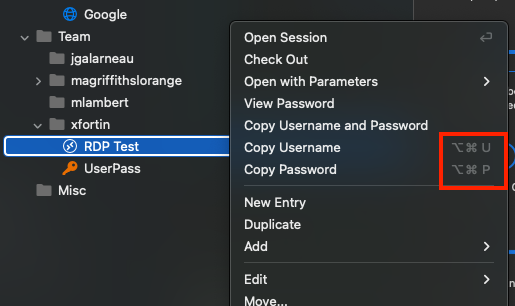
It won't work with the list you've previously mentioned. The menu in the Main Menu is specifically the menu used in the Entry Tree.
Best regards,
Xavier Fortin
CopyShortcuts.png
Correct hide would be after any copy action on an entry: Username, Domain, Password, etc.
would be an outside ask to have the actions in-line on the entry? instead of them being on the left and not aligned to the items within entry. Position them next to their respective items making it easier to locate the respective buttons. of you can just double click on the field to copy.
something to this effect
Hi,
I've opened a ticket for the first point.
For the second, I'll have to get in touch with the other platforms teams since this is a component that would affect all version of RDM.
Best regards,
Xavier Fortin
no worries, i mean the ability to just double click those fields to copy would be ok as well.
I wanted to add overall Devolutions works well and has tons of functionality which is great. These are just things coming from other password managers I have noticed.
I will tell you also your support is insanely responsive and has been great!
Glad to hear you appreciate you experience so far!
Also, I've reached out to the other teams and we've opened a ticket for the Copy Username/Password buttons directly in the dashboard overview.
Best regards,
Xavier Fortin
Hello Georgesnow,
We now have an option to automatically hide the application when a password or an username is copied.
If you go In Preferences > General > General, you will find this:
If you enable it. The application will hide itself on copy.
Best regards.
Michel Lambert
Screen Shot 2023-01-12 at 1.33.48 PM.png
Hi georgesnow,
Just letting you know that RDM 2022.3.16.1 is now available and will set the Transient/Concealed type when appropriate on copy.
Best regards,
Xavier Fortin