Option Key Functionality Not Working in SSH
0 vote

Hi, recently I've been demoing Remote Desktop Manager as a potential replacement for SecureCRT, and I have to say I've been thoroughly impressed by how much there is to offer! Combining SFTP, RDP, and SSH into a single application is absolutely perfect for our needs. However, there seems to be a few issues with the SSH client for Mac.
Currently, the Option key on Mac does not pass through as Alt in SSH sessions. This prevents a large number of console application shortcuts from functioning correctly, such as vim, tmux and nano. An option to "Send Option Key as Meta/Alt" would be a perfect solution to this I think. I tried restoring some functionality by adjusting the keymaps, but I could not get it to send the correct keycodes to do what I need. Is there anything like this in the works from your team?
Also, some additional SSH Terminal customization would be amazing! (ie, change cursor to bar instead of block, blinking, customize selection colors etc.)
Thanks again for your hard work, it is much appreciated!
All Comments (5)
Hi njharger,
Thanks for the feedback!
For your issue, before we investigate, could you try to uncheck the Preferences -> Types -> Terminal -> Advanced -> "Use legacy engine". And see if it works properly like this? You will have to relaunch any opened SSH entries.
As for your other requests (change cursor to bar instead of block, blinking, customize selection colors) are already in our TODO list. But once again, all those will only be available with the "Use legacy engine" unchecked.
Best regards,
Xavier Fortin
Xavier, thanks for the quick response! I have deselected the "Use legacy engine" option, but unfortunately I'm still not quite able to get the right keycodes sent to the terminal.
For example,  these are the characters read into the remote ubuntu terminal whenever I press Option+1, Option+2, Option+3, Option+4, if that helps out at all!
example.png
Hi njharger,
We've reproduced your issue. We are opening a ticket and we will inform you when a fix has been made.
Best regards,
Xavier Fortin
Hi njharger,
RDM and RDM Free 2022.2.15.0 is now available. There is a new option available that should enable the behaviour you want. You just need to check the Preferences -> Types -> Terminal -> General -> "Send option key as alt" option: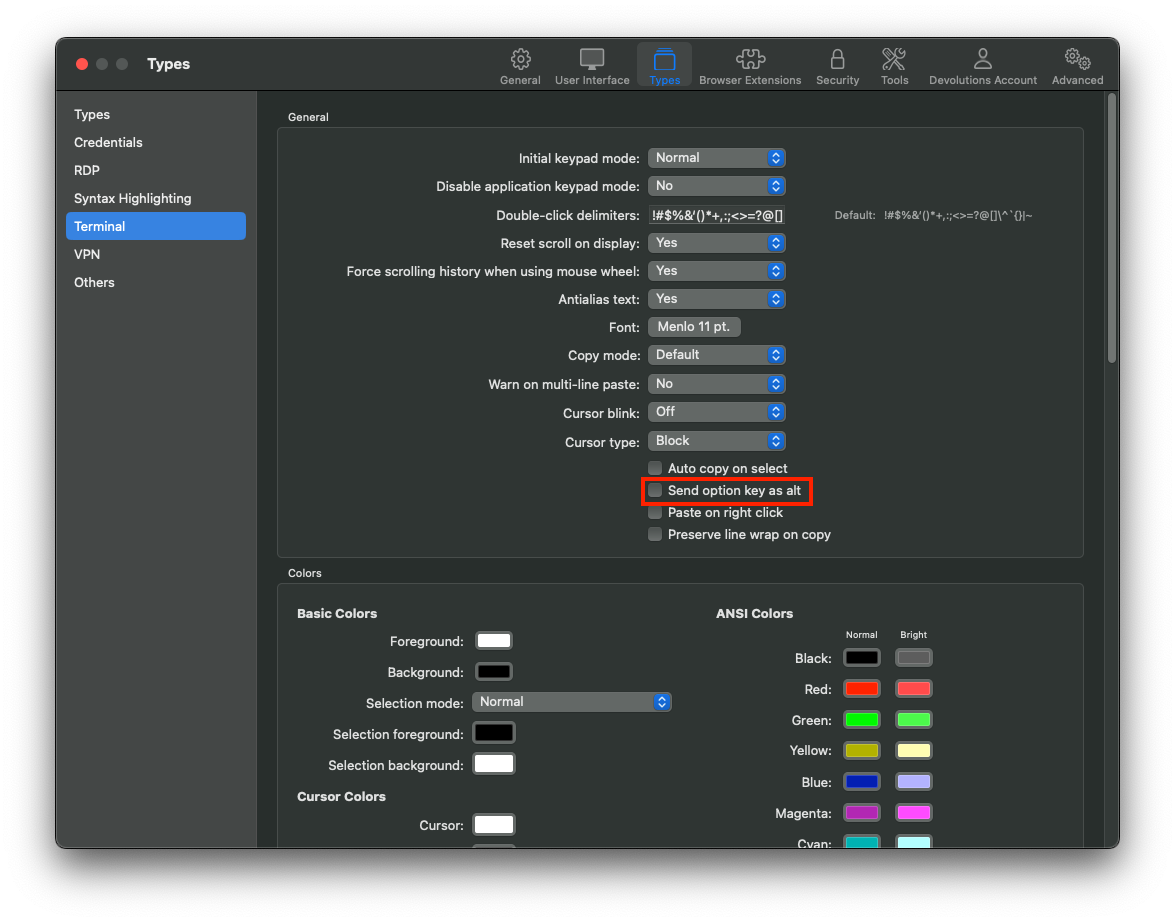
Best regards,
Xavier Fortin
SendOptionKeyAsAlt.png
Oh, also, as can be seen from the above screenshot, "Cursor blink", "Cursor type" and "Selection mode" have also been added.
Best regards,
Xavier Fortin