Devolutions Server 2022.2 - BETA

At this time trying to install recording server getting a Invalid license error when trying to connect as part of the installer. Also The pre-req installer will not install the dotnet 6.0.6 hosting.
All Comments (13)
Moving this to the Correct Forum sorry
Hi,
I would like to be sure of what you tried. You installed Devolutions Server 2022.2.3.0 (the BETA version) without any issue and now, you would like to install the recording server and you got an issue, am I right ? The recording server installation failed with an "invalid license" message when it tried to update the Devolutions Server settings and create the application key and secret, is it correct ?
Don't hesitate to add a screenshot and/or full error message, it could help us.
Best regards,
François Dubois
![2022-06-22 18_43_17-Remote Desktop Manager]](https://forum-api.devolutions.net/api/messages/163739/attachments/2022-06-22 18_43_17-Remote Desktop Manager].png)

Hope this helps
2022-06-22 18_43_17-Remote Desktop Manager].png
2022-06-22 18_43_30-Devolutions Server - Login Attempt - Brave.png
Hi,
Could you confirm that you installed Devolutions Server version 2022.2.3.0 before trying to install that version of Recording Server ? And I assume that you are trying to install the recording server included in the version 2022.2.3.0, am I right ? We will try to reproduce your issue and let you know if we can figure it out.
Sorry about that, we will keep you posted
Best regards,
François Dubois
Yes I upgraded from 2022.1.13 to 2022.2.3 beta version I downloaded today from the download site
Hi,
We reproduced the issue, we are working on that. We will keep you posted.
Thank you for your patience,
Best regards,
François Dubois
Any word of this? is there a way to install via Command line on a machine or remote machine so I can get this feature into testing?
Hello Elric,
The issue has been fixed in the 2020.2.4 release, which should be available early next week.
In the meantime, you can try to install it via the CLI, you will need to change most arguments:
- --du is for the Access URI of your DVLS
- --da is a custom account with admin rights
- --dp is the password for said account
- --op is where the recordings will be saved to
- --p is the port used for the recordings
- --hostname is the FQDN or the server you are doing the installation on
- --i is the installation path for the recording server
Cd "C:\Program Files (x86)\Devolutions\Devolutions Server Console\"
.\DPS.Console.CLI.exe recording install --accept-eula --du "https://url" --da "admin_username" --dp "admin_password" --op "output_path" --p "50505" --hostname "server_name" -i "installation_path" --sa "LocalSystem"
Let us know if it works.
Best regards,
Richard Boisvert
Got the same problem via command line on both Local and remote servers.
Also thank you for the Example because without it I would have been left guessing as the Options you gave above you have 3 different values for --op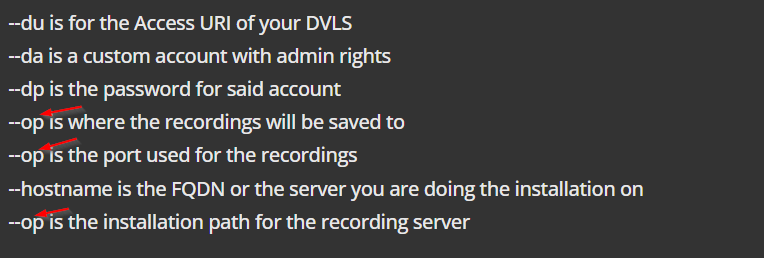
2022-06-30 20_09_05-Devolutions Server 2022.2 - BETA.png
2022-06-30 20_07_39-Remote Desktop Manager .png
Hello,
Auto-correct on my phone did not like the switches! I fixed the initial post.
The new beta will fix the issue, sorry for the inconvenience.
Best regards,
Richard Boisvert
I installed 2022.2.5 version of DVLS and having the same problem.
Hello,
Can you please confirm the following:
- The Devolutions Server (console and web application) was upgrade to 2022.2.5 prior to installing the Recording Server
- You are using a custom user to authenticate to the server. Using an O365 or Windows user will not work. A 2FA must also not be configured on that account
If it does not work, in the web interface, under Reports > Login Attempt, you should see why it failed.
Best regards,
Richard Boisvert
I got this to install finally. The problem was I was testing on Remote server for installing recording and it did not trust my root certificate authority when I corrected this problem I was able to install.
I was also able to install on machine running 2022.2.5 without issues after reboot. Don't know what was causing the blockage but after reboot install on local DVLS machine with recording server had no issues.