Switch user macro using separate credential

I'm trying to figure out if it's possible to have a macro that I can execute that would essentially type a switch user command in Linux and enter the password referenced in a separate credential entry.
We use KeePass for our credential storage. I have the plugin installed and use it successfully to enter both RDP and SSH sessions. We have to log in as ourselves in SSH sessions, but then many times have to su to another user. I have created a separate credential in RDM that is linked to a specific credential in KeePass. I would like to be able to reference that credential in the typing macro if that's possible.
The basics of the macro would be:
su - newuser {enter} {pause} %separately_stored_KeePass_credential% {enter}
Thanks for any help you can give or any direction you can point me for more research.
All Comments (1)
Hello,
Here are the steps you should to take to get what I believe you're explaining to me:
First create a KeePass entry, and configure it. Make sure in the Entry tab that the option "Always Prompt With List" is set. Once that is done, in the same KeePass entry, go to the Security Settings to check the "Allow password in variable" option.
Once your KeePass entry has been properly configured, create your SSH Shell entry and make sure the Credentials are set to "Linked (Vault)" with your KeePass entry selected next to it. 
Next, in the same SSH Shell entry, go to the Security Settings to check the "Allow password in variable" option.
Once these two entries are set up there is one more to create, the SSH Command Line Entry, in the entry type $PASSWORD$ in the "Run" field.
Once all these steps have been done, right-click on your SSH Shell Entry, go to Macro/Script/Tools, and select the SSH Command Line Entry you just created. 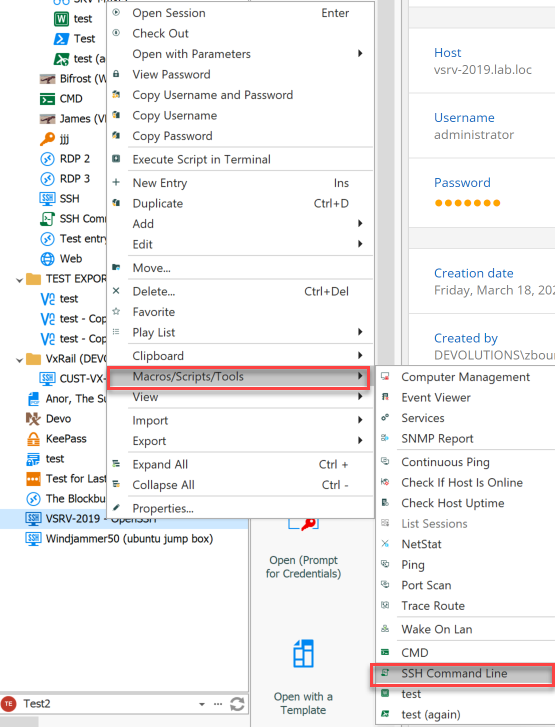
This will open a prompt to find and select the desired password from your KeePass database.
If you have any further inquiries or issues, don't hesitate to contact us and we will be happy to help you.
Best Regards
image_2022-06-20_113209659.png
image_2022-06-20_111817169.png