Remotedesktopmanager Powershell Module Fehler beim Verbinden
Remotedesktopmanager Powershell Module Fehler beim Verbinden

Hallo,
ich versuche seit längerer Zeit vergeblich mich mit dem Powershell Modul mit meiner DPS Datasource zu verbinden. Ich bekomme immer die Fehhlermeldung "InvalidUserNameOrPasswordPleaseVerifyYourCredentials".
Ich versuche über folgenden Befehl eine Verbindung herzustellen.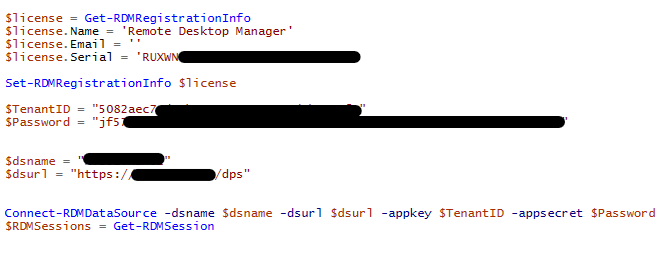
Nach der Ausführung kommt allerdings folgende Meldung. Die Registrierung funktioniert. Beim Ausführen von Get-RDMVault kommt die Meldung "WARNING: Your connection is not ready".
Screenshot 2022-05-11 105725.png
Screenshot 2022-05-11 105525.png
All Comments (2)
Hello Lukas,
My apologies for replying in English.
If you already have RDM installed on the machine, you can create a data source in RDM that is configured with the Application Key and Application Secret set in the PowerShell tab of a DVLS data source. This way, it will connect using those credentials.
After, you can connect to that data source and retrieve the credentials
$ds = Get-RDMDataSource -Name "data_source_name"
Set-RDMCurrentDataSource $ds

$RDMSessions = Get-RDMSession
Or you can manually create a data source in PowerShell with this sample script. Please replace the variables values with your values.
$dsname = "DVLS PowerShell"
$dsurl = "https://your_dvls_url"
$appkey = "your_appkey"
$appsecret = "your_appsecret"

$ds = New-RDMDataSource -DVLS -Name $dsname -Server $dsurl -SetDatasource -WarningAction SilentlyContinue
Set-RDMDatasourceProperty $ds -Property "ScriptingTenantID" -Value $appkey
Set-RDMDatasourceProperty $ds -Property "ScriptingApplicationPassword" -Value $appsecret
Set-RDMDataSource $ds
Set-RDMCurrentDataSource $ds

$RDMSessions = Get-RDMSession
Best regards,
Richard Boisvert
Hello,
thanks for your answer.
My Problem was solved by setting this option.