Window snapping not working

What works with other applications:
- drag the application with its title bar to the top of the screen: it maximizes
- when maximized, drag it down, and its former size is restored
- drag it to the left of the screen, and it snaps to the left side, 'maximized' to the left pane of the screen
- drag it away from this left-maximized position, and its former size is restored
- idem for the right side
These snapping actions can be performed with key-combinations too:
- Win+Up: maximize
- Win+Down: restore
- Win+Left: snap to left
- Win+Right: snap to right
RDM only allows to maximize and restore from maximized (drag and key combo work).
The other modes are missing.
All Comments (3)
Hi David,
I've opened a ticket for this issue.
Regards
Jonathan Lafontaine
Hi David,
As it turns out, this isn't really a bug or an issue with RDM itself. What happens here is that the main RDM window is simply too large for the OS to be able to resize it to only fit half the screen. This is a behavior that can be observed in a lot of applications in Windows and in (I assume) most Linux desktop environments like KDE Plasma, Gnome, etc. What actually causes the RDM to be so large is the menu tool bar at the top of the window. However, it can be hidden using the "Top Pane (Ribbon/Menubar)" button here: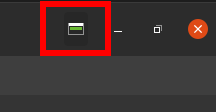
With the menubar hidden, RDM should be able to become narrower and you should be able to use the window snapping function in your desktop environment. I hope this helps.
Regards
Nicolas Parr
hide menu bar.png
That's correct.
Hiding the Top Pane allows the window snapping to the sides of the screen.
Thanks for the clarification.