Running Typing Macro sequentially on Multiple Devices
Running Typing Macro sequentially on Multiple Devices

Hi I have a typing macro that runs on Putty SSH Sessions on Cisco Kit. It works fine one device at a time but if I try and run it on multiple devices the session focus changes before the script has finished on one host. Ideally I would want the script to run sequentially on multiple hosts. I have tried changing the execution mode and deselecting the Batch Mode which prevent me from running on multiple devices. I am not sure if it is because if the Delay time on the script?
All Comments (3)
Hello,
It seems to be working properly on my side, how do you send the macro to your session?
Also, are you using Putty entry type or SSH Shell entry type?
Best Regards,
Etienne Lord
Hi Etienne,
Thanks for replying, All the sessions are putty sessions, The script work fine with one device selected, it runs as it should, opens the session runs the commands and logs off. The Issue occurs when i select multiple devices/sessions, if I select two switches, right click select macros/scripts/tools I get the Batch screen up with the two devices selected. When the script runs instead of running the script to completion sequentially, the focus changes to the 2nd session and attempts to run part of the script and errors . If I could get the script to run in parallel but keep focus on the same session to completion or run the script sequentially on the device that would sort it.. As an example the commands on one device run and display the appropriate output (removed for clarity) . When I run it on two devices you can see the section below occurs splitting between the two different sessions.
===================================================================================
CCC-02-SWI-2204#term len 0
CCC-02-SWI-2204# sh int transceiver
CCC-02-SWI-2204# sh int status | i trunk
CCC-02-SWI-2204# sh int status | i not
CCC-02-SWI-2204# sh cdp nei
CCC-02-SWI-2204# sh etherc summ
CCC-02-SWI-2204# sh int status | i not
CCC-02-SWI-2204# logout
=================================================================
CCC-02-SWI-2204# termint transceiverlen
^
% Invalid input detected at '^' marker.
CCC-02-SWI-2204#0
% Unknown command or computer name, or unable to find computer address
CCC-02-SWI-2104#term len 0
CCC-02-SWI-2104# sh logout
^
% Invalid input detected at '^' marker.
CCC-02-SWI-2104#
Thanks Mike
Hello,
It indeed seems to be an issue with PuTTy. Using SSH Shell session, you can send the script directly in the session, after giving it a try with multiple sessions, it seems to be working properly : 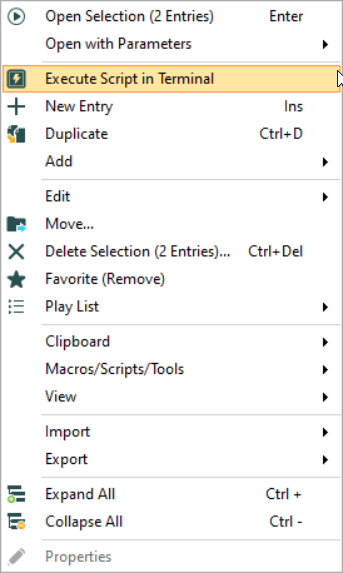
Best Regards,
Etienne Lord
script.png