Have the "Quick search" option search across all Vaults
Have the "Quick search" option search across all Vaults
0 vote

We're an MSP with multiple clients, and we use Vaults to control which clients our various Support staff can see in RDM. Currently, the Quick Search feature (top right) only searches within the selected Vault - and not globally across all Vaults.

Please consider adding an option that allows us to change the default behaviour and allow searching across all Vaults. At the moment we have to switch Vaults to the client we want to search, then re-perform the search. Being able to type any client's computer name into Quick Search and have all results across all Vaults return would be a time saver for an action we do several dozen times a day.
I realise the "Advanced Search" option allows you to search across all Vaults. The problem, however, is that doing so involves almost the same amount of clicks/time as switching the vault for the quick search option. And so, this would not be an acceptable workaround IMO.
All Comments (4)
Hi Timothy,
We already have a Find Quickly feature:
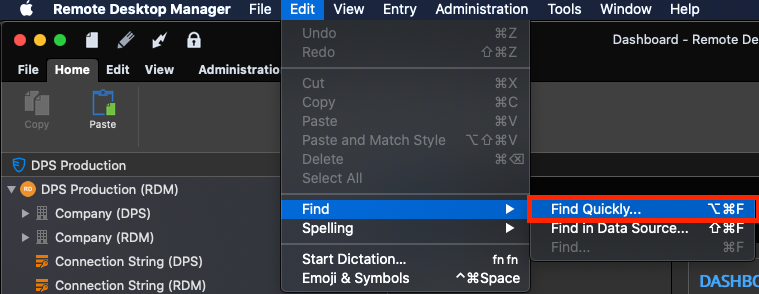
It is bound to the ⌥⌘F shortcut by default (this can be changed in Preferences -> User Interface -> Shortcuts). This will open a Spotlight like window displaying all found result across all vaults:
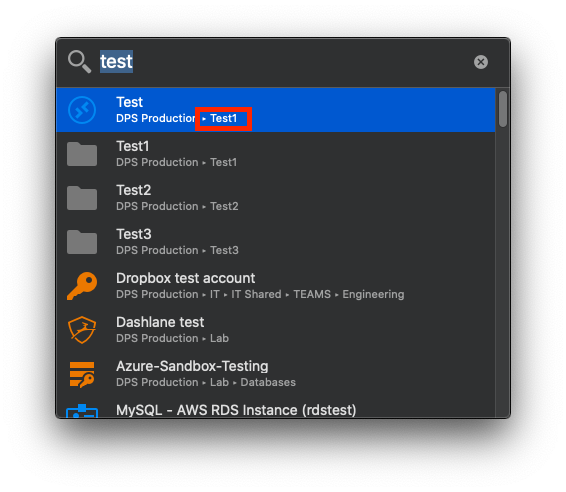
Each item displays their location under their name with the format "Datasource name -> Vault name -> Folder1 -> Folder2 -> ...".
Would this be what you are looking for?
Best regards,
Xavier Fortin
Hello,
Sorry for only responding now. Is this excellent! And, exactly what I am looking for. I'm finding that the keyboard shortcut doesn't work when I have an active RDP session running and want to launch Find Quickly (to connect to a different server, for example). Is there a way to put Find Quickly in the top navigation bar?
