Default Browser

In Webbrowser Sessions haben wir als Webbrowser "Standard / Default" eingestellt:
In den Optionen: "Typen -> Web" steht Google Chrome als Standard, trotzdem wird der IE beim öffnen der Session genutzt.
Es ändert sich auch nichts, wenn ich da Microsoft Edge oder Firefox oder sogar Systemstandard einstelle. Ich muss explizit in der Session den Browser direkt auswählen, dann wird er auch genutzt
Neuste Windows RDM Version, Datenquelle MSSQL 2019 auf Windows Server 2019 Core.
All Comments (6)
Hello,
Do you launch you session in Embedded (Tabbed) or External mode? Also, do you launch it using the "Open Session" button or this one : 
Best Regards,
Etienne Lord
web.png
Default Settings: Google Chrome
Session Settings: "use Default"
If i launch the session with Embedded (Tabbed) Mode IEXplorer is starting
If i launch the session with a click on the URL, IExplorer is starting
If i launch the session in external Mode, RDM open my default Browser (MS Edge Chromium)
Related Settings:


Regards
Sebastian
Hello,
I did some test, it does seem a little confusing.
Standard (or Default) seems to only use Internet Explorer when you launch in embedded (tabbed) but will use your Default Browser (Windows) in your launch in External.
This icon will launch in External with the Browser Set in File - Options - Types - Web : 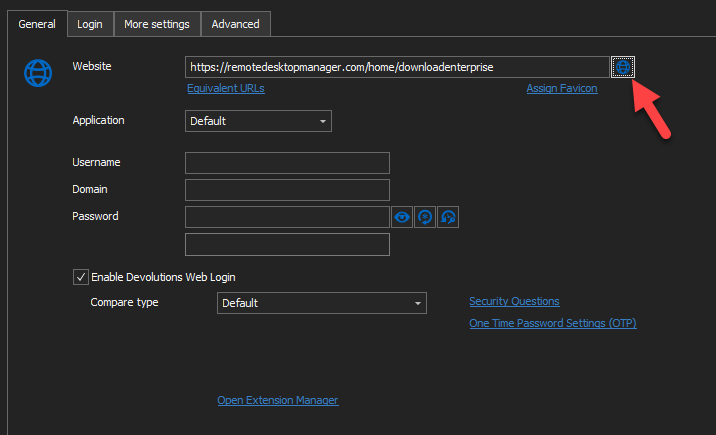
This Icon will always launch in External with IE : 
If you change the "Applications" to Chrome, it will use Chrome for Both External and Embedded, which is what I would recommend.
Best Regards,
Etienne Lord
web2.png
web1.png
Okay thanks,
there are no global "Default" Settings to do that for all Web Sessions? Application -> Default should be able to configure, like all other "Defaults" or not? ( its the same with SSH autowrap, you can choose "Default" but i cant find it under options)
Hello,
I believe (For the Auto wrap) that the default will be either on and off, and that this default cannot be changed with a global setting (File - options)
If you would like, you can always add a Feature Request in order to add those global settings! : https://forum.devolutions.net/forums/17/remote-desktop-manager--feature-request
Best Regards,
Etienne Lord
Hallo Sebastian,
einen Feature Request für die Option eines globalen Standardbrowser findest du hier - dort kannst du gerne deine Stimme hinzufügen 😉
LG,
Min