RDM -> Passwordstate

Disabled
Hallo zusammen,
wir haben folgendes Problem bei uns:
Beim Zusammenführen der Anmeldeinformationen vom RDM zur Passwordstate Datenbank erfolgt über die Windows Integration API keine Anzeige der eigenen Password-Accounts. Es kann keine Password Liste ausgewählt werden.
Beim Zusammenführen über den API Key funktioniert es dagegen.
URL ist korrekt eingetragen.
Hat einer eine Idee?
Danke und Gruß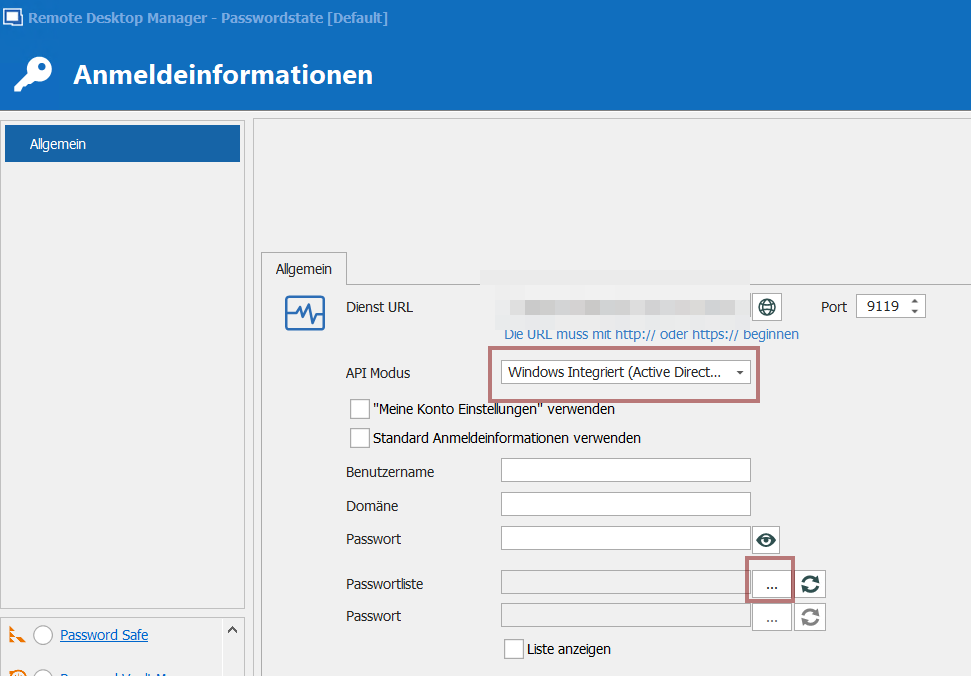
RDM.png
All Comments (7)
Hello David,
Thank you for contacting us on that matter and sorry to intervene in English!
Once the Username, Password and Domain fields are filled in, do you receive any error message when you use the ellipsis button next to the "Password List" field? If you do not receive any error message, are you seeing the following window?
Also, which version of RDM and what type of Data Source you are currently using?
Best regards,
James Lafleur
Hello James,
we use a SQL Express Instance with both databases, one for Remote Desktop Manager and one for Passwordstate on a dedicated server in the same Jump-VLAN.
Version of RDM see below...
The requests in powershell over WINAPI works fine and also the Standard-API can connect to passwordstate database without problems.
Best regards,
Rüdiger
Hello,
Thank you for your quick reply!
Since you are currently on RDM 2020.1.20.0, would it be possible for you to create a portable version of that latest version of RDM and see if this issue still occurs?
To do so, you will need to do the following:
1- Download the .zip file below:
https://remotedesktopmanager.com/home/thankyou/rdmbin
2- Create a new folder on your Desktop
3- Extract the content of the .zip file into the folder created at #2
4- Go in this folder once the .zip file has been extracted and run remotedesktopmanager64.exe
5- Enter your current serial
6- Create a PasswordState entry in the Local Data Source that is created by default at the creation of your portable to see if this issue still occurs
Best regards,
James Lafleur
Hi James,
thanks a lot for your support. It was successfull.
I've created a portable version of RDM and now i can connect to the Passwordstatedatabase and see all Passwordlists.
What means that now in case of the installation on the Server? Could it be an authentication problem within our Active Directory?
Best regards
Hello,
You are more than welcome!
Since you do not experience this issue with the portable version of RDM, I suspect that this issue was either tied to the configuration of the application or to the local installation.
For this reason, I would recommend replacing your current installation with the content of the portable version of RDM in order to be able to use your PasswordState entry without issues. To do so, you will need to do the following:
1- Go under your %LocalAppData% -> Devolutions -> RemoteDesktopManager folder.
2- Move the content of your RemoteDesktopManager folder someplace else in case you need it later on.
3- Copy the content of your portable version of RDM into the RemoteDesktopManager folder located under your %LocalAppData% -> Devolutions. In doing so, your portable version of RDM will now be your local installation.
4- Create a new shortcut of RDM using the RemoteDesktopManager64.exe contained in this folder.
5- Launch RDM
Best regards,
James Lafleur
Hello James,
Thanks you very much but for your understanding: Our environment is a RDS-Farm in a dedicated Jump-Server VLAN. There are 2 Connection Broker Server configured in high availibilty, 1 Session Host on which RDM is installed and published as a Webapplication over RD-WebAccess and 1 DB-Server which is hosting the databases for RDM and Passwordstate. So, you see it's more complicated.
I've tried to exchange the RDM-Files on the session host against the Files from the portable-folder but without effect, unfortunatly we have still the same issues.
Best regards and hope you have furthermore good suggestions
Hello,
Thank you for providing us more details about your installation of RDM. Since you are using RDM in an RDS Farm, I would recommend that you follow the installation steps listed here: https://help.remotedesktopmanager.com/installation_terminalservices.html
To create your new default.cfg file, you will need to use your portable version of RDM.
Best regards,
James Lafleur