SonicWall NetExtender login detection

Hi guys,
maybe, I've noticed a little glitch. When RDM launch the NetExtender CLI it pops up with the countdown window of some seconds and, when complete, it close but it pops out again for more or less 1 second (even if the VPN is connected).
You can see this second window in attach.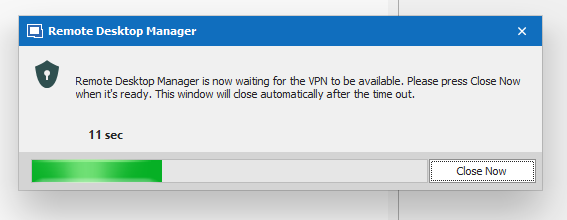
Don't know if timer seconds are insufficient (seems not) but it appears like an inconsistent GUI behavior to me.
Having the window stay out longer (if really needed) should be advisable instead of in/out two times.
Hope that can help.
Regards.
RemoteDesktopManager64_2020-04-29_11-04-40.png
All Comments (13)
Hello,
What version of RDM are you running?
Is it possible to post a small video of the issue?
Best regards,
Jeff Dagenais
2020.1.20.0 64-bit
In the attached video, you can see a second window for 5 seconds (sometimes less).
Just a note: if NetExtender doesn't connect to the VPN, seems that RDM is not aware of, it in fact ask for entry password anyway after the second waiting window disappear.
I've set the VPN section to prompt if not pinging.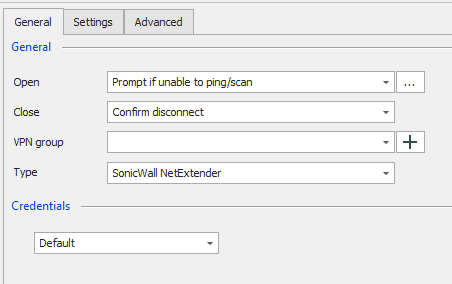
Regards.
2020-05-12_10-04-10.png
2020-05-12_09-50-39.mp4
Hello,
We use the same VPN internally, so I was able to test the behavior and I had 2 prompts has you mentioned.
I was able to remove the second prompt by putting the delay to 0 seconds under the Settings tab. Could you give it a try? 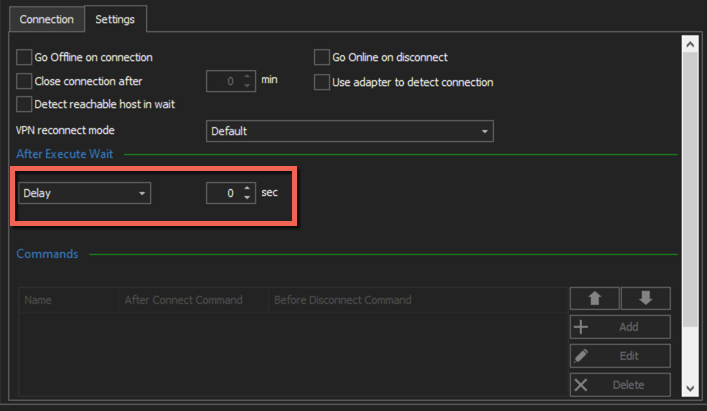
Best regards,
Jeff Dagenais
2020-05-12_07-39-26.png
Thanks Jeff,
this work for me too. For NetExtender usage, I'm so not sure about this waiting options because, as stated before, seems that in case of connection doesn't work, RDM starts entry anyway. I've shorted the "Wait delay" in "Settings" too, because I see that in most cases is surely too long but having RDM apparently not aware of VPN connection state is not intuitive.
What I mean is that RDM would ideally act as follow:
- user starts entry
- RDM try to ping and see that it doesn't respond
- RDM start NetExtender (fix for password request prompt and always accept self-signed certificates is needed, but Devolutions is working on it)
- RDM waits to see a ping response (a maximum amount of time must be set to avoid an infinite loop)
- As soon as ping is received, RDM open the entry and eventually ask for credentials
Can be this achieved?
Many thanks.
Hello,
Could you try Connect if unable to ping instead of prompt if unable to ping? 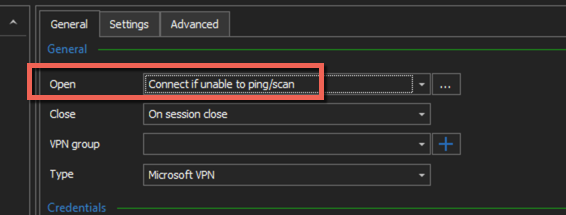
Best regards,
Jeff Dagenais
2020-05-13_15-38-49.png
This is what I'm using but, as stated early, for some entries RDM ask for credentials even if VPN is not connected...
Hello,
I had in mind that you we're using Prompt if unable to ping instead of Connect if unable to Ping because of your screenshot.
Sorry about that.
The credentials that you are referring to, it's the credentials inside the session?
Is it possible to send us a small video of the behavior?
Best regards,
Jeff Dagenais
My fault Jeff, I'm using "prompt" actually. But this is clear, I wish to be prompted instead of automatically connected.
My concern is about if VPN can't connect. I now start to understand better the RDM VPN settings, the point is "Wait after" option. If I left "-1" value, RDM is not aware of VPN is successfully connected or not.
What can you suggest? I see several interesting options, but not sure how to intend them.
Thanks.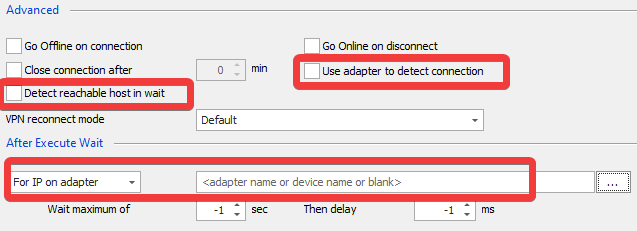
2020-05-14_13-37-07.png
We look in the code and -1 is set to 6 seconds in this case.
So how it works, it looks at the "wait maximum of" count. If -1 = 6 seconds.
Then will wait an IP to be assigned to the network card you set. For IP on adapter (this field is mandatory)
If the network card has an IP before the 6 seconds we will continue, otherwise it will wait up the end of the count (wait maximum of).
Regards,
David Grandolfo
Thanks David.
What about "Detect reachable host in wait" and "use adapter to detect connection"? Are they related?
Thanks.
Let me confirm with the engineering department.
Thanks,
David Grandolfo
Hi,
“Detect reachable hosts in wait.”
Try to reach the Host with a ping and if successful the "Wainting for VPN" pop-up will close automatically and continue the connection.
“Use adapter to detect connection.”
Will look at adapter name (if specify) to know if the VPN is open or not and will set the green play button.
Regards,
David Grandolfo
Thanks.