WaykDen always connecting

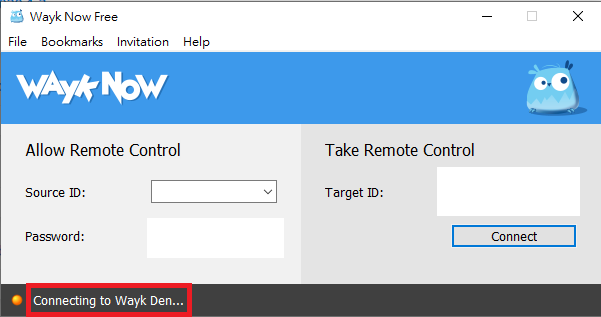
Hi,I'm Taiwanese user.
My WaykNow always shows connecting.
This happened only today. 15:00 (GMT+8)
My 2 different computers show this problem . (Win10)
So I think it appears to be a Wayk Den issue.
And I saw this article.
This problem seems to have been solved.
But my problem still exists.
Sorry my english is not very good.
Hope you understand what I mean.
thanks
wayknow.png
All Comments (4)
I can confirm I have the same issue on a Windows 10 PC and an Ubuntu PC.
Hello,
I'm sorry for the inconvenience. It looks like something doesn't work with the unattended service. The easiest way to fix that is to restart the service manually.
On Windows :
Open the Services console and locate the "Wayk Now Unattended Service", and choose the option to restart. Alternatively, you can reboot the computer.
On Ubuntu :
Run those commands (or alternatively, you can also reboot the computer) :
sudo systemctl stop now-service
sudo systemctl start now-service
But it would be very helpful for us if you could send us the log of the service. You will find that log here :
On Windows :
%programdata%/Wayk/logs/NowService.log
On Ubuntu :
/etc/wayk/logs/NowService.log
Thank you in advance
Best regards,
François Dubois
Hi François,
This fixed my issue without doing a restart on the host systems.
Thank you for the help!
Edit: I also included the NowService.log file.
Best regards
NowService.log
Hello,
I'm sorry for the inconvenience. It looks like something doesn't work with the unattended service. The easiest way to fix that is to restart the service manually.
On Windows :
Open the Services console and locate the "Wayk Now Unattended Service", and choose the option to restart. Alternatively, you can reboot the computer.
On Ubuntu :
Run those commands (or alternatively, you can also reboot the computer) :
sudo systemctl stop now-service
sudo systemctl start now-service
But it would be very helpful for us if you could send us the log of the service. You will find that log here :
On Windows :
%programdata%/Wayk/logs/NowService.log
On Ubuntu :
/etc/wayk/logs/NowService.log
Thank you in advance
Best regards,
Hi François,
This problem is solved.
Thank you for the help!
Best regards.