Secure Remote Delegation Login problem

Hi dear,
I want to know how to use the delegation login method in Wayk Now. I set my PC and register as an unattended mode, then I use my laptop to remote connect the PC with the target ID. When I choose the SRD method, it requires me to input the user name and password. I tried my PC's account to login, but failed. I tried the account I login with Wayk Now, but failed still. So what should I use in this unattended mode with SRD method? Do I need to use the wayk Den to create user name and password? I can see my PC machine in Wayk Den protal.
Please help me with this!!!! Thanks!!!!
All Comments (13)
Hello
SRD authentication expects Windows credentials to login to the remote computer. In this case, I'd expect your computer login to work: is there an error message shown when the connection fails?
Thanks and kind regards,
Richard Markievicz
Hello,
But what if the Azure account? I use the Microsoft azure active account to log in my remote PC, but when I use the same Azure account, it cannot connect. Just ask me to input the username and pwd again and again. Do I must use the local PC account?
Thanks!!!!!
Hello
SRD authentication expects Windows credentials to login to the remote computer. In this case, I'd expect your computer login to work: is there an error message shown when the connection fails?
Thanks and kind regards,
Hello again
Please try using the username in the format AzureAD\<username@domain.com>, as discussed in this post. Let me know if that works or not.
Otherwise, a similar issue was discussed here without a resolution - I will have to check internally the status on this. In the meantime, creating a local account would be a workaround. The user must be a member of the local Administrators or Remote Desktop Users group, or the "wayk-users" group created by our installer.
Thanks and kind regards,
Richard Markievicz
Oh, it works!! use the AzureAD\ added. Thanks so much!!
Hello
I'm happy to hear that it worked. Please let us know if you have further questions or comments.
Thanks and kind regards,
Richard Markievicz
Hi Richard,
Can I have some more questions that can I use the SRD method when the Wayk Now app is not running in my remote PC? What about SRP and PFP method on this issue? And how can I control the remote connection with Wayk Den? I can only see the active sessions there, any more functions with Wayk Den?
Thanks and best regards,
Jessy
Hi Jessy
SRD is the only authentication that will be available if WaykNow.exe is not running - this is what we call "unattended" access and it does require a license. You can request a trial, or, deploy your own Wayk Den - as a Covid-19 relief measure, all private Wayk Den deployments are granted an unlimited Enterprise license through September - see here for details about that.
SRP and PFP authentication are really designed for ad-hoc support of end-users, as such they are tied to a running WaykNow.exe (and, by extension, a logged-in user on the remote machine).
The public Wayk Den should allow you to connect to your machines (if they are currently online / connected to Wayk Den). You will see more features added over time as we deploy updated versions. Note that the on-premises Wayk Den offers significantly more functionality - check our website and GitHub for the full details.
I hope it helps - if you have further questions, don't hesitate to post back here
Thanks and kind regards,
Richard Markievicz
Hi Richard,
Thanks for the information. I see. But for the Wayk Den - as a Covid-19 relief measure, I just checked the "About Wayk Now" and saw "Support expires on 2020 May 3rd." How can I have the unlimited enterprise license to September? I saw from the website that I need to deploy the Wayk Den and connect Wayk Now to it, which I already done that. Could you advise more about the relief measure? Thanks vm!
Best regards,
Jessy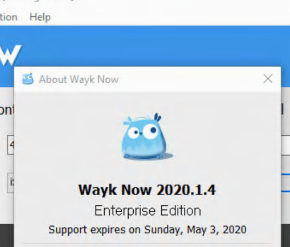
捕获.PNG
Hi Jessy
The license issued by Wayk Den in this case is issued month-by-month, but be assured, it is granted through to September 19th 2020 at the earliest. If you want to be sure things are set up correctly, please open Help > Register Product and validate it says "Licensed via Wayk Den". The expiry date will update automatically through to September.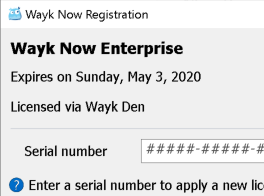
I hope it helps - if you have further questions, don't hesitate to post back here
Thanks and kind regards,
Richard Markievicz
Screen Shot 2020-04-02 at 23.13.38.png
Hi Richard,
Wow, that's cool. I saw that. Thanks!
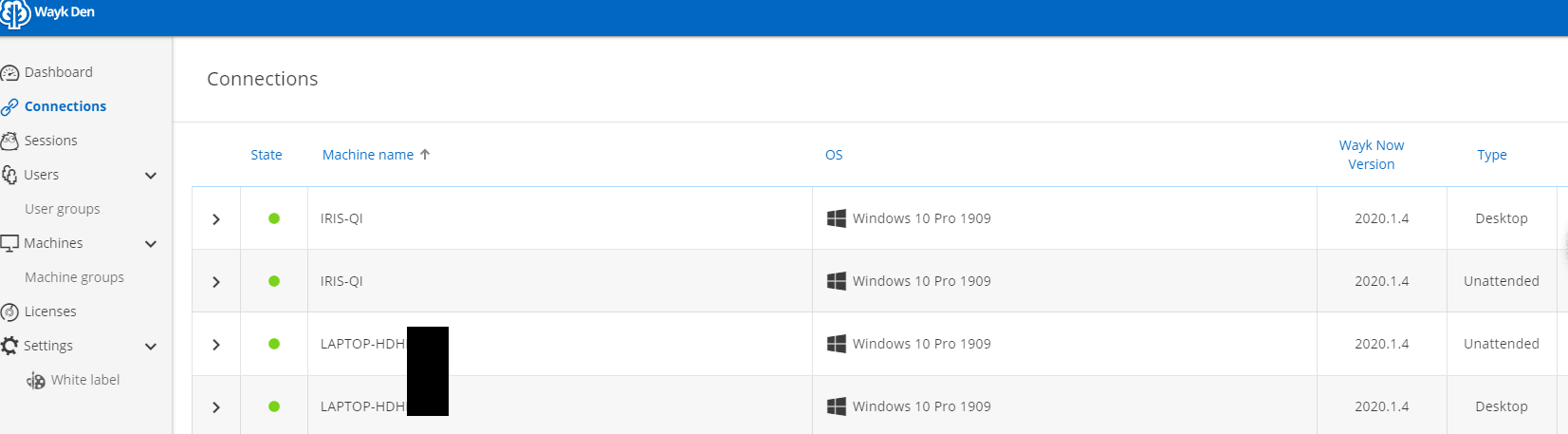
While I have more questions now about the Wayk Den, sorry that I am keeping asking questions, I am so new to Wayk products. When I checked the connections in Wayk Den, where it seems to list out all machines I connect to Wayk Den. But I found "same" connections with different type and different target ID. Which means, I found my laptop there, but two connection, one is unattended, one is desktop with different target ID. When I close the Wayk Now app in my laptop, I fond the state for desktop one has no green light now, but the unattended one still have. Could you advise the meaning of two connection with different ID?
Besides, I want to know more about the meaning and functions of user, user group, machine, machine group and access right grant issues. Could you advise where I can find the meaning and functions of that?
Thanks sooooo much!
Best regards,
Jessy
with pics like below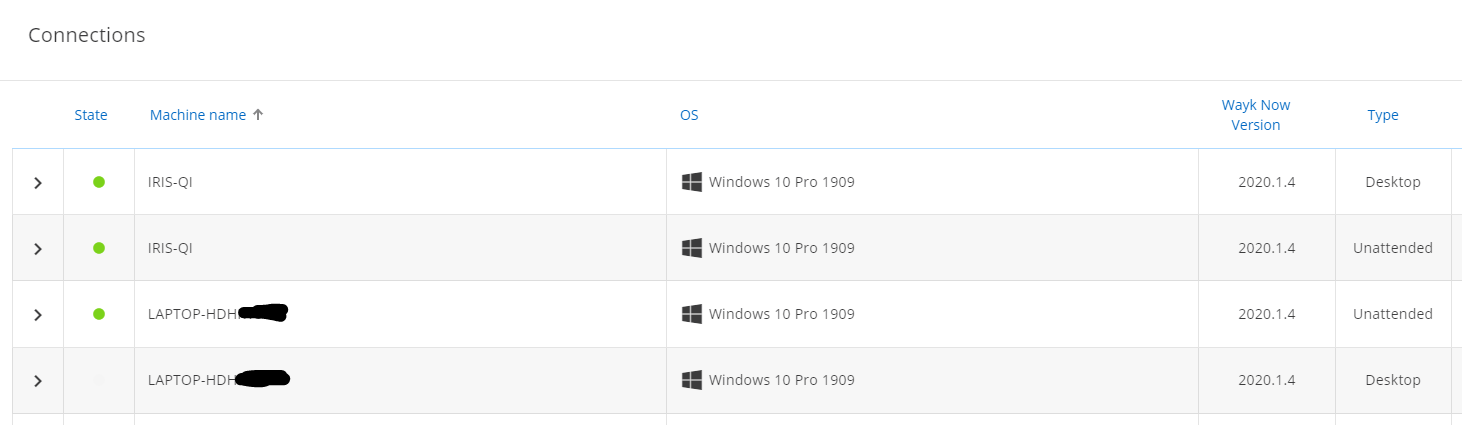
2.PNG
tempsnip.png
Hi,
I'm sorry for the confusion about this, but in the current version of the protocol, both the client (the Wayk Now application) and server (the Wayk Now system service) make separate connections to Wayk Den. In the upcoming Den V3 protocol version, the clients will no longer be always connected, but semi-connected in the same way you'd be logged in to a website in a browser. We are in the process of reworking this to move away from this confusing "connections" section.
You can ignore those connections marked as "Desktop", these are the client connections and provide little value as such. Those that matter are the ones marked as "Unattended".
Best regards,
Marc-André Moreau
Oh thanks. Well noted. Have a nice day!
Hi,
I'm sorry for the confusion about this, but in the current version of the protocol, both the client (the Wayk Now application) and server (the Wayk Now system service) make separate connections to Wayk Den. In the upcoming Den V3 protocol version, the clients will no longer be always connected, but semi-connected in the same way you'd be logged in to a website in a browser. We are in the process of reworking this to move away from this confusing "connections" section.
You can ignore those connections marked as "Desktop", these are the client connections and provide little value as such. Those that matter are the ones marked as "Unattended".
Best regards,